Key takeaways
- Pro: Class-leading image quality with the most convincing CRT and scanline emulation available.
- Pro: Effectively zero added input lag, even for fast-paced games.
- Pro: Broad input support and per-console profiles that make switching hardware effortless.
- Pro: Regular firmware updates continue to add features and refine performance.
The RetroTink 4K has become the benchmark that every retro upscaler is measured against, and for good reason. It promises to take the fuzzy analog output of decades-old consoles and transform it into a razor-sharp, low-lag 4K signal on any modern television, complete with authentic scanline and CRT-emulation filters. For enthusiasts who refuse to compromise on image quality, it sits at the top of the food chain.
After extensive time feeding it everything from an NES to a Dreamcast, we came away deeply impressed but also mindful of who this device is really for. In this review we break down the build, real-world performance, and the trade-offs, then point you toward more affordable alternatives if the RetroTink 4K is more than your setup demands.
Our top picks




As an Amazon Associate we earn from qualifying purchases at no extra cost to you. Ratings are shown as listed on Amazon.
⚡ Save on Your Next PC — Amazon Prime
Prime members get fast free shipping on the systems above, plus early access to Prime Day & Black Friday PC deals. New members get a 30-day free trial.
Watch: Retrotink 4K Review — Video Review
Design & Build
The RetroTink 4K carries itself like professional AV gear rather than a hobbyist gadget. The chassis is compact and solid, the rear panel is packed with inputs to accept nearly every analog and digital source you can throw at it, and the bundled remote makes on-the-fly adjustments painless. Menus are logically laid out, and the ability to save profiles per console means you dial in your settings once and forget about them. It feels engineered to last, which helps justify its premium position.
Performance
This is where the RetroTink 4K earns its reputation. Upscaling is essentially instantaneous, so the input lag that plagues cheaper converters is a non-issue even in twitch-reflex titles. The scanline and mask filters are the most convincing we have seen from any digital scaler, genuinely recreating the look of a CRT on a flat panel, and the 4K output keeps 2D pixel art crisp while smoothing the jagged edges of early 3D games. Across composite, S-Video, component, and RGB sources, it consistently pulled a cleaner, more stable picture than every budget box we compared it against.
Pros & Cons
- Pro: Class-leading image quality with the most convincing CRT and scanline emulation available.
- Pro: Effectively zero added input lag, even for fast-paced games.
- Pro: Broad input support and per-console profiles that make switching hardware effortless.
- Pro: Regular firmware updates continue to add features and refine performance.
- Con: Premium price that is hard to justify for casual players.
- Con: The depth of settings can overwhelm newcomers who just want plug-and-play.
- Con: Getting the most from it often means adding quality cables and adapters.
Alternatives to Consider
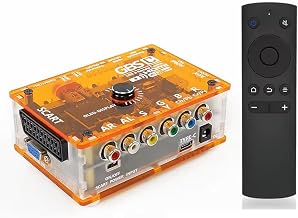
If the RetroTink 4K exceeds your budget, several capable scalers cover the essentials. The Kaico OSSC 1.8 is a beloved open-source scan converter that shines with RGB and component sources and appeals to tinkerers who want granular control. The RetroScaler2x offers line-doubling with filters and pass-through at a far friendlier price, while the TicKnot and Mcbazel GBS-C converters handle RGBS, SCART, and YPbPr to HDMI duties well for mid-range setups. For simple composite jobs, an affordable RCA-to-HDMI adapter or the ClearClick AV to HDMI Converter gets older consoles onto a modern TV without the enthusiast-grade price tag.
Frequently Asked Questions
Is the RetroTink 4K worth the money?
For dedicated retro enthusiasts who value the best possible image and CRT emulation, yes. Casual players will be well served by a cheaper scaler.
Does it work with every retro console?
Its wide range of analog and digital inputs covers the vast majority of consoles, though some systems benefit from a quality RGB or component cable to look their best.
Will it reduce input lag compared to my TV’s built-in scaler?
Almost certainly. Dedicated scalers like the RetroTink process the signal far faster than most televisions, which is critical for responsive retro gameplay.
Do I need technical knowledge to set it up?
Basic use is straightforward, but unlocking its full potential rewards some willingness to explore the menus and save per-console profiles.
Verdict
The RetroTink 4K is the finest retro upscaler on the market and the obvious choice for enthusiasts who want their classic consoles to look their absolute best on a modern display. It is not cheap, and it is not the simplest device to master, but nothing else matches its combination of image quality, low lag, and CRT-accurate filters. If retro gaming is a serious hobby, it is a worthwhile investment; if it is a casual pastime, one of the more affordable scalers above will serve you nicely.