Key takeaways
- Budget, $20-$28: Usually basic USB or motherboard-linked ARGB hubs with four to eight ports. The airgoo 8-Port model at about $23.96 fits this category. These are best when you already have fan power handled elsewhere.
- Midrange, $28-$40: Often includes eight to 16 ports, magnetic mounting, broader software support, or fan-control features. The Airgoo 16-Port model at about $31.99 and the CORSAIR Commander Duo at about $32.99 are examples of different approaches in this range.
- Premium, $40 and above: You are generally paying for an ecosystem, proprietary connectors, stronger software integration, included sensors, or better cable management rather than simply more RGB capacity.
Choosing a controller for Razer Chroma RGB is less about buying the box with the most ports and more about matching the controller to your motherboard, fans, lighting software, and available power. A common mistake is assuming that every product labeled “RGB controller” will work directly with Razer Synapse. Another is confusing a 5V, 3-pin ARGB controller with a 12V, 4-pin RGB hub, or buying a fan controller when the real need is simply more lighting outputs.
The right choice depends on whether you want native Razer Chroma control, broad software compatibility through SignalRGB or OpenRGB, support for PWM fans, or a clean way to connect several lighting devices inside a small case. Use the guide below to compare the important specifications before you buy.
Our top picks
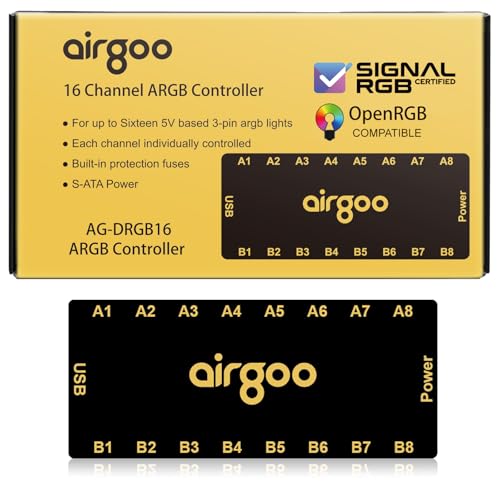 Airgoo 16-Port Magnetic-Mount USB ARGB Controller Support
- ✅ IMPORTANT: MUST DOWNLOAD CORRECT SOFTWARE FIRST! Latest…
- ✅ 16-Port RGB Expandability: Control up to 16…
- ✅ SignalRGB Software Supported: Sync lighting effects across…
 CORSAIR Commander Duo iCUE Link RGB Lighting
- Two Devices in One - Works with both…
- Two Ecosystems, One Interface - With support for…
- Two ARGB and PWM Channels - There are…
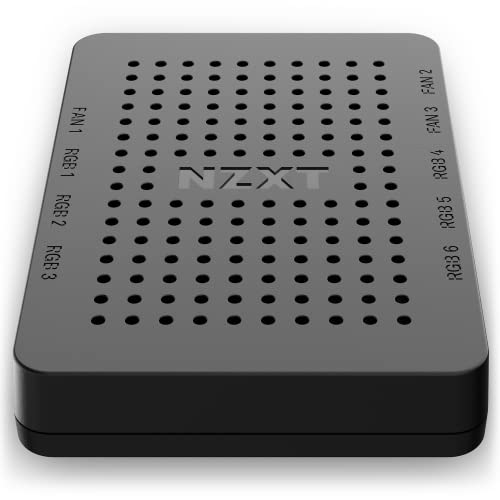 NZXT RGB & Fan Controller
- Power up to nine PWM fans and manage…
- Expand your RGB setup with six lighting channels…
- Install the controller easily using built-in magnets or…
| Product | Key specs | |
|---|---|---|
| Airgoo 16-Port Magnetic-Mount USB ARGB Controller Support | ✅ IMPORTANT: MUST DOWNLOAD CORRECT SOFTWARE FIRST! Latest… ✅ 16-Port RGB Expandability: Control up to 16… ✅ SignalRGB Software Supported: Sync lighting effects across… | Check price |
| CORSAIR Commander Duo iCUE Link RGB Lighting | Two Devices in One - Works with both… Two Ecosystems, One Interface - With support for… Two ARGB and PWM Channels - There are… | Check price |
| NZXT RGB & Fan Controller | Power up to nine PWM fans and manage… Expand your RGB setup with six lighting channels… Install the controller easily using built-in magnets or… | Check price |
 airgoo 8-Port Magnetic-Mount USB ARGB Controller Support airgoo 8-Port Magnetic-Mount USB ARGB Controller Support | ✅ IMPORTANT: MUST DOWNLOAD CORRECT SOFTWARE FIRST! Latest… ✅ 8-Port RGB Expandability: Control up to 8… ✅ SignalRGB Software Supported: Sync lighting effects across… | Check price |
As an Amazon Associate we earn from qualifying purchases at no extra cost to you.
Decide These 3 Things First
- Identify your lighting connector. Addressable RGB normally uses a 5V, 3-pin connector. Traditional RGB uses 12V and 4 pins. These systems are not interchangeable, and connecting a 5V ARGB device to a 12V RGB header can damage the LEDs.
- Choose your software ecosystem. Razer Chroma, SignalRGB, OpenRGB, Corsair iCUE, and NZXT CAM do not offer identical compatibility. A controller that works well in iCUE may not appear in Razer Synapse at all.
- Count both lighting and fan connections. A controller may advertise 8 or 16 RGB ports while offering no fan-speed control. If you want to run case fans from the same unit, look for PWM fan channels and confirm the maximum amperage per channel.
Size and Port Count
Start with the number of devices you will connect now, then add at least 25% spare capacity. A controller with four ports is enough for a compact system with two light strips and two fans, but a larger case can quickly need eight or more outputs.
An 8-port unit, such as the airgoo 8-Port Magnetic-Mount USB ARGB Controller, is a sensible middle ground for many gaming PCs. Its listed price is about $23.96. A 16-port controller, such as the Airgoo 16-Port Magnetic-Mount USB ARGB Controller, costs about $31.99 and gives considerably more room for expansion. The extra ports are useful if you have six to 10 fans, multiple strips, or lighting in a desk setup.
Also measure the mounting area. Magnetic controllers are typically designed to attach to a steel case panel, but the usable space behind a motherboard tray can be less than 4 inches wide once cables are installed. Check the controller’s actual dimensions, USB cable length, and port orientation before ordering. A unit with side-facing connectors can be easier to route than one with every cable exiting from the top.
Material and Construction
Controller housings are usually made from ABS plastic, aluminum, or a combination of a plastic shell and a metal mounting plate. Plastic is perfectly adequate for a stationary PC, while an aluminum cover can feel more rigid and may better suit a visible desk-mounted build. Construction matters most at the connectors: loose sockets and thin wires create more trouble than the shell material.
Look for a firmly attached USB cable, clearly labeled ports, strain relief at cable exits, and a mounting method that will not slide behind the motherboard tray. Magnetic mounting is convenient on steel cases, but it will not work on aluminum or tempered-glass panels. Adhesive-backed mounting is more universal, though it can be difficult to remove cleanly.
Do not treat a metal enclosure as proof that the controller can handle more power. The important ratings are the input voltage, maximum current, total LED load, and maximum current per output. If the listing does not provide those figures, contact the manufacturer before connecting a large number of high-density LED strips.
Software and Razer Chroma Compatibility
For anyone searching how to choose a razer chroma rgb controller, software compatibility is the decisive issue. “Works with Razer Chroma” can mean several different things: direct control in Razer Synapse, synchronization through a motherboard header, or indirect control through a third-party application such as SignalRGB.
A USB ARGB controller that supports SignalRGB or OpenRGB may be a good choice for mixed-brand lighting, but it may not be natively detected by Razer Synapse. Check the controller’s current compatibility list and confirm whether each individual port is addressable. Some hubs merely duplicate one lighting signal across every connected device; others control outputs independently.
Razer Chroma-compatible hardware may use a Razer addressable RGB controller or a compatible motherboard connection. If you want a simple Synapse setup, a controller explicitly listed as compatible with Razer Chroma is safer than relying on a general-purpose ARGB hub. If you prefer open software, SignalRGB and OpenRGB support can provide more flexibility, but setup may require USB permissions, motherboard-header configuration, or manual device mapping.
Construction, Fan Control, and Electrical Limits
Lighting control and fan control are separate functions. An RGB hub may distribute lighting data while leaving fan speed connected to the motherboard. A combination controller adds PWM outputs, allowing software to adjust fan speed based on CPU or GPU temperature.
The CORSAIR Commander Duo iCUE LINK RGB Lighting and PWM ARGB Fan Controller is aimed at users who need both functions. Its listed configuration supports up to 12 daisy-chained PWM fans and includes two flexible temperature sensors, with a listed price of about $32.99. However, the iCUE LINK ecosystem uses its own connector approach, so verify that your existing fans and lighting devices are compatible before assuming it will act like a universal ARGB hub.
The NZXT RGB & Fan Controller, model AC-CRFR0-B1, provides six RGB lighting channels and three fan channels, with a listed price near $34.99. It is more appropriate for a build centered on NZXT CAM and compatible NZXT accessories. For mixed-brand equipment, count connector types carefully and check each channel’s electrical rating. Never exceed a channel’s stated amperage, even if the controller has unused ports.
Price Tiers
For most buyers, the useful price range is approximately $20 to $45.
- Budget, $20-$28: Usually basic USB or motherboard-linked ARGB hubs with four to eight ports. The airgoo 8-Port model at about $23.96 fits this category. These are best when you already have fan power handled elsewhere.
- Midrange, $28-$40: Often includes eight to 16 ports, magnetic mounting, broader software support, or fan-control features. The Airgoo 16-Port model at about $31.99 and the CORSAIR Commander Duo at about $32.99 are examples of different approaches in this range.
- Premium, $40 and above: You are generally paying for an ecosystem, proprietary connectors, stronger software integration, included sensors, or better cable management rather than simply more RGB capacity.
Compare the complete cost, not only the controller price. You may need a SATA power lead, internal USB 2.0 header splitter, adapter cables, extension leads, or a separate PWM hub. An inexpensive controller can become the more expensive option after accessories are added.
Warranty and Support
A controller is a small purchase, but failure can affect several fans or lighting devices at once. Look for a clearly stated warranty of at least one year and a manufacturer that provides installation instructions, wiring diagrams, and a current compatibility list.
Support is especially important for products that depend on SignalRGB, OpenRGB, Synapse, CAM, or iCUE updates. Check whether the company explains firmware updates and replacement procedures. Keep your receipt and photograph the original wiring before changing connections. If a controller causes flickering, disconnect it rather than repeatedly increasing brightness or adding more devices.
Delivery and Assembly
Before ordering, confirm that the package includes the controller, power cable, USB cable, mounting hardware, and any proprietary adapters shown in the product photos. A product can arrive quickly but still delay a build if it requires a missing internal USB cable or a special fan connector.
Allow 20 to 45 minutes for installation in a typical desktop, and longer if the motherboard tray is crowded. Turn off the power supply, unplug the PC, and identify every connector before routing cables. Connect SATA power only where specified, keep cables away from fan blades, and avoid forcing a keyed connector in the wrong orientation.
Spec Checklist
| Spec | Budget | Mid | Premium |
|---|---|---|---|
| Typical price | $20-$28 | $28-$40 | $40-$75+ |
| Lighting outputs | 4-8 | 8-16 | Individually managed or ecosystem-specific |
| Lighting standard | Usually 5V, 3-pin ARGB | 5V ARGB, sometimes adapters | Proprietary, ARGB, or both |
| Fan control | Usually none | 3-12 PWM channels | Advanced PWM, sensors, or daisy chaining |
| Software | Motherboard software or basic USB control | SignalRGB, OpenRGB, CAM, or iCUE depending on model | Deep ecosystem integration and profiles |
| Mounting | Adhesive or loose placement | Magnetic or adhesive | Magnetic, bracketed, or case-integrated |
| Key checks | Voltage, connector, power input | Port independence and USB requirements | Proprietary compatibility and channel limits |
Red Flags
- A listing says “RGB” but does not identify whether it is 5V 3-pin or 12V 4-pin.
- The product claims universal compatibility without naming supported software.
- There is no maximum current, total LED load, or fan-channel amperage listed.
- Photos show adapters or cables that are not included in the package.
- Every port mirrors the same effect, but the listing implies independent control.
- A proprietary connector is presented as a standard ARGB plug.
- Reviews mention flickering, random disconnects, overheating, or USB devices disappearing.
- The controller requires an internal USB 2.0 header, but your motherboard has no free header.
FAQ
Can any ARGB controller work with Razer Chroma?
No. The controller must be recognized by Razer Synapse, connected through a compatible Chroma device, or supported through an approved software bridge. Confirm the exact model and software version before buying.
Is an 8-port controller enough for a gaming PC?
It is enough for many builds with four to six fans and one or two light strips, provided the devices can be connected safely within the controller’s power limit. Choose 16 ports if you expect to add lighting later.
Do RGB controllers control fan speed?
Not automatically. RGB control changes lighting. Fan speed requires a PWM controller or motherboard fan header. Combination products provide both, but verify the number of fan channels and the maximum amperage per channel.
Should I choose SignalRGB, OpenRGB, iCUE, or CAM support?
Choose the software that matches the rest of your hardware. SignalRGB or OpenRGB is useful for mixed brands, while iCUE and CAM can be simpler when your fans and accessories already belong to those ecosystems. For direct Razer Chroma use, prioritize explicit Synapse or Chroma compatibility over a generic “ARGB compatible” label.