Key takeaways
- A specification-based review of the Razer Wolverine V3 Tournament Edition, covering extra controls, trigger modes, app customization and PC polling.
This review analyzes published product information. We have not performed detailed research of this unit.
As an Amazon Associate, we earn from qualifying purchases.
Extra inputs are the main attraction
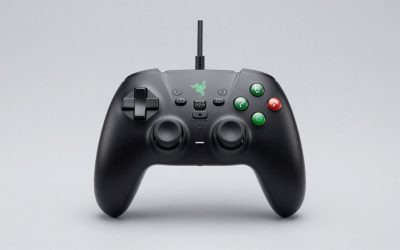
The Razer Wolverine V3 Tournament Edition is a wired Xbox and PC controller whose strongest buying argument is its control layout: four rear buttons, two additional claw-grip bumpers, and triggers that can switch between short-actuation and analog operation. Those features matter more to the purchase decision than sweeping claims about competitive performance. They give you more ways to arrange commands, but their usefulness depends on your grip and willingness to configure the controller.
This review evaluates the black Tournament Edition using the supplied retailer specifications, not detailed research. It is specifically the wired model. The evidence supports app-based customization and a PC-only 1000Hz Tournament Mode; it does not establish measured latency, long-term durability, or comfort for a particular hand size.
Key specifications and their limits
| Feature | Listed specification |
|---|---|
| Connection and platforms | Wired USB connection for Xbox and PC |
| Cable | Detachable 10-foot USB Type-C cable |
| Additional controls | Four mouse-click-style back buttons and two claw-grip bumpers |
| Triggers | Pro HyperTriggers with short-actuation and analog settings; integrated haptic vibrations |
| Thumbsticks | Hall effect sensing with anti-friction rings |
| Face controls | Mecha-Tactile action buttons and eight-way floating D-pad |
| Customization | Dedicated Razer app for thumbstick sensitivity, button layouts and a personalized profile |
| PC Tournament Mode | 1000Hz polling, enabled through the companion app or a controller shortcut |
Rear buttons reward a deliberate grip
Razer describes the four back buttons as using actuation similar to its gaming-mouse buttons, with those controls integrated into rubberized handles. Two claw-grip bumpers provide further inputs. On paper, this arrangement is attractive if you want frequently used commands assigned to additional controls rather than relying entirely on the face buttons. Whether it actually reduces finger movement will depend on your chosen mapping and how naturally your fingers reach each control.
The important fit question is not simply whether you want more buttons. It is whether you can reach them consistently without changing your hold. The supplied evidence does not establish button spacing, actuation force, or accidental-press resistance. Players who prefer a relaxed conventional grip should therefore treat the extra bumpers as a potential benefit, not an automatic ergonomic improvement.
The action buttons combine microswitches with a rubber membrane, while the D-pad uses an eight-way floating design. Razer positions that combination around quick input and cushioned feel. That construction is worth noting, but it does not tell us how distinct diagonal inputs feel or how loud the buttons are. Those remain practical unknowns for fighting-game players and anyone sharing a quiet room.
Trigger flexibility is more useful than a speed slogan
The Pro HyperTriggers offer a choice between an instant-actuation setting and analog control, according to the listing. The sensible distinction is between commands that need an on/off response and actions that benefit from graduated input. A short-actuation setting could suit firing or other binary actions, while analog operation is the more relevant option when a game uses variable trigger input.
Razer also lists integrated haptic vibrations. However, the evidence does not explain supported effects by game or platform, so their behavior should not be assumed. Likewise, the seller’s description of instantaneous trigger operation is not a measured end-to-end response result.
The thumbsticks use Hall effect sensing and anti-friction rings. These are identifiable design features, whereas Razer’s accompanying claims of superior accuracy, smoothness and durability are unverified here. There are no supplied measurements for centering, dead zones or wear. Buy for the specified sensing design and configuration options, not an implied guarantee that calibration or drift concerns can never arise.
Wired simplicity, with a PC-specific polling option
A detachable 10-foot USB Type-C cable is the listed connection method. That length gives you a concrete starting point for checking the distance between your seat and system, although the actual routing path matters. Detachability is useful for packing the controller, but this is still a wired configuration: it is not the choice for someone seeking untethered couch play.
The listing identifies Xbox and PC compatibility without detailing individual Xbox generations or PC operating-system requirements. It also does not identify the host-side cable connector. Check those details against your setup rather than treating the USB Type-C wording as a complete port-compatibility description.
PC Tournament Mode enables a listed 1000Hz polling rate through either the companion app or a controller shortcut. The platform qualification matters: the evidence does not extend that mode to Xbox. Nor does polling rate alone establish total input delay. The retailer’s latency language should not be read as proof of a literally delay-free connection.
Customization needs a little homework
The dedicated Razer app supports thumbstick sensitivity adjustments and custom button layouts, with the listing also describing storage of a personalized profile. That makes configuration part of the controller’s appeal, especially if the default assignments do not suit your game. However, the published listing information do not establish the remapping restrictions, number of profiles, storage location, or whether settings persist across devices without the app.
Before choosing it for a shared Xbox-and-PC setup, verify the app requirements and profile behavior that matter to you. For a separate look at console storage, see our Xbox game drive guide; storage planning is a different decision from controller compatibility.
Verdict: compelling for configurable wired play
The Wolverine V3 Tournament Edition makes the clearest specification-based case for players who want additional controls, selectable trigger behavior and adjustable stick sensitivity in a wired Xbox-and-PC controller. PC Tournament Mode adds a specifically documented PC feature. The main reservations are the cable requirement, unverified grip comfort, and incomplete app and profile details. Prioritize those practical checks over promises of automatic competitive improvement.
Sources: Supplied retailer listing for the Razer Wolverine V3 Tournament Edition. Features and compatibility statements above reflect that listing rather than independent performance testing.
Check the exact product and current offer on Amazon