Key takeaways
- Specification-based Razer Mouse Dock Pro review covering magnetic charging, the included puck, 8K transceiver, RGB status lighting and compatibility limits.
This review analyzes published product information. We have not performed detailed research of this unit.
As an Amazon Associate, we earn from qualifying purchases.
A charging accessory with a specific audience
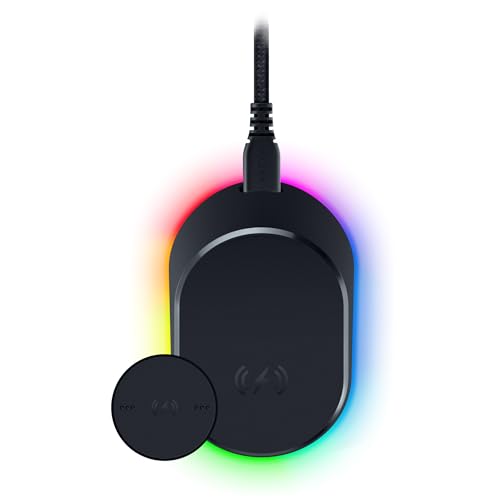
The Razer Mouse Dock Pro makes sense only after you have chosen a compatible mouse. This configuration combines a magnetic charging dock, a wireless charging puck and an integrated HyperPolling 8K Hz transceiver. Its appeal is consolidating charging and a compatible mouse’s wireless connection into one desktop accessory, rather than adding another mouse or a universal charging surface.
This review is based on the supplied retailer specifications, not detailed research. The strongest buying case is convenience: install the puck in a supported mouse, place the mouse on the dock between sessions, and use the lighting to check battery status. The important qualification is that charging compatibility and access to the transceiver’s highest polling capability should not be treated as the same promise.
What this exact configuration includes
| Item | Listed specification |
|---|---|
| Product | Razer Mouse Dock Pro with wireless charging puck |
| Charging arrangement | Magnetic wireless charging after installing the puck in a compatible mouse |
| Wireless receiver | Integrated HyperPolling 8K Hz transceiver |
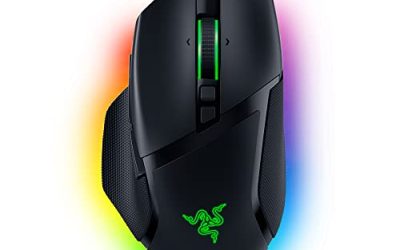
| Named compatible mice | Basilisk V3 Pro, Cobra Pro and Naga V2 Pro |
| Decorative lighting | Eight Chroma RGB zones with customizable effects and setup synchronization |
| Battery indication | Red for low, yellow for intermediate and green for full charge |
| Base | Tacky anti-slip underside |
| Listed dimensions | 5.39 × 4.37 × 4.09 inches |
| Listed weight | 0.53 pounds |
The dimensions and weight are retailer-listed figures; the evidence does not establish whether they describe the dock alone or the packaged product. Avoid using them as an exact footprint for a tightly fitted shelf or monitor riser without further confirmation. The charging puck is explicitly part of this configuration, but the published listing information does not identify the cable contents or host connector.
Check the mouse name before the feature list
The listing names three compatible models: Basilisk V3 Pro, Cobra Pro and Naga V2 Pro. That is a useful starting point, not permission to extend compatibility to every mouse sharing those family names. In particular, an existing Naga V2 HyperSpeed or wired Basilisk V3 should not be assumed compatible merely because another Naga or Basilisk appears on the list.
There is a relevant distinction for owners of the previously covered Basilisk V3 Pro 35K. Its supplied specifications explicitly identify the Mouse Dock Pro as an optional accessory for enabling 8000 Hz polling. That establishes a buying reason for this separate accessory rather than making the dock another version of the mouse. It still does not justify applying that polling claim to every model in the dock’s general compatibility list.
If you have not selected a mouse yet, start with its shape, controls and connection needs. Our gaming mouse selection guide provides a separate starting point. A dock is best evaluated after those primary requirements, because it cannot compensate for an unsuitable mouse layout or fit.
Magnetic parking instead of a charging-time promise
Razer describes a straightforward charging routine: fit the wireless puck to a compatible mouse and set the mouse on the dock, where the magnetic connection holds it during charging. The practical attraction is a defined resting place between sessions. For someone who already returns a mouse to the same spot, that could make topping up feel less like an additional task.
The evidence does not provide charging wattage, time to full charge or a short-charge runtime claim. Consequently, this is not a basis for calling the dock a faster charging method. Nor does the listing establish universal charging support for phones or unrelated mice. Buy it for the supported mouse-and-puck arrangement, not as a general-purpose wireless charger.
The anti-slip underside is intended to keep the dock stable. The seller also claims it avoids leaving sticky residue, but neither grip nor surface behavior has been independently verified here. A sensible setup would leave enough accessible space to place and remove the mouse without crowding nearby controls.
The 8K transceiver needs a compatible system
The integrated HyperPolling 8K Hz transceiver is the dock’s second substantial function. Razer markets it as a responsiveness feature when paired with a compatible mouse. The useful specification is the transceiver capability itself; the supplied material does not demonstrate an improvement in aiming, precision or game results.
It also leaves several setup questions unanswered: supported operating systems, required firmware, the pairing procedure and the polling options available to each named mouse. Confirm those details for your exact mouse before making 8K the deciding factor. A general compatibility statement is not a model-by-model polling support chart.
Lighting that can communicate as well as decorate
Eight Chroma RGB zones provide customizable underglow. The listing advertises more than 16.8 million color choices, effects, synchronization with a setup and lighting integration with more than 150 games. These are ecosystem claims, not evidence that every game or host platform will expose identical controls.
The more immediately useful lighting function is battery status. Razer says the mouse and dock indicate low, intermediate and full charge through red, yellow and green lighting respectively. That offers an at-a-glance indication, although percentage thresholds and the relationship between status lighting and decorative effects are not specified. The evidence also does not name the software version or account requirements for lighting customization, so those remain pre-purchase checks rather than assumed plug-and-play features.
Verdict: useful consolidation, conditional value
The Mouse Dock Pro is a focused accessory for supported Razer mice: magnetic parking, an included charging puck, a built-in high-polling transceiver and visible battery status make a coherent package. Its value is strongest when you want both charging convenience and supported receiver functionality. If you need verified fast charging, universal compatibility or a guaranteed 8K mode for any listed mouse, the supplied evidence is insufficient.
Sources: Razer Mouse Dock Pro retailer listing. Analysis also cross-checks the supplied specifications for previously covered Razer mice where explicitly noted.
Check the exact product and current offer on Amazon