Our Top Picks
 JUNHETEK Retro Handheld Game Console 4.0-inch IPS 64GB4.0 Inches5.5 x 3.2 x 1 inches0.55 poundsCheck on Amazon
The best handheld retro emulator depends on the oldest and newest systems you want to play: a Snapdragon 8 Gen 2 Android handheld such as the Retroid Pocket 6 or AYN Odin 2 Portal suits buyers who want PS2, GameCube and Wii on top of classic consoles, while a small Linux device such as the Miyoo Mini Plus fits buyers who only want 8-bit, 16-bit and PlayStation 1 games at a low budget. For PC gamers, the useful question is not which device is “best” but which tier matches your library, because emulation headroom rises sharply with the chip and so does the size of the device.
At a Glance: Current Handheld Emulators Compared
| Device | Best for | Key stated specs | Limits |
|---|---|---|---|
| AYN Odin 3 | Premium all-rounder | The maker lists a Dragonwing Q8 chip, a 6-inch 120Hz AMOLED, Android 15, an 8000mAh battery, Hall sticks, about 390g, and RAM/storage options from 8GB/128GB up to 24GB/1TB | Premium tier; heavier than pocket-size devices |
| AYN Odin 2 Portal | Big-screen play | Roundups list a 7-inch 1080p 120Hz OLED, Snapdragon 8 Gen 2 and an 8000mAh battery | Large for a pocket; one outlet lists a different chip, so confirm the processor on the maker page |
| Retroid Pocket 6 | Value Android pick | Reviewers list a Snapdragon 8 Gen 2, a 5.5-inch full HD 120Hz OLED, 8GB or 12GB RAM and active cooling | Battery capacity is reported inconsistently across outlets |
| Anbernic RG556 | Budget Android | Roundups list 8GB LPDDR4X memory and an Android software stack | Less headroom than Snapdragon 8 Gen 2 devices for demanding systems |
| Retroid Pocket Classic | Entry-level Android | Listed by reviewers as the low-cost Retroid option | Aimed at lighter systems |
| Miyoo Mini Plus | Classic 8/16-bit and PS1 | 3.5-inch 640×480 IPS screen, dual-core Cortex-A7 chip and a 3000mAh battery, per roundups | Not meant for 3D-era consoles beyond PlayStation 1 |
| Miyoo Mini Flip | Clamshell pocket device | Reviewers report a SigmaStar SSD202D chip and 128MB RAM | Suited to PS1 and earlier systems only |
Specs above come from maker pages where available and from reviewer roundups elsewhere; where outlets disagree, the table says so rather than guessing.

R36MAX 2 Retro Handheld Console, 4.5" IPS HD Portable Gaming Emulator, Detachable Grip, 20000+ Classic Arcade Games, Open Source Linux & 4000mAh Battery (Black-128G)
Chosen because it specifies 4.5" IPS HD Portable Gaming Emulator and Detachable Grip.
View on AmazonJUNHETEK Retro Handheld Game Console 4.0-inch IPS 64GB Black | 30+ Emulators, 4000mAh Battery, Open Source, Dual Analog Sticks, Portable Gaming
Chosen because it specifies 30+ Emulators and 4000mAh Battery.
View on Amazon
RS36 Retro Handheld Game Console,20,000+ Classic Games, 64GB,4.0“ | 12 Emulators,4000mAh Battery Portable Pocket Video Games,Transparent Black
Chosen because it specifies 000+ Classic Games and 64GB.
View on Amazon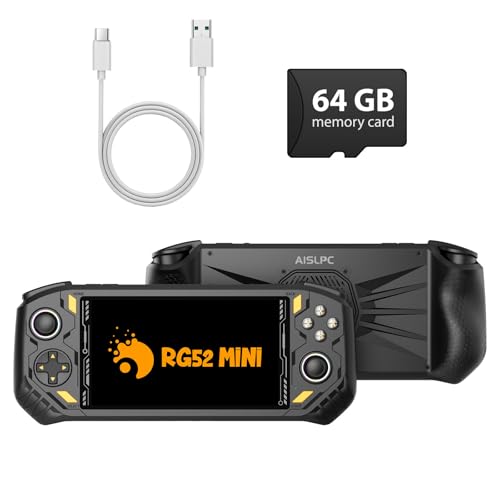
RG52MINI Retro Handheld Game Console, 5.5 Inch IPS Screen, Portable Dual System, 64GB Support 30+ Emulator&22000+ Classic Games, WiFi Networked Fighting, HDMI TV Output, 5000mAh Battery(Black 64GB)
Chosen because it specifies 5.5 Inch IPS Screen and Portable Dual System.
View on AmazonHow to Choose a Retro Handheld
Start with the systems you want to play
Emulation difficulty climbs with each console generation. Systems up to the 16-bit era and the original PlayStation run on almost any device in this guide, including low-power Linux handhelds. Dreamcast, PSP and Nintendo 64 usually want a stronger chip, and PS2, GameCube and Wii are where the processor matters most. Roundup authors commonly treat the Snapdragon 8 Gen 2 as the practical line for upscaled PS2, GameCube and Wii play, which is why that chip appears in both the Retroid Pocket 6 and the Odin 2 Portal.
Android versus Linux handhelds
Android devices run standalone emulator apps, the Play Store or sideloaded apps, and often streaming apps such as a PC game-streaming client. That is a real plus for PC gamers who want to stream a library from a desktop. Linux handhelds such as the Miyoo Mini series use a simple custom operating system that boots quickly and is organized around retro systems, with less flexibility but less setup. If you like tinkering with per-game settings, shaders and frontends, Android gives more room; if you want to turn it on and play, the Linux route is simpler.
Screen shape and size
Screen aspect ratio shapes how old games look. A 3.5-inch 640×480 panel like the Miyoo Mini Plus has a 4:3 shape that matches many classic consoles and allows clean integer scaling. Larger 16:9 OLED and AMOLED panels on the Retroid Pocket 6, Odin 3 and Odin 2 Portal give vivid color and good brightness for modern Android games, but classic 4:3 games will show borders or need stretching. Many buyers choose an OLED device and accept those borders; others pair a Linux pocket device with an Android one.
Controls, sticks and ergonomics
The maker lists Hall sticks on the Odin 3, which use magnetic sensing instead of potentiometers and are generally promoted as less prone to drift. D-pad feel is a personal matter, and reviewers often single it out when comparing devices for fighting games and platformers. Shoulder triggers matter for PS2 and GameCube titles, so check whether a device has analog triggers if you plan to play those libraries. Pocket-size units are easier to carry; the 390g Odin 3 and the 7-inch Odin 2 Portal are better for long sessions at home or on a plane than in a jacket pocket.
Battery, cooling and memory
Reviewers list an 8000mAh battery on the Odin 3 and Odin 2 Portal. Higher-wattage chips draw more power under load, so the stated capacity does not tell the whole story; lighter 2D emulation lasts far longer than PS2 or GameCube. Reviewers note the Retroid Pocket 6 has active cooling, which helps sustained performance in heavy emulation. For memory, 8GB is enough for most emulation, while the 12GB and larger Odin 3 configurations suit users who run several apps or heavy Android games. Storage is another cost lever: most of these devices accept microSD cards, but the Odin 3 offers configurations up to 1TB built in.
Picks by Budget Tier
Premium: AYN Odin 3
The Odin 3 is the newer flagship in AYN’s lineup. The maker lists a 6-inch 120Hz AMOLED, Android 15, Hall sticks, an 8000mAh battery and four memory configurations. It is for buyers who want a device with room to grow as emulators improve and who do not mind paying for a higher RAM and storage tier. It is a poor fit if you want a tiny, light pocket companion.
Mid-range: Retroid Pocket 6 and Odin 2 Portal
Reviewers consistently name the Retroid Pocket 6 the value choice among Android handhelds, thanks to the Snapdragon 8 Gen 2, a 5.5-inch OLED and active cooling. The Odin 2 Portal trades pocketability for a 7-inch 1080p screen and a large battery, which suits players who mostly play at home and want a bigger picture. One roundup mentions a price change for the Odin 2 Portal in mid-2026, so compare the configurations on offer before buying.
Budget: Anbernic RG556, Retroid Pocket Classic and Miyoo Mini Plus
The Anbernic RG556 is described as the budget Android option, with 8GB of memory. The Retroid Pocket Classic is positioned as an inexpensive entry to Android emulation. The Miyoo Mini Plus remains a common recommendation for people who just want a pocket device for 8-bit, 16-bit and PS1 games. These devices cost far less than the flagships, but they have less performance, and you should not expect PS2 or GameCube play from the lowest tier.
Compatibility and Setup Notes
- Game files and BIOS: Emulators run files you own legally; some systems such as PlayStation 1 need a BIOS dump from your own console. Do not rely on a device to supply them.
- PC streaming: Android handhelds can run streaming clients for a home PC, so a gaming desktop can serve modern titles while the handheld handles retro play.
- Storage cards: Use a quality microSD card from a known brand; fake or very slow cards cause loading stutter and corrupted saves.
- Firmware and frontends: Linux devices often use community firmware; installation steps differ by device, so follow the maker or community documentation.
- Controllers on PC: Several of these handhelds can also act as controllers over wireless connections, but support varies by model.
Pick X If … Decision Table
| Pick this | If you … |
|---|---|
| AYN Odin 3 | want the newest flagship with a high-refresh AMOLED, Hall sticks and plenty of memory options |
| AYN Odin 2 Portal | prefer a 7-inch screen and mostly play at home |
| Retroid Pocket 6 | want Snapdragon 8 Gen 2 performance in a pocket-friendly OLED handheld |
| Anbernic RG556 | want an Android handheld with a lower budget |
| Retroid Pocket Classic | mostly play older systems and want the lowest entry into Android |
| Miyoo Mini Plus | want a simple 4:3 device for 8/16-bit and PS1 games |
| Miyoo Mini Flip | want a clamshell form for the lightest retro systems |
Alternatives Worth Considering
- A Steam-style PC handheld: Full Windows or SteamOS handhelds run PC games and most emulators, but they are larger, shorter on battery and cost more than dedicated emulation devices.
- A phone with a clip-on controller: An Android phone plus a controller attachment can handle many retro systems if you already own a capable phone.
- Other Anbernic and Retroid models: Both brands release many variants each year, so a previous-generation model may be a sensible choice if your target systems are older.
Frequently Asked Questions
Which retro handheld can play PS2 and GameCube games?
Reviewers generally point to devices with a Snapdragon 8 Gen 2 or newer chip, such as the Retroid Pocket 6 and the AYN Odin family. Performance still varies by game and emulator settings, so some titles run better than others.
Is a Miyoo device enough for PlayStation 1?
Roundups describe Miyoo Mini devices as suited to 8-bit, 16-bit and PS1 systems. Heavier systems like PSP, Dreamcast and PS2 are outside what these small Linux handhelds are meant to do.
Do I need Android or Linux?
Android gives wider emulator choice, streaming apps and more tuning options. Linux handhelds are simpler and boot faster but offer less flexibility, so pick Linux only if your library is classic systems.
How much RAM do I need?
For most emulation 8GB is plenty. Larger options like the Odin 3’s higher memory tiers are for users who multitask or run heavy Android games alongside emulators.
Are Hall sticks worth it?
Hall sticks use magnetic sensing, and makers promote them as less likely to develop drift over time. They matter most if you play many hours with analog-heavy systems.
Can I use these handhelds to stream PC games?
Android handhelds can run game-streaming clients, so you can stream a library from a gaming PC on your home network. Results depend on your network quality and the host PC.
FAQ
Which retro handheld can play PS2 and GameCube games?
Is a Miyoo device enough for PlayStation 1?
Do I need Android or Linux?
How much RAM do I need?
Are Hall sticks worth it?
Can I use these handhelds to stream PC games?
More from Amazon
Programs that pair well with the guide above. Offers and eligibility are set by Amazon and may change.
Free shipping on eligible items, Prime Video and more. Eligible new members can start with a free trial.
Start a Prime free trialAd-free music streaming. Eligible new subscribers can start with a free trial.
Try Music Unlimited freeA Prime membership for ages 18-24 with a trial period. Eligibility is set by Amazon.
See Prime for Young AdultsAudiobooks and podcasts to listen to on the go. Eligible new members can start with a free trial.
Try Audible freeAs an Amazon Associate we earn from qualifying purchases.