Our Top Picks
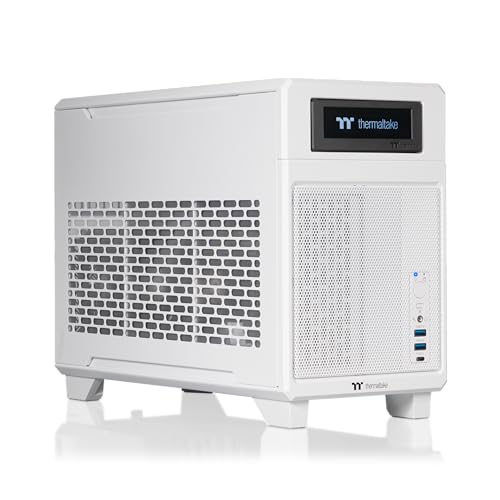
 Sonnet Breakaway Box 750ex Thunderbolt 3 eGPU Enclosure13.38 x 7.25 x 8 inches2 KilogramsCheck on Amazon
For a Thunderbolt 5 laptop, the Razer Core X V2 is the usual pick when you already have or are willing to buy a power supply, the Sonnet Breakaway Box 850 T5 suits buyers who want a power supply and extra ports included in one box, and the Sonnet Breakaway Box 750ex fits Thunderbolt 4 laptops. If your device also has an OCuLink port, an enclosure that supports both connections such as the AOOSTAR AG03 or MINISFORUM DEG2 gives you an extra option. An external GPU enclosure is a compromise, so confirm your laptop’s port and your graphics card’s size before buying anything.
At a Glance: eGPU Enclosures Compared
| Enclosure | Best for | Key stated specs (maker and reviewers) | Limits |
|---|---|---|---|
| Razer Core X V2 | Thunderbolt 5 laptops, value-minded buyers | Thunderbolt 5; supports cards up to four slots wide; up to 140 W laptop charging; PCIe 4.0 x4 internally; most roundups say you supply the ATX power supply | One roundup lists a 700W PSU, others say none is included, so confirm the exact package; needs Windows 11 and host support |
| Sonnet Breakaway Box 850 T5 | All-in-one Thunderbolt 5 box | Includes an 850 W power supply; takes triple-wide cards; roundups list 5GbE and USB ports plus a downstream Thunderbolt 5 port | Higher tier than a PSU-less enclosure |
| Sonnet Breakaway Box 750ex | Thunderbolt 4 laptops | Reviewers describe it as a reliable pick for Thunderbolt 4 hosts with an included 750W PSU | Thunderbolt 4 bandwidth caps GPU performance |
| AOOSTAR AG03 | Thunderbolt 5 plus OCuLink in one case | Roundups recommend it for users who want both connections | Check which port and card sizes it supports on the maker page |
| MINISFORUM DEG2 | Dual-connection alternative | Also recommended in roundups for Thunderbolt 5 and OCuLink | Confirm included power and card clearance |
| PELADN Link S-3 | Compact open-frame build | Recommended only after written host and GPU confirmation from the maker | Open frame exposes the card; compatibility needs checking |
Specs are those listed by makers and 2026 roundups, which sometimes disagree; confirm details on the maker page for your model.
Sonnet Breakaway Box 750ex Thunderbolt 3 eGPU Enclosure 750W Mac Windows | Supports GPUs up to 312mm; 375W continuous GPU power; four USB-A ports and Gigabit Ethernet built in
Picked as a relevant option in this category.
View on Amazon
MINISFORUM DEG2 eGPU Docking Station for OCuLink and USB4 V2, (Supports TBT5), Graphics Card Extension Enclosure, Works with ATX/SFX Power Supplies, Features M.2 Slot,2.5G LAN Portand USB 3.2 Port
Chosen because it specifies (Supports TBT5) and Graphics Card Extension Enclosure.
View on AmazonHow to Choose an eGPU Enclosure
Match the connection to your laptop
The enclosure must match the connection your laptop offers. Thunderbolt 5 enclosures such as the Core X V2 and Breakaway Box 850 T5 are designed for the newest ports, and Thunderbolt 4 laptops can generally use a Thunderbolt 4 box like the Breakaway Box 750ex. OCuLink, found on some mini PCs and handhelds, uses a direct PCIe connection that the AG03 and DEG2 support. Look at the laptop’s specifications, not just the port shape, because USB-C ports are not all Thunderbolt.
Bandwidth is the main limit
A Thunderbolt link is not an internal PCIe x16 slot. The Core X V2 uses PCIe 4.0 x4 internally, and one review claims it delivers 88 to 92 percent of internal PCIe performance on Thunderbolt 5 laptops. Other reviewers caution that a Thunderbolt link always carries overhead. The outcome depends on the GPU, game, resolution and host, so expect some performance loss versus a desktop, especially at lower resolutions and with CPU-limited games.
Power supply: included or your own
Some enclosures include a power supply, such as the 850 W unit in the Sonnet Breakaway Box 850 T5 and the 750W unit in the 750ex. Others, like the Core X V2 according to most roundups, need you to supply a standard ATX power supply, adding cost and effort. Reviewers suggest a quality 850W unit for high-end cards. Check your graphics card maker’s recommended power supply wattage and connectors, and follow the enclosure manual for installation; unplug everything before opening the box, and consult a qualified person if unsure about internal power wiring.
Card size and cooling
Cards are sized in slot widths. The Core X V2 is listed for cards up to four slots wide, and the Breakaway Box 850 T5 for triple-wide cards. Measure card length, thickness and height against the enclosure’s stated limits. Large modern cards may not fit smaller boxes. Airflow matters because enclosed cards need ventilation, so keep vents clear.
Laptop charging and ports
Some enclosures pass power to the laptop through the same cable. The Core X V2 is listed with up to 140 W of laptop charging, which can replace a separate laptop charger if your laptop’s needs fit. The Breakaway Box 850 T5 adds 5GbE networking and USB ports, so one cable can serve as a mini dock. If your laptop needs more power than the enclosure provides, you will still need its own charger.
Operating system and driver support
The Core X V2 requires Windows 11 and a host that supports external graphics, according to roundups. On Linux, one source states it works with kernel 6.12 or newer and NVIDIA 570 or newer drivers, while other Linux roundups cover different boxes. Not every laptop works well with an eGPU, and some require BIOS settings. Review your laptop maker’s documentation and community reports before buying.
Internal versus external display
Many eGPU users connect a monitor directly to the graphics card for the best performance, since sending frames back to a laptop display uses extra bandwidth. If you only use the laptop screen, expect a larger performance penalty than with an external monitor.
Picks by Budget Tier
Budget: PSU-less enclosures and open frames
Open-frame designs like the PELADN Link S-3 and enclosures that do not include a power supply reduce the cost of the box, but you add a power supply and must confirm compatibility in writing with the maker. This tier suits tinkerers who are comfortable checking specs and installing components.
Mid-range: Razer Core X V2
Several roundups rank it first overall or best value among Thunderbolt 5 enclosures. A quality power supply raises the total cost, but the closed design and 140 W laptop charging appeal to users who want a tidy setup.
Premium: Sonnet Breakaway Box 850 T5
This box adds an included power supply, triple-wide card support and extra ports. It is the top pick at several roundups for buyers who want everything built in. If you only have Thunderbolt 4, the 750ex is the more fitting Sonnet model.
Fit and Compatibility Notes
- Check host support: Confirm your laptop supports external graphics on the port you plan to use.
- Cable: Use the cable supplied or a certified Thunderbolt cable of the right length.
- GPU choice: Check that the card, driver version and operating system work with the enclosure.
- Hot-plugging: Follow the maker’s guidance about connecting and disconnecting the box.
- Safety: Power supplies and cards carry high currents; follow the manuals and consult an electrician or technician for any uncertainty.
Pick X If … Decision Table
| Pick this | If you … |
|---|---|
| Razer Core X V2 | have a Thunderbolt 5 laptop and will add your own power supply |
| Sonnet Breakaway Box 850 T5 | want a power supply, ports and triple-wide support included |
| Sonnet Breakaway Box 750ex | have a Thunderbolt 4 laptop |
| AOOSTAR AG03 or MINISFORUM DEG2 | have both Thunderbolt 5 and OCuLink options |
| PELADN Link S-3 | want a compact open frame and can confirm compatibility with the maker |
Alternatives Worth Considering
- A gaming laptop with a discrete GPU: Avoids the bandwidth limit entirely.
- A small desktop PC: A compact desktop may cost similar to a laptop plus enclosure plus card.
- Cloud or streaming gaming: An option for light users who do not want extra hardware.
Is an eGPU Right for You?
An enclosure makes sense when you already own a thin laptop you like and want stronger graphics at a desk, or when you plan to upgrade the card over time while keeping the same laptop. It makes less sense if you travel constantly, if your laptop only has a slower port, or if the total of enclosure, power supply and card approaches the price of a gaming laptop or a compact desktop. Reviewers also point out that CPU-limited games gain little from a faster card, and that a laptop processor can become the bottleneck. Think through the whole setup, including desk space for a box and its fan noise, before committing to one.
Setup Checklist
- Confirm the laptop port type and whether the maker supports external graphics.
- Check card length, slot width and power connectors against the enclosure’s stated limits.
- Decide whether you will use an external monitor connected to the card.
- Update graphics drivers and system firmware following the makers’ guidance.
Frequently Asked Questions
Does an eGPU perform like a desktop card?
Not fully. A Thunderbolt link adds overhead compared with an internal slot, so expect some loss that varies by game and resolution.
Do I need to buy a power supply separately?
It depends on the box. The Sonnet boxes include one, while most roundups say the Core X V2 does not. Confirm the package before ordering.
Will it work with any laptop?
No. Your laptop needs a compatible Thunderbolt or OCuLink connection and external graphics support.
Can the enclosure charge my laptop?
Some can. The Core X V2 is listed with up to 140 W of laptop charging, but your laptop’s power needs may differ.
What size card can I fit?
The Core X V2 is listed for four-slot cards and the Breakaway Box 850 T5 for triple-wide cards. Measure before you buy.
Does it work on Linux?
One roundup says the Core X V2 works on kernel 6.12 or newer with NVIDIA 570 or newer drivers. Check community reports for your laptop.
FAQ
Is an eGPU Right for You?
Does an eGPU perform like a desktop card?
Do I need to buy a power supply separately?
Will it work with any laptop?
Can the enclosure charge my laptop?
What size card can I fit?
Does it work on Linux?
More from Amazon
Programs that pair well with the guide above. Offers and eligibility are set by Amazon and may change.
Free shipping on eligible items, Prime Video and more. Eligible new members can start with a free trial.
Start a Prime free trialAd-free music streaming. Eligible new subscribers can start with a free trial.
Try Music Unlimited freeA Prime membership for ages 18-24 with a trial period. Eligibility is set by Amazon.
See Prime for Young AdultsAudiobooks and podcasts to listen to on the go. Eligible new members can start with a free trial.
Try Audible freeAs an Amazon Associate we earn from qualifying purchases.