Our Top Picks
 Honeycomb Aeronautical Alpha Flight Controls Yoke & Switch18.5 x 13.3 x 10.1 inches11 poundsCheck on Amazon
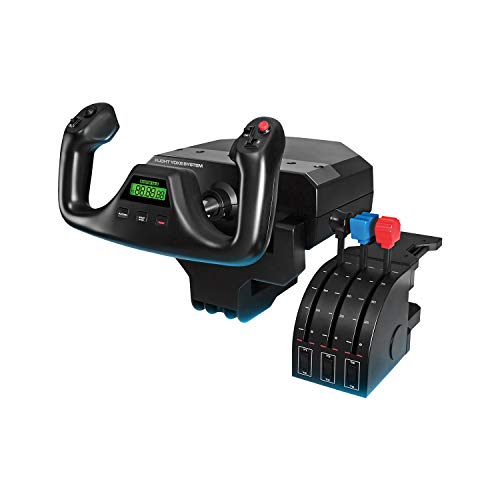 Logitech G PRO Flight Yoke System Professional Simulation18.9 x 15.8 x 9.1 inches6.17 poundsCheck on Amazon


A flight stick suits combat jets, but if you fly airliners and general aviation aircraft in Microsoft Flight Simulator, a yoke is the control that matches the real cockpit. A good yoke gives you a full 180-degree turn, a smooth push-and-pull elevator axis, and enough buttons and switches to manage flaps, gear, trim, and autopilot without reaching for the keyboard. This guide covers five yokes and yoke bundles, from a straightforward starter system to a complete setup with throttle quadrant and rudder pedals.
As an Amazon Associate, we earn from qualifying purchases.
What to look for in a flight yoke
Rotation and travel. Look for a full 180-degree aileron turn with self-centering and no dead zone. Longer elevator travel (the push-and-pull motion) makes pitch control finer, especially during landing.
Throttle quadrant. Most yoke systems include a throttle quadrant, either built in or as a separate unit. A quadrant with swappable levers and a trim wheel covers everything from a single-engine trainer to a four-engine airliner.
Switches and buttons. A built-in switch panel with master, avionics, and light switches, plus an ignition switch, keeps common tasks on the hardware. Count the programmable buttons and hat switches if you fly aircraft with complex cockpits.
Rudder control. Some yokes have rudder controls on the handles, but dedicated rudder pedals feel far more natural for taxiing and crosswind landings. Bundles that include pedals save you a separate purchase.
Platform. Most yokes are PC-only, but a few are also licensed for Xbox Series X|S. Check compatibility before buying if you fly on console.
Mounting. Yokes clamp to a desk. Check the clamp range against your desk thickness, and make sure the yoke leaves room for a keyboard in front of it.
1. Honeycomb Alpha Flight Controls Yoke & Switch Panel
The Honeycomb Alpha is the yoke most sim pilots recommend first, and for good reason. Its all-metal mechanism delivers a full 180-degree turn with a self-centering action and no dead zone, and the steel elevator shaft gives 15 cm of smooth travel. The built-in switch panel carries master, alternator, avionics, and light switches, plus an ignition switch like the ones in piston-engine aircraft, and a red LED backlight keeps everything readable on night flights. The left handle holds two buttons, two 2-way hat switches, and a push-to-talk button, while the right handle adds two 2-way switches, an 8-way switch, and another button. It is a yoke-only unit, so you will pair it with a separate throttle quadrant and rudder pedals.
Specs
- Rotation: 180 degrees, self-centering, no dead zone
- Elevator travel: 15 cm steel shaft
- Controls: 28 buttons and switches, switch panel with ignition switch
- Backlight: Red LED on switch panel
- Dimensions: 18.5 x 13.3 x 10.1 inches
- Weight: 4.9 kg (10.8 lb)
- Connectivity: USB
- Compatibility: PC, Mac
- ASIN: B07SH2SFLW
2. Logitech G PRO Flight Yoke System
The Logitech G PRO Flight Yoke System is the most approachable way into yoke flying. It pairs the yoke with a separate throttle quadrant, giving you five axes in total, and the stainless steel elevator and aileron shaft keeps the motion smooth. Three modes give you 75 programmable controls across 25 buttons and switch positions, and the configurable knobs handle trim and other frequently adjusted settings. The system is modular, so it integrates with Logitech G flight panels and rudder pedals as your setup grows. It is a solid first yoke for anyone moving from a gamepad or a stick to a proper civil-aviation setup.
Specs
- Axes: 5 total (yoke + throttle quadrant)
- Shaft: Stainless steel elevator and aileron control
- Controls: 25 programmable buttons and switch positions, 75 programmable controls across 3 modes
- Dimensions: 18.9 x 15.8 x 9.1 inches
- Weight: 6.17 lb
- Connectivity: USB
- Compatibility: PC
- Warranty: 2 years
- ASIN: B07QXMTNPB
3. Thrustmaster TCA Yoke Pack Boeing Edition
If you fly Boeing airliners, this is the yoke built for you. Officially licensed by both Boeing and Xbox, the TCA Yoke Pack Boeing Edition pairs a 787-inspired yoke with a matching throttle quadrant. The suspended PENDUL_R mechanism replicates the feel of a floor-mounted pendular yoke, with a long 8.3-inch range of travel, and the internal frame is 100 percent metal. Two additional axes on the yoke base let you manage standalone maneuvers, and you can adjust the internal springs from two to four to tune the resistance. The throttle quadrant includes four swappable levers and the iconic Boeing autopilot controls for altitude, airspeed, and heading. Magnetic H.E.A.R.T technology gives 16-bit resolution on the main axes.
Specs
- License: Officially licensed by Boeing and Xbox
- Mechanism: Suspended PENDUL_R, 8.3-inch (21 cm) travel
- Frame: 100% metal internal structure
- Springs: Adjustable, 2 to 4 springs
- Throttle quadrant: 4 swappable levers, Boeing autopilot controls
- Controls: 35 action buttons
- Resolution: 16-bit magnetic H.E.A.R.T sensors
- Weight: 14.77 lb
- Connectivity: USB
- Compatibility: Xbox Series X|S, Xbox One, PC
- ASIN: B09DPYHM55
4. Turtle Beach VelocityOne Flight + Rudder Pedals Bundle
This bundle is the most complete setup in this guide: the VelocityOne Flight universal control system plus the matching VelocityOne Rudder Pedals in one box. The yoke offers a true-to-life 180-degree handle with built-in rudder controls at your fingertips, a modular throttle quadrant with an integrated trim wheel and custom lever handles, and a flight management display for on-the-fly configuration. The rudder pedals add an ultra-smooth rudder axis with non-contact hall-effect sensors on all axes, adjustable differential brakes, two sets of swappable springs, adjustable pedal width, and two sets of swappable pedals. Everything is officially licensed for Xbox Series X|S and Xbox One as well as Windows PCs, so console sim pilots are covered too.
Specs
- Bundle contents: VelocityOne Flight control system + VelocityOne Rudder Pedals
- Yoke: 180-degree handle with built-in rudder controls
- Throttle: Modular quadrant with integrated trim wheel
- Display: Flight management display for on-the-fly setup
- Rudder pedals: Hall-effect sensors, 10-bit axis data, adjustable differential brakes
- Pedal adjustability: Swappable springs and pedals, adjustable width
- Connectivity: USB
- Compatibility: Xbox Series X|S, Xbox One, Windows 10 and 11 PCs
- ASIN: B0CL94D9YC
5. Honeycomb Alpha + Bravo Throttle Quadrant Bundle
This bundle pairs the Honeycomb Alpha yoke from pick one with the Bravo Throttle Quadrant, giving you the most capable Honeycomb setup without buying the units separately. The Bravo is an all-in-one cockpit system with a configurable throttle setup that scales from single-engine general aviation aircraft to four-engine commercial jets. It includes an autopilot panel, an annunciator panel, gear and flap levers, and a trim wheel, so the controls you use most in a flight are all within reach. Combined with the Alpha’s 180-degree turn, steel shaft, and switch panel, this is the bundle to choose if you want a serious desk cockpit built around Honeycomb hardware.
Specs
- Bundle contents: Honeycomb Alpha Flight Controls Yoke + Honeycomb Bravo Throttle Quadrant
- Yoke: 180-degree turn, self-centering, 15 cm steel shaft travel
- Throttle quadrant: Configurable for single-engine to four-engine aircraft
- Panels: Autopilot panel, annunciator panel, gear and flap levers, trim wheel
- Controls: 28 buttons and switches on the yoke, switch panel with ignition switch
- Connectivity: USB
- Compatibility: PC, Mac
- ASIN: B09MDCYDW3
Comparison
| Yoke | What you get | Platform | Best for |
|---|---|---|---|
| Honeycomb Alpha | Yoke + switch panel | PC, Mac | The benchmark standalone yoke |
| Logitech G PRO Flight Yoke System | Yoke + throttle quadrant | PC | First yoke, modular growth |
| Thrustmaster TCA Yoke Pack Boeing Edition | Yoke + throttle quadrant | Xbox, PC | Boeing airliner flying |
| Turtle Beach VelocityOne bundle | Yoke + throttle + rudder pedals | Xbox, PC | Complete setup in one box |
| Honeycomb Alpha + Bravo bundle | Yoke + throttle quadrant | PC, Mac | Serious Honeycomb cockpit |
FAQ
Do I need rudder pedals with a yoke?
Not strictly. Several yokes include rudder controls on the handles, and you can map rudder to a twist axis or keyboard. Pedals feel far more natural for taxiing, crosswind landings, and coordinated turns, and the Turtle Beach bundle in this guide includes them.
Yoke or stick — which is right for me?
Yokes suit civil aviation: airliners, business jets, and general aviation aircraft that use a yoke in the real cockpit. Stick-based HOTAS systems suit military jets and space sims. If you fly both, many sim pilots keep a yoke and a stick on the desk and swap between them.
Will these yokes work on Xbox?
The Thrustmaster TCA Yoke Pack and the Turtle Beach VelocityOne bundle are officially licensed for Xbox Series X|S and Xbox One. The Honeycomb and Logitech systems in this guide are PC and Mac only.
Can I mount a yoke on a thin desk?
All five yokes clamp to a desk, and most clamps handle standard desk thicknesses. Measure your desk edge and check the clamp range on the listing before ordering. If your desk has a beveled or rounded edge, a flat mounting board between the clamp and the desk helps.
Do I need a separate throttle quadrant with the Honeycomb Alpha?
The Alpha is a yoke-only unit, so yes, you will want a throttle quadrant. The Alpha + Bravo bundle in this guide is the simplest way to get both, or you can pair the Alpha with any standalone quadrant.
Conclusion
For most sim pilots, the Honeycomb Alpha remains the yoke to beat, and the Alpha + Bravo bundle is the easiest path to a complete Honeycomb cockpit. The Logitech G PRO Flight Yoke System is the friendliest starting point, the Thrustmaster TCA Yoke Pack is the pick for Boeing fans and Xbox pilots, and the Turtle Beach VelocityOne bundle is the only option here that includes rudder pedals out of the box. Whichever you choose, a yoke changes how flight simulation feels — the controls in your hands finally match the aircraft on screen.
More from Amazon
Programs that pair well with the guide above. Offers and eligibility are set by Amazon and may change.
Free shipping on eligible items, Prime Video and more. Eligible new members can start with a free trial.
Start a Prime free trialAd-free music streaming. Eligible new subscribers can start with a free trial.
Try Music Unlimited freeA Prime membership for ages 18-24 with a trial period. Eligibility is set by Amazon.
See Prime for Young AdultsAudiobooks and podcasts to listen to on the go. Eligible new members can start with a free trial.
Try Audible freeAs an Amazon Associate we earn from qualifying purchases.