Our Top Picks
 TRENDnet 2.5GBase-T PCIe Network Adapter3.3 x 2.5 x 0.7 inches3.3 x 2.5 x 0.7 inches0.1 poundsCheck on Amazon


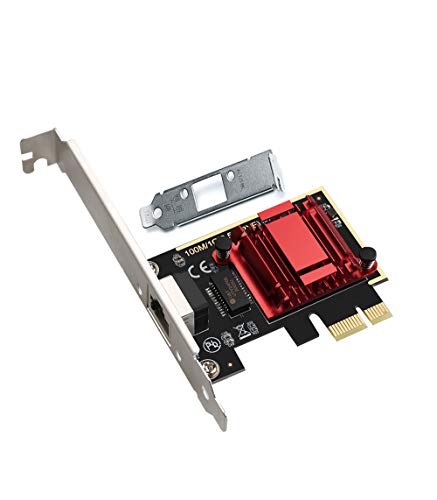
Most gaming PCs still ship with a standard Gigabit Ethernet port, and for years that was plenty. Modern game downloads now measure in the hundreds of gigabytes, though, and multi-gig internet plans and fast home networks are becoming common. A 2.5GbE network card slots into a free PCIe slot and lifts the wired ceiling of your rig to 2.5 Gbps, which is two and a half times the throughput of a Gigabit port. The result is shorter download waits, quicker transfers to a home server or NAS, and a wired connection that stays steady.
Every card in this guide is a single-port PCIe 2.5GbE adapter with a standard RJ45 connector, so each one works with the Ethernet cables most gamers already own. The differences sit in the controller, the included brackets, operating system support, and the extra features each maker bundles in. Here are the five best 2.5GbE network cards for gaming setups.
As an Amazon Associate, we earn from qualifying purchases.
How to Choose a 2.5GbE Network Card for Gaming
Match the Card to Your Network
A 2.5GbE card only runs at full speed when the rest of the chain supports it. You need a router or switch with a 2.5G port, plus either a multi-gig internet plan or a fast local device such as a NAS. If your internet plan tops out at 1 Gbps, the card still pays off for local transfers and leaves headroom for later. Every card in this guide negotiates down to 1 Gbps and 100 Mbps automatically, so each one works with older routers and switches while you wait to upgrade the rest of the network.
Check the PCIe Slot and Bracket
All five cards here are x1 cards, which means they fit any PCIe slot of x1 length or longer, including x4, x8, and x16 slots. Before you buy, check that a free slot is not blocked by a large graphics card, and check whether your case needs a low-profile bracket. Slim and small form factor cases need the shorter bracket, and every card in this guide includes one in the box. Full-height brackets come fitted or included as well, so a standard tower needs no extra parts.
Look at the Controller and Drivers
Four of the five cards in this guide use a Realtek RTL8125 family controller, which is the most common 2.5GbE chip in this class. Windows 11 and Windows 10 include drivers for the RTL8125, and modern Linux kernels support it out of the box. TRENDnet aims its card at Windows and Windows Server systems instead. If you run macOS or an older Windows version, confirm operating system support before you buy, since driver coverage is what separates one card from another in daily use.
Features That Matter for Gaming
For pure gaming, link stability and mature drivers matter more than enterprise extras. Still, a few features are worth knowing about. Wake on LAN lets you power up the PC remotely. PXE boot matters if the machine boots from the network. VLAN tagging and jumbo frames help when the same PC doubles as a home server or a streaming box. Quality of Service, or QoS, helps the card prioritize gaming traffic over background downloads. None of these changes raw throughput, but they decide how flexible the card is once installed.
1. TP-Link TX201 — Best Overall 2.5GbE Network Card for Gaming

The TP-Link TX201 is the safe default in this guide. It pairs the Realtek RTL8125 controller with a clean, no-nonsense board, and it has been on sale since October 2022, which gives it the longest track record of any card here from a major networking brand. It negotiates 2.5 Gbps, 1 Gbps, and 100 Mbps over a single RJ45 port, and it carries QoS and Wake on LAN support.
Installation is straightforward: the card fits a PCIe 2.1 x1 slot, and Windows 11, Windows 10, and older Windows versions down to Windows 7 are supported, along with Windows Server and Linux. Link and activity LEDs show the negotiated speed at a glance, so you can confirm the card has linked at 2.5 Gbps rather than falling back to 1 Gbps. TP-Link backs the TX201 with a 2-year warranty, and the card carries FCC, CE, and RoHS certification.
Specs
- Controller: Realtek RTL8125
- Interface: PCIe 2.1 x1
- Link speeds: 2.5 Gbps, 1 Gbps, 100 Mbps
- Port: 1 x RJ45
- Brackets: Standard and low-profile included
- Features: QoS, Wake on LAN, Link/Act LEDs
- Operating systems: Windows 11/10/8.1/8/7, Windows Server 2022/2019/2016, Linux
- Dimensions: 4.8 x 3.9 x 0.8 in (120.8 x 98.2 x 21.5 mm)
- Weight: 1.76 oz
- Warranty: 2 years
2. TRENDnet TEG-25GECTX — Best for VLAN and Jumbo Frame Support
The TRENDnet TEG-25GECTX is the card to pick when your gaming PC also works as a home server, a media box, or a machine on a segmented home network. It supports 802.1Q VLAN tagging and 9KB jumbo frames, two features the other cards here do not document. It runs at 2.5 Gbps, 1 Gbps, 100 Mbps, and 10 Mbps over a single RJ45 port, and it works over standard Cat5e cabling at distances up to 100 m.
TRENDnet also gives this card a 3-year manufacturer protection period, the longest standard coverage in this guide, and the card is NDAA and TAA compliant for buyers who need that certification. The card fits a PCIe 2.0 x1 slot or any longer slot. Operating system support covers Windows and Windows Server, so Linux and macOS users should look at the other cards here instead.
Specs
- Controller: 2.5GBASE-T PCIe adapter
- Interface: PCIe 2.0 x1
- Link speeds: 2.5 Gbps, 1 Gbps, 100 Mbps, 10 Mbps
- Port: 1 x RJ45
- Brackets: Standard and low-profile included
- Features: 802.1Q VLAN tagging, 9KB jumbo frames, LED indicators
- Compliance: NDAA and TAA compliant
- Operating systems: Windows, Windows Server
- Power consumption: 1.8 W
- Weight: 1.5 oz (42 g)
- Manufacturer protection: 3 years
3. BrosTrend 2.5Gb PCIe Network Card — Best Compact Card for Small Cases
The BrosTrend 2.5Gb PCIe card is built around the Realtek RTL8125B controller, covered by a metal enclosure that shields the chip and keeps the board tidy. It is a compact PCIe 2.1 x1 card that fits older motherboards as well as new ones, and it negotiates 2.5 Gbps down to 10 Mbps through a single RJ45 port. The box includes both brackets, a driver CD, and a quick installation guide, so small form factor builds are covered without extra parts.
BrosTrend backs this card with limited lifetime protection, which is the most generous coverage in this guide. Note that BrosTrend sells a separate Linux-focused version of this card under its own listing; the card covered here is the gaming listing for Windows systems, so check the listing title before you buy.
Specs
- Controller: Realtek RTL8125B
- Interface: PCIe 2.1 x1
- Link speeds: 2.5 Gbps, 1 Gbps, 100 Mbps, 10 Mbps
- Port: 1 x RJ45
- Brackets: Standard and low-profile included
- Features: Metal controller enclosure, driver CD included
- Operating systems: Windows 11/10/8.1/8/7/XP, Windows Server
- Dimensions: 11.94 x 7.37 x 1.78 cm
- Weight: 39.6 g
- Protection: Limited lifetime
4. YuanLey 2.5G Network Card — Best for Mac and Linux Compatibility
The YuanLey 2.5G card is the most flexible pick here for mixed operating systems. It runs the Realtek RTL8125B controller and lists support for Windows, Linux, and Mac OS, which makes it a good fit for a gaming PC that dual-boots or for a household with more than one platform. It delivers 2.5 Gbps over a single RJ45 port and fits x1, x4, x8, and x16 PCIe slots, so it works in almost any free slot on a modern motherboard. A low-profile bracket is included for slim cases.
YuanLey is a newer, lesser-known brand, and this listing first appeared in March 2025. The card itself is a straightforward RTL8125B design with no extras to configure: install it, let the operating system pick up the driver, and connect the cable.
Specs
- Controller: Realtek RTL8125B
- Interface: PCIe x1 (fits x1, x4, x8, x16 slots)
- Link speeds: 2.5 Gbps
- Port: 1 x RJ45
- Brackets: Low-profile included
- Features: Plug-and-play driver support on supported systems
- Operating systems: Windows 11/10/8.1/8/7, Linux, Mac OS
- Model: 2.5G NIC
- Weight: 3.87 oz
5. ULANSeN RTL8125B Network Adapter — Best Long-Running Compact Pick
The ULANSeN RTL8125B adapter has been on sale since February 2021, making it the oldest listing in this guide, and it remains a simple way to add 2.5GbE to a desktop. Its board measures just 71.5 x 50 x 1.6 mm, the smallest footprint here, which helps in tight builds. It runs the Realtek RTL8125B controller over a PCIe 2.1 x1 interface and negotiates 2.5 Gbps, 1 Gbps, 100 Mbps, and 10 Mbps through one RJ45 port.
This card also carries PXE boot and Wake on LAN support, plus 2.5G and 1G Lite modes, and its LED indicators show link and activity at 100M, 1G, and 2.5G. A low-profile bracket is included in the box, and operating system support covers Windows, Windows Server, Linux, and Mac OS.
Specs
- Controller: Realtek RTL8125B
- Interface: PCIe 2.1 x1
- Link speeds: 2.5 Gbps, 1 Gbps, 100 Mbps, 10 Mbps
- Port: 1 x RJ45
- Brackets: Low-profile included
- Features: PXE boot, Wake on LAN, 2.5G and 1G Lite mode, Link/Act LEDs
- Operating systems: Windows, Windows Server, Linux, Mac OS
- Dimensions: 71.5 x 50 x 1.6 mm
2.5GbE Network Cards Compared
All five cards deliver the same core upgrade: a wired 2.5 Gbps link from a single PCIe slot. The TP-Link TX201 is the best starting point for most gamers, with the strongest brand support and a 2-year warranty. The TRENDnet TEG-25GECTX stands apart with VLAN tagging, jumbo frames, and a 3-year manufacturer protection period, which suits a PC that also serves files or media. The BrosTrend card is the pick for compact builds, thanks to its small board, metal controller enclosure, and limited lifetime protection.
For operating system flexibility, the YuanLey and ULANSeN cards both cover Windows, Linux, and Mac OS, with the ULANSeN offering the smallest board and PXE boot support. Whichever card you choose, pair it with a router or switch that has a 2.5G port and a connection fast enough to use it, and the upgrade pays off in shorter downloads and a steadier wired link.
Frequently Asked Questions
Do I need a 2.5GbE network card for gaming?
Online play itself uses very little bandwidth, so a 2.5GbE card is not required for smooth gameplay. Where it helps is everything around the game: downloading large titles and updates, streaming to other devices in the house, and moving files to a NAS or home server. A wired card also removes the interference and signal swings of Wi-Fi, which keeps the connection steady.
Will a 2.5GbE card work with my existing Ethernet cables?
Yes. The 2.5GBASE-T standard runs at full speed over ordinary Cat5e cabling at distances up to 100 m, and Cat6 works as well. Most homes wired in the last twenty years already have Cat5e or better in the walls, so no rewiring is needed. Just make sure the router or switch on the other end has a 2.5G port.
Does a 2.5GbE card lower ping in online games?
Ping is set by your internet route and the distance to the game server, so a faster card cannot lower it below what your connection delivers. What a wired 2.5GbE card does is remove Wi-Fi jitter and packet loss from the local hop, which keeps latency steady and avoids the spikes that wireless connections can introduce. For the lowest, most consistent latency, a wired link beats Wi-Fi regardless of the card speed.
What PCIe slot does a 2.5GbE network card need?
Every card in this guide is an x1 card, so it needs one free PCIe x1 slot or any longer slot, including x4, x8, and x16. The card works at full speed in a longer slot. Check that the slot is not blocked by your graphics card and that you have the right bracket height for your case.
Conclusion
A 2.5GbE network card is one of the simplest upgrades you can make to a gaming PC: one free PCIe slot, one cable, and your wired ceiling rises to 2.5 Gbps. The TP-Link TX201 is the best all-round choice, the TRENDnet TEG-25GECTX adds VLAN and jumbo frame support for multi-purpose rigs, and the BrosTrend card fits compact builds with lifetime protection. The YuanLey and ULANSeN cards round out the list with broad operating system support and small footprints. Pick the card that matches your case and your network, and your downloads will never be the bottleneck again.
FAQ
Do I need a 2.5GbE network card for gaming?
Will a 2.5GbE card work with my existing Ethernet cables?
Does a 2.5GbE card lower ping in online games?
What PCIe slot does a 2.5GbE network card need?
More from Amazon
Programs that pair well with the guide above. Offers and eligibility are set by Amazon and may change.
Free shipping on eligible items, Prime Video and more. Eligible new members can start with a free trial.
Start a Prime free trialAd-free music streaming. Eligible new subscribers can start with a free trial.
Try Music Unlimited freeA Prime membership for ages 18-24 with a trial period. Eligibility is set by Amazon.
See Prime for Young AdultsAudiobooks and podcasts to listen to on the go. Eligible new members can start with a free trial.
Try Audible freeAs an Amazon Associate we earn from qualifying purchases.