Our Top Picks
An adult cam stream lives or dies on how you look on camera. Viewers decide in seconds whether to stay, and a soft, grainy, or lagging feed pushes them away no matter how good the show is. The real decision is not which webcam costs the most, but which one keeps your face sharp, your skin tones natural, and your movement smooth in the lighting you actually stream in, often a dim room with a single lamp or a ring light.


This guide is for cam creators who stream on adult platforms, for performers moving from a laptop camera to a dedicated webcam, and for established creators upgrading from basic 1080p gear. Every camera below was chosen from the names and specifications shown on its Amazon product page, with the focus on resolution, low-light sensors, autofocus, and framing that matter on a long live stream.
Quick Picks
As an Amazon Associate we earn from qualifying purchases
| Product | Best for | Key spec from title |
|---|---|---|
| Razer Kiyo Pro Ultra | Dim-room streams that need DSLR-like depth | 1/1.2-inch Sony STARVIS 2 sensor |
| Logitech MX Brio | All-round 4K streaming with clean audio | 8.5MP Sony STARVIS sensor, 4K |
| Elgato Facecam Pro | Smooth 4K motion and manual control | True 4K60 video |
| Logitech Brio 4K | A proven 4K upgrade on a familiar platform | 4K with 5x digital zoom |
| Razer Kiyo Pro | Sharp 1080p at 60 frames per second | 1080p 60 fps with HDR |
How to Choose
Resolution and Frame Rate
Resolution decides how much detail your viewers see, and frame rate decides how smooth your movement looks. A 4K camera captures fine detail in hair, skin, and fabric, which matters when viewers watch full screen, while 1080p at 60 frames per second gives smoother motion for dancing, posing, and quick gestures. For most cam creators, 1080p at 60 frames per second is the safer baseline, and 4K is the upgrade for creators whose audience watches on large screens. Check the frame rate at the resolution you plan to use, because some cameras offer 4K only at 30 frames per second and reserve 60 frames per second for 1080p.
Low-Light Performance
Cam rooms are rarely lit like studios. A large image sensor gathers more light and produces a cleaner picture with less grain in dim conditions, which is why sensor size matters more than the resolution number on the box. Look for a large sensor, a wide aperture lens, and automatic light correction that lifts shadows without washing out skin tones. A camera with a 1/1.2-inch or 1/1.8-inch sensor will hold up far better in a dim room than a small-sensor camera, even at the same resolution. Pair the camera with one soft light source in front of you and the sensor does the rest.
Autofocus and Field of View
Adult cam streams involve movement, so autofocus has to keep up. A camera with fast autofocus and face tracking keeps you sharp when you lean in, stand up, or shift position, while a fixed-focus camera goes soft the moment you leave its sweet spot. Field of view decides how much of the room shows in frame. A wide angle around 90 degrees suits full-body framing and room shots, while a narrower angle around 65 to 78 degrees suits close head-and-shoulders framing. Cameras with adjustable field of view let you switch between the two without moving the mount.
Audio, Privacy, and Mounting
Built-in microphones are a backup, not a studio setup, but they matter when you chat with viewers between shows. Dual microphones with noise reduction keep your voice clear over fan noise and room echo. A physical privacy shutter is essential for creators who share a living space or stream from a bedroom, because it blocks the lens completely between sessions. Check the mount too: a clip that grips a monitor, a tripod thread for a desk stand, and a long enough cable all decide whether the camera actually fits your setup without extra accessories.
The 5 Best Options
Razer Kiyo Pro Ultra
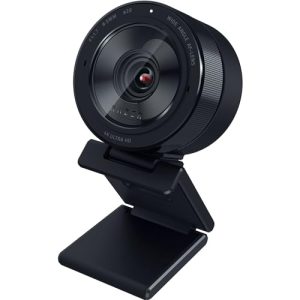
The Kiyo Pro Ultra is built around the largest sensor ever fitted to a webcam, a 1/1.2-inch Sony STARVIS 2 unit paired with a bright f/1.7 lens, and that hardware shows up immediately in dim rooms. Skin tones stay natural, grain stays low, and the background falls into a soft blur that looks close to a dedicated camera. AI face tracking and autofocus keep you sharp while you move, and HDR at 30 frames per second balances bright lamps against dark corners. It records uncompressed 4K at 24 frames per second or 1080p at 60 frames per second, and a built-in shutter covers the lens between sessions.
Specs
- 1/1.2-inch Sony STARVIS 2 sensor with 2.9 micrometer pixels
- f/1.7 aperture lens with AI face tracking autofocus
- 4K at 30 fps, 1080p at 60 fps, HDR at 30 fps
- Built-in microphone and privacy shutter
- USB-C connection, model RZ19-04420100-R3U1
- Effective still resolution 8.3 MP, viewing angle 82 degrees
Best for: Creators who stream in dim rooms and want DSLR-like depth and clean low-light video.
Watch out for: It is a large, heavy webcam at 1.5 pounds, so a thin monitor bezel or a flimsy clip mount may not hold it steady.
ASIN: B0CT6FFK4R
Logitech MX Brio
The MX Brio is the strongest all-round 4K webcam here, with an 8.5MP Sony STARVIS sensor that uses larger pixels for clearer faces in difficult light. It streams 4K at 30 frames per second or 1080p at 60 frames per second, and its adjustable field of view switches between 65, 78, and 90 degrees, so one camera covers close framing and full-room shots. Dual beamforming microphones with noise reduction keep your voice clear, and the integrated privacy shutter twists closed in one motion. Fine controls in the Logi Options+ app adjust temperature, tint, ISO, and shutter speed for creators who like to tune their look.
Specs
- 8.5MP Sony STARVIS sensor with larger pixels for low light
- 4K at 30 fps, 1080p at 60 fps, HDR
- Adjustable field of view: 65, 78, and 90 degrees
- Dual beamforming microphones with noise reduction
- Integrated privacy shutter, USB-C connection
- Model 960-001545, weight 12.64 ounces
Best for: Creators who want one dependable 4K camera for streaming, calls, and recording with clean built-in audio.
Watch out for: The Show Mode tilt-down feature is made for desk demonstrations, not for framing a stream, so set your angle with the clip and tripod thread instead.
ASIN: B0BFJ4CRKD
Elgato Facecam Pro

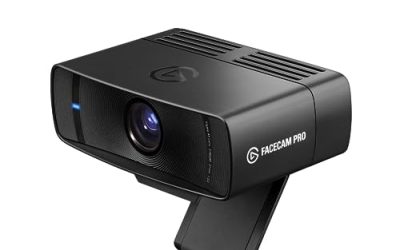
The Facecam Pro is the only camera here that records true 4K at 60 frames per second, which makes it the pick for creators whose streams involve a lot of movement. Its 1/1.8-inch Sony sensor and f/2.0 lens hold detail in low light, and autofocus works from 40 centimeters to infinity, so leaning in close stays sharp. The Camera Hub software gives DSLR-style control over zoom, pan, tilt, and exposure, with settings saved to onboard memory, so your look stays the same every time you go live. A 90-degree field of view suits wide room framing, and the mount includes a quarter-inch thread for tripods and arms.
Specs
- True 4K60 video, 2160p60, 2160p30, 1080p60, 1080p30
- 1/1.8-inch Sony sensor, f/2.0 lens, 21 mm focal length
- Autofocus range 40 cm to infinity, 90-degree field of view
- USB-C connection, UVC compatible
- 8.3 MP rear webcam resolution, weight 240 g
- Model 20WAB9901, mount with quarter-inch thread
Best for: Creators who move a lot on stream and want the smoothest 4K motion with manual control over the shot.
Watch out for: It has no built-in microphone, so you need a separate mic or headset for voice, and 4K60 needs a USB-C port with enough bandwidth.
ASIN: B0BJL7Q3SR
Logitech Brio 4K
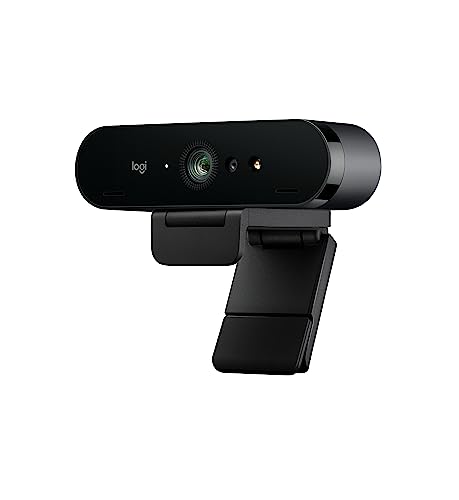
The Brio 4K is the proven classic of this group, a camera that has served streamers for years and still holds up where it counts. It records 4K at 30 frames per second and 1080p at 60 frames per second, with autofocus and 5x digital zoom for framing without moving the camera. RightLight 3 adjusts exposure and contrast for glare and backlighting, and the adjustable field of view offers 65, 78, or 90 degrees. Dual omnidirectional microphones with noise-canceling capture voice from up to 1.2 meters away, and Windows Hello support adds facial recognition login for creators who share a computer.
Specs
- 4K at 30 fps, 1080p at 60 fps, autofocus, 5x digital zoom
- RightLight 3 automatic exposure and contrast correction
- Adjustable field of view: 65, 78, and 90 degrees
- Dual omnidirectional microphones with noise-canceling
- Windows Hello facial recognition support
- USB-A and USB-C connection, model 960-001105
Best for: Creators who want a proven 4K camera with strong auto exposure and a familiar setup.
Watch out for: It is an older design, so its low-light image is grainier than the newer large-sensor cameras in this guide, and a ring light helps it a lot.
ASIN: B01N5UOYC4
Razer Kiyo Pro

The Kiyo Pro is the value pick for creators who stream at 1080p and want smooth motion without paying for 4K. It records full HD at 60 frames per second with HDR, and its adaptive light sensor adjusts to dim rooms. The wide-angle lens offers adjustable field of view at 103, 90, and 80 degrees, so you can frame a close shot or a wide room shot from the same camera. A built-in microphone and lens cover round out a compact body that weighs under 7 ounces, and it works with OBS and XSplit out of the box. It delivers the frame rate that matters most for live movement.
Specs
- Full HD 1080p at 60 fps, HDR enabled
- Adaptive light sensor for dim rooms
- Wide-angle lens with adjustable field of view: 103, 90, and 80 degrees
- Built-in microphone and lens cover
- USB-A to USB-C cable, model RZ19-03640100-R3U1
- Weight 6.9 ounces, 2.1 MP rear webcam resolution
Best for: New creators who want smooth 1080p at 60 frames per second and strong low-light adjustment at a lower tier.
Watch out for: It tops out at 1080p, so creators whose audience watches on large screens will see softer detail than with the 4K cameras here.
ASIN: B08T1MWX6J
Which One Fits Your Situation
You stream in a dim room
Pick the Razer Kiyo Pro Ultra. Its 1/1.2-inch Sony STARVIS 2 sensor and f/1.7 lens gather far more light than any other camera here, so your video stays clean and your skin tones stay natural with only a lamp or a ring light. The Logitech MX Brio is the backup choice if you want the same low-light help with stronger built-in audio.
You move around during a stream
Pick the Elgato Facecam Pro. True 4K at 60 frames per second keeps dancing, posing, and quick gestures smooth, and its autofocus holds from 40 centimeters out, so leaning in close never goes soft. The Razer Kiyo Pro is the 1080p alternative if you want the same smooth motion at a lower tier.
You are upgrading from a laptop camera
Pick the Razer Kiyo Pro. It plugs in over USB, works with OBS and XSplit, and immediately gives you 1080p at 60 frames per second with automatic low-light adjustment. It is the smallest jump in setup for the biggest jump in image quality, and you can add a ring light later.
You run long sessions from a fixed desk
Pick the Logitech MX Brio or the Logitech Brio 4K. Both hold a steady frame for hours, both offer adjustable field of view for close and wide shots, and both have integrated privacy shutters for the moment the stream ends. The MX Brio adds finer image controls for creators who tune their look between sessions.
Common Mistakes
- Choosing a camera by resolution alone and ignoring sensor size, which decides how clean the picture looks in a dim room.
- Streaming at 4K without checking whether your platform and connection actually carry it, which can cause dropped frames and lag.
- Using a fixed-focus camera for a stream where you move, so every lean or step out of position goes soft.
- Forgetting a privacy shutter or cover, leaving the lens open between sessions in a shared living space.
- Relying on the built-in microphone for long sessions instead of a separate mic or headset, which makes voice quality the weak point of an otherwise sharp stream.
Frequently Asked Questions
Do I need a 4K webcam for cam streaming?
Not always. A sharp 1080p camera at 60 frames per second looks better in motion than a 4K camera at 30 frames per second, and many viewers watch on phones or small windows where the difference is hard to see. Choose 4K if your audience watches full screen on large displays or if you crop and zoom into the frame during a stream.
Can I use these webcams with OBS?
Yes. All five cameras work with OBS and XSplit over a standard USB connection, and the Razer and Elgato models add their own software for fine control. Set the resolution and frame rate in OBS to match the camera, and test the stream privately before going live so dropped frames show up early.
Why does my webcam look grainy at night?
Grain comes from a small sensor struggling in low light. A larger sensor, a wider aperture lens, and one soft light source in front of you fix most of it. Point a lamp or ring light at your face rather than at the wall behind you, and let the camera’s automatic light correction do the rest.
Should I use the built-in microphone or a separate mic?
Use a separate mic or headset for regular streaming. Built-in microphones work for short chats, but they pick up fan noise, keyboard clicks, and room echo. A headset mic or a USB microphone placed close to you gives clearer voice and lets viewers hear you over music and background sound.
FAQ
Do I need a 4K webcam for cam streaming?
Can I use these webcams with OBS?
Why does my webcam look grainy at night?
Should I use the built-in microphone or a separate mic?
More from Amazon
Programs that pair well with the guide above. Offers and eligibility are set by Amazon and may change.
Free shipping on eligible items, Prime Video and more. Eligible new members can start with a free trial.
Start a Prime free trialAd-free music streaming. Eligible new subscribers can start with a free trial.
Try Music Unlimited freeA Prime membership for ages 18-24 with a trial period. Eligibility is set by Amazon.
See Prime for Young AdultsAudiobooks and podcasts to listen to on the go. Eligible new members can start with a free trial.
Try Audible freeAs an Amazon Associate we earn from qualifying purchases.