Our Top Picks
 Best budget wirelessLogitech G Pro X Superlight 2 Lightspeed WirelessClassic1.57 x 2.5 x 4.92 inches0.1 poundsCheck on Amazon
 Razer DeathAdder V3 Pro Wireless Gaming Mouse1000 Hz5.01 x 2.65 x 1.69 inches0.1 poundsCheck on Amazon
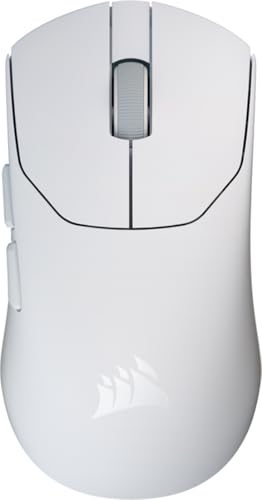 Corsair Sabre v2 PRO Ultralight FPS Wireless Gaming4.69 x 2.46 x 0.1 inches0.1 poundsCheck on Amazon
Pros & cons
- Up to 250 hours of gameplay come from a single AA battery
- Endurance mode can extend battery life up to 9 months
- At 3.4 ounces, the lightweight body supports high maneuverability
- Relies on a single AA battery rather than a rechargeable cell
- 12,000 DPI sensitivity may be more than casual users need
 Best wired valueSteelSeries Esports FPS Gaming MouseWired2.67 x 4.93 x 1.67 inches0.23 poundsCheck on Amazon
The best mouse for Warzone and Valorant is a lightweight, symmetrical wireless mouse under about 60 g with a current optical sensor, such as the Razer Viper V3 Pro or Logitech G Pro X Superlight 2. Valorant rewards tiny flicks and quick resets, Warzone rewards steady tracking and recoil control, and one light, accurate mouse can handle both. Budget buyers can get most of the benefit from a 60 to 70 g mouse with a good sensor.
Picks at a Glance
- Best overall: Razer Viper V3 Pro, a 54 g symmetrical wireless mouse.
- Best safe shape: Logitech G Pro X Superlight 2, a 60 g right-handed shape that many players like.
- Best for palm grip: Razer DeathAdder V3 Pro, an ergonomic 63 g wireless mouse.
- Best ultralight: Corsair Sabre v2 Pro, listed at 36 g.
- Best budget wireless: Logitech G305 Lightspeed.
- Best wired value: SteelSeries Prime.
- Best carbon-fiber ultralight: Attack Shark R5 Ultra, listed at 39 g.
- Best for no-software setups: BenQ Zowie FK1-DW.
Comparison Table
| Mouse | Weight (listed) | Shape | Connection | Best for | Budget tier |
|---|---|---|---|---|---|
| Razer Viper V3 Pro | 54 g | Symmetrical | Wireless | Valorant flicks, claw and fingertip | High |
| Logitech G Pro X Superlight 2 | 60 g | Right-handed | Wireless | All-round FPS | High |
| Razer DeathAdder V3 Pro | 63 g | Ergonomic | Wireless | Palm grip, Warzone | High |
| Corsair Sabre v2 Pro | 36 g | Ergonomic FPS | Wireless | Ultralight fans | Mid to high |
| Logitech G305 Lightspeed | Light (check the maker) | Compact | Wireless | Budget wireless | Low |
| SteelSeries Prime | 69 g | Ergonomic | Wired | Value wired | Low to mid |
| Attack Shark R5 Ultra | 39 g | Compact | Wireless | Ultralight on a budget | Mid |
| BenQ Zowie FK1-DW | 55 g | Symmetrical | Wireless | Plug-and-play fans | Mid to high |
What Warzone and Valorant Each Ask of a Mouse
| Demand | Valorant | Warzone |
|---|---|---|
| Typical movement | Short, precise flicks to heads | Mixed: long tracking, quick turns |
| Sensitivity | Usually low | Often medium |
| Weight preference | Light; speed of reset | Light to medium; steadiness helps |
| Shape preference | Symmetrical for claw or fingertip | Ergonomic often feels steadier |
| Buttons | Few needed | Extra side buttons can help with melee and ping |
Because the two games pull in different directions, the mouse to buy is the one that sits in the middle: light enough for flicks, accurate enough for tracking, and shaped to match your grip.
Best Mouse for Valorant and Warzone: Our Top Picks
1. Razer Viper V3 Pro: Best Overall

Razer Viper V3 Pro Wireless Esports Gaming Mouse, 54g Lightweight, Black | 35K DPI Optical Sensor, Gen3 Optical Switches, 8 Programmable Controls, 95 Hr Battery, 8000 Hz Polling Rate, for PC & Mac
Chosen because it specifies 54g Lightweight and Black.
View on AmazonThe Razer Viper V3 Pro is a 54 g wireless esports mouse with a 35K DPI optical sensor and Gen-3 optical switches, per its listing. Its symmetrical shape suits claw and fingertip grips, and its low weight makes quick flicks easy. Independent guides frequently list it among the top Valorant choices.
- Weight: about 54 g
- Sensor: 35K DPI optical
- Switches: Gen-3 optical
- Connection: wireless
Best for: claw and fingertip grip, Valorant and Warzone. Skip if: you use a large palm grip or want extra buttons.
Pros: very light; symmetrical; fast optical switches; strong sensor. Cons: high tier; few buttons; small for large hands.
2. Logitech G Pro X Superlight 2: Best Safe Shape
Logitech G Pro X Superlight 2 Lightspeed Wireless Gaming Mouse, Black | Lightweight, LIGHTFORCE hybrid switches, HERO 2 sensor, 32,000 DPI, 5 programmable buttons, USB-C charging, Mac & PC gaming
Chosen because it specifies Black and Lightweight.
View on AmazonThe G Pro X Superlight 2 is a lightweight Lightspeed wireless mouse with LIGHTFORCE hybrid switches and a HERO 2 sensor. Guides describe it as 60 g with a right-hand ergonomic shape that works for many grips.
- Weight: about 60 g
- Sensor: HERO 2
- Switches: LIGHTFORCE hybrid
- Connection: Lightspeed wireless
Best for: players who want a proven, familiar shape. Skip if: you are left-handed or want a symmetrical body.
Pros: light; reliable wireless; familiar shape; strong software support. Cons: high tier; right-handed only; five buttons.
3. Razer DeathAdder V3 Pro: Best for Palm Grip
Razer DeathAdder V3 Pro Wireless Gaming Mouse, 63g, 90 Hr Battery, Black | Focus Pro 30K Optical Sensor, Fast Optical Switches Gen-3, HyperSpeed Wireless, 5 Programmable Buttons
Chosen because it specifies 63g and 90 Hr Battery.
View on AmazonThe DeathAdder V3 Pro is a 63 g wireless mouse with a 30K optical sensor and a listed 90-hour battery. It keeps the classic ergonomic DeathAdder shape in a much lighter body, which makes it a comfortable choice for Warzone’s longer matches.
- Weight: about 63 g
- Sensor: Focus Pro 30K optical
- Battery: up to 90 hours (listed)
- Shape: ergonomic, right-handed
Best for: palm and relaxed claw grips. Skip if: you prefer a symmetrical or very small mouse.
Pros: classic shape; light for its size; long battery. Cons: high tier; right-handed; larger than the Viper.
4. Corsair Sabre v2 Pro: Best Ultralight
Corsair Sabre v2 PRO Ultralight FPS Wireless Gaming Mouse – White | 33,000 DPI, 36g Weight, 8,000Hz Hyper-Polling, Mechanical Switches, Up to 70-Hour Wireless Battery Life
Chosen because it specifies White and 000 DPI.
View on AmazonThe Corsair Sabre v2 Pro is a wireless FPS mouse listed at 36 g, with a 33,000 DPI sensor and 8,000 Hz polling. It targets players who want the lightest possible body for quick flicks.
- Weight: about 36 g
- Sensor: 33,000 DPI
- Polling: up to 8,000 Hz
- Connection: wireless
Best for: ultralight fans. Skip if: you like a heavier, steadier feel for tracking.
Pros: very light; high polling rate; modern sensor. Cons: can feel too light for some players; high polling drains battery faster.
5. Logitech G305 Lightspeed: Best Budget Wireless

Logitech G305 LIGHTSPEED Wireless Gaming Mouse, Hero 12K Sensor - Black | 12,000 DPI, lightweight, 6 programmable buttons, 250h battery life, on-board memory, PC/Mac, lightweight gaming mouse
Chosen because it specifies Hero 12K Sensor and Black.
View on AmazonThe G305 Lightspeed is a lightweight wireless mouse with a HERO 12K sensor and six programmable buttons. It is an older design but remains one of the lowest-cost ways to try wireless in a shooter.
- Sensor: HERO 12K
- DPI: up to 12,000
- Buttons: six programmable
- Connection: Lightspeed wireless
Best for: tight budgets and first wireless mice. Skip if: you want a sub-60 g body or the newest sensor.
Pros: low tier; solid sensor; six buttons. Cons: heavier than current esports mice; runs on a replaceable battery.
6. SteelSeries Prime: Best Wired Value
SteelSeries Esports FPS Gaming Mouse – Prime Edition | Ultra Lightweight 69g – 18K CPI TrueMove Pro Sensor – Magnetic Optical Switches – Customization - RGB Lighting – PC/Mac
Chosen because it specifies Prime Edition and Ultra Lightweight 69g.
View on AmazonThe SteelSeries Prime is a 69 g wired esports mouse with an 18K CPI TrueMove Pro sensor and magnetic optical switches. It is the pick for wired players who want a modern sensor without paying wireless rates.
- Weight: about 69 g
- Sensor: TrueMove Pro, 18K CPI
- Switches: magnetic optical
- Connection: wired
Best for: wired players on a budget. Skip if: you want wireless or a sub-60 g body.
Pros: strong sensor for the tier; low cost; no battery. Cons: heavier; wired cable drag.
7. Attack Shark R5 Ultra: Best Carbon-Fiber Ultralight

ATTACK SHARK R5 Ultra Wireless Gaming Mouse,39g Superlight Carbon Fiber Hollowed-Out,PAW3950MAX Optical Sensor Nordic 52840 MCU 8K Polling 42K DPI,Tri-Mode Programmable Mice with Coiled Cable-Green
Chosen because it specifies 39g Superlight Carbon Fiber Hollowed-Out and Tri-Mode Programmable Mice with Coiled Cable-Green.
View on AmazonThe Attack Shark R5 Ultra is a wireless gaming mouse listed at 39 g with a carbon-fiber hollowed-out shell and a PAW3950MAX optical sensor. It aims at players who want a very light mouse without paying flagship rates.
- Weight: about 39 g
- Sensor: PAW3950MAX optical
- Shell: carbon fiber, hollowed out
- Connection: wireless
Best for: experimenters and ultralight fans. Skip if: you want brand support or a larger shape.
Pros: very light; modern sensor; lower tier than flagships. Cons: less established support; compact size.
8. BenQ Zowie FK1-DW: Best Plug-and-Play

BenQ Zowie FK1-DW 4K Wireless Mouse for Esports, Sports Science, 4K Enhanced Receiver, 55g, Symmetrical, Driverless, 3950 Sensor, 4K Polling Rate
Chosen because it specifies Sports Science and 4K Enhanced Receiver.
View on AmazonThe BenQ Zowie FK1-DW is a 55 g symmetrical wireless mouse with a 4K enhanced receiver and a driverless design. Zowie mice are known for working without installed software, which suits players who want to plug in and play.
- Weight: about 55 g
- Shape: symmetrical
- Receiver: 4K enhanced
- Software: driverless
Best for: players who dislike software. Skip if: you want many buttons or deep customization.
Pros: light; symmetrical; no software; 4K receiver. Cons: few settings; mid to high tier.
Also Consider
- Razer Viper V4 Pro: the newer Viper, listed at about 49 g with a 50K sensor; a step up if you want the newest Razer.
- Razer Viper V3 HyperSpeed: a lower-tier Viper with an 82 g shell and AA battery.
- Corsair M75 Wired: a wired lightweight FPS mouse with swappable side buttons.
How We Chose
This guide is research-based. We did not use these mice ourselves. We compared maker listings and independent buying guides for Valorant and Warzone, and we looked for shared advice on weight, sensor, shape and connection. We limited each brand to two picks and skipped used or unavailable listings. We make no claims about which mouse any professional player uses.
Buying Guide: What Matters for Valorant and Warzone
Weight
Under 70 g is a sensible floor for both games, and many players land between 50 and 65 g. Below 45 g is very light, and some players find it too twitchy for tracking.
Shape and grip
Symmetrical mice suit claw and fingertip grips. Ergonomic mice suit palm grips and long sessions. Match the shape to your hand size and grip before you chase extra specs.
Sensor
Any current sensor from Razer, Logitech, Corsair or SteelSeries is accurate enough for both games. DPI numbers above 20,000 are marketing for most players, and most people use 400 to 1,600 DPI.
Connection and polling rate
Modern wireless, using a dongle, is as fast as wired for most players. Polling rates above 1,000 Hz are optional and reduce battery life. Choose wired if you want zero battery management.
Switches and buttons
Optical or hybrid switches resist double-click problems over time. Warzone players may value extra side buttons, while Valorant players often need only two.
Best Mouse for Valorant: Does a 2022 Guide Still Hold?
Older Valorant guides from 2022 favored wired lightweight mice, and many are still good. The big change since then is that wireless mice are now light and fast enough to match wired ones.
If you own a 2022-era pick such as a Viper Ultimate, a G Pro Wireless or a Zowie model, it is likely still fine. Upgrade for weight, shape or battery life, not just for a newer name.
Best Bloody Mouse for Drag Clicking: What to Know
Drag clicking is a technique used for fast clicking in some games, and it is not part of Valorant or Warzone play. Bloody-brand mice are often discussed for it because of their switches and coatings.
We did not find a Bloody listing in our store, so we are not recommending one. If you want a mouse for drag clicking, check the maker’s page for switch and coating details. For Valorant and Warzone, choose from the lighter picks above.
Setting Up Your Mouse for Both Games
- Start with 800 DPI or similar. Pair it with an in-game sensitivity you can control, then adjust slowly.
- Use the same eDPI in both games. Players often convert between games so aim feels consistent; many sensitivity converters exist online.
- Set polling rate to 1,000 Hz first. Raise it only if your PC handles it without frame drops.
- Use a clean, consistent mouse pad. A pad with a stable surface matters as much as a mouse upgrade.
- Give a new mouse a week. Judging a new shape in one match is a common mistake.
Grip Styles and Which Mouse Fits Them
Palm grip
The whole hand rests on the mouse. This grip favors a taller, ergonomic body with a gentle slope, which is why the DeathAdder V3 Pro and SteelSeries Prime are the natural picks. Palm grip tends to feel steady for Warzone tracking but slower for tiny Valorant corrections.
Claw grip
The palm touches the back of the mouse and the fingers arch over the buttons. Claw grip suits mid-height mice with a slight hump toward the rear. The Superlight 2, Viper V3 Pro and Zowie FK1-DW all fit here, depending on hand size.
Fingertip grip
Only the fingertips and thumb touch the mouse, so weight matters most. Ultralight bodies like the Sabre v2 Pro and Attack Shark R5 Ultra are built for this grip, and the Viper V3 Pro also suits it.
How to measure your hand
Measure from the wrist crease to the tip of the middle finger, and across the widest part of the palm. Makers publish mouse length and width, so compare those numbers to your hand. A mouse that is about two thirds of your hand length is a common starting point for claw grip.
Weight Ranges Compared
| Weight range | Feel | Better for | Watch out for |
|---|---|---|---|
| Under 45 g | Very light, twitchy | Fast flicks, fingertip grip | Overshooting; shell flex on hollow designs |
| 45 to 60 g | Light and controlled | Most Valorant players; mixed play | Few downsides; check hand fit |
| 60 to 70 g | Balanced | Warzone tracking; palm grip | Slightly slower flick resets |
| Over 70 g | Heavy by current standards | Players who like inertia | Arm fatigue over long sessions |
Weight is not the only factor. Balance and cable or dongle drag can change how heavy a mouse feels. A 63 g wireless mouse can feel lighter than a 60 g wired mouse with a stiff cable.
Wired vs Wireless for Competitive Shooters
Wireless used to mean a delay. Current 2.4 GHz mice from major brands are built for esports and are widely treated as equal to wired for most players. The remaining reasons to choose wired are battery management, lower cost and avoiding any chance of dropouts.
- Choose wireless if: you hate cable drag, move your mouse a lot at low sensitivity, or use a desk with limited space.
- Choose wired if: you want the lowest cost, never want to charge, or play on a PC with a crowded USB environment.
If you use wireless, place the dongle on a short extension near the mouse pad. It improves signal stability and costs very little.
Mouse Pad and Surface Notes
A new mouse on the wrong pad can feel worse than your old one. Control pads give more stopping power and help with small Valorant corrections. Speed pads help long swipes in Warzone. A mid-speed cloth pad is the safest starting point.
Mouse feet matter too. Lightweight mice often ship with thin PTFE feet that wear over time, and replacement feet are inexpensive. If your mouse starts to feel scratchy, replace the feet before you replace the mouse.
Common Mistakes When Choosing an FPS Mouse
- Chasing the lowest weight. Ultralight is not better for everyone. Fit and balance matter more.
- Buying by DPI. Sensor DPI figures above 20,000 are not a reason to buy.
- Ignoring hand size. A great mouse in the wrong size will not help your aim.
- Using Bluetooth for shooters. Use the 2.4 GHz dongle mode instead.
- Changing mice and sensitivity at once. Change one variable at a time, so you know what helped.
Razer Options Compared: Viper, DeathAdder and Cobra
Razer fills both ends of the shape spectrum, so it helps to compare its own mice before you look elsewhere.
| Razer mouse | Shape | Weight (listed) | Connection | Fits |
|---|---|---|---|---|
| Viper V3 Pro | Symmetrical | About 54 g | Wireless | Claw, fingertip; Valorant first |
| Viper V4 Pro | Symmetrical | About 49 g | Wireless | Claw, fingertip; newest Viper |
| Viper V3 HyperSpeed | Symmetrical | About 82 g | Wireless | Lower-tier wireless, AA battery |
| DeathAdder V3 Pro | Ergonomic | About 63 g | Wireless | Palm grip; Warzone first |
| DeathAdder V3 (wired) | Ergonomic | About 59 g | Wired | Palm grip without a battery |
| Cobra | Compact ergonomic | About 58 g | Wired | Small hands, low tier |
The short version is simple. Choose a Viper if your hand fits a symmetrical shape and Valorant is your main game. Choose a DeathAdder if you prefer an ergonomic body and spend more time in Warzone. Check the maker’s page for the latest weights, because Razer revises models often.
Sensitivity and eDPI Across the Two Games
Valorant and Warzone use different sensitivity scales, so the same DPI will feel different in each. The common approach is to pick a comfortable number in one game, then use a sensitivity converter to match the other, so that a full swipe covers the same distance.
- Valorant: multiply DPI by in-game sensitivity to get your eDPI. Many players land in a low range, which suits a light mouse and a large mouse pad.
- Warzone: uses its own sensitivity values and often separate settings for aiming down sights. Start with a converter, then adjust to taste.
- Keep DPI fixed. Change in-game sensitivity rather than hopping between mouse DPI stages, so your muscle memory stays stable.
Do not chase numbers you read online. Good sensitivity is the one that lets you track a target and still snap to a head without overshooting.
Choosing by Budget Tier
Low tier
The Logitech G305 and SteelSeries Prime give you a modern sensor and reliable build. You give up the very lightest weight and the newest switches. For most players learning a new game, this is plenty.
Mid tier
The Attack Shark R5 Ultra and Zowie FK1-DW sit here. You get lower weight or a software-free setup, with less brand polish than the flagships.
High tier
The Viper V3 Pro, Superlight 2, DeathAdder V3 Pro and Sabre v2 Pro are flagship wireless mice. The difference from the mid tier is smaller than the price gap suggests, so only pay for the shape you are sure will fit.
Care and Longevity
- Charge habits: wireless mice last longer if you avoid draining them to zero often.
- Feet: replace worn feet instead of the mouse.
- Cleaning: wipe the shell with a damp cloth and keep the sensor window clear of dust.
- Firmware: update through the maker’s app when a stable version is offered.
- Storage: keep the dongle in the mouse or a small case so it does not get lost.
Frequently Asked Questions
Is a lighter mouse always better for Valorant?
No. Lighter helps flicks, but very light mice can feel unsteady for tracking. Most players do well between about 50 and 65 g.
Is wireless good enough for Warzone and Valorant?
Yes. Modern 2.4 GHz wireless mice are fast enough for competitive play. Avoid Bluetooth for shooters.
What DPI should I use?
Most players use 400 to 1,600 DPI with a sensitivity that fits their arm movement. Higher DPI is not required for accuracy.
Should I get a symmetrical or ergonomic mouse?
Symmetrical suits claw and fingertip grip. Ergonomic suits palm grip. Pick by your hand size and grip, not by popularity.
Do I need extra buttons?
For Valorant, two side buttons are enough. Warzone players may like more buttons for melee, ping or tactical equipment.
Is the Razer Viper V3 Pro worth it over a budget mouse?
It is worth it if you value the lightest body and the best sensor. A budget wireless like the G305 is a smart choice if you want to keep spending low.
Which One Should You Buy?
- Most players: Razer Viper V3 Pro.
- Safe shape: Logitech G Pro X Superlight 2.
- Palm grip: Razer DeathAdder V3 Pro.
- Ultralight: Corsair Sabre v2 Pro or Attack Shark R5 Ultra.
- Low spend, wireless: Logitech G305 Lightspeed.
- Low spend, wired: SteelSeries Prime.
- No software: BenQ Zowie FK1-DW.
Sources
- Razer product information
- Logitech G product information
- Corsair, SteelSeries and BenQ Zowie product information
- ProSettings Valorant mouse guide
- Glorious Gaming mouse guide
Last updated: November 2026
FAQ
Best Mouse for Valorant: Does a 2022 Guide Still Hold?
Is a lighter mouse always better for Valorant?
Is wireless good enough for Warzone and Valorant?
What DPI should I use?
Should I get a symmetrical or ergonomic mouse?
Do I need extra buttons?
Is the Razer Viper V3 Pro worth it over a budget mouse?
More from Amazon
Programs that pair well with the guide above. Offers and eligibility are set by Amazon and may change.
Free shipping on eligible items, Prime Video and more. Eligible new members can start with a free trial.
Start a Prime free trialAd-free music streaming. Eligible new subscribers can start with a free trial.
Try Music Unlimited freeA Prime membership for ages 18-24 with a trial period. Eligibility is set by Amazon.
See Prime for Young AdultsAudiobooks and podcasts to listen to on the go. Eligible new members can start with a free trial.
Try Audible freeAs an Amazon Associate we earn from qualifying purchases.