Our Top Picks

A laptop camera usually fails in predictable ways: the picture softens in evening light, the microphone picks up the room instead of your voice, and the frame crops out half the desk during a shared presentation. Choosing an online webcam is really about fixing those three problems at the level your calls actually need. A 1080p camera with a sensible field of view suits most meetings, while a 2K sensor or smarter framing helps if you present, teach or record often.
The five picks below cover the main buyer groups: remote workers who live in meetings, students and teachers in daily classes, home users upgrading a family PC, and casual streamers who want a cleaner picture without creator-tier gear. Each pick was chosen from the resolution, field of view, microphone and privacy details stated in its own Amazon product name and listing, so the differences below come from the listings themselves rather than from brand reputation.
Quick Picks
As an Amazon Associate we earn from qualifying purchases.
| Product | Best for | Key spec from title |
|---|---|---|
| Logitech C920s HD Pro Webcam | Everyday meetings with a privacy shutter | 1080p at 30 fps with built-in privacy shutter |
| Anker PowerConf C200 2K Webcam | Sharper picture and adjustable framing | 2K video with adjustable field of view |
| EMEET C960 Webcam | Wide rooms and two-person calls | Full HD 1080P with 90-degree field of view |
| Logitech Brio 505 | Business calls with auto-framing | Full HD 1080p with auto-framing and Show Mode |
| NexiGo N60 Webcam | The widest view on a simple setup | 1080p at 30 fps with 110-degree wide-angle lens |
How to Choose
Resolution and frame rate
For standard video calls, 1080p at 30 frames per second is the practical baseline: meeting platforms compress your feed anyway, so a clean 1080p picture from the C920s or N60 looks sharp on the receiving end. A 2K camera like the Anker C200 keeps more detail when the app crops or zooms your image, and it gives recordings more headroom. Chasing higher numbers only pays off if your calls, classes or recordings actually use the extra resolution. Frame rate matters less than stability at this level: a steady 30 frames per second looks better on a call than a higher rate that stutters whenever your connection dips.
Field of view and framing
Field of view decides how much of the room the camera shows. A 78-degree view, as listed for the C920s, frames one person at a desk without much background. A 90-degree view suits two people side by side or a whiteboard behind you, and a 110-degree lens takes in a whole small room. Adjustable fields of view and auto-framing solve the same problem differently: the C200 lets you pick the crop, while the Brio 505 adjusts it for you. Sit too close to a wide lens and your face stretches at the edges, so whichever width you choose, leave a little distance between you and the camera.
Microphones and noise handling
Most callers hear you more clearly than they see you, so the microphone matters as much as the sensor. Every pick here carries built-in microphones, but the listings differ in detail: the C920s lists stereo audio from dual microphones, the C200 lists AI noise-canceling stereo microphones, and the Brio 505 lists dual noise-reduction microphones. If your room echoes or a fan runs nearby, the noise-focused models are the safer choice; in a quiet room, any of them will sound acceptable. Distance matters as well: a camera mounted closer to you will always sound clearer than one across the room.
Privacy and everyday convenience
A built-in privacy cover sounds minor until the camera lives on your monitor all day. The C920s, C200, C960 and Brio 505 all list a shutter or cover, so closing the lens is a physical habit rather than a settings menu. Also check the basics the listings state: plug-and-play USB on the C960 means no driver hunt on a shared family PC, and fixed focus means one less thing to adjust before a call starts. A clip that folds flat or grips the top of a laptop screen also makes the camera easier to move between rooms and machines.
The 5 Best Options
Logitech C920s HD Pro Webcam

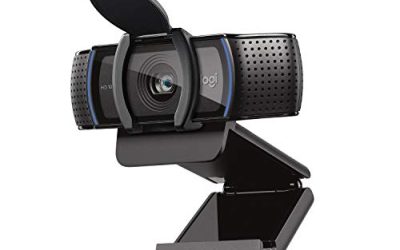
The C920s is the safe default for people whose workday is a chain of video meetings. Its listing pairs 1080p video at 30 frames per second with stereo audio from dual microphones, a combination that covers calls, classes and recorded updates without any setup decisions. The built-in privacy shutter is the detail owners use most: one flick closes the lens between calls. Its 78-degree field of view frames a single person at a desk neatly, without pulling the whole room into the picture behind you.
Specs
- Video: 1080p at 30 fps
- Field of view: 78 degrees
- Audio: stereo audio from dual built-in microphones
- Privacy: built-in privacy shutter
- Item model number: 960-001257
Best for: Remote workers who want a dependable meeting camera with a physical shutter.
Watch out for: The 78-degree view is tight for two people sharing one screen; look at the wider picks below if you present together.
ASIN: B07K986YLL
Anker PowerConf C200 2K Webcam

The C200 suits callers who find 1080p a little soft, especially anyone who records lessons, demos or video messages as well as joining live calls. Its listing leads with 2K video capture, and the adjustable field of view lets you tighten the frame for a solo call or widen it when a second person joins. AI noise-canceling stereo microphones aim at the common home-office problem of keyboards, fans and street noise under your voice, and a built-in privacy cover closes the lens when the day ends.
Specs
- Video capture resolution: 2K, at 30 fps
- Field of view: adjustable, with selectable 65, 78 and 95-degree views
- Audio: AI noise-canceling stereo microphones
- Light handling: low-light correction
- Privacy: built-in privacy cover
- Item model number: A3369
Best for: Teachers, presenters and home workers who want a sharper picture and control over framing.
Watch out for: A separate bundle pairs this camera with an Anker speakerphone under a different listing; make sure you order the standalone webcam if that is all you need.
ASIN: B09MFMTMPD
EMEET C960 Webcam
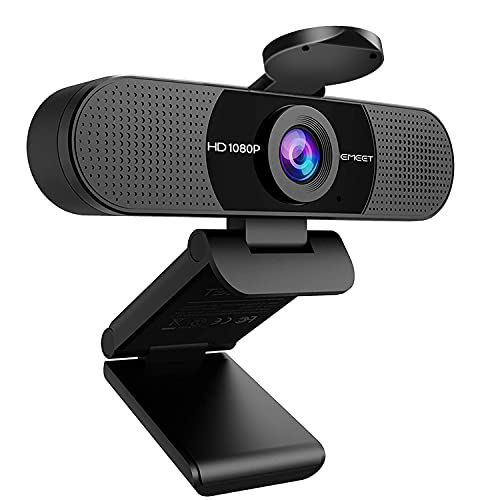
The C960 is built around a simple idea: plug it in and appear on screen with a wide, bright-enough picture. The listing states Full HD 1080P video and a 90-degree field of view, which fits two people at one desk or a tutor who needs a board in frame. Two built-in microphones handle voice pickup, a privacy cover is included, and the fixed focal length removes focus hunting from the routine. For a shared home computer or a classroom machine, that lack of settings is a genuine advantage.
Specs
- Video: Full HD 1080P (1920 x 1080)
- Field of view: 90 degrees
- Audio: 2 built-in microphones
- Focus: fixed focal length, listed focal range 11.8 to 118.1 inches
- Privacy: privacy cover included
- Connection: plug and play USB
- Item model number: 960
Best for: Families, classrooms and shared PCs that need a wide view with zero setup.
Watch out for: Several similar C960 listings exist, including a tripod bundle, an autofocus upgrade and a grey version; check the listing title carefully so you order the original 1080P model described here.
ASIN: B07M6Y7355
Logitech Brio 505

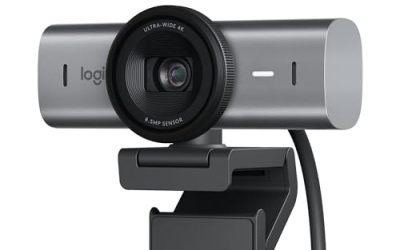
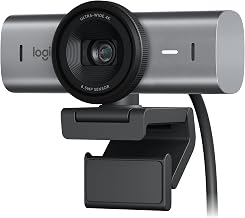
The Brio 505 is the business-leaning pick, aimed at people who present as often as they talk. Beyond Full HD 1080p video, its listing names auto-framing, which keeps you centred when you move, and Show Mode, which tilts the view down to share documents or objects on your desk. Auto light correction helps in rooms where the lighting changes through the day, and dual noise-reduction microphones keep speech clear. The listing also names Microsoft Teams, Google Meet and Zoom as supported platforms.
Specs
- Video: Full HD 1080p
- Framing: auto-framing and Show Mode
- Light handling: auto light correction
- Audio: dual noise-reduction microphones
- Privacy: integrated privacy shutter
- Platforms named in listing: Microsoft Teams, Google Meet, Zoom
- Item model number: 960-001522
Best for: Professionals who present, share desk items on camera and move around while talking.
Watch out for: A second listing for this model circulates under a different code, so confirm the live listing matches the graphite Brio 505, model 960-001522, before ordering.
ASIN: B0BMQQQHC2
NexiGo N60 Webcam

The N60 is the wide-angle option for anyone whose calls regularly include more than one face or a whole room. Its listing states 1080p video at 30 frames per second from a 2MP CMOS sensor, behind a 110-degree wide-angle lens — the broadest view in this group. That makes it a natural fit for family video calls, small meeting rooms and tutors who move around. It keeps the formula simple: no framing software to learn, just a wide, fixed picture that takes in the scene in front of it.
Specs
- Video: 1080p at 30 fps
- Sensor: 2MP CMOS
- Lens: 110-degree wide-angle
Best for: Family calls, small rooms and anyone who wants the widest fixed view.
Watch out for: A 110-degree view shows a lot of background, so check what sits behind you; also confirm the live listing details before ordering, as the captured listing information for this model is brief.
ASIN: B088TSR6YJ
Which One Fits Your Situation
You work from home and live in meetings
Pick the C920s if your calls are one-to-one or small team meetings at a single desk. The 78-degree frame keeps the background tidy, the stereo microphones cover speech well, and the shutter gives you a clear on-off habit between calls. Choose the Brio 505 instead if you present often, since its auto-framing and Show Mode handle movement and desk sharing that a fixed camera cannot.
You teach or attend classes online
The C200 fits teachers who record as well as present live, because the 2K capture keeps detail when lessons are replayed or cropped, and the selectable field of view adapts to one person or two. The C960 suits classroom and family computers better: it is plug and play, the 90-degree view includes a board or a second student, and there are no settings for younger users to disturb.
Your calls include the whole family or room
The N60 is the straightforward answer when grandparents, children or a small team all need to be in frame at once. Its 110-degree lens takes in the group without anyone shuffling chairs closer together. If only two people share the camera and you also want a privacy cover included in the box, the C960 gives you a slightly narrower but still generous 90-degree view.
Your room lighting is poor or changes all day
Start with the C200 or the Brio 505, since their listings specifically name light handling: low-light correction on the Anker and auto light correction on the Logitech. Either will hold a steadier picture at dusk than a basic sensor. Whichever you choose, sit facing the light source rather than with a window behind you, because no correction feature fully rescues a backlit face.
Common Mistakes
- Buying the widest lens for a solo desk setup, then wondering why you look small and the messy room behind you dominates the call.
- Paying for a 2K camera when every platform you use compresses the feed to 1080p or lower anyway, so the extra detail never reaches anyone.
- Ignoring the microphone: a sharper picture with echoing, distant audio makes a worse impression than a plain 1080p camera with clear sound.
- Ordering a similar-looking variant by mistake, such as a bundle, an upgraded autofocus version or a different colourway, instead of the exact model you compared.
- Leaving the lens uncovered all day and relying on software indicators, when several picks here include a physical shutter or cover for a reason.
Frequently Asked Questions
Is 1080p enough for work and school calls?
Yes, for most people. Meeting and classroom platforms compress your video before anyone sees it, so a clean 1080p feed at 30 frames per second from a camera like the C920s or C960 looks sharp on the other end. A 2K model such as the C200 helps mainly when you record lessons, crop the image or present detailed material on screen.
What field of view should I choose?
Match the view to the scene. Around 78 degrees frames one person at a desk with little background, which suits most home offices. A 90-degree view fits two people or a board behind you, and 110 degrees covers a small room or family group. Adjustable models, such as the C200 with its selectable views, let one camera cover several of these situations.
Do I need a separate microphone with these webcams?
Usually not for calls and classes. Every pick here includes built-in microphones, and the C200 and Brio 505 list noise-focused microphone designs for busier rooms. A separate microphone still helps if you record lessons or videos for an audience, but for meetings, tutoring and family calls the built-in microphones in these listings are designed to carry your voice clearly.
Why does a privacy shutter matter?
A physical shutter or cover closes the lens itself, so the camera cannot capture anything even if software misbehaves or a meeting app reconnects unexpectedly. It also gives you a visible, certain off state between calls. The C920s, C200, C960 and Brio 505 all list a shutter or cover, which makes the habit easy: close it when the call ends, open it when the next one starts.
FAQ
Is 1080p enough for work and school calls?
What field of view should I choose?
Do I need a separate microphone with these webcams?
Why does a privacy shutter matter?
More from Amazon
Programs that pair well with the guide above. Offers and eligibility are set by Amazon and may change.
Free shipping on eligible items, Prime Video and more. Eligible new members can start with a free trial.
Start a Prime free trialAd-free music streaming. Eligible new subscribers can start with a free trial.
Try Music Unlimited freeA Prime membership for ages 18-24 with a trial period. Eligibility is set by Amazon.
See Prime for Young AdultsAudiobooks and podcasts to listen to on the go. Eligible new members can start with a free trial.
Try Audible freeAs an Amazon Associate we earn from qualifying purchases.