Our Top Picks
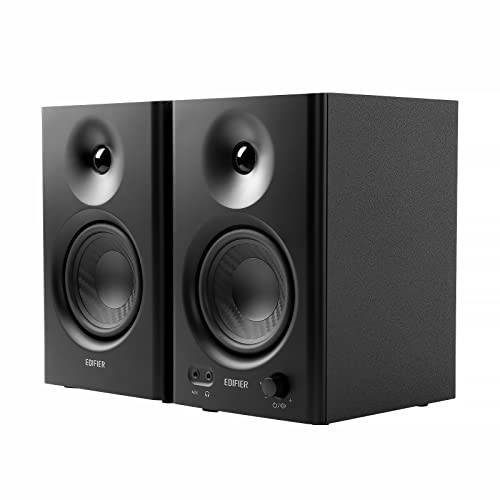 Edifier MR4 Power Studio Monitor Speakers140 x 228 x 197.5 mm7.2 x 16.9 x 12.1 inches9.9 poundsCheck on Amazon

Most gaming speakers are tuned to impress: boosted bass, lifted treble, a sound that flatters explosions and soundtracks. Studio monitors do the opposite. They are built for flat, accurate sound, and on a gaming desk that honesty has real value. Footsteps sit where they should in the stereo image, dialogue stays clear without a bass hump swallowing it, and long sessions stay easy on the ears.
The trade-off is that a flat monitor can sound plain next to a gaming speaker tuned for fun, and monitors expect more from you: proper cables, desk depth, and placement that puts the tweeters at ear level. This guide compares five powered near-field pairs, from compact 3-inch models to full 5-inch pairs.
As an Amazon Associate, we earn from qualifying purchases.
How to Choose Studio Monitor Speakers for a Gaming Desk
Woofer size and desk space. A 5-inch woofer reaches deeper bass, but each cabinet runs about 11 to 12 inches tall and 9 to 10 inches deep. A 3-inch or 3.5-inch pair fits a shallow desk or a monitor arm setup. Measure desk depth first: monitors want a few inches of air behind them, and rear-ported models want more.
Flat sound, honestly. Monitors aim for accuracy, not excitement. Footsteps, reloads, and voice lines arrive with their position and distance intact, which is genuinely useful in competitive play. The same tuning can feel dull for casual sessions. Two picks below offer a livelier option: the KRK has a Create voicing mode, and the Edifier has a Music mode.
Inputs and cables. The balanced inputs on studio monitors are XLR and 1/4-inch TRS. A PC headphone jack is an unbalanced 3.5 mm output, which connects directly to RCA or aux inputs but needs a 3.5 mm to dual TRS cable or an audio interface to feed balanced-only monitors. Several pairs here ship without audio cables at all.
Placement and tuning. Set the speakers and your head in an equilateral triangle, angle each cabinet inward, and keep the tweeters at ear level. Isolation pads cut desk resonance. Front-panel volume and a headphone jack beat reaching around the back. If you plan to add a subwoofer later, check for a subwoofer output now: the PreSonus has one, the Mackie does not.
1. KRK ROKIT 5 Generation Five (Pair)

The ROKIT 5 Generation Five is the most capable pair in this guide, and the one that asks the most of your desk. Each cabinet pairs a 5-inch woven Kevlar woofer with a 1-inch silk dome tweeter, driven by bi-amplified Class D amps rated at 55 watts total per speaker. The front-firing bass port means you can place these closer to a wall than most rear-ported monitors without the low end turning muddy.
What sets the KRK apart is tuning. Three voicing modes change the character of the pair: Mix is the flat reference sound, Focus pushes the midrange forward, and Create adds a livelier presentation for casual play. On top of that, 25 boundary and EQ combinations, adjustable through the KRK app, help correct for a desk in a corner or against a wall. Isolation stands come in the box.
The trade-offs are size and hookup. Each cabinet is over 11 inches tall and nearly 10 inches deep, so a shallow desk will feel crowded. The only inputs are a balanced XLR and 1/4-inch TRS combo jack, with no RCA input, so a direct PC connection needs a 3.5 mm to dual TRS cable or an audio interface, and audio cables are not in the box. Buy the pair listing: KRK also sells this monitor as a single under a separate listing.
Specs
- Woofer: 5-inch woven Kevlar aramid fiber
- Tweeter: 1-inch silk dome
- Power: 55 watts total per speaker (20W HF + 35W LF, Class D); 130 watts dynamic
- Frequency response: 54 Hz – 30 kHz (+/- 3 dB)
- Max SPL: 104 dB
- Inputs: balanced XLR / 1/4-inch TRS combo (no RCA)
- Voicing: Mix, Focus, and Create modes; 25 boundary and EQ combinations with KRK app tuning
- Cabinet: front-firing bass port; isolation stands included
- Dimensions: 11.34 x 7.52 x 9.53 inches per speaker
- Weight: 10.91 lb per speaker
- Warranty: 3 years
2. JBL 305P MkII (Pair)

The JBL 305P MkII earns its reputation with a wide, forgiving sweet spot. The patented Image Control Waveguide spreads the stereo image so the sound stays coherent when you lean, shift, or turn your head, which matters in long sessions. Dual 41-watt Class D amplifiers give 82 watts per speaker, driving a 5-inch woofer and a 1-inch tweeter down to 49 Hz.
For gaming, the JBL’s strengths are imaging and headroom: positional cues stay stable across a wide area, and the pair plays loud without strain. The cabinet is a similar size to the KRK, about 11.7 inches tall and 9.9 inches deep. This is a balanced-only pair as well, XLR and 1/4-inch TRS with no RCA, and the audio cables are not included. The pair listing ships two speakers under model 305PMKIISET; JBL also sells the 305P MkII as a single under a different listing.
Specs
- Woofer: 5-inch long-throw
- Tweeter: 1-inch damped woven composite
- Power: 82 watts total per speaker (2 x 41W Class D)
- Frequency response: 49 Hz – 20 kHz (+/- 3 dB); range 43 Hz – 24 kHz (-10 dB)
- Max SPL: 94 dB continuous / 108 dB peak
- Inputs: balanced XLR and 1/4-inch TRS (no RCA)
- Waveguide: Image Control Waveguide for a wide sweet spot
- Dimensions: 11.7 x 7.3 x 9.9 inches per speaker
- Weight: 10.43 lb per speaker
3. Edifier MR4 (Black, Pair)
The Edifier MR4 is the most desk-friendly pair here that still behaves like a real studio monitor. A 4-inch woofer and a 1-inch silk dome tweeter in MDF cabinets deliver a near-flat response from 60 Hz to 20 kHz, driven by 21 watts per speaker. The compact cabinets, about 9 inches tall, look at home on a desk in a way black plastic boxes do not.
The MR4 is also the easiest pair here to connect. Balanced TRS, RCA, and 3.5 mm aux inputs cover an interface, a PC, and a phone, and a front headphone output saves reaching behind the cabinet. RCA and 3.5 mm cables come in the box; only TRS cables are on you. A front knob switches between Monitor mode, the flatter tuning, and Music mode, a livelier presentation for casual play.
This pick is the black colorway. Edifier sells the same model in white under a separate listing, and the MR3, MR4.5, and MR5 are different models, not color variants of this pair.
Specs
- Woofer: 4-inch
- Tweeter: 1-inch silk dome
- Power: 42 watts total (21W + 21W, Class D)
- Frequency response: 60 Hz – 20 kHz
- Inputs: balanced TRS, RCA, and 3.5 mm aux; front headphone output
- Modes: Monitor mode and Music mode, switched from the front knob
- Cabinet: MDF wood; front-panel volume control
- Dimensions: active speaker 140 x 228 x 197.5 mm; passive speaker 140 x 228 x 184 mm
- Weight: 9.9 lb (pair, net 4.5 kg)
- Warranty: 2 years
4. PreSonus Eris 3.5 2nd Gen (Pair)
The Eris 3.5 2nd Gen is the smallest pair here that still carries a subwoofer output, which makes it the best starting point if you expect your setup to grow. A 3.5-inch woven composite woofer and a 1-inch silk dome tweeter run on 50 watts of Class AB power, 25 watts per side, with a frequency response of 80 Hz to 20 kHz. The compact cabinets fit where 5-inch monitors will not.
TRS, RCA, and 3.5 mm inputs cover every common source, a front headphone jack handles late-night sessions, and high- and low-frequency controls on the rear panel let you tame a boomy corner or a bright room. The subwoofer output means you can add low-end extension later without replacing the pair.
This is the second generation, which supersedes the original Eris E3.5, so confirm the listing says 2nd Gen. PreSonus also sells a Bluetooth variant, the Eris 3.5BT 2nd Gen, under a separate listing; this pick is the wired pair.
Specs
- Woofer: 3.5-inch woven composite
- Tweeter: 1-inch silk dome
- Power: 50 watts total (25W per side, Class AB)
- Frequency response: 80 Hz – 20 kHz
- Peak SPL: 98 dB at 1 m
- Inputs: TRS, RCA, and 3.5 mm; subwoofer output; front headphone output
- Tuning: high- and low-frequency controls
- Weight: 6.4 lb (per the listing)
- Warranty: 2 years
5. Mackie CR3-X (Pair)
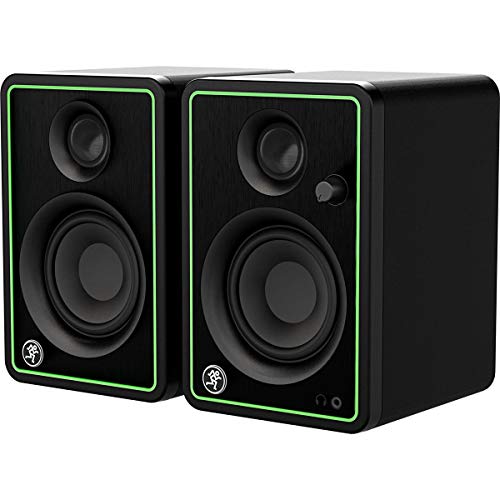
The Mackie CR3-X is the compact pick for the smallest desks, and the pair that needs the least extra gear. Each cabinet is 8.1 inches tall and 7.1 inches deep, the smallest footprint in this guide, and the box includes the RCA and 3.5 mm cables needed to connect a PC right away. A front-panel volume knob and headphone jack keep daily controls within reach.
One honest note on size: the listing title calls these 3.5-inch monitors, but Mackie’s own copy says 3-inch monitors, and that is the figure we use here. The 3-inch woofers and 0.75-inch tweeter run on 50 watts of peak Class D power, with a frequency response of 80 Hz to 20 kHz. That is enough for dialogue, positional cues, and casual play, but low-end weight is limited at this size, and there is no subwoofer output. Inputs cover TRS, RCA, and 3.5 mm, so any PC connects directly.
The CR3-X is a multimedia monitor first and a reference monitor second: balanced and clear at normal desk volume, but it will not dissect a mix the way the KRK or JBL will. For a tight desk or a first pair, that is a fair trade.
Specs
- Woofer: 3-inch (per maker copy; the listing title says 3.5-inch)
- Tweeter: 0.75-inch
- Power: 50 watts peak (Class D)
- Frequency response: 80 Hz – 20 kHz (-3 dB); 70 Hz – 20 kHz (-10 dB)
- Max SPL: 97 dB
- Inputs: 1/4-inch TRS pair, RCA pair, and 1/8-inch TRS; front headphone output
- Cabinet: MDF with brushed-metal front panel; front volume control
- Dimensions: 5.5 x 8.1 x 7.1 inches per speaker
- Weight: 7.8 lb (pair)
- Warranty: 1 year
Comparison
The two 5-inch pairs, the KRK and the JBL, deliver the deepest bass and the most headroom, and both need balanced cables and a desk with real depth. The KRK adds app-based room tuning and three voicing modes, while the JBL offers the widest sweet spot. The Edifier MR4 is the middle ground: a 4-inch pair with every common input and a Music mode. The PreSonus Eris 3.5 is the compact pair with a growth path, thanks to its subwoofer output, and the Mackie CR3-X is the smallest and simplest, for desks where space decides.
Frequently Asked Questions
Are studio monitors good for gaming?
Yes, with one honest caveat. Studio monitors reproduce sound flat and accurately, which keeps footsteps, dialogue, and positional cues clear and correctly placed. That accuracy can feel plain next to gaming speakers tuned with boosted bass and treble, so players who want maximum excitement sometimes prefer a monitor with a voicing option, like the KRK Create mode or the Edifier Music mode.
Do I need an audio interface to connect studio monitors to a PC?
Not always. Pairs with RCA or 3.5 mm inputs, like the Edifier, PreSonus, and Mackie in this guide, connect straight to a PC headphone jack. Balanced-only pairs, like the KRK and JBL, need a 3.5 mm to dual TRS cable or an audio interface.
Do studio monitors need a subwoofer for gaming?
Most players will not miss one with a 5-inch pair, since the KRK and JBL reach into the 40s and 50s. Smaller pairs roll off higher: the PreSonus and the Mackie both start at 80 Hz, so explosions and low rumble lose weight. If deep bass matters, choose a pair with a subwoofer output, like the PreSonus, so you can add a sub later.
How should I place studio monitors on a gaming desk?
Set the two speakers and your head in an equilateral triangle, angle each cabinet inward toward your ears, and keep the tweeters at ear level. Leave a few inches of air behind each cabinet, more for rear-ported models, and use isolation pads to cut desk resonance. Avoid pushing monitors hard into a corner unless the pair has boundary tuning, like the KRK.
Conclusion
Studio monitors are not the obvious choice for a gaming desk, but they are an honest one. A flat, accurate pair keeps positional cues where they belong and stays comfortable over long sessions, as long as you accept the trade-offs: proper cables, desk depth, and a sound that does not flatter. Pick by desk space and inputs first, and the sound will follow.
FAQ
Are studio monitors good for gaming?
Do I need an audio interface to connect studio monitors to a PC?
Do studio monitors need a subwoofer for gaming?
How should I place studio monitors on a gaming desk?
More from Amazon
Programs that pair well with the guide above. Offers and eligibility are set by Amazon and may change.
Free shipping on eligible items, Prime Video and more. Eligible new members can start with a free trial.
Start a Prime free trialAd-free music streaming. Eligible new subscribers can start with a free trial.
Try Music Unlimited freeA Prime membership for ages 18-24 with a trial period. Eligibility is set by Amazon.
See Prime for Young AdultsAudiobooks and podcasts to listen to on the go. Eligible new members can start with a free trial.
Try Audible freeAs an Amazon Associate we earn from qualifying purchases.