Our Top Picks


A shaky camera frame is one of the fastest ways to lose a viewer. People will forgive a plain background and a budget webcam, but a frame that wobbles every time you lean on the desk makes a stream hard to watch. A good tripod fixes that for good: it holds the camera exactly where you put it and keeps the shot level.
The right tripod depends on where your camera sits. A webcam on a desk needs a short, stable stand. A mirrorless camera across the room needs a full-size tripod that reaches eye level. A camera on a shelf or a pole needs flexible legs. The five tripods below cover all of those jobs: two flexible GorillaPods, two full-size tripods, and one pocket-size desktop tripod. Every pick uses the standard 1/4-inch camera thread, so any webcam, mirrorless camera, or action camera with a tripod socket mounts straight on.
As an Amazon Associate, we earn from qualifying purchases.
How to choose a tripod for streaming
Start with placement. A desk setup usually puts the camera 2 to 4 feet from your face, so a desktop tripod or a flexible mini tripod is enough. A standing camera across the room needs a full-size tripod that reaches 60 inches or more. An overhead shot of a keyboard or a desk build needs either a tall tripod or a flexible tripod wrapped around a shelf above the desk.
Load capacity comes next. Add up everything the tripod will carry: camera body, lens, microphone, light, and any adapter. Then compare that total against the rated load and leave headroom — a tripod carrying a fraction of its rated load is steadier, and the head moves more smoothly with weight to spare. As a rule of thumb, keep the total load at about two-thirds of the rated capacity or less.
Head type decides how the camera moves. A ball head tilts and pans with one locking knob, which makes it fast to frame a shot and fast to reframe between segments. A 3-way head has separate handles for pan, tilt, and roll, which gives finer control for a fixed shot. A fluid video head is the pick for moving shots: it damps the pan and tilt so the camera glides instead of jerking. If your camera never moves once the stream starts, a ball head or 3-way head is all you need.
Look at the mounting details too. A quick-release plate lets you pull the camera off the tripod in seconds and snap it back on without re-threading anything. A cold shoe mount gives you a place to clip a microphone or a small LED panel, so the audio and light stay in the same frame as the camera. Finally, think about weight: a heavy tripod is steadier, but a full-size tripod around 3 lb is easy to carry to a different room, while a 10 lb video tripod is a permanent fixture.
1. Joby GorillaPod 3K Kit
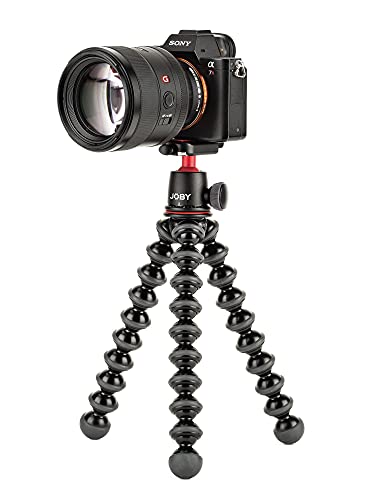
The GorillaPod 3K Kit is the tripod for cameras that live in awkward places. Its flexible legs bend and wrap around railings, shelf edges, branches, and desk legs, so the camera can sit anywhere a flat surface does not exist. On a desk it works as a normal mini tripod; wrapped around a pole it becomes a wall mount; gripped to a shelf it holds an overhead angle that a rigid tripod cannot reach. The ball head pans a full 360 degrees and tilts 90 degrees, with a bubble level built in.
The 3K Kit handles cameras and devices up to 3 kg (6.6 lb), which covers a mirrorless body with a kit lens, a webcam, an action camera, or a phone in a clamp, plus a small light or microphone. At 13.8 oz and 12 inches tall, it fits on a crowded desk without blocking a monitor. The honest limits are height and load: the legs are short and do not extend, and 3 kg is a real ceiling.
Specs
- Load capacity: 3 kg (6.6 lb)
- Weight: 13.8 oz
- Height: 12 in
- Head: Ball head, 360-degree pan, 90-degree tilt, bubble level, quick-release plate
- Legs: Flexible ball-and-socket, wrappable, rubber grip rings
- Mount: 1/4-inch thread
- Model: JB01507
2. Neewer TP-M200 79-Inch Video Tripod
The TP-M200 is the full-size tripod in this lineup, built for a camera that stands across the room. It extends to 79 inches (200 cm), which puts a camera at eye level for a standing presenter or above a seated streamer for a clean downward angle, and it folds down to 35.8 inches for storage. The fluid drag head pans a full 360 degrees and tilts from -70 degrees to 90 degrees, so pans glide instead of jerking.
Load capacity is 17.6 lb (8 kg), far more than any streaming camera needs, and that headroom is the point: a tripod carrying a fraction of its rated load is steadier, and the fluid head moves more smoothly under a light load. The three leg sections lock with flip locks and a carry bag is included. One figure needs a note: the listing’s item-weight field shows 12.43 lb, but that is the package weight; the tripod’s net weight is 9.87 lb (4.48 kg) per the maker’s spec text.
Specs
- Max height: 79 in (200 cm)
- Height range: 34.6 to 78.7 in
- Folded length: 35.8 in
- Load capacity: 17.6 lb (8 kg)
- Weight: 9.87 lb net (4.48 kg)
- Head: Fluid drag head, 360-degree pan, -70-degree to 90-degree tilt
- Legs: 3 sections, flip locks, aluminum
- Extras: Quick-release plate, carry bag
- Warranty: 1 year
- Model: TP-M200
3. Manfrotto PIXI II
The PIXI II is the smallest tripod here, and the simplest. It is a fixed-height desktop tripod at 13.5 cm tall, with a push-button ball head that tilts plus or minus 35 degrees and pans a full 360 degrees. There are no legs to extend and no locks to fiddle with: set it on the desk, press the button, aim the camera, release the button, and the head locks.
Load capacity is 1 kg (2.2 lb), which is plenty for any webcam and for a compact camera with a small lens, but not for a full mirrorless rig. Two details are worth knowing. First, the weight figure varies by source: the maker’s figure is 0.17 kg, while the listing shows 0.24 kg and one independent measurement came in at 0.23 kg. We use the maker’s 0.17 kg here. Second, no phone clamp is included — if the camera is a phone, you will need a separate clamp with a 1/4-inch socket.
Specs
- Height: 13.5 cm fixed
- Load capacity: 1 kg (2.2 lb)
- Weight: 0.17 kg (maker figure; listing shows 0.24 kg)
- Head: Push-button ball head, plus or minus 35-degree tilt, 360-degree pan
- Material: Technopolymer and aluminum
- Mount: 1/4-inch thread
- Model: MTPIXIMII-B
4. Amazon Basics 60-Inch Lightweight Tripod WT3540
The WT3540 is the budget full-size tripod, and it has been the default first tripod for a reason: it does the basic job well and it weighs almost nothing. It extends to 60 inches with the center post cranked up, which reaches eye level for a seated streamer, and the 3-way head gives separate pan and tilt control with two built-in bubble levels for leveling the shot.
Load capacity is 6.6 lb (3 kg), which covers a mirrorless camera with a kit lens, a camcorder, or a webcam with room to spare. The aluminum legs lock with levers and the rubber feet grip a hard floor or a desk. Two figures in the listing disagree with the manual, and both are worth flagging. The listing says the minimum height is 25 inches, while the manual itself says 23.2 inches; we use the listing’s 25 inches here. The weight is listed as 3 lb in the listing bullets and 2.93 lb in the manual’s spec table, against 2.7 lb in the manual’s own text; we use 2.7 lb.
Specs
- Max height: 60 in (152 cm)
- Min height: 25 in per listing (manual says 23.2 in)
- Load capacity: 6.6 lb (3 kg)
- Weight: 2.7 lb per manual (listing says 3 lb)
- Head: 3-way pan and tilt, 2 bubble levels, quick-release plate
- Legs: 3-section aluminum, lever locks, rubber feet
- Extras: Carry bag included
- Model: WT3540
5. Joby GorillaPod 3K Video PRO
The 3K Video PRO takes the flexible-leg idea of the 3K Kit and adds the one thing a streaming camera often needs: a fluid video head. The head pans and tilts smoothly with a removable and foldable pan bar, so a camera move during a stream looks deliberate instead of shaky. The flexible legs wrap around the same railings, shelves, and poles as the 3K Kit, so the camera can sit in places a rigid tripod cannot reach, and now it can pan from there too.
The kit also includes an extra GorillaPod arm that mounts on the side of the head, giving you a place to clip a microphone or a small LED light so the audio and the light move with the camera. A mount for a mobile photography remote is built in, and the sliding plate uses a standard 1/4-inch mount with a 3/8-inch adapter included. Load capacity is 6.6 lb (3 kg), the same as the 3K Kit, and the whole kit weighs 1.43 lb at 13 inches long.
Specs
- Load capacity: 6.6 lb (3 kg)
- Weight: 1.43 lb
- Length: 13 in
- Head: Fluid video head, removable and foldable pan bar
- Legs: Flexible ball-and-socket, wrappable
- Extras: Extra GorillaPod arm for mic or light, sliding plate, 3/8-inch adapter, remote mount
- Mount: 1/4-inch thread
- Warranty: 1 year
- Model: JB01562-BWW
How the five compare
The two GorillaPods are the flexible options. The 3K Kit is the lighter, simpler stand for a camera that stays put; the 3K Video PRO adds the fluid head and the accessory arm for a camera that moves. Both top out at 6.6 lb. The two full-size tripods split on height and head type: the Neewer TP-M200 reaches 79 inches with a fluid drag head and a 17.6 lb load rating, the pick for a standing camera across the room, while the Amazon Basics WT3540 reaches 60 inches with a 3-way head and a 6.6 lb rating, enough for a seated streamer and far easier to carry. The Manfrotto PIXI II is the desk-only pick: 13.5 cm tall, 1 kg load, and the fastest setup of the five.
FAQ
What height tripod do I need for streaming?
Match the tripod to the camera position, not to your height. A desk camera 2 to 4 feet away needs a desktop tripod or a flexible mini tripod at roughly eye level when seated. A camera standing on the floor behind the desk needs 40 to 60 inches, and a standing camera across the room needs 60 to 79 inches.
Can I mount a webcam on a camera tripod?
Yes, if the webcam has a tripod socket. Most standalone webcams have a standard 1/4-inch threaded socket on the base, and every tripod in this article uses that thread. A webcam without a socket can still mount with a clamp adapter that grips the webcam body and provides a 1/4-inch thread. Webcams are light, so any tripod here holds one with plenty of load headroom.
Ball head or fluid head for streaming?
A ball head is the right pick for a camera that stays fixed once the stream starts: it frames fast, locks with one knob, and costs less. A fluid head is the right pick for a camera that moves during the stream, because it damps the pan and tilt so the movement looks smooth instead of jerky. A 3-way head sits between the two: finer control than a ball head for a fixed shot, but no damping for moving shots.
Do I need a quick-release plate?
You do not need one, but you will notice its absence. A quick-release plate lets you lift the camera off the tripod and snap it back on in seconds, which matters if the camera also serves as a handheld camera or a travel camera. Without one, every removal means unscrewing the camera from the head and re-threading it afterward. Four of the five tripods here include a quick-release plate; only the PIXI II uses a direct screw mount.
Conclusion
A steady frame is the foundation of a watchable stream, and the tripod is what holds it. The GorillaPod 3K Kit is the most versatile stand for a camera in an awkward spot, the 3K Video PRO adds smooth movement to the same flexible legs, the Neewer TP-M200 covers a standing camera across the room, the Amazon Basics WT3540 is the straightforward full-size pick for a seated setup, and the PIXI II is the simplest desk stand of the five.
FAQ
What height tripod do I need for streaming?
Can I mount a webcam on a camera tripod?
Ball head or fluid head for streaming?
Do I need a quick-release plate?
More from Amazon
Programs that pair well with the guide above. Offers and eligibility are set by Amazon and may change.
Free shipping on eligible items, Prime Video and more. Eligible new members can start with a free trial.
Start a Prime free trialAd-free music streaming. Eligible new subscribers can start with a free trial.
Try Music Unlimited freeA Prime membership for ages 18-24 with a trial period. Eligibility is set by Amazon.
See Prime for Young AdultsAudiobooks and podcasts to listen to on the go. Eligible new members can start with a free trial.
Try Audible freeAs an Amazon Associate we earn from qualifying purchases.