Our Top Picks
 Scanfield Under Desk Cable Management Tray2pcs Self Adhesive17 x 3.5 x 0.1 inches2.5 poundsCheck on Amazon


A gaming desk gathers cables faster than any other desk in the house. The monitor needs power and a video cable, the PC needs power and USB runs, and then come charger bricks for a headset, a controller dock, a phone, and speakers. Left alone, it all ends up in a tangled pile on the floor, where it collects dust and catches feet. An under-desk cable tray fixes the mess at the source: it hangs beneath the desktop, holds the power strip and the slack, and leaves the floor clear.
The five trays below cover the main mounting styles — screw-mount steel, no-drill clamp, and self-adhesive — in lengths from 13.4 to 32 inches. Each section lists the mounting hardware, the desk thicknesses it fits, and the load rating where the listing states one.
As an Amazon Associate, we earn from qualifying purchases.
How to choose an under-desk cable tray
Start with the mount, because it decides whether the tray works on your desk at all. Screw-mount trays are the strongest option: they bolt into the underside of a wood or particle-board top and stay put under a heavy strip and several bricks, at the cost of permanent holes. Clamp-mount trays grip the desk edges with no drilling, which suits rented rooms and glass or metal tops — but every clamp has a thickness range, so measure your desktop first. Adhesive trays stick to a flat, smooth underside with no tools; they need a clean surface and a full cure time before you load them, and they suit lighter loads.
Length comes next. A single 32-inch tray covers a full-width strip and its cables in one run. Two shorter trays can be split across a wide or L-shaped desk, or joined end to end. Measure the strip, then add room for cables entering from each side.
Depth matters more than most people expect. A shallow tray, around 3 inches deep, holds a slim strip and a bundle of cables. A deep tray, around 6 inches, swallows chunky laptop-style adapter bricks whole. If your setup has two or three bricks, depth is the spec to check first.
Material follows the load. Steel and iron trays carry the most weight; PVC trays are lighter and suit modest loads; ventilated designs let warm bricks breathe. A rated load, where the listing gives one, is the honest limit. Finally, think about access: an open front or a reversible layout lets you swap a cable without unmounting anything. And note what a tray is not — it is not a wall raceway and it is not a sleeve.
1. VIVO DESK-AC06-1C — Best low-profile steel tray
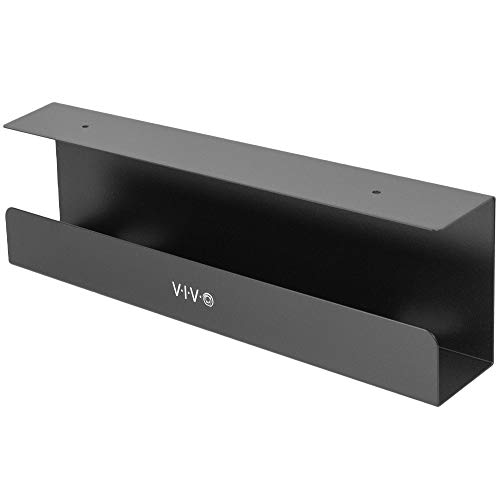
The VIVO DESK-AC06-1C is the pick for a gaming desk that needs a solid steel tray without giving up legroom. At 16.5 inches long and 3 inches wide, it sits tight under the desktop, and its partially closed design with an open front hides the cable bundle from the front of the desk while keeping the strip reachable. It screw-mounts under wood or particle-board tops, with mounting holes 11 inches apart and screws included.
The headline number is the load rating: the listing rates this tray for up to 11 pounds, which covers a full-size power strip plus two or three adapter bricks with room to spare. That makes it the strongest single-tray pick here, and the steel build is the reason — it does not flex under a heavy strip. Note that VIVO sells a two-pack version under a different model number, DESK-AC06-2C; this pick is the single-tray DESK-AC06-1C.
Specs
- Size: 16.5 inches long, 3 inches wide
- Material: steel
- Mount: screw-mount under wood or particle-board tops
- Mounting holes: 11 inches apart, screws included
- Load rating: up to 11 lb
- Design: partially closed with open front
- Color: Black
- Model: DESK-AC06-1C
2. Univivi 32-Inch Steel Tray — Best full-width coverage
The Univivi UN1450 is the pick for a wide gaming desk where one long tray beats two short ones. At 32 inches, it spans a full-size power strip and the whole cable run behind a dual-monitor setup in a single piece, with no gap in the middle where cables can sag out. The tray is steel, finished in black, and its hollow ventilated structure lets air move around warm adapter bricks.
Mounting is the flexible part: the tray ships with hardware for no-drill C-clamps that grip the desk edge, or screws for a permanent mount. The listing’s title and bullets both describe the dual mount, so you can choose at install time. Enlarged cable holes make it easy to drop cables in from above, and the front and back layout is reversible, so the opening can face inward or outward. The listing does not publish a width or a weight figure for the tray itself, so this article states neither. A one-year warranty covers the tray.
Specs
- Length: 32 inches
- Material: steel
- Mount: no-drill C-clamp or screw mount
- Design: hollow ventilated structure, enlarged cable holes
- Layout: front and back reversible
- Color: Black
- Model: UN1450
- Warranty: 1 year
3. Scanfield 17-Inch 2-Pack — Best no-drill adhesive tray
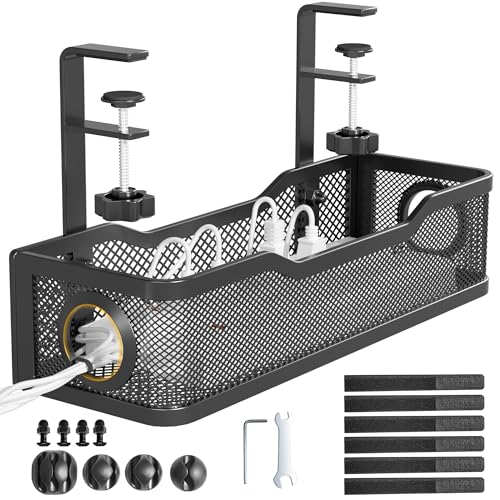
The Scanfield two-pack is the pick for anyone who cannot or will not drill into their desk. Each tray is 17 inches long with a 3.5-inch interior, and the pair mounts with self-adhesive strips — no screws, no clamps, no tools. The adhesive needs a 24-hour cure before the tray carries a load, so plan the install a day ahead.
The material is PVC, which is worth stating plainly: some roundups describe this tray as steel, but the listing’s own spec table names PVC as the enclosure material. The 3.5-inch interior is wide enough for a standard power strip, and each tray ships with long straps that fix an extension cord underneath. The pair together weighs 1.13 kg.
Two trays give you options a single tray does not: one under each side of a wide desk, or one for the strip and one for the slack. The listing states no weight capacity, so this article gives none — load the trays with a strip and cables rather than a stack of heavy bricks, and give the adhesive its full cure time.
Specs
- Size: two trays, each 17 inches long, 3.5 inches wide inside
- Material: PVC
- Mount: self-adhesive, no screws
- Adhesive cure time: 24 hours before loading
- Included: 2 long straps per tray
- Weight: 1.13 kg for the pair
- Color: Black
4. KEEGH KE1415 2-Pack — Best deep tray for adapter bricks
The KEEGH KE1415 is the pick for a setup with chunky adapter bricks. Each tray measures 16 inches long, 4.5 inches wide, and 6 inches deep, and that depth is the difference: a 6-inch tray swallows laptop-style bricks whole, where a shallow tray would leave them poking out the top. The two trays can be split across a wide or L-shaped desk, or joined for a 32-inch run.
Mounting is clamp-first with a screw option. The C-clamp fits desks from 0 to 2.2 inches thick, with double-sided tape for extra grip, and the same trays can be screw-mounted for a permanent fix. Side and bottom guide holes let cables enter from several directions, and adjustable tie straps keep bundles tidy inside the tray. The trays are iron alloy, model KE1415, with a one-year warranty. The listing states no weight and no weight capacity, so this article gives neither figure.
Specs
- Size: two trays, each 16 inches long, 4.5 inches wide, 6 inches deep
- Combined length: 32 inches when joined
- Material: iron alloy
- Mount: C-clamp for desks 0 to 2.2 inches thick, or screw mount
- Cable entry: side and bottom guide holes
- Included: adjustable cable tie straps
- Color: Black
- Model: KE1415
- Warranty: 1 year
5. Cinati 13.4-Inch Tray — Best compact tray for small desks
The Cinati is the pick for a compact desk where a 32-inch tray would be overkill. At 13.4 inches long, 4.6 inches wide, and 3.1 inches deep, it holds one power strip and a handful of cables — the right size for a single-monitor setup or a desk with a drawer unit underneath. It is fully welded powder-coated metal, so there are no joints to loosen, and the clamp mount needs no drilling.
The clamp fits desks from 0.4 to 2.4 inches thick, and anti-scratch mats protect the desk surface. The opening mounts inward or outward, so you can face it toward yourself for access or toward the wall for a cleaner look. The listing rates the tray for up to 10 pounds, and the kit includes four cable clips and six cable ties. A two-year warranty covers the tray. The spec table carries a stray line naming freestanding and tabletop use, but the title and bullets are clear that this is a clamp-mount tray.
Specs
- Size: 13.4 inches long, 4.6 inches wide, 3.1 inches deep
- Material: powder-coated metal, fully welded
- Mount: no-drill clamp for desks 0.4 to 2.4 inches thick
- Load rating: up to 10 lb
- Clamp protection: anti-scratch mats
- Mounting: opening faces inward or outward
- Included: 4 cable clips, 6 cable ties
- Color: Black
- Warranty: 2 years
Comparison at a glance
| Tray | Length | Mount | Material | Load rating |
|---|---|---|---|---|
| VIVO DESK-AC06-1C | 16.5 in | Screw | Steel | Up to 11 lb |
| Univivi UN1450 | 32 in | Clamp or screw | Steel | Not stated |
| Scanfield 2-pack | 2 x 17 in | Adhesive | PVC | Not stated |
| KEEGH KE1415 2-pack | 2 x 16 in | Clamp or screw | Iron alloy | Not stated |
| Cinati 13.4 in | 13.4 in | Clamp | Powder-coated metal | Up to 10 lb |
The two trays with published load ratings are the steel VIVO and the welded Cinati; the other three list no rating and should be loaded with a strip and cables rather than heavy bricks.
Frequently asked questions
Will a cable tray hold a full-size power strip?
Yes, as long as the tray’s interior is longer than the strip and deep enough for it. A standard strip is around 12 to 14 inches long, so every tray here fits one. The tighter fit is depth: a slim strip sits fine in a 3-inch tray, while a strip with bulky plugs needs the 6-inch depth of the KEEGH.
Do I need to drill holes in my desk to mount a cable tray?
No. The Scanfield sticks on with adhesive, and the Cinati and KEEGH clamp onto the desk edge. The Univivi offers both clamp and screw mounting, and only the VIVO is screw-only. If you rent, or your desktop is glass or metal, pick a clamp or adhesive tray and check the clamp’s thickness range against your desktop first.
How much weight can an under-desk cable tray hold?
It depends on the tray. The VIVO is rated for up to 11 pounds and the Cinati for up to 10 pounds, which covers a full-size strip plus several adapter bricks. The Univivi, Scanfield, and KEEGH list no weight capacity, so treat them as strip-and-cable trays. For an adhesive tray, the 24-hour cure time matters as much as the load: loading it early is the most common reason an adhesive mount fails.
Can I use a cable tray on a standing desk?
Yes, and it is one of the best uses for one. A tray mounted under a standing desk rises and falls with the desktop, so the strip and cables move as a unit instead of dragging on the floor. Leave enough slack in every cable for the desk’s full travel range, and check that the tray clears the desk frame at the lowest height setting.
Conclusion
The best under-desk cable tray for a gaming desk is the one that matches your mount, your length, and your load. The VIVO DESK-AC06-1C is the strongest single tray here, with a steel build and an 11-pound rating for a desk you can drill into. The Univivi 32-inch tray covers a full-width setup in one piece and offers both clamp and screw mounting. The Scanfield two-pack is the no-drill answer for rented rooms. The KEEGH pair is the deep option for chunky adapter bricks, and the Cinati is the compact pick for a small desk.
Whichever you choose, measure the strip, measure the desktop thickness, and give an adhesive mount its full cure time. A tray that fits the desk and the load will keep the floor clear and make every future hardware swap a two-minute job instead of a crawl under the desk.
FAQ
Will a cable tray hold a full-size power strip?
Do I need to drill holes in my desk to mount a cable tray?
How much weight can an under-desk cable tray hold?
Can I use a cable tray on a standing desk?
More from Amazon
Programs that pair well with the guide above. Offers and eligibility are set by Amazon and may change.
Free shipping on eligible items, Prime Video and more. Eligible new members can start with a free trial.
Start a Prime free trialAd-free music streaming. Eligible new subscribers can start with a free trial.
Try Music Unlimited freeA Prime membership for ages 18-24 with a trial period. Eligibility is set by Amazon.
See Prime for Young AdultsAudiobooks and podcasts to listen to on the go. Eligible new members can start with a free trial.
Try Audible freeAs an Amazon Associate we earn from qualifying purchases.