Key takeaways
- Find the best vr headsets for roblox with this guide to standalone and PCVR options, display clarity, comfort, tracking, storage and safe play space setup.
As an Amazon Associate we earn from qualifying purchases.
Roblox in virtual reality changes the purchase decision from a simple brand comparison into a question about where and how the game will actually run. Roblox has a native app on Meta Quest headsets, so a standalone headset can open it without a computer, while a PCVR setup runs Roblox through a gaming PC and a wired or wireless link. The right choice therefore depends on the hardware already in the house, the size of the play area, and how long each session is likely to last.
This guide is written for parents buying a first headset for a child, for teenagers moving from flat-screen Roblox to VR, for PC gamers who want sharper visuals, and for families who expect one headset to be shared between several people. Instead of naming one winner for every household, it compares headset types on the points that shape day-to-day Roblox play, so each reader can match the setup to the player, the room, and the computer they already own.
How to Choose
Choosing well means looking past the box art and checking how a headset handles the specific demands of Roblox, from bright, blocky worlds and fast social games to long building sessions in Roblox Studio. The four points below cover the trade-offs that matter most, and they apply whether the headset runs on its own or leans on a PC.
Standalone Play or a PC Connection
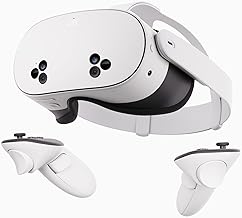
A standalone Quest headset runs Roblox directly from its own store. That suits a child, a bedroom setup, or a household without a gaming PC, because the headset, controllers, and Wi-Fi connection are enough to get into a game. A PCVR route, by contrast, connects a headset to a computer through a cable or a wireless streaming app, and it can deliver crisper visuals and smoother performance in demanding experiences. The catch is the PC itself: it needs a capable graphics card, enough memory, and a stable connection, and the headset becomes far less portable once a cable is involved. Decide first which route fits the household, and the shortlist narrows quickly.
Display Clarity, Lenses and Field of View
Roblox worlds are full of small text, distant name tags, and fast-moving avatars, so display clarity shapes how readable and comfortable a session feels. Pancake lenses, found on the sharper standalone models, tend to give a clearer image across more of the view and a slimmer headset, while older Fresnel lenses can blur toward the edges and make text harder to read. Resolution per eye matters here too, because a higher pixel count keeps signs, menus, and building tools legible. Field of view is the third piece: a wider view feels more natural when turning to look around a game, but it is less important than clarity for most Roblox play.
Tracking, Controllers and Hand Tracking
Roblox VR relies on the headset knowing exactly where the hands and head are, so tracking quality decides whether reaching, grabbing, and gesturing feel natural or frustrating. Modern inside-out tracking uses cameras on the headset itself, which avoids base stations and keeps setup simple. Controller tracking should stay steady when hands move to the sides or behind the body. Some headsets also offer hand tracking without controllers, which is enjoyable for menus and social worlds but less precise for fast games. Check that the controllers feel comfortable in smaller hands, that the buttons fall naturally under the fingers, and that replacement batteries or charging are easy to manage.
Comfort, Fit, Battery Life and Storage
A headset that pinches after twenty minutes will sit unused, so comfort deserves as much attention as any display specification. Weight distribution matters more than raw weight: a balanced headset with a supportive rear pad feels lighter than a front-heavy one. Adjustable lens spacing, often called IPD adjustment, helps the image stay sharp and reduces eye strain, and players who wear glasses should check the clearance and whether prescription lens inserts are available. Battery life on standalone headsets is typically around two hours, so a battery strap or a charging break matters for long play. Storage matters as well, because Roblox itself is modest in size but other games and apps add up quickly.
Which One Fits Your Situation
The headset that fits your Roblox sessions best depends on how and where you play. A player with a small bedroom needs inside-out tracking that works without base stations and a guardian boundary that is quick to set up, while someone with a large living room can make use of a wider play area and a headset that stays comfortable during longer sessions. Standalone headsets suit players who want to jump straight into Roblox without a gaming PC, whereas a PC-connected headset suits players who also run demanding desktop experiences and want sharper visuals. Younger players need a light headset with a simple strap and clear parental controls, while players who wear glasses should check the facial interface and the space for frames. Think about your room size, your PC, and how long you play before you decide.
No single headset type suits every Roblox player, because the best match depends on who is playing, what hardware is already available, and how much space the room offers. The four situations below map common households to the setup that usually works best for them, with the compromises spelled out honestly.
A First Headset for a Younger Player
A younger player benefits most from a standalone headset that starts quickly, needs no computer, and can be supervised easily in a shared room. Choose a model with simple controls and a strap that fits a smaller head. Keep sessions short at first, set a clear play space away from furniture, and use the platform parental controls to manage friends, chat, and spending. A standalone model also makes it easier to put the headset away between sessions.
A Household Sharing One Headset
When several people share one headset, adjustability and hygiene matter more than raw performance. A strap that adjusts quickly, lens spacing that can be changed between players, and a wipeable facial interface make handovers painless. Enough storage helps too, because each player tends to install different games and apps alongside Roblox. Agree on charging habits so the headset is ready for the next player.
A PC Gamer Who Already Owns a Strong Computer
A household with a capable gaming PC can get more from a PCVR setup, where the computer handles the heavy work and the headset delivers a sharper, smoother image in Roblox and in other VR games. Before committing, check the graphics card, the available ports, and the Wi-Fi setup, because a weak link or an underpowered computer will undo the advantage. If the PC is borderline, a standalone headset is the safer and simpler choice.
A Small Room or a Player Who Wears Glasses
Small rooms and glasses both push the decision toward comfort and fit rather than raw specifications. In a tight space, a standalone headset with a well-defined guardian boundary works well, and seated or standing play suits many Roblox experiences better than room-scale movement. Players who wear glasses should look for generous lens clearance, a facial interface that does not press frames into the face, and the option of prescription inserts for long-term use.
Common Mistakes
These five mistakes come up again and again when a household buys its first VR headset for Roblox, and each one is easy to avoid with a short check before ordering. Read through them once, confirm the headset type, the computer requirements, and the play space, and the first session is far more likely to go smoothly.
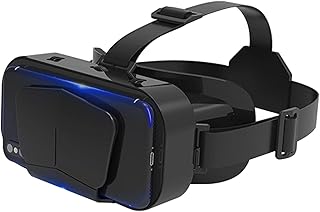
- Buying a headset that cannot run Roblox at all. PlayStation VR2, phone-slot viewers, and headsets built only for video playback do not run the Roblox VR app, so the headset would be useless for this game even if it looks impressive on paper. Confirm that the exact model runs Roblox natively or through a supported PCVR connection before ordering, and ignore listings that only mention virtual reality in general terms.
- Assuming any gaming PC is ready for PCVR. Roblox on a flat screen runs on modest hardware, but VR asks far more of a computer, because it must render two high-resolution views at a high refresh rate without stutter. A PC that copes with desktop Roblox can still struggle in VR, producing judder, blur, and motion discomfort. Check the headset maker’s recommended graphics card and processor guidance, test with a wired connection first, and keep a standalone fallback in mind if the PC falls short.
- Ignoring the play space until the first session. Roblox VR games involve reaching, turning, and sometimes stepping sideways, so a cluttered room turns a fun session into a collision risk. Clear a space with room to stretch both arms, move breakable objects and cables out of reach, and set up the guardian boundary carefully before the first game starts. A rug or mat underfoot helps the player feel where the centre of the space is without looking down.
- Skipping lens spacing and glasses checks. A headset set to the wrong lens spacing can make the image look soft and leave the player with a headache, even when the display itself is capable of a sharp picture. Take a minute to adjust the spacing for each player, check that glasses fit without pressing against the lenses, and look into prescription inserts if glasses are worn every day. Scratches on headset lenses are difficult to repair, so keep the lenses protected when glasses are in use.
- Choosing storage and accessories as an afterthought. A small storage model fills up quickly once Roblox, a few other games, and system updates compete for space, and deleting games to make room becomes a regular chore. A rigid head strap, a battery pack, or a proper case can also transform daily use, but they add cost and are easy to forget in the excitement of the first order. Plan the total setup, including storage, comfort accessories, and a safe place to store the headset, before deciding which model to buy.
Frequently Asked Questions
Can you play Roblox in VR on a Meta Quest headset?
Yes, Roblox has a native app for Meta Quest headsets, so it can be downloaded from the Quest store and played without a computer. The player needs a Meta account, a Roblox account, and a Wi-Fi connection, plus a clear play space with a guardian boundary set up. Support varies by game, since some experiences were not built for VR.
Does Roblox VR need a gaming PC?
No, a gaming PC is not required when playing Roblox natively on a standalone Quest headset, which runs the game on its own hardware. A PC becomes necessary only for PCVR play, where the headset streams Roblox from a computer through a cable or a wireless link. That route can look sharper, but it needs a capable graphics card and a stable connection.
What age is Roblox VR suitable for?
Roblox itself is designed for a wide age range, but VR adds comfort, supervision, and motion-sickness considerations that do not apply to flat-screen play. Meta Quest headsets are intended for players aged ten and older, and younger players should have an adult nearby, shorter sessions, and regular breaks. Parents should set up Roblox parental controls and headset account settings first.
Why do some Roblox games look flat inside a VR headset?
Not every Roblox experience was built with VR in mind, so some games open as a flat screen floating in a virtual room rather than a fully immersive world. Fully supported games let the player look around, reach out, and move in three dimensions, while unsupported ones keep the usual flat-screen controls. The catalogue of VR-friendly experiences keeps growing as creators add support.
FAQ
Can you play Roblox in VR on a Meta Quest headset?
Does Roblox VR need a gaming PC?
What age is Roblox VR suitable for?
Why do some Roblox games look flat inside a VR headset?
More from Amazon
Programs that pair well with the guide above. Offers and eligibility are set by Amazon and may change.
Free shipping on eligible items, Prime Video and more. Eligible new members can start with a free trial.
Start a Prime free trialAd-free music streaming. Eligible new subscribers can start with a free trial.
Try Music Unlimited freeA Prime membership for ages 18-24 with a trial period. Eligibility is set by Amazon.
See Prime for Young AdultsAudiobooks and podcasts to listen to on the go. Eligible new members can start with a free trial.
Try Audible freeAs an Amazon Associate we earn from qualifying purchases.