
Choosing between the Razer Basilisk V3 and Logitech G502 X is less about raw gaming performance than about how the mouse will live on your desk every day. Both are full-size wired gaming mice with sculpted right-hand shapes, plenty of programmable controls, precise sensors, and enough visual presence to suit a dedicated home office or gaming setup. The real decision is whether you prefer the Basilisk V3’s more traditional, heavier ergonomic feel and richer RGB lighting, or the G502 X’s lighter chassis, updated optical switches, and cleaner, more modern design.
For many households, the mouse is also shared equipment: it may move between work, homework, casual gaming, and a desktop PC in a common room. That makes comfort, cable management, cleaning, and long-term switch durability just as relevant as DPI specifications. In 2026, both remain practical wired choices for buyers who would rather avoid charging another device.
Our top picks
 Razer Basilisk V3 Customizable RGB Wired Ergonomic
11 programmable buttons support extensive macro and function assignment
HyperScroll tilt wheel switches between free-spin and tactile modes
Optical switches are rated for up to 70 million clicks per button
Wired-only design limits freedom compared to wireless alternatives
11 lighting zones require Razer software to fully customize
 Razer Basilisk V3 X HyperSpeed Customizable Wireless
- Favored by millions worldwide, the mouse’s signature shape…
- Unleash seamless, low-latency performance that's faster than other…
- With up to 535 hours on Bluetooth and…
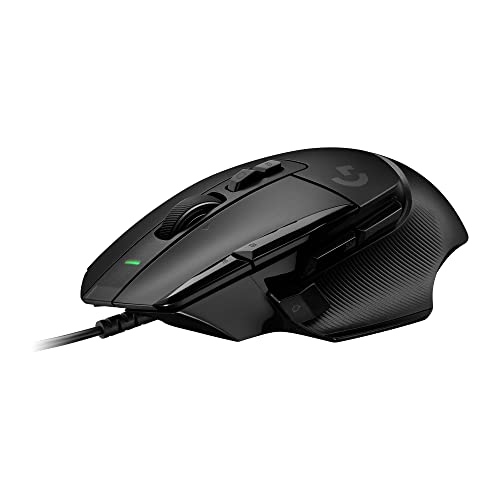 Logitech G502 X Wired Gaming Mouse
- Icon reinvented: From the legacy of Logitech's most…
- LIGHTFORCE switches: All-new hybrid optical-mechanical switch technology for…
- HERO 25K gaming sensor: Incredibly precise down to…
| Product | Key specs | |
|---|---|---|
| Razer Basilisk V3 Customizable RGB Wired Ergonomic | Check price | |
| Razer Basilisk V3 X HyperSpeed Customizable Wireless | Favored by millions worldwide, the mouse’s signature shape… Unleash seamless, low-latency performance that's faster than other… With up to 535 hours on Bluetooth and… | Check price |
| Logitech G502 X Wired Gaming Mouse | Icon reinvented: From the legacy of Logitech's most… LIGHTFORCE switches: All-new hybrid optical-mechanical switch technology for… HERO 25K gaming sensor: Incredibly precise down to… | Check price |
 Logitech G502 X Plus Wireless RGB Gaming Logitech G502 X Plus Wireless RGB Gaming | Icon, reinvented: From the legacy of the legendary… High-precision tracking: Experience sub-micron accuracy with the HERO… Pro-grade connectivity: LIGHTSPEED technology delivers pro-grade responsiveness that… | Check price |
As an Amazon Associate we earn from qualifying purchases at no extra cost to you.
Quick Verdict
Choose the Razer Basilisk V3 if you want a comfortable, feature-heavy mouse at a lower upfront price. At about 101 grams, it has a substantial feel, a supportive thumb rest, 11 programmable buttons, and distinctive RGB lighting. Its adjustable scroll-wheel behavior is especially useful for people who switch between long documents, spreadsheets, web browsing, and games.
Choose the Logitech G502 X if you prioritize a lighter mouse, a more restrained desk aesthetic, and optical primary switches designed to avoid the double-click concerns associated with conventional mechanical mouse switches. It weighs about 89 grams, offers 13 programmable controls, and has a replaceable/reversible DPI-shift button to better accommodate different hand sizes and grip preferences.
For value, the Basilisk V3 is the easier recommendation. For a long-term desk setup where lighter weight and durable-feeling primary clicks matter most, the G502 X is worth its higher price.
Side by Side
| Buying factor | Razer Basilisk V3 | Logitech G502 X |
|---|---|---|
| Comfort | Right-handed ergonomic shell with thumb rest; approximately 101 g | Right-handed ergonomic shell with thumb rest; approximately 89 g |
| Dimensions | About 5.12 x 2.36 x 1.67 inches | About 5.17 x 3.11 x 1.62 inches |
| Controls | 11 programmable buttons; multifunction tilt wheel | 13 programmable controls; reversible/removable DPI-shift button |
| Durability | Optical mouse switches; flexible Speedflex cable | LIGHTFORCE hybrid optical-mechanical primary switches; braided cable |
| Price range | Typically about $35 to $70; listed reference price $34.98 | Typically about $70 to $80; listed reference price $79.99 |
| Maintenance | More seams and RGB areas to wipe; clean wheel recess regularly | Simple to wipe, though the exposed wheel and side contours collect dust |
| Desk space needed | Full-size footprint; best with a medium or larger mouse pad | Also full-size, but lighter for tighter work surfaces |
| Look | More overtly gaming-focused, with 11-zone Chroma RGB lighting | Sharper, more understated black-and-white design language; no RGB on wired model |
| Resale appeal | Strong budget appeal, but lower original price limits resale value | Higher-end positioning and recognizable G502 shape can support stronger used-market interest |
| Best for | Value-focused buyers, RGB setups, productivity scrolling, and larger hands | Buyers wanting less weight, crisp clicks, and a refined long-term desk mouse |
Where Razer Basilisk V3 Wins
The biggest advantage of the Razer Basilisk V3 is how much mouse you receive for the money. With a reference price of $34.98, it costs less than half the $79.99 reference price of the wired Logitech G502 X. That difference can cover a good desk mat, cable clips, or a replacement set of keyboard accessories for a shared workspace.
Its scroll wheel is also unusually useful beyond gaming. The Basilisk V3 supports tactile scrolling, free-spin scrolling, and a Smart-Reel mode that can automatically shift behavior when you scroll faster. For someone working from home, sorting through long product lists, editing documents, or navigating large spreadsheets, that flexibility can make the mouse feel more versatile than a standard click-wheel design.
The Basilisk’s 11-zone RGB lighting is another clear win for buyers building a visible desktop setup. Lighting is not essential to performance, but it can make a desk feel more intentional in a bedroom office, media room, or gaming nook. If your keyboard, monitor backlighting, or PC already uses Razer Chroma effects, the Basilisk V3 fits naturally into that look.
Comfort favors the Basilisk V3 for users who like a planted mouse with a substantial hand feel. Its approximately 101-gram weight is not extreme, but it is noticeably heavier than the G502 X. That extra mass can feel steadier for everyday clicking and browsing, especially for palm-grip users who dislike lightweight mice that seem to skate across the desk.
Buyers who want cable-free use without moving to the G502 family can also consider the Razer Basilisk V3 X HyperSpeed, listed at $59.99. It is a related wireless option, although the wired Basilisk V3 remains the better choice when lowest cost and uninterrupted plug-in use are the priorities.
Where Logitech G502 X Wins
The Logitech G502 X improves on the familiar heavy, button-rich gaming-mouse concept by cutting weight to about 89 grams. A 12-gram difference may sound small, but it is noticeable over a full day of work and play. The G502 X is easier to reposition on a compact desk, and it requires less effort during repeated wide cursor movements.
Its LIGHTFORCE primary switches are a meaningful practical feature. These hybrid optical-mechanical switches use optical actuation while retaining a defined, clicky feel. For a mouse likely to receive years of frequent use, that design will appeal to shoppers who want an updated alternative to traditional contact-based click switches. The clicks are crisp and distinctive, which some people will love and others may find slightly louder in a quiet shared room.
The G502 X also offers more control options: 13 programmable controls versus 11 on the Basilisk V3. Its DPI-shift control can be reversed or removed, which is a small but valuable accommodation for different thumb lengths. If the standard button placement presses into your thumb, removing it creates a cleaner thumb-rest area.
Design is another Logitech advantage for buyers who do not want their office gear to look aggressively gamer-oriented. The wired G502 X has a geometric, updated profile but skips RGB lighting. In black, it can blend into a home office more easily than the illuminated Basilisk V3, particularly when the desk is in a living room, guest room, or rental where a calmer visual style matters.
Those who like the G502 X shape but want a cable-free, illuminated version may come across the Logitech G502 X Plus Wireless RGB model, listed at $127.99. It is a related premium alternative rather than a substitute for the simpler wired G502 X value proposition.
Cost Over 5 Years
The purchase-price gap remains the clearest cost difference. Using the provided reference prices, the Razer Basilisk V3 starts at $34.98, while the Logitech G502 X starts at $79.99. Over five years, that works out to roughly $7.00 per year for the Basilisk and $16.00 per year for the G502 X, assuming either mouse remains in service for the entire period.
Both are wired, so there are no rechargeable-battery replacement costs and no routine battery purchases. Their power draw is too small to make a meaningful household electricity-cost difference. Your likely ongoing expense is basic cleaning: a microfiber cloth, cotton swabs for the wheel area, and occasional desk-pad cleaning. Budget about $0 to $15 over five years if you already have ordinary cleaning supplies.
The less predictable cost is replacement after heavy use, accidental cable damage, or a spill. The Basilisk V3’s lower price makes replacement less painful. The G502 X’s higher initial cost is easier to justify if its lower weight, button layout, and switch design make you more likely to use it comfortably for the full five years.
Which One for Your Home
Small apartment
Choose the Logitech G502 X if your desk is narrow, your monitor stand takes up space, or you often work at a multipurpose table. Neither mouse is small, but the G502 X’s lighter 89-gram body feels less cumbersome in tight quarters. Its lack of RGB also helps it disappear visually when the desk is part of a bedroom or living area. Choose the Basilisk V3 instead if your compact setup is deliberately gaming-focused and you value lighting more than a lighter feel.
Family with kids or pets
Choose the Razer Basilisk V3 for the lower replacement cost. A $34.98 mouse is simply less stressful around curious children, energetic pets, snack crumbs, and shared computers. Its textured surfaces and wheel area should still be wiped regularly. Keep either mouse’s cable routed behind the desk or through a cable sleeve; a wired mouse is only as tidy and protected as its cable path.
Rental
Choose the Logitech G502 X for a rental home office or temporary workstation where you want a polished, less flashy desktop. Its black shell, cleaner lighting-free presentation, and versatile programmable controls make it suitable for work use without looking out of place. It also needs no permanent installation: add a desk mat and a removable cable clip, and your setup can move easily when your lease ends.
Long-term home
Choose based on the room’s purpose. The Basilisk V3 is better for a dedicated gaming room, RGB desk, or office where long scrolling sessions are common. The G502 X is the stronger fit for a permanent work-and-play desk where a lighter mouse, upgraded primary click design, and subdued appearance matter more than decorative lighting. For a buyer investing in one mouse to keep for years, the G502 X is the more refined upgrade; for a buyer furnishing several desks, the Basilisk V3 offers better value.
FAQ
Is the Razer Basilisk V3 or Logitech G502 X better for work?
Both work well for productivity because they have multiple programmable controls and ergonomic right-handed shapes. The Basilisk V3 has the edge for long documents and spreadsheets because of its flexible scroll-wheel modes. The G502 X is better for users who want a lighter mouse for all-day movement.
Which mouse is better for larger hands?
Both are full-size mice that generally suit medium to large hands, especially with a palm or relaxed claw grip. The Basilisk V3 has a more traditionally substantial feel, while the G502 X provides a wider listed footprint around the thumb-rest area and a removable DPI-shift button for fit adjustments.
Do either of these mice need batteries or charging?
No. The Razer Basilisk V3 and wired Logitech G502 X connect by USB cable, so they do not require charging or disposable batteries. This is convenient for a permanent desktop because performance is always available when the computer is on.
Is the Logitech G502 X worth paying more for?
It is worth the premium if lighter weight, optical-hybrid primary switches, extra programmable controls, and a more understated design are important to you. If you mainly want a comfortable wired mouse with useful buttons, strong scrolling features, and RGB lighting at the lowest price, the Razer Basilisk V3 is the better buy.








