Our Top Picks
The Razer Blade 15 is a 15.6-inch gaming laptop built in a slim aluminum body, first launched in 2018 and refreshed several times since. The verdict in short: it is still a good-looking, well-built thin gaming laptop, but “Razer Blade 15” is not one machine. It is a family that spans GTX 10-series, RTX 20-series, RTX 30-series and RTX 40-series generations, so the model year matters more than the name. Use this review to understand what changed between generations and what to check before you pay for any one of them.
Verdict: Who the Razer Blade 15 Suits
The Blade 15 suits players who want a portable gaming laptop with a premium chassis and do not mind that thin laptops trade some cooling headroom and upgrade options for looks. It is a weaker fit for buyers who want the most frames per dollar or who plan to open the case and upgrade parts often.
- Buy it if: you want a slim 15.6-inch gaming laptop that also works as a daily machine, you like a plain black design and you care about build quality.
- Skip it if: your main goal is the lowest cost per frame, you want a big upgrade path, or you need a current-generation GPU and the model in front of you is an older year.
- Look at newer Blades if: you want a current design. Razer now sells the Blade 14, 16 and 18 as its main lineup, and the Blade 15 name belongs to earlier years.
We make no claim about which configurations are on sale today. Specs below come from Razer pages, press coverage and store listings. Where a figure was not confirmed, we say so.
Razer Blade 15 Model Years at a Glance
This table sums up what we could confirm from published sources. It is a guide to generations, not a list of every configuration.
| Year | CPU family | GPU family | Display notes |
|---|---|---|---|
| 2018 | 8th-gen Intel Core i7 | GTX 1060 or 1070 class | 60 Hz or 144 Hz options. Later split into Base and Advanced. |
| 2019 to 2021 | Intel Core i7 H-series, higher tiers on Advanced | GTX and RTX 20-series, later RTX 30-series (verify per unit) | Several panel options including 4K OLED on some models. Check the listing. |
| 2022 | 12th-gen Intel 14-core | RTX 30-series laptop GPUs, up to RTX 3080 Ti on the Advanced | FHD 360 Hz, QHD 240 Hz and 4K 144 Hz options on the Advanced. FHD 144 Hz or QHD 165 Hz on the Base. |
| 2023 | 13th-gen Intel, Core i7-13800H | RTX 40-series, up to RTX 4070 | One QHD IPS, 240 Hz, 100% DCI-P3 option. |
The 2019 to 2021 row is the least certain in our sources, so verify the exact CPU, GPU and display on any unit from those years before relying on it.
Razer Blade 15 Specs by Generation
2018: the first 15.6-inch Blade
Razer introduced the Blade 15 in May 2018 with an 8th-gen Intel Core i7 and Nvidia GTX 1060 or 1070 graphics, plus a choice of 60 Hz or 144 Hz screens. In October that year it added a lower-priced Base model and renamed the earlier one Advanced. The Base is thicker, uses copper heatpipes instead of a vapor chamber and is limited to 60 Hz, according to press coverage.
2020: the Base listing in the store
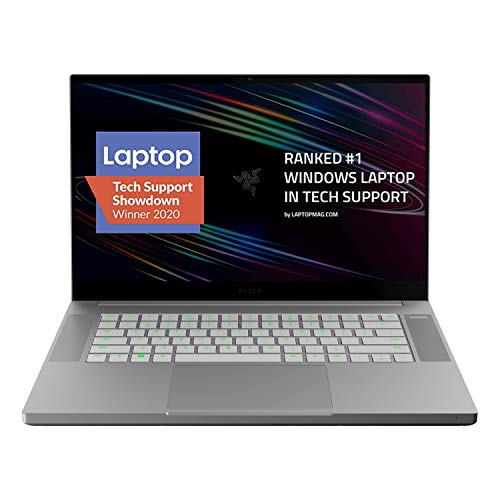
Razer Blade 15 Base Gaming Laptop 2020: Intel Core i7-10750H 6-Core, NVIDIA GeForce RTX 2070 Max-Q,15.6" 4K OLED,16GB RAM,512GB SSD, CNC Aluminum,Chroma RGB,Thunderbolt 3,Creator Ready, Mercury White
Chosen because it specifies NVIDIA GeForce RTX 2070 Max-Q and 15.6" 4K OLED.
View on AmazonOne listing in the store catalog is the Razer Blade 15 Base from 2020. It describes an Intel Core i7-10750H six-core CPU, an NVIDIA GeForce RTX 2070 Max-Q graphics chip, a 15.6-inch 4K OLED screen and 16 GB of memory. Another listing for the same Base year shows a 1080p 144 Hz panel instead, so the screen is the first thing to check when you compare Blade 15 listings. This is a good example of why the model year and panel matter more than the headline name.
2022: the biggest jump
The 2022 Blade 15 moved to a 12th-gen Intel 14-core CPU and RTX 30-series laptop graphics. The Advanced version reached the RTX 3080 Ti, with screen options of FHD 360 Hz, QHD 240 Hz (G-SYNC or OLED) or 4K 144 Hz. The Base went up to an RTX 3070 with FHD 144 Hz or QHD 165 Hz.
2023: a light refresh
The 2023 model was a modest update with 13th-gen Intel CPUs and RTX 40-series graphics. It used a Core i7-13800H, went up to an RTX 4070, and came with 16 GB of DDR5 memory and a 1 TB SSD. There was only one display option, a QHD IPS panel at 240 Hz covering 100% DCI-P3.
Performance by Use
Because the Blade 15 spans many years, performance depends on the GPU in the specific unit. These are general expectations by GPU generation, not measured results, since we did not use these laptops ourselves.
Esports and competitive shooters
Almost any Blade 15 with a GTX 1060-class or newer GPU can drive a high-refresh 1080p screen in light esports titles. Screen refresh rate matters here. A 144 Hz or faster panel suits shooters, while a 60 Hz Base panel does not.
AAA games
For demanding games, the GPU tier is the deciding factor. RTX 30-series and 40-series models handle modern titles far better than the GTX 10-series and early RTX 20-series models. Laptop GPUs also vary by power limit, so two laptops with the same GPU name can perform differently. Check the maker’s page for the power rating if the listing gives one.
Creative and daily work
The slim aluminum body, sharp screens and solid keyboard make the Blade 15 comfortable for editing, coding and travel. The OLED and 4K panels in some years are a strong draw for creators.
Thermals and noise
Thin gaming laptops run hot under load. The Base model from 2018 uses copper heatpipes where the Advanced uses a vapor chamber, which is a difference that carries into how each handles heat. Expect fan noise under heavy play, and keep vents clear. Do not use the laptop on soft surfaces for long sessions.
Razer Blade 15 vs Newer Blade Models
Razer’s current gaming range centers on the Blade 14, Blade 16 and Blade 18 rather than the Blade 15. If you want something modern, look at those sizes.
Razer Blade 14 (2025) as a current compact option

Razer Blade 14 (2025) Gaming Laptop, RTX 5060, 16GB DDR5 RAM, 1TB, Black | AMD Ryzen AI 9 365, 3K 120Hz OLED Display, Thin & Lightweight, Chroma RGB, Windows
Chosen because it specifies RTX 5060 and 16GB DDR5 RAM.
View on AmazonThe Blade 14 (2025) listing shows an AMD Ryzen AI 9 365 processor, an RTX 5060 GPU, 16 GB of DDR5 memory, a 1 TB drive and a 3K 120 Hz OLED display. It is a smaller body than the Blade 15, so it suits people who value portability. Skip it if you want a larger 15-inch screen, since Razer no longer sells a Blade 15 in its newest lineup.
Blade 16 and Blade 18
The Blade 16 (2026) and Blade 18 (2026) appear in store listings with RTX 50-series graphics and Intel Core Ultra processors. These are the closest current replacements if you want more screen than the 14-inch model. They also cost far more than most older Blade 15 units. Check the exact listing before comparing.
Display Guide: Picking the Right Panel
The screen is the most variable part of the Blade 15, and it changes how the laptop feels more than a small CPU step does. Here is how to read the panel options that Razer and press coverage list across the years.
| Panel type | Best for | Watch out for |
|---|---|---|
| FHD 144 Hz or faster | Esports and fast shooters | Lower sharpness than QHD or 4K |
| QHD 165 Hz to 240 Hz | All-round gaming and desktop work | Needs a stronger GPU to reach high frames |
| 4K OLED or 4K 144 Hz | Creative work, movies, slower games | Heavy GPU demand, shorter battery life |
| 60 Hz panel (early Base) | Light use only | Wastes a fast GPU in action games |
High refresh versus resolution
A thin laptop can seldom push a 4K screen at high frame rates in demanding games. If you play fast shooters, a 144 Hz to 240 Hz panel at FHD or QHD is the better choice. If you edit photos or video, the sharper 4K or OLED panel is the stronger pick. A 2022 Advanced model offered FHD 360 Hz for competitive play, QHD 240 Hz, and 4K 144 Hz, so the family covers each use.
OLED notes
OLED panels give deep blacks and strong color. They can also show burn-in if a static image sits on screen for very long stretches. Set a screen timeout and use a dark theme for desktop work to reduce that risk. Check the maker’s guidance for the exact panel.
Keyboard, Ports, Battery and Portability
Keyboard and trackpad
The Blade 15 uses a low-profile keyboard with per-key lighting in the Razer Chroma style, and a large glass trackpad. Thin laptops have short key travel, which some players like and others find shallow. If you type a lot, try the keyboard first when you can.
Ports
Port selection changed from year to year. Because we could not confirm every generation’s port list, check the listing or the maker’s page for the exact number of USB, HDMI and Thunderbolt ports before buying. If you plan to use an external monitor, confirm which port carries video.
Battery life and charging
Gaming laptops drain their batteries quickly under load. Plan to play while plugged in, and use the balanced power mode away from the desk. Use the charger that matches the model, because a mismatched charger can charge slowly or throttle performance.
Size and weight
The Blade 15 is thin for a 15.6-inch gaming laptop, which is the main reason people buy it. It still carries a large charger, so count that in your bag. For lighter travel, the newer 14-inch Blade is the smaller step.
Blade 15 vs Newer Blade Sizes
| Model | Screen size | Best for | Trade-off |
|---|---|---|---|
| Blade 14 | 14 in | Portability with modern GPUs | Smaller screen, fewer cooling options |
| Blade 15 | 15.6 in | Balanced size, many used options | Older generations, mixed availability |
| Blade 16 | 16 in | Larger screen with current parts | Costly, heavier |
| Blade 18 | 18 in | Desktop-style performance | Large and heavy |
Used and Renewed Blade 15 Checklist
Because the Blade 15 is an older name, many buyers will meet used or renewed units. Work through this list before you commit.
- Match the model number on the listing to the maker’s support page for that year.
- Ask for photos of the keyboard, the trackpad area and the underside. A trackpad that sits high or a case that does not close flat can point to a swollen battery.
- Confirm the GPU, RAM and storage in the listing text, not just the title.
- Check which charger is included, and whether it is the original.
- Look for screen marks, dead pixels and hinge looseness.
- Read the return policy and the warranty terms. A clear return window is worth more than a small saving.
Battery safety
Lithium batteries in older thin laptops can swell as they age. If you notice the trackpad lifting, a gap in the case or a bulge on the base, stop using and charging the laptop and ask the maker or a qualified repair shop for help. Do not press on the area or try to puncture it.
Quick Troubleshooting for Common Blade 15 Complaints
Fans loud or the laptop gets hot
Update the BIOS and drivers, clean the vents and raise the back of the laptop. Switch to a balanced power mode if you do not need full performance.
Black screen after sleep
Update the graphics driver and the BIOS first. If the problem remains, ask the maker’s support for guidance on your model year.
Games stutter on battery
Laptops reduce GPU power on battery. Plug in for gaming and select the performance power mode.
Battery drains fast
High refresh rates and a bright screen raise drain. Lower brightness, switch to a lower refresh rate when away from the desk and check battery health in the system settings.
Buying Guide: Checks Before You Pay for a Blade 15
| Check | What to look for | Why it matters |
|---|---|---|
| Model year | Confirm the year and the model number on the listing | The Blade 15 spans four GPU generations. |
| Base or Advanced | Know which version you are getting, mostly for 2018 to 2022 | The Base uses a cheaper cooling and screen setup. |
| GPU name and tier | RTX 30-series or newer for modern games | Older GPUs struggle with new releases. |
| Screen refresh rate | 144 Hz or higher for shooters | A 60 Hz panel wastes a fast GPU. |
| RAM and SSD | 16 GB RAM and 1 TB storage as a comfortable baseline | Heavy games and creative work need space. |
| Battery health | Ask about battery condition on used units | Lithium batteries in older thin laptops can swell. If you see a lifted trackpad or case, stop using the laptop. |
| Warranty and returns | Look for a clear return window | Older laptops carry more risk. |
New, used or renewed
Many Blade 15 listings are used or renewed, because the model is no longer in Razer’s newest lineup. Treat condition notes seriously, and check for the charger, the original box and any battery notes. Do not assume a listing includes the original accessories.
Do not assume the configuration
The name “Blade 15” does not tell you the CPU, GPU or screen. We do not claim any specific configuration beyond what published sources and listings state. Read the full title and the spec box, and ask the seller if anything is unclear.
Setup Tips for Better Performance
- Update the GPU driver and the laptop BIOS from the maker’s support page.
- Pick the performance power mode when plugged in, and use the balanced mode on battery.
- Use a cooling pad or raise the back of the laptop to improve airflow.
- Clean vents with compressed air at intervals, and keep the laptop on a hard surface.
- Check battery health every few months. Replace swollen batteries through the maker or a qualified repair shop.
Alternatives to the Razer Blade 15
If the Blade 15 is not available in the year you want, or if you want more frames for the money, consider laptops in the same size class from other makers. The store catalog includes an ASUS ROG Strix G16 with an RTX 5060 and an Intel Core i7 processor, which is a thicker design that typically leaves more room for cooling. For a lighter-weight, more premium feel, newer Razer models such as the Blade 14 are the natural step. Compare the GPU tier, screen refresh rate and RAM rather than the brand name alone.
Razerblade 15 and Other Search Variants
Many shoppers type “razerblade 15” as one word. Razer’s own name is “Razer Blade 15”, and the same family of laptops is what you will find under either spelling. The advice is the same: confirm the year, the GPU and the screen.
Frequently Asked Questions
Is the Razer Blade 15 good for gaming?
Yes, for the right year. RTX 30-series and 40-series models suit modern games, while older GTX 10-series units suit lighter and older titles.
What is the difference between the Razer Blade 15 Base and Advanced?
The Base is the lower-priced version. In 2018 press coverage, the Base was thicker, used copper heatpipes instead of a vapor chamber and was limited to 60 Hz, while the Advanced offered faster screens.
Which Razer Blade 15 year is the best?
The 2022 model offered the widest range of options, with RTX 30-series GPUs up to the 3080 Ti on the Advanced. The 2023 model is the newest with RTX 40-series graphics up to the RTX 4070.
Does the Razer Blade 15 have an OLED screen?
Some years offered OLED options, including a 4K OLED on certain models and a QHD OLED on the 2022 Advanced. Check the listing for the exact panel.
Can you upgrade the RAM and SSD in a Razer Blade 15?
Upgrade options vary by model and year. Check the maker’s support page or a repair guide for your exact model before you open the case.
Is the Razer Blade 15 still sold new?
We make no claim on current availability. Razer’s current range emphasizes the Blade 14, 16 and 18, so many Blade 15 listings are older or used.
What should I do if the trackpad lifts or the case bulges?
Stop using the laptop and contact the maker or a qualified repair shop. A swollen lithium battery is a safety risk.
Which One Should You Buy?
If you want a Blade 15, choose the newest year you can afford, confirm the GPU and the screen, and favor listings with a clear return window. If you can stretch to a current model, look at the Blade 14 for portability or the Blade 16 for a bigger screen. If cost per frame matters most, compare thicker laptops from other brands with the same GPU tier.
How We Chose
This review is research-based. We did not use these laptops ourselves. We compared Razer’s product pages and support pages, press coverage of the 2018, 2022 and 2023 models, and store listings for the Blade 15 Base and newer Blade models. Where our sources did not cover a year, we left the detail open instead of guessing.
Sources
- Razer product and support pages for the Blade 15 (2022 and 2023)
- PC Gamer, Razer Blade 15 (2018) review
- XDA Developers, Razer Blade 15 2023 launch coverage
- Tom’s Guide, 2022 Razer Blade 15 coverage
FAQ
Is the Razer Blade 15 good for gaming?
What is the difference between the Razer Blade 15 Base and Advanced?
Which Razer Blade 15 year is the best?
Does the Razer Blade 15 have an OLED screen?
Can you upgrade the RAM and SSD in a Razer Blade 15?
Is the Razer Blade 15 still sold new?
What should I do if the trackpad lifts or the case bulges?
Which One Should You Buy?
More from Amazon
Programs that pair well with the guide above. Offers and eligibility are set by Amazon and may change.
Free shipping on eligible items, Prime Video and more. Eligible new members can start with a free trial.
Start a Prime free trialAd-free music streaming. Eligible new subscribers can start with a free trial.
Try Music Unlimited freeA Prime membership for ages 18-24 with a trial period. Eligibility is set by Amazon.
See Prime for Young AdultsAudiobooks and podcasts to listen to on the go. Eligible new members can start with a free trial.
Try Audible freeAs an Amazon Associate we earn from qualifying purchases.