
When comparing Razer Blade 14 vs Zephyrus G14 gaming laptops, the real decision is not simply which machine has the faster graphics card. Both are compact gaming laptops that can replace a desktop in a home office, bedroom, or small apartment. The better choice depends on what you value every day: a more substantial aluminum chassis, a cleaner minimalist look, a brighter OLED display, lower weight, greater storage, or a lower purchase price.
The Razer Blade 14 is the more understated and furniture-friendly option. Its black aluminum body looks at home beside a monitor or on a living-room console, while its compact footprint and approximately 4.05-pound weight make it portable without feeling fragile. The Zephyrus G14 is lighter at roughly 3.3 to 3.5 pounds, and its 14-inch 3K OLED display makes it especially appealing for someone who wants one device for gaming, streaming, creative work, and travel.
Our top picks
 Razer Blade 14
- ULTRA THIN .62 IN
- Featuring up to a GeForce RTX 5070 GPU…
- With up to 50 Tera Operations Per Second…
 Razer Blade 16
- Take flagship performance anywhere with a 14.9 mm…
- Run demanding AAA games and multitask effortlessly with…
- Experience smooth high FPS and realistic visuals with…
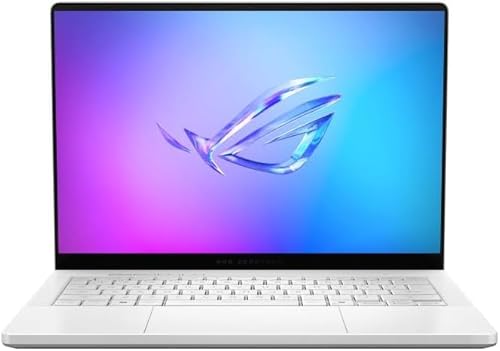 ASUS ROG Zephyrus G14 14" 3K OLED
- The AMD Ryzen AI 9 HX 370 Processor…
- Experience Cutting Edge Graphics With NVIDIA GeForce RTX…
- OLED ROG Nebula Display and NVIDIA G-SYNC Uplevel…
| Product | Key specs | |
|---|---|---|
| Razer Blade 14 | ULTRA THIN .62 IN Featuring up to a GeForce RTX 5070 GPU… With up to 50 Tera Operations Per Second… | Check price |
| Razer Blade 16 | Take flagship performance anywhere with a 14.9 mm… Run demanding AAA games and multitask effortlessly with… Experience smooth high FPS and realistic visuals with… | Check price |
| ASUS ROG Zephyrus G14 14" 3K OLED | The AMD Ryzen AI 9 HX 370 Processor… Experience Cutting Edge Graphics With NVIDIA GeForce RTX… OLED ROG Nebula Display and NVIDIA G-SYNC Uplevel… | Check price |
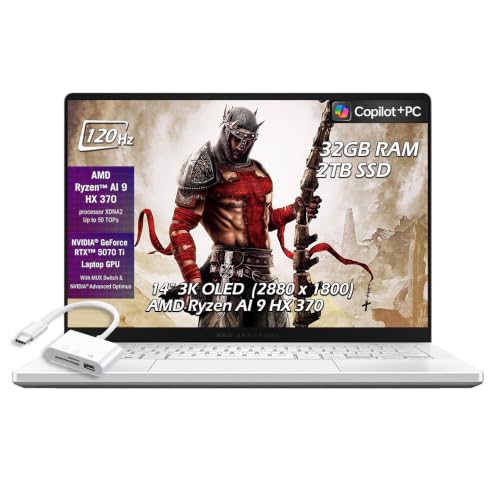 ASUS ROG Zephyrus G14 14" 3K OLED ASUS ROG Zephyrus G14 14" 3K OLED | Check price |
As an Amazon Associate we earn from qualifying purchases at no extra cost to you.
Quick Verdict
Choose the Razer Blade 14 if you want a durable-feeling, understated laptop with strong performance, a conventional premium design, and simpler desk integration. The current RTX 5070 configuration costs $2,499.99 and includes 32GB of memory and a 1TB SSD.
Choose the ASUS ROG Zephyrus G14 if display quality, lower weight, and storage capacity matter most. Available configurations range from approximately $2,985.95 for an RTX 5070 Ti model with 32GB of LPDDR5X memory and a 2TB SSD to $3,379 for an RTX 5080 model with the same memory capacity and 2TB of storage.
For most homes, the G14 offers the more versatile screen and lighter body. The Blade 14 is the better fit for buyers who prefer a restrained appearance, a more traditional laptop feel, and a purchase price that leaves room in the budget for a monitor, desk, or accessories.
Side by Side
| Consideration | Razer Blade 14 | ASUS ROG Zephyrus G14 |
|---|---|---|
| Comfort | Approximately 4.05 lb; firm aluminum chassis and a spacious-feeling keyboard deck | Approximately 3.3–3.5 lb; easier to carry and comfortable for mobile use |
| Durability | Solid aluminum construction with a dense, premium feel | Lightweight premium construction; easier to move but less substantial in the hand |
| Display | High-resolution 14-inch gaming display, depending on configuration | 14-inch 3K OLED panel with a 120Hz refresh rate in the referenced configurations |
| Performance | RTX 5070 configuration with 32GB RAM and 1TB SSD | RTX 5070 Ti or RTX 5080 configurations with 32GB RAM and 2TB SSD |
| Price range | About $2,500 for the referenced configuration | About $2,986–$3,379 for the referenced configurations |
| Maintenance | Keep vents clear and periodically clean dust; internal upgrades may be limited | Same basic care; compact internals and memory configuration can limit future expansion |
| Space needed | Approximately 12.2 by 9 inches, plus room for the power adapter | Approximately 12.2 by 8.7 inches, plus room for the power adapter |
| Look | Minimal black metal design with a discreet gaming identity | Platinum white finish with a more distinctive, contemporary appearance |
| Resale | Premium branding and metal construction may help long-term appeal | High-end screen, light weight, and strong specifications can attract buyers |
| Best for | Quiet-looking home setups, desktop replacement use, and buyers prioritizing build feel | Small spaces, frequent travel, OLED viewing, and demanding graphics work |
Where Razer Blade 14 Wins
The Blade 14’s biggest advantage is how naturally it fits into a home. Its black, slab-sided design avoids the bright accents and oversized styling associated with many gaming machines. On a desk, it can sit beside a wood monitor stand, a neutral lamp, or a television without dominating the room. That matters if the computer lives in a shared office, guest room, or open-plan apartment.
Build quality is another strength. At roughly 0.70 inches thick and about 12.23 inches wide by 8.97 inches deep, the Blade 14 is compact but has a reassuringly dense feel. The aluminum chassis is easy to wipe clean and resists the hollow sensation common in lighter plastic laptops. It is still a gaming laptop, so the fans and power adapter take up meaningful space, but the computer itself is easy to place on a 24- to 30-inch desk.
The $2,499.99 configuration also creates a more approachable entry point. With an RTX 5070, 32GB of DDR5 RAM, and a 1TB SSD, it is equipped for modern gaming and demanding everyday workloads without immediately requiring a storage upgrade. The memory capacity is particularly useful for buyers who keep a browser, game launcher, voice chat, and creative applications open together.
Razer’s product family may also appeal to shoppers who want a consistent setup. Someone considering the larger Razer Blade 16 with an RTX 5070 Ti at $3,499.99 can choose between a compact machine and a larger-screen alternative without changing the overall design language. The Blade 14 is the better choice when desk and shelf space are limited.
Where Zephyrus G14 Gaming Wins
The Zephyrus G14 wins on display versatility. A 3K OLED panel with a 120Hz refresh rate is well suited to games, movies, photos, and general desktop work. OLED technology can provide rich contrast and deep blacks, making the G14 especially attractive in a bedroom or living room where you may use it for both entertainment and productivity.
Its lighter body is equally important. At roughly 3.3 to 3.5 pounds, the G14 is easier to carry from a home office to a kitchen table, couch, or college classroom. The difference of around half a pound may sound minor, but it becomes noticeable when combined with the charger, headphones, and other accessories. The chassis is also slightly smaller in depth, which helps on narrow desks and compact shelving.
Storage is another clear advantage in the referenced models. Both include a 2TB SSD, compared with 1TB in the Blade 14 configuration. Large modern games can consume well over 100GB each, so the extra capacity reduces the need to uninstall older titles or attach an external drive. The RTX 5070 Ti configuration at approximately $2,985.95 offers a useful middle ground, while the RTX 5080 configuration at $3,379 is aimed at buyers who want a higher performance ceiling.
The G14’s Platinum White finish also changes how the laptop works in a room. It feels more like a premium piece of contemporary technology than a traditional black gaming computer. That can be a benefit in a bright home office or minimalist bedroom, although light finishes can show marks and discoloration more readily than black metal.
Cost Over 5 Years
Purchase price is only the first part of ownership. Using the referenced prices, the Blade 14 costs $2,499.99 before tax. The G14 costs approximately $2,985.95 to $3,379, creating an upfront difference of about $486 to $879. Spread across five years, that equals roughly $8 to $15 more per month for the G14 before accessories and electricity.
Plan for a quality laptop stand or cooling platform at approximately $30 to $100, a protective sleeve at $25 to $60, and an external SSD at $80 to $200 if your game library or media collection grows. A USB-C or powered hub may be more useful with the G14 if you connect several accessories at once. The referenced G14 package that includes a USB hub can reduce that extra purchase, but compare the included ports and specifications before assuming it replaces a full desktop dock.
Neither laptop should be treated as maintenance-free. Keep the rear and side vents unobstructed, avoid using either machine on bedding, and use compressed air carefully when dust accumulates. Battery replacement, out-of-warranty repairs, and display damage are the largest possible five-year expenses. A padded sleeve and a stable desk position can prevent more cost than a routine accessory upgrade.
Which One for Your Home
Small apartment
Choose the Zephyrus G14 if you regularly move between rooms or work at a narrow table. Its lower weight and slightly smaller footprint make it easier to store in a drawer or carry to the sofa. Choose the Blade 14 if the laptop will stay on one desk and you prefer its quieter visual presence in a shared room.
Family with kids or pets
The Blade 14’s dark aluminum exterior and substantial feel may be preferable for a busy household, but neither laptop should be left near food, drinks, or pet hair. Place the computer on a raised, stable surface and close the lid when it is not in use. A protective sleeve matters more than the small difference in chassis weight.
Rental home
The G14 is a strong rental-friendly choice because it can serve as a gaming system, movie screen, and work computer without requiring a permanent desk installation. Its OLED display reduces the temptation to buy a separate monitor immediately. The Blade 14 is better if you want a restrained black device that blends into existing furniture.
Long-term home
For a dedicated office or gaming room, the Blade 14 makes sense as a durable-feeling centerpiece, particularly when paired with an external monitor and keyboard. The G14 is the better all-purpose investment if you expect to use the laptop in several rooms or want 2TB of built-in storage from the start.
FAQ
Is the Razer Blade 14 or Zephyrus G14 better for gaming?
Both are capable compact gaming laptops. The G14 configurations listed here offer RTX 5070 Ti or RTX 5080 graphics, while the referenced Blade 14 uses an RTX 5070. The G14 therefore has the stronger specification options, but the Blade 14 may be the better value if its performance meets your games and budget.
Which laptop has the better screen?
The Zephyrus G14 has the clearest advantage on paper with its 14-inch 3K OLED display and 120Hz refresh rate. It is especially appealing for cinematic games, streaming, photo work, and anyone who values contrast. Check the exact Blade 14 panel configuration before buying if display quality is your top priority.
Is 1TB enough for a gaming laptop?
It can be enough for a moderate library, but 2TB is more comfortable for large games, creative files, and media. The G14 models referenced here include 2TB SSDs. The Blade 14 includes 1TB, which is workable but may eventually call for an external SSD or storage management.
Which is easier to live with every day?
The G14 is easier to carry and offers more built-in storage, while the Blade 14 feels more substantial and has a more subdued design. For a stationary home setup, choose the Blade 14. For a laptop that moves around the home or doubles as a portable entertainment system, choose the G14.








