Key takeaways
- A specification-based review of the wired Razer Basilisk V3, covering its programmable controls, scroll modes, thumb-rest shape and software unknowns.
This review analyzes published product information. We have not performed detailed research of this unit.
As an Amazon Associate, we earn from qualifying purchases.
A wired Basilisk built around control choice
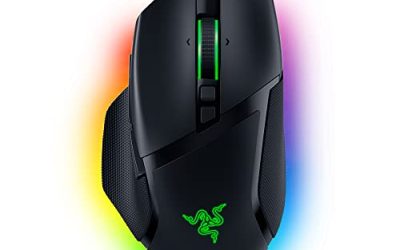
The Razer Basilisk V3 makes its strongest case through its controls rather than its headline sensor specification. The supplied listing describes 11 programmable buttons, a wheel with tactile and free-spinning modes, and a thumb-rest shape. Together, those features suggest a mouse worth considering if you want to consolidate game commands and desktop navigation into one device.
This review covers the black, wired Basilisk V3 in the linked listing. It is a specification-based assessment, not a hands-on test: comfort, button reach and tracking consistency have not been independently evaluated. The useful buying question is whether this particular combination of shape, controls and customization matches your routine, rather than whether its promotional accuracy claims sound impressive.
The listed specification, with its boundaries
The details below are seller-listed specifications. They establish what this variant is advertised to include, but do not verify its behavior in use.
| Model and connection | Razer Basilisk V3, wired |
|---|---|
| Finish | Black |
| Shape | Ergonomic design with thumb rest |
| Programmable controls | 11 buttons with macro and secondary-function assignments |
| Scroll wheel | HyperScroll Tilt Wheel with free-spinning and tactile modes |
| Sensor | Focus+ optical sensor, listed at 26K DPI |
| Switches | Second-generation optical mouse switches |
| Lighting | 11 Razer Chroma RGB zones |
| Dimensions | 2.96 × 5.12 × 1.67 inches |
| Weight | 0.2225 pounds |
| Software reference | Razer Synapse App |
Eleven programmable buttons need a sensible plan
The listing says macros and secondary functions can be assigned across 11 programmable buttons, with communication and in-game marking commands among its examples. That gives the Basilisk V3 an appealing role for players who want more actions at their fingertips. A practical starting point would be to map a few frequently used commands rather than treating every programmable input as something that must be occupied.
The count should not be mistaken for 11 extra side buttons. The evidence does not provide a complete control-by-control layout or explain how secondary assignments are activated. It therefore cannot establish whether every desired command will be reachable without changing your grip. For command-heavy games, the potential benefit is clear; for someone who uses very few mouse bindings, much of that customization may simply go unused.
Two scrolling behaviors serve different jobs
The HyperScroll Tilt Wheel is described as supporting both free-spinning scrolling and a tactile mode. This is a more concrete reason to consider the mouse than a broad claim of gaming precision. Free-spinning operation suggests a useful option for moving through lengthy content, while tactile feedback is the more natural fit when you want distinct scrolling steps for selecting items or changing weapons.
Those are intended-use interpretations, not findings about the wheel’s feel. The listing does not explain the mode-switching controls, whether transitions can be automated, or how tilt inputs are configured. Buyers who consider a particular wheel workflow essential should verify those details rather than assuming the feature name guarantees it. The supported takeaway is the availability of two different scrolling behaviors, not a tested judgment about their execution.
Thumb-rest comfort is still a fit question
Razer’s listing presents the ergonomic shape and thumb rest as central features. A defined resting area may appeal if you prefer a mouse that supports the thumb rather than leaving it alongside the body. However, the listing’s universal-sounding comfort language cannot establish a comfortable fit for an individual hand.
The stated dimensions and weight give you reference points to compare with a mouse you already know. They do not settle palm, claw or fingertip suitability, and the supplied evidence offers no hand-size guidance. If your current mouse feels too wide or too tall, compare its documented dimensions before treating the Basilisk’s ergonomic label as a solution. Button access matters just as much as overall size when customization is a major reason for buying.
Sensor and switches: capability claims, not results
The listed Focus+ 26K DPI optical sensor and second-generation optical switches identify the advertised tracking and primary-switch hardware. The seller also makes strong claims about accuracy, responsiveness and switch endurance. Those claims are not independent measurements of this mouse, and the DPI figure alone does not establish better aim or a better match for your sensitivity preferences.
For buying purposes, these specifications belong alongside the shape and controls rather than above them. The supplied evidence does not document polling rate or provide comparative tracking tests. There is consequently no basis here for ranking its responsiveness against another mouse or promising that the switches eliminate all unwanted inputs.
Wired connection and software checks before committing
The wired identity is explicit, making this the wrong variant for someone seeking wireless operation. The published listing information do not identify the connector, cable length or cable construction, so they cannot confirm how comfortably the cable will reach or route across your setup. Check those particulars if your computer sits far from the mouse area.
Software deserves similar attention. The listing points to Razer Synapse for optimization and advertises individually customizable Chroma lighting zones with supported-game reactions. It does not specify the Synapse version, supported operating systems, onboard profile storage or which customizations persist without the application running. If you cannot install peripheral software, do not assume the full advertised customization will be accessible. Its Windows settings advice is not a complete compatibility statement.
Verdict: compelling controls, conditional fit
On the supplied specifications, the wired Basilisk V3 is most persuasive for someone who wants programmable inputs, two scrolling modes and a thumb-rest body together. Its weaker point as a buying proposition is uncertainty: fit, cable details and software persistence still need checking. For broader selection criteria, see our gaming mouse buying guide.
Sources: Supplied retailer listing for the Razer Basilisk V3 wired mouse. Product specifications and feature descriptions above are listing claims, not independently measured results.
Check the exact product and current offer on Amazon