Key takeaways
- A specification-based Razer Naga V2 HyperSpeed review covering its 19 programmable buttons, wireless modes, battery claims, scroll wheel and fit unknowns.
This review analyzes published product information. We have not performed detailed research of this unit.
As an Amazon Associate, we earn from qualifying purchases.
A wireless Naga for command-heavy play
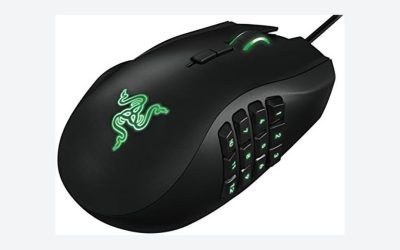
The Razer Naga V2 HyperSpeed makes its strongest case when a mouse needs to do more than aim and fire. Its listed 19 programmable buttons offer room for game commands and macros, while two wireless connection modes let you choose between Razer HyperSpeed and Bluetooth. The important buying question is whether that control capacity suits your games and habits—not simply whether more buttons sound better.
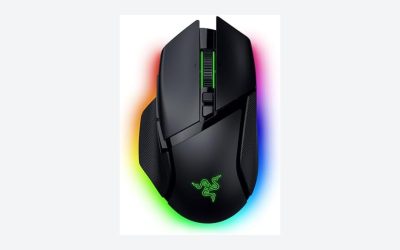
This review assesses the black Naga V2 HyperSpeed from the supplied retailer specifications, rather than detailed research. It covers this exact wireless MMO configuration; its controls, battery figures and switch specifications should not be assumed to apply to other Naga versions. On paper, it is most compelling for players who want to move a substantial set of commands onto the mouse and are willing to plan their mappings.
The listed hardware at a glance
| Specification | Listed detail |
|---|---|
| Model | Razer Naga V2 HyperSpeed |
| Programmable controls | 19 buttons; command and macro assignment advertised |
| Wireless connections | Razer HyperSpeed Wireless at 2.4 GHz and Bluetooth |
| Scroll wheel | Razer HyperScroll technology with free-spin and tactile modes |
| Claimed battery life | Up to 400 hours over Bluetooth; up to 250 hours over HyperSpeed Wireless |
| Sensor | Focus Pro 30K optical sensor |
| Main switch technology | Mechanical Mouse Switches Gen 2; advertised lifespan up to 60 million clicks |
| Listed dimensions | 4.71 × 2.96 × 1.71 inches |
| Listed weight | 0.209375 pounds; battery inclusion not specified |
| Software reference | Razer Synapse App mentioned for performance optimization |
Button capacity matters only if you can use it
The 19-button specification is the central reason to consider this model. The listing advertises both ordinary command assignments and advanced macros. For an MMO player, that suggests space for frequently used abilities, utility actions or communication shortcuts without putting every binding on the keyboard. Those are potential uses, not a supplied profile or evidence that every game will accept every macro.
There is an important distinction between having 19 programmable buttons and having 19 equally convenient controls. The retailer describes their placement as ergonomic, but the published listing information does not establish the complete layout, individual button reach or how easily neighboring controls can be distinguished. A buyer with a carefully developed action bar should check the physical arrangement before assuming each command has a comfortable destination.
Editorially, this is a better match for someone who can name the extra functions they want than for someone buying control count alone. Building and learning a consistent layout is part of the commitment. If your games need only a few mouse shortcuts, much of this model’s advertised capability may go unused.
Wireless choice comes with different battery claims
Razer HyperSpeed Wireless uses a 2.4 GHz connection, and Bluetooth provides the second option. The listing positions HyperSpeed as the low-latency gaming mode and Bluetooth as the longer-running choice. No measured connection testing is supplied, so those descriptions should guide expectations rather than serve as proof of response time or interference resistance.
The advertised endurance is up to 250 hours over HyperSpeed and up to 400 hours over Bluetooth. The headline 400-hour figure therefore does not apply to both modes. If you intend to use HyperSpeed throughout, the lower of those two claims is the relevant planning figure, and even that is a stated maximum rather than a guaranteed replacement interval.
The battery wording refers to replacement, but the supplied facts do not identify battery type, included battery contents or a charging facility. Do not interpret this as confirmation of rechargeable operation. Likewise, the evidence does not specify operating-system requirements, receiver contents, wired operation or device-switching behavior. Confirm those details if they are essential to your setup.
A scroll wheel with two distinct jobs
The HyperScroll wheel offers free-spin and tactile modes. Free-spin is the logical choice for traversing long pages or documents, while tactile scrolling is the more deliberate option when individual steps matter. That gives the Naga a potentially useful role beyond gaming without requiring its button mappings to do all the work.
For games, consider what scrolling actually controls. Rapid repetition may suit one binding and be inappropriate for another. The supplied evidence does not describe the switching procedure or establish automatic mode changes, so the safest conclusion is simply that both modes are advertised. Wheel feel, resistance and noise remain untested.
Sensor specifications do not settle fit or comfort
The Focus Pro 30K optical sensor is accompanied by a claim of tracking across varied surfaces, including glass. That is a manufacturer capability claim, not a test result for a particular desk. The sensor designation alone also does not establish practical aiming accuracy. Surface choice, sensitivity settings and how comfortably you move the mouse still deserve attention.
This model lists second-generation mechanical mouse switches, with gold-plated contacts and an advertised lifespan reaching 60 million clicks. That endurance figure should not be read as a service-life guarantee. The listing provides no basis for judging click force, sound or long-term consistency.
The stated dimensions and weight give you reference points for comparison with a mouse you already know. However, the weight entry does not clarify whether a battery is included, and dimensions cannot establish grip comfort. Hand size, preferred grip and access to the extra controls remain important unresolved fit questions.
Software checks and the buying verdict
The listing references Razer Synapse for optimization and recommends disabling Windows pointer acceleration. It does not document the programming workflow, supported software versions, onboard profile storage or which settings persist without software running. Buyers using restricted computers or unsupported environments should verify those details before relying on extensive customization.
The Naga V2 HyperSpeed is a persuasive specification-level choice for command-heavy gaming: substantial programmable control capacity, two wireless modes and a dual-mode scroll wheel form a coherent package. Its main reservations are fit uncertainty, incomplete software details and battery claims that depend on the connection used. For a broader comparison, consult our gaming mouse buying guide. Choose this exact Naga when its extra controls solve a specific need, not merely because the specification list is long.
Sources: Supplied retailer listing for the Razer Naga V2 HyperSpeed.
Check the exact product and current offer on Amazon