Key takeaways
- A specification-based review of the Razer Basilisk V3 Pro 35K, covering wireless battery claims, configurable scrolling, controls and accessory requirements.
This review analyzes published product information. We have not performed detailed research of this unit.
As an Amazon Associate, we earn from qualifying purchases.
A materially different Basilisk configuration
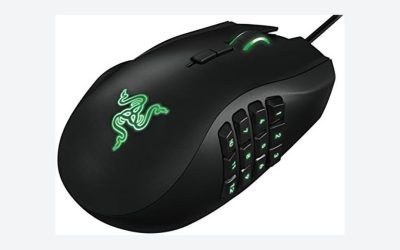
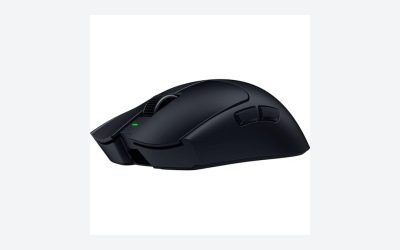
The Razer Basilisk V3 Pro 35K Wireless targets players who want extensive mouse controls and configurable scrolling without a permanent cable connection. Its appeal rests less on the sensor’s headline resolution than on how its scroll modes, multi-function trigger and programmable commands might fit a mixed gaming and desktop routine.
This is a specification-based assessment of the Black wireless Pro 35K configuration, not a hands-on test. It is materially different from the previously covered wired Basilisk V3: the supplied listings establish wireless operation, a different sensor generation, 13 customizable controls rather than 11 programmable buttons, and newer optical switches. Those differences create distinct buying questions around battery life, software and optional wireless accessories, rather than merely a cosmetic variation.
The specifications that matter here
| Exact configuration | Razer Basilisk V3 Pro 35K Wireless, Black |
|---|---|
| Sensor | Focus Pro 35K Optical Sensor Gen-2; advertised 1-DPI adjustment increments |
| Controls | 13 customizable controls, including a multi-function trigger |
| Scroll wheel | HyperScroll tilt wheel with tactile, free-spin and configurable Smart-Reel operation |
| Wireless endurance | Advertised up to 140 hours on Razer HyperSpeed Wireless |
| Optional polling capability | 8000 Hz with Mouse Dock Pro or HyperPolling Wireless Dongle, each sold separately |
| Main switches | Razer Optical Mouse Switches Gen-3; advertised 90-million-click lifecycle |
| Lighting | 13 Chroma zones with underglow |
| Named configuration software | Razer Synapse |
Scroll behavior is the strongest practical distinction
The HyperScroll tilt wheel offers two clearly different behaviors: stepped scrolling for deliberate selection and free-spin scrolling for moving through longer content. In gaming, the former is the more intuitive choice when each movement changes a weapon or skill. For documents and browsing, the latter offers a different workflow without requiring a second mouse.
Smart-Reel adds automatic switching according to scrolling speed, with configuration through Synapse. That makes this model especially interesting if you alternate between short, controlled inputs and long page navigation. However, the supplied evidence does not explain the available adjustment range or how settings persist when software is unavailable. Anyone buying specifically for automatic switching should verify those details rather than assume every preferred behavior can be stored on the mouse.
The 13 customizable controls include a multi-function trigger and support command and macro assignments. That provides room to move actions such as voice communication or contextual game commands onto the mouse. The listing calls them controls, so they should not automatically be interpreted as 13 separate conventional buttons. Their usefulness also depends on whether you can reach the required inputs comfortably; a control count alone cannot establish that.
Wireless freedom comes with an accessory decision
Razer advertises up to 140 hours of battery life using HyperSpeed Wireless. Treat that as an upper-bound listing claim, not a prediction for your particular lighting and polling settings. The evidence does not provide the test conditions behind it or a battery-life breakdown across operating modes, so it cannot establish a reliable charging interval for your routine.
The advertised 8000 Hz capability requires either the Razer Mouse Dock Pro or HyperPolling Wireless Dongle, both sold separately. This is an important configuration boundary: the headline polling option is not presented as a capability unlocked by the mouse purchase alone. Decide whether that option matters before choosing accessories, rather than treating an additional receiver or dock as an automatic requirement.
The supplied listing does not establish the standard included receiver’s polling rate, Bluetooth support, charging connection or wired data operation. Those omissions are not evidence that the functions are absent, but they prevent a complete connection assessment. Buyers switching between computers or expecting a particular cable workflow should confirm those points first.
Sensor, switches and lighting without the superlatives
The Focus Pro 35K Optical Sensor Gen-2 supports sensitivity adjustments in single-DPI increments, according to the listing. This offers fine configuration granularity, although it does not by itself establish a practical aiming advantage. Razer also advertises tracking across a wider range of surfaces, including glass; without detailed surface conditions or independent testing, that should not be treated as universal glass compatibility.
The Gen-3 optical switches carry an advertised 90-million-click lifecycle. That is a component durability claim, not a guarantee of whole-mouse service life. Likewise, the seller’s responsiveness language cannot establish how the mouse will feel in your games.
Lighting spans 13 zones with underglow, and the listing describes reactive effects for supported Chroma-integrated games. This adds customization potential, but does not imply that every game supports reactive lighting. The supplied facts also do not quantify lighting’s battery impact.
Fit and software deserve checking before purchase
The listing supplies dimensions and weight without clarifying whether they describe the bare mouse or its packaged presentation. They are therefore insufficient for confident grip-size or handling guidance. In particular, do not choose this configuration for a specific hand size or lightweight target based on those fields alone.
Synapse is explicitly involved in Smart-Reel configuration and further tuning, but the evidence does not establish its required version, operating-system support or onboard profile behavior. If you cannot install configuration software, verify how much functionality remains accessible. For broader selection criteria, see our gaming mouse buying guide.
Verdict
The Basilisk V3 Pro 35K is a compelling specification-led option for users prioritizing wireless operation, varied scrolling and extensive command assignments. Its strongest reasons to buy are those workflow features, not unverified speed claims. Confirm physical fit and connection details, and account for the separate accessory needed for 8000 Hz before committing.
Sources: Supplied retailer listing for the Razer Basilisk V3 Pro 35K Wireless. Specifications and manufacturer claims are assessed without hands-on verification.
Check the exact product and current offer on Amazon