Key takeaways
- Use a capable dual-tower air cooler or a 240 mm liquid cooler.
- Install 32GB of DDR5-6000 memory as a 2 x 16GB kit; use 64GB for heavy modding, content creation, or many background applications.
- Enable EXPO in the BIOS after confirming the memory kit is on the board’s memory support list.
- Update the motherboard BIOS before troubleshooting memory instability or unusual boost behavior.
- Use a 750W power supply for a typical high-end graphics card, or 850W when the graphics card manufacturer recommends it.
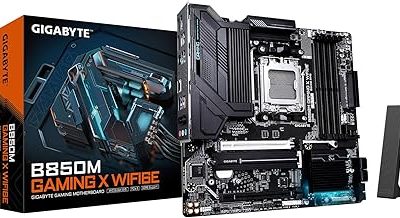
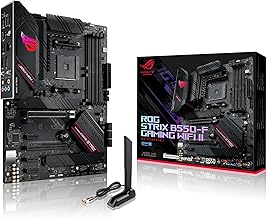
The best motherboard and CPU for gaming in 2026 is usually an AMD Ryzen 7 9800X3D paired with a quality B850 motherboard: it delivers excellent gaming performance, sensible power use, PCIe 5.0 support, and a longer upgrade path than Intel’s current desktop platform.
Best CPU and motherboard pairings by build type
| Gaming build | CPU | Motherboard class | Why this pairing works | Typical platform budget |
|---|---|---|---|---|
| Best overall | Ryzen 7 9800X3D | B850 ATX or X870 | Strong gaming performance, 8 cores, 3D V-Cache, AM5 upgrade path | Usually $600–$850 |
| High-end gaming and streaming | Ryzen 9 9950X3D | X870E or premium X870 | Very high gaming performance with 16 cores for creation and heavy multitasking | Usually $950–$1,300 |
| Value 1440p gaming | Ryzen 7 7800X3D | B650 or B650E | Still a powerful gaming chip when discounted; inexpensive DDR5 ecosystem | Usually $400–$650 |
| Intel productivity-focused build | Core Ultra 7 265K | Z890 | Good all-round performance, modern connectivity, useful multi-core capability | Usually $650–$950 |
| Compact or lower-cost build | Ryzen 7 9700X | B850 Micro-ATX or B650 | Efficient 8-core performance without paying for a flagship board | Usually $500–$750 |
Best overall: Ryzen 7 9800X3D with B850
The Ryzen 7 9800X3D is the easiest recommendation for a dedicated gaming PC. Its 8-core, 16-thread design is enough for modern games, background applications, voice chat, and normal streaming, while its extra 3D V-Cache helps games that are sensitive to CPU cache and latency.
Pair it with a B850 motherboard rather than automatically buying the most expensive X870E model. A good B850 board can provide DDR5 memory support, PCIe 5.0 for the main graphics slot, at least one PCIe 5.0 M.2 slot, Wi-Fi 7 on selected models, 2.5Gb Ethernet, and BIOS flashback. Those features matter more in a gaming build than decorative heatsinks or extreme overclocking controls.
Choose X870 instead when you need more high-speed USB, additional M.2 slots, stronger expansion, or a particular rear-I/O layout. X870E is mainly justified for multiple PCIe 5.0 devices, unusually demanding storage configurations, or a premium workstation-style build.
Recommended settings for this pairing
- Use a capable dual-tower air cooler or a 240 mm liquid cooler.
- Install 32GB of DDR5-6000 memory as a 2 x 16GB kit; use 64GB for heavy modding, content creation, or many background applications.
- Enable EXPO in the BIOS after confirming the memory kit is on the board’s memory support list.
- Update the motherboard BIOS before troubleshooting memory instability or unusual boost behavior.
- Use a 750W power supply for a typical high-end graphics card, or 850W when the graphics card manufacturer recommends it.
Best high-end combination: Ryzen 9 9950X3D with X870E
The Ryzen 9 9950X3D makes sense when gaming is only one part of the computer’s job. Its 16 cores and 32 threads are useful for video encoding, 3D rendering, compiling, virtual machines, and streaming while gaming. It is more CPU than most games require, so the premium is justified by the additional work you do rather than by gaming alone.
An X870E motherboard is a sensible match for this class of system because it typically offers more flexible PCIe 5.0 connectivity, stronger power delivery, and a broader selection of high-speed storage and USB connections. A premium board is not automatically faster in games, however. If you are installing one graphics card and one or two SSDs, a good X870 or B850 model can run the same CPU just as well.
Use a large dual-tower cooler or a 280/360 mm liquid cooler, and allow extra case airflow. Check the motherboard’s CPU support list and minimum BIOS version before buying, especially if the board has been sitting in retail inventory.
Best value: Ryzen 7 7800X3D with B650
The Ryzen 7 7800X3D remains attractive when its price is clearly below newer X3D processors. It uses the AM5 socket and performs well at 1440p and 4K, where the graphics card usually limits frame rate. A B650 motherboard is enough for a single graphics card, one or two NVMe drives, and ordinary USB requirements.
Do not pay a large premium for an old X670E board simply because it has a higher chipset number. Compare the actual feature list: graphics-slot generation, M.2 slots, rear USB ports, networking, BIOS flashback, and memory support. A newer B850 board may be a better purchase if its price is close and you value newer connectivity.
When an Intel build is the better choice
The Core Ultra 7 265K with a Z890 motherboard is a strong option for someone who combines gaming with productivity and prefers Intel’s current desktop features. It offers substantial multi-core capability and modern platform connectivity, but LGA1851 does not provide the same clearly established long-term upgrade story as AM5. Buy it because its current price, application performance, or motherboard features suit you—not because it is the cheapest route to gaming performance.
Z890 is the appropriate enthusiast chipset for the 265K because it exposes the platform’s tuning and connectivity features. For a locked or lower-power Core Ultra processor, a less expensive 800-series chipset can be more appropriate. Avoid choosing a board solely by VRM size: a midrange Z890 board is already sufficient for a gaming CPU if it has adequate cooling and the features you need.
Motherboard selection: the checks that prevent expensive mistakes
1. Match the socket and BIOS support
Ryzen 7000, 8000 desktop APUs, and Ryzen 9000 desktop processors use AM5, but the chipset does not guarantee that every board ships with the required BIOS. Check the exact CPU support page and BIOS version. BIOS flashback is valuable because it lets you update firmware without installing an older processor.
Core Ultra desktop processors use LGA1851 and require an 800-series motherboard such as Z890. An LGA1700 board for older Core processors is not compatible, even if its branding and memory support look similar.
2. Check memory layout and capacity
Buy a matched two-stick kit rather than combining separate kits. Two DDR5 modules are generally easier for the memory controller than four. For most gaming PCs, 32GB is the practical starting point; 64GB is worthwhile for simulation games with large mods, content creation, or long-term ownership.
Verify that the board supports the kit’s capacity and speed. Advertised memory speeds are overclocked profiles, so stability can vary with the CPU’s memory controller, motherboard BIOS, and number of modules.
3. Count storage and expansion lanes
One PCIe 4.0 NVMe SSD is already fast enough for most games. PCIe 5.0 storage can offer higher sequential speeds, but it often costs more and may run hotter without improving game loading proportionally. If you need several M.2 drives, read the motherboard manual: some slots disable SATA ports or share bandwidth with expansion slots.
4. Inspect the rear I/O and internal headers
- Choose 2.5Gb Ethernet if your network equipment supports it; it is now common on midrange boards.
- Choose Wi-Fi 7 only if you have, or plan to buy, a compatible router and need wireless performance.
- Confirm that the board has enough USB 3 headers for the case’s front ports.
- Check for a front-panel USB-C header if your case includes a high-speed USB-C port.
- Confirm the audio outputs you need; some compact boards omit optical audio.
A practical power and bandwidth check
Suppose a build uses a Ryzen 7 9800X3D rated around 120W, a graphics card with a 350W board-power target, 60W for the motherboard and memory, 40W for drives and fans, and 30W of transient margin. The estimated sustained-and-margin load is:
120W + 350W + 60W + 40W + 30W = 600W.
A quality 750W supply gives roughly 150W of headroom, while an 850W model gives more room for transient spikes and future graphics-card upgrades. The manufacturer’s recommended supply for the graphics card still takes priority, and the supply should use the correct modern GPU power connector rather than an unsafe adapter arrangement.
For display planning, a 2560 x 1440 monitor at 165Hz requires up to approximately 17.1Gbps of uncompressed RGB pixel data before blanking and protocol overhead: 2560 x 1440 x 165 x 24 bits equals about 14.6Gbps of active image data, and overhead raises the practical link requirement. DisplayPort 1.4 with DSC or DisplayPort 2.1 is therefore preferable for high-refresh 1440p and 4K monitors. This does not mean the CPU must render every refresh at maximum settings; it means the graphics card, cable, and monitor connection must support the target mode.
Decision matrix: which pair should you buy?
| Your situation | CPU | Motherboard choice | Key reason |
|---|---|---|---|
| 1440p gaming with a high-end GPU | Ryzen 7 9800X3D | B850 | Excellent gaming performance without overspending on chipset features |
| 4K gaming and occasional upgrades | Ryzen 7 9800X3D | B850 or X870 | Strong CPU now, AM5 platform flexibility later |
| Gaming plus rendering or encoding | Ryzen 9 9950X3D | X870/X870E | More cores and stronger expansion for mixed workloads |
| Lowest sensible cost on AM5 | Ryzen 7 7800X3D | B650 | Older platform parts can produce excellent value when discounted |
| Intel-focused mixed-use PC | Core Ultra 7 265K | Z890 | Strong all-round performance and current Intel desktop connectivity |
Final buying rule
Spend first on the graphics card, then choose the CPU that will keep it fed at your target resolution and refresh rate. For most new gaming builds, the Ryzen 7 9800X3D plus B850 is the best balance of performance, features, power, and upgrade potential. Move to Ryzen 9 9950X3D and X870E only for serious multi-core workloads, choose the 7800X3D and B650 when the discount is substantial, and select Core Ultra 7 265K with Z890 when Intel-specific productivity performance and platform features outweigh AM5’s longer upgrade path.