Our Top Picks
An ITX case is a compact PC case built around the mini-ITX motherboard standard, which is a 170 mm by 170 mm board, and it matters if you want a small gaming PC but are willing to trade easy upgrades and cooling headroom for size. For most people with space on a desk or under it, a larger case is simpler, but a good ITX build can run modern gaming hardware.
What an ITX Case Is
ITX describes a family of small motherboard sizes. The one used in gaming is mini-ITX, a 170 mm square board with typically one PCIe slot for a graphics card, two memory slots, and fewer ports and headers than larger boards. An ITX case is designed for that board. Many accept only mini-ITX, while some roomy small-form-factor cases also support larger sizes such as micro-ATX; read the maker’s specification for the exact model.

Lian Li A3-mATX PC Case, 415mm GPU, 360 AIO, Wood Black Mesh (A3X-WD) | No Fans Included, Supports 360mm AIO, Modularity Design, For M-ATX, ITX Motherboard, DAN Cases Collaboration
Chosen because it specifies 415mm GPU and 360 AIO.
View on Amazon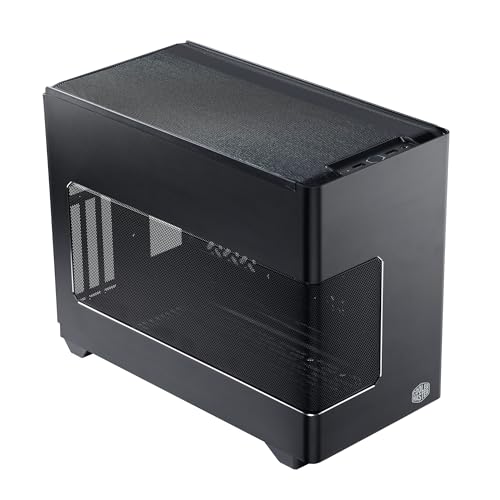
Cooler Master NR200P V3 Mini-ITX PC Case, High Airflow, 361.5mm GPU Support | 280mm AIO Radiator Support, 361.5mm Graphics Card Support, SFX PSU Support, Vertical GPU Mount, PCIe 5.0 Riser, Mesh Panel
Chosen because it specifies High Airflow and 361.5mm GPU Support.
View on Amazon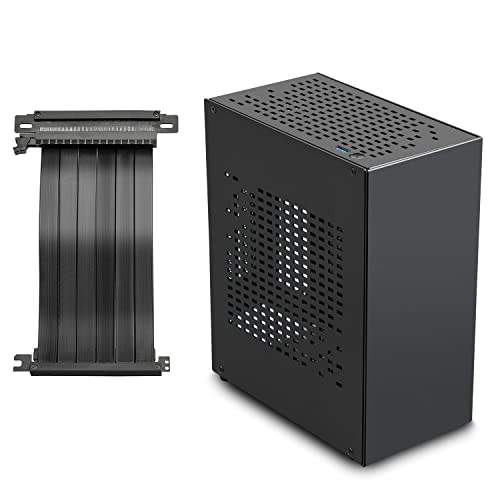
Aluminum Mini ITX Case with PCIe 3.0 Riser, JOYJOM Mini PC Case, SFF Small Form Factor PC Case, TX Computer Gaming Case Supports GPU Graphics Card (Black)
Chosen because it specifies JOYJOM Mini PC Case and SFF Small Form Factor PC Case.
View on AmazonCases are often described by volume in litres, such as under 15 L for very small designs and up to 30 L for roomier ones. There is no strict official category, so litre figures are descriptive, not a standard.
How It Differs From a Standard Case
- Space: everything sits close together, so component length, height and thickness all matter.
- Power supply: many ITX cases require a smaller SFX or SFX-L power supply instead of a standard ATX one, while a few accept ATX. Always check which form factor the case supports.
- Cooling: fewer fan mounts and tighter airflow paths, so cooler type and fan placement need planning.
- Graphics cards: maximum card length, thickness (slot count) and sometimes height are strict limits.
- Storage and expansion: fewer drive bays and a single expansion slot.
Quick Reference: What to Check Before Buying
| Item | What to look for | Why it matters |
|---|---|---|
| Motherboard size | Mini-ITX support | Board must fit the 170 mm layout |
| GPU length and thickness | Maker’s maximum card length and slot width | Many current high-end cards are too large for small cases |
| Power supply type | SFX, SFX-L or ATX | Wrong size will not mount |
| CPU cooler height | Maximum cooler height in the specification | Tall air coolers may not fit |
| Radiator support | Mounting positions for a liquid cooler | Needed if you plan a liquid cooler |
| Ventilation | Mesh panels, fan positions | Small spaces heat up quickly |
| Cable room | Routing space behind the board | Neat cabling aids airflow |
Why It Matters for Gaming PCs
A mini-ITX board can run the same processors as bigger boards, including AMD Ryzen 9000 and Intel Core Ultra 200S chips with a matching socket, and DDR5 memory. Mini-ITX boards also exist with PCIe 5.0 support and WiFi, so the platform is not a compromise on features. The compromise is physical. The graphics card has to fit, the cooler has to fit, and heat has less room to leave.
Modern graphics cards are often thick, so a tight case may force you toward a compact model, and manufacturers and case makers publish compatibility lists. A larger ITX case with a vertical or sideways GPU layout can handle bigger cards, but a very small case may limit you to a short, two-slot design. High-power parts produce more heat, and in a small enclosure, lower-power models or a mild undervolt can keep temperatures and noise in check. Undervolting and BIOS changes can cause instability and affect warranty coverage, so make small changes and consult the motherboard manual.
How to Check Whether Your Parts Will Fit
- Find the case maker’s specification sheet and note the maximum GPU length, GPU thickness, CPU cooler height and power supply type.
- Find your graphics card’s length and slot thickness on its product page, and compare it with the case limit with a few millimetres of margin.
- Compare the cooler’s height with the case limit. If you plan a radiator, check which sizes the case lists.
- Confirm the power supply form factor and length.
- Look for a compatibility list from the case maker, since several publish tested graphics card lists.
- Read independent build guides for your exact case to see real-world issues such as cable pressure or tight clearance.
When assembling, unplug the system and ground yourself. Be gentle with cables, because bending them tightly can strain connectors. For high-power graphics cards using the 12VHPWR or 12V-2×6 connector, follow the GPU and power supply maker guidance on seating the plug fully and avoiding sharp bends right at the connector, because tight cases make bends more likely. If a connector shows any melting or heat damage, stop using the system and contact the maker. Never open a power supply; contact the maker or a technician.
Common Misconceptions
- “ITX means weaker performance.” The processors and graphics cards are the same as in larger builds, but thermal limits may reduce sustained speeds in very cramped cases.
- “ITX is automatically cheaper.” Small cases, boards and SFX power supplies often cost more than their full-size equivalents.
- “ITX and mini-ITX are different.” In PC building, people use ITX to mean mini-ITX.
- “Any GPU will fit.” Many will not, so compare dimensions first.
- “ITX can’t be quiet.” It can, with good fans, a suitable cooler and a moderate power target, though it is harder than in a roomy case.
When to Care and When to Ignore It
Care if you want a PC that sits on a desk, moves to LAN events, fits a living-room cabinet, or looks tidy in a small apartment. A small-form-factor build can also be a rewarding project, if you enjoy planning each component.
Ignore ITX if you want the easiest build, the lowest temperatures for the money, many drives, or the widest choice of components. A standard mid-tower is cheaper, easier to cool and simpler to upgrade, and in most households size is not a limiting factor. If you want a small prebuilt rather than a DIY project, look at the maker’s small-form-factor lines and read reviews for noise and thermals.
Planning Tips for a First Small Build
Pick the case and graphics card first, then fit everything else around them, because those two parts impose the tightest limits. Reviewers of small cases commonly advise reading a build guide for the exact case, since assembly order matters: the power supply and cables often go in before the motherboard, and a radiator or cooler may need installing before the graphics card. Leave time for cable management, and use shorter or custom-length cables if the maker sells them, because bulky bundles block airflow. Finally, plan for dust: small cases pack components tightly, so clean filters regularly to keep temperatures steady.
Frequently Asked Questions
What size is an ITX case?
There is no single size, because the standard defines the motherboard (170 mm by 170 mm) not the case. Cases range from very small boxes under about 10 litres to larger ones around 30 litres or more.
Can an ITX case fit a high-end graphics card?
Some can and many cannot. Check the case’s maximum card length, thickness and height against the card’s dimensions, and look for the maker’s compatibility list.
Do I need a special power supply?
Often yes. Many ITX cases use SFX or SFX-L units, while some larger ones accept standard ATX. The case specification states which.
Is cooling harder in an ITX case?
Generally, yes, because there is less airflow room. Choose a case with good ventilation, a suitable cooler, and consider a modest power limit to manage heat.
Can I upgrade an ITX PC later?
Partly. The graphics card, memory, storage and processor can be swapped if they fit and the cooling copes, but you have only one expansion slot, so options are narrower than with larger boards.