Our Top Picks
The Acer Aspire E5-575 is the better buy of the two older laptops if you want a still-usable budget machine for office work, video and light games, while the Aspire V5-471 is a much older design that is only worth considering as a cheap spare or a project for an SSD swap. Neither is a gaming laptop by today’s standards, and neither officially runs Windows 11, so the real question for most buyers is whether an upgrade is worth the effort or whether a newer budget laptop is the smarter move.
Quick Comparison
| Model | Era and CPU class | Memory | Storage | Best for | Limits |
|---|---|---|---|---|---|
| Aspire E 15 E5-575 | Intel 6th and 7th generation Core i3/i5 (for example i3-7100U, i5-7200U) | Two DDR4 SODIMM slots; Acer lists up to 32 GB on the E5-575-33BM | 2.5-inch SATA bay; stock configs vary (1 TB hard drive on the i3 model, 256 GB SSD on a G variant) | Budget office, study and light gaming, easy upgrades | Not on Microsoft’s Windows 11 supported CPU list; plastic build |
| Aspire E5-575G | Same platform plus Nvidia 940MX graphics on some SKUs | Same DDR4 slots | Same | Esports-grade older titles at low settings | 940MX is a low-end part by modern standards |
| Aspire V5-471 / V5-471G | Intel 2nd and 3rd generation Core (i3-2367M listed on the base model) | Two DDR3 SODIMM slots; maximum listed at 8 GB | 2.5-inch SATA | Cheap spare, basic browsing after an SSD swap | Very old platform, 1366 x 768 display, no Windows 11 |
Configurations vary by region and year, so a model name alone does not guarantee a given processor, panel or drive. Confirm the exact part number on the laptop’s label.
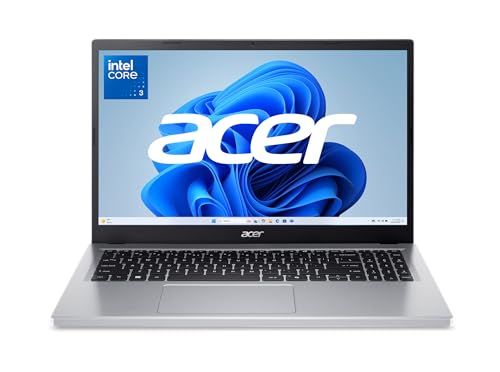
Acer Aspire Go 15 AI Ready Laptop | 15.6" FHD (1920 x 1080) IPS Display | Intel Core 3 Processor N355 | Intel Graphics | 8GB DDR5 | 128GB UFS | Wi-Fi 6 | Windows 11 Home in S Mode | AG15-32P-352Z
Chosen because it specifies 15.6" FHD (1920 x 1080) IPS Display and Intel Core 3 Processor N355.
View on Amazon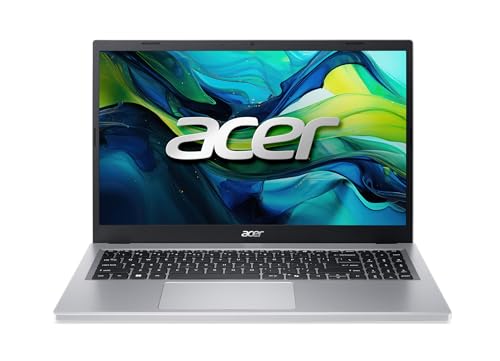
Acer Aspire Go 15 AI Ready Laptop | 15.6" FHD IPS Display | AMD Ryzen 3 30 Processor | AMD Radeon Graphics | 8GB LPDDR5 | 128GB PCIe SSD | Wi-Fi 6 | Windows 11 Home | AG15-21P-R42Z
Chosen because it specifies 15.6" FHD IPS Display and AMD Ryzen 3 30 Processor.
View on Amazon
Acer Aspire Go 15in Laptop AMD Ryzen 5 16GB RAM 512GB SSD Touch | AG15-21PT-R641, 15.6in FHD touchscreen, WiFi 6, HDMI port, webcam, Windows 11 Home, backlit keyboard
Chosen because it specifies AG15-21PT-R641 and 15.6in FHD touchscreen.
View on Amazon
acer Aspire 3 Touch Laptop Ryzen 5 16GB RAM 1TB SSD 15.6 W11 (A315-Renewed)
Picked as a relevant option in this category.
View on AmazonAspire E 15 E5-575: What It Is
The E5-575 is a 15.6-inch budget laptop in Acer’s Aspire E line. Reviews cover several variants: the E5-575-33BM with a Core i3-7100U, 4 GB of DDR4-2133 and a 1 TB hard drive, and the E5-575G series with a Core i5-7200U and an Nvidia 940MX in the E5-575G-57D4. PCWorld’s review of the i3 model praised the value and solid performance for its ultra-low cost at the time. Laptop Mag’s reviews of the line were also positive about value but criticized an all-plastic build and a dull 1080p screen with poor colour accuracy. LaptopMedia described the E5-575G as a feature-packed, dirt-cheap mid-ranger.
This laptop was built for everyday use. It is a reasonable second machine for documents, streaming and browsing. For games, the integrated Intel graphics handle older and lightweight titles, and the 940MX variants stretch to esports titles at low settings. Modern 3D games will not run well.
Aspire V5-471: What It Is
The V5-471 is a 14-inch laptop from the Ivy Bridge and Sandy Bridge era. One listing describes the base model with a Core i3-2367M, 4 GB of RAM, a 14-inch display at 1366 x 768, and Windows 7 as the shipped operating system. The V5-471G adds an Nvidia GeForce GT 620M, and some versions use third-generation Core i5 chips. A listing gives the weight as about 4.6 pounds. The only review found in a search, for the touchscreen V5-471P, was lukewarm: Think Digit gave it 50 percent and cited an older processor, display problems and battery life.
In practical terms, this is a laptop from well over a decade ago. Batteries in these machines are likely worn or unavailable as new stock, and the platform lacks modern features such as USB-C and Wi-Fi 6.
RAM Upgrade Notes
E5-575
The E5-575 has two SODIMM slots and takes DDR4 memory. Acer lists a maximum of 32 GB across two slots for the E5-575-33BM, and a memory retailer lists the same ceiling. The official speed is DDR4-2133 (PC4-17000). Some sellers list DDR4-2400 modules as compatible. An Acer Community answer notes that the processor limits the memory to 2133 MHz, so faster modules will run at the lower speed. That answer concerned a Core i3-6100U model, and it also suggests two 4 GB modules in dual channel over a single 8 GB module for better performance.
A practical path is a 2 x 8 GB DDR4 SODIMM kit for 16 GB, which suits browsing, office work and light games. Reviewers describe a three-screw access panel on the bottom that gives access to both memory and storage on the E5-575, which makes this an easy upgrade.
V5-471
The V5-471 uses DDR3 SODIMMs. Kingston’s compatibility listing for the V5 series names DDR3 modules at 1066 and 1600 MT/s, and one source lists a maximum of 8 GB across two slots. DDR3 is now an old standard, so used or new-old-stock modules may be the only choice.
SSD Upgrade Notes
Both laptops use a 2.5-inch SATA drive bay, and a SATA SSD in the 2.5-inch format is the simplest speed-up available. Retail guides for the V5-471 list drives from Kingston and Crucial as compatible, and Kingston lists 9.5 mm 2.5-inch SATA SSDs as compatible with this series. A new SSD arrives blank, so you either clone the existing drive or install a fresh operating system.
- Back up your files and note any software licences.
- Power down, unplug the charger and, if the battery is removable, take it out.
- Open the access panel per the Acer service manual or a repair guide for the exact model.
- Swap the drive, then install or clone the operating system.
If the laptop has a hard drive with an unknown history, back up the data first. Opening a laptop can void a remaining warranty, so check the terms for any unit still covered, and follow the maker’s manual for the model.
Windows 11 Support Limits
Microsoft’s published requirements list 8th-generation Intel Core processors and newer, plus AMD Zen+ or Zen 2 Ryzen and newer. A Core i5-7200U in an E5-575G is therefore not on the supported list, and Acer Community replies say the same. Microsoft’s supported-processor lists for 22H2 and 23H2 cover 8th through 13th generation Core chips, and Microsoft has said that 8th to 10th generation chips remain supported in 24H2, although one third-party source disagrees. Unofficial bypass methods exist, but a Microsoft Q&A answer warns that unsupported installs may not receive essential updates. For a laptop you rely on, the safer path is to stay on a supported operating system, which for these machines means Windows 10 while it remains usable, or a lightweight Linux distribution.
The V5-471’s second and third-generation processors are further from the requirements, so Windows 11 is not a realistic option there.
Gaming Reality Check
| Use | E5-575 / E5-575G | V5-471 / V5-471G |
|---|---|---|
| Web, office, video | Fine with 8 GB or more and an SSD | Usable with an SSD, but slow |
| Older and indie games | Possible at low settings | Very limited |
| Modern 3D games | Not suitable | Not suitable |
| Cloud game streaming | Possible with a good connection, within the Windows support limits | Browser-only and limited |
Pick X If: Decision Table
| Pick this | If you |
|---|---|
| Keep and upgrade an E5-575 | already own one, can add RAM and an SSD cheaply, and need it for documents and streaming |
| Keep a V5-471 as a spare | want an offline or backup machine and accept its age |
| Replace with a newer budget laptop | need Windows 11 support, current security updates or any real gaming |
| Move to a gaming-capable laptop | want modern titles, which need a recent discrete GPU |
Alternatives
- Newer Acer Aspire models: Current Aspire 3 and Aspire 5 lines use recent Core or Ryzen chips and meet Windows 11 requirements.
- Acer Nitro V or Nitro 5 line: A step into entry-level gaming laptops with discrete GeForce graphics.
- A refurbished business laptop: Lenovo ThinkPad, Dell Latitude and HP EliteBook units from the 8th-generation Core era onward often meet the Windows 11 CPU requirement and have better builds.
Frequently Asked Questions
Can the Acer Aspire E5-575 run Windows 11?
Not officially. Microsoft’s requirements start at 8th-generation Intel Core, and the E5-575 uses 6th and 7th generation chips. Unofficial workarounds exist, but they may not receive essential updates.
How much RAM can an Aspire E5-575 take?
Acer lists a maximum of 32 GB across two DDR4 SODIMM slots for the E5-575-33BM. Memory speed is capped by the processor at 2133 MHz, per an Acer Community answer. A 16 GB kit is a sensible target for everyday use.
What SSD fits an Acer Aspire V5-471?
The laptop uses a 2.5-inch SATA drive bay, and retail and Kingston compatibility guides list 2.5-inch 9.5 mm SATA SSDs as suitable. The SSD comes blank, so you must clone or reinstall the operating system.
What RAM does the Aspire V5-471 use?
It uses DDR3 SODIMM modules, with one source listing a maximum of 8 GB across two slots. Because DDR3 is an older standard, modules are mainly available as used or leftover stock.
Is the E5-575G good for gaming?
Models with the Nvidia 940MX can run older and esports titles at low settings. It is not suited to modern demanding games, and a recent laptop with a discrete GPU is a better choice for those.
Are these laptops worth upgrading in 2026?
An E5-575 can be worth a small RAM and SSD upgrade if you own one and need a basic machine. A V5-471 is hard to justify upgrading beyond a hobby project, and buyers needing current security support are better served by a newer system.
FAQ
Can the Acer Aspire E5-575 run Windows 11?
How much RAM can an Aspire E5-575 take?
What SSD fits an Acer Aspire V5-471?
What RAM does the Aspire V5-471 use?
Is the E5-575G good for gaming?
Are these laptops worth upgrading in 2026?
More from Amazon
Programs that pair well with the guide above. Offers and eligibility are set by Amazon and may change.
Free shipping on eligible items, Prime Video and more. Eligible new members can start with a free trial.
Start a Prime free trialAd-free music streaming. Eligible new subscribers can start with a free trial.
Try Music Unlimited freeA Prime membership for ages 18-24 with a trial period. Eligibility is set by Amazon.
See Prime for Young AdultsAudiobooks and podcasts to listen to on the go. Eligible new members can start with a free trial.
Try Audible freeAs an Amazon Associate we earn from qualifying purchases.