Our Top Picks
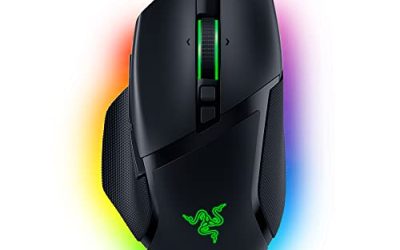
 Razer Basilisk V3 X HyperSpeed Customizable Wireless GamingStandard5.12 x 2.96 x 1.67 inches0.2 poundsCheck on Amazon
Verdict: the Logitech G502 HERO gaming mouse review comes down to this. It is still a strong wired mouse for anyone who wants lots of buttons, adjustable weight and a capable 25K sensor at a mid-range tier, but it is heavy by modern standards and the shape suits palm and claw grips more than fingertip. Buy it for MMOs, shooters you play at a relaxed pace and general desk use; skip it if you want an ultralight esports mouse.
Quick Verdict: Logitech G502 HERO
- Best for: players who want 11 programmable buttons, a tunable weight and a proven shape
- Skip if: you want a very light mouse or a symmetrical, ambidextrous shape
- Strengths: HERO 25K sensor, adjustable weights, thumb buttons, a free-spinning scroll wheel, onboard profiles
- Weak spots: weight, cable, right-handed shape, software required for deep customization
- Closest alternatives: G502 LIGHTSPEED (wireless), G502 X family, G305, G303 Shroud Edition, Razer Basilisk V3 X
Logitech G502 HERO Specs at a Glance

Logitech G502 HERO Wired Gaming Mouse, HERO 25K Sensor for PC/Mac | High performance, 25,600 DPI, RGB, adjustable weights, 11 programmable buttons, on-board memory, programmable mouse
Chosen because it specifies HERO 25K Sensor for PC/Mac and High performance.
View on AmazonThe listing for the Logitech G502 HERO describes a wired gaming mouse with the HERO 25K sensor, a DPI range up to 25,600, RGB lighting and adjustable weights. Retailer spec sheets list the mouse itself at roughly 121 grams before the optional weights are added, and the weight set raises that figure; treat the numbers as approximate and confirm them on Logitech’s own page.
| Spec | G502 HERO (wired) |
|---|---|
| Connection | Wired USB |
| Sensor | HERO 25K optical |
| Maximum DPI | 25,600 |
| Programmable buttons | 11 |
| Weight system | Removable weights (check the maker for exact grams) |
| Lighting | RGB |
| Shape | Right-handed ergonomic |
| Software | Logitech G HUB for profiles, buttons and lighting |
The Logitech G502 Family: Which Version Is Which?
Searches such as “new G502”, “G502 new” and “G502 Hero high performance gaming mouse” all point at the same family, so it helps to untangle it. The family uses the same core shape with different internals and connection types.
| Model | Connection | Sensor | Key difference |
|---|---|---|---|
| G502 HERO | Wired | HERO 25K | The classic: adjustable weights and 11 buttons |
| G502 HERO Special Edition | Wired | HERO 25K | Same core design with a different look, per the listing |
| G502 LIGHTSPEED | Wireless | HERO 25K | Wireless with POWERPLAY compatibility, per the listing |
| G502 X (wired, Plus, LIGHTSPEED) | Wired or wireless | Check the maker for each | Redesigned body, hybrid optical-mechanical main switches, 13 buttons per listing |
The HERO Special Edition and the plain HERO share the same sensor according to the listings, so the choice between them is mostly about appearance. If you want wireless, step up to the LIGHTSPEED. If you want the newer switch design, look at the G502 X range.
Design and Ergonomics
The G502 shape is unmistakable: a sculpted right-hand body with a wide thumb rest, a cluster of thumb buttons, a sniper-style DPI button and a metal scroll wheel that can switch between ratcheted and free-spinning. It was built to fit a palm or claw grip and has been a reference design for years.
Grip fit
- Palm grip: comfortable for medium to large hands; the thumb rest supports the hand well.
- Claw grip: works for many people, though the body is tall.
- Fingertip grip: not ideal because of the mouse’s size and weight.
- Left-handed users: the shape is right-handed, so look at ambidextrous alternatives.
Buttons
Eleven programmable buttons is a lot. Left and right click, scroll click, two scroll-wheel tilt actions, a DPI shift, a mode switch under the wheel and several thumb buttons give you room for macros, voice chat toggles or game abilities. The thumb buttons are well placed, though the DPI shift button above the thumb is easy to hit by accident if you do not map it.
Adjustable weights
Weights slot into the base of the mouse through a hatch. You can run it light or add weights to make it feel steadier. This was once a headline feature, and it remains useful if you like tuning how the mouse feels, but even at its lightest the G502 HERO is heavier than modern lightweight mice. Check Logitech’s page for the exact numbers for your edition.
Sensor and Performance
The HERO 25K sensor offers a very wide DPI range, up to 25,600 per the listing. In practice most players use a few hundred to a few thousand DPI, so the headline number matters less than tracking consistency and smoothing behavior. The HERO family is known for accurate tracking without noticeable acceleration at typical settings, according to publisher information and widely read reviews. We did not use the mouse ourselves, so we are reporting what the maker states rather than measuring anything.
By use case
- FPS games: the sensor is more than capable, but the weight can feel slow for players who flick quickly. Players who prefer steadier aim may like it.
- MMOs and MOBAs: a strong match because of the thumb buttons and DPI shift for switching between precision and fast cursor movement.
- Productivity: the programmable buttons and free-spinning wheel are helpful for scrolling long documents and mapping shortcuts.
- Casual gaming: comfortable and durable for daily use.
Software and Customization
Logitech G HUB handles button mapping, DPI stages, lighting and profiles. The mouse also stores profiles on board, which means your settings follow you if you plug it into another computer. For most people the setup is quick: pick DPI stages, assign thumb buttons and go. The learning curve appears when you build per-game profiles and macros, which can take a little time.
If you like to keep software minimal, you can set profiles once and then close the app. Check the maker for details on which features rely on the software at runtime.
The Wired Cable and the Wireless Option
The HERO is a wired mouse, which means no battery and no latency concerns from a wireless link, but it also means a cable at your desk. A mouse bungee can help if cable drag bothers you. If you want to cut the cord, the G502 LIGHTSPEED uses Logitech’s wireless technology and, per its listing, works with the POWERPLAY charging system, so it can charge while you play. That is a different product at a higher tier.
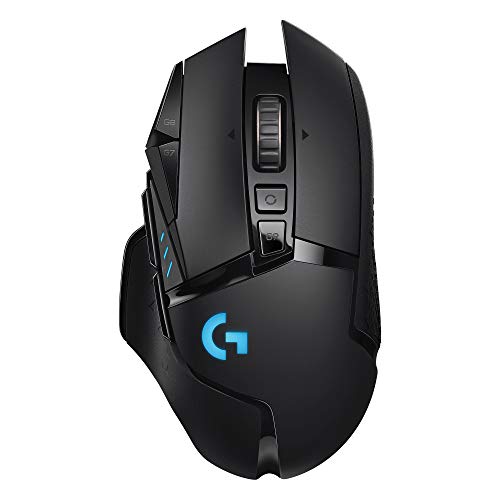
Logitech G502 Lightspeed Wireless Gaming Mouse, Hero 25K Sensor, 25,600 DPI, RGB, Adjustable Weights, 11 Programmable Buttons, Long Battery Life, POWERPLAY-Compatible, PC/Mac - Black
Chosen because it specifies Hero 25K Sensor and 600 DPI.
View on AmazonThe Logitech G502 LIGHTSPEED listing describes a wireless gaming mouse with the HERO 25K sensor, up to 25,600 DPI, RGB lighting, adjustable weights and 11 programmable buttons, plus POWERPLAY compatibility. It is the natural step up if you like the G502 shape but want wireless freedom. Battery life details are best checked on Logitech’s page.
Suggested Button Layouts
Eleven buttons are only useful if you map them sensibly. These starting layouts use the thumb buttons and DPI shift; adjust to taste in G HUB.
| Use | Thumb buttons | DPI shift button | Scroll tilt |
|---|---|---|---|
| FPS | Push-to-talk, grenade or utility | Sniper or precision DPI while held | Weapon swap |
| MMO or MOBA | Ability keys or number-row actions | Slow DPI for precise clicks | Camera or hotbar page |
| Office and editing | Back and forward, copy and paste | Slow DPI for precise selection | Horizontal scroll |
A good rule is to map only the buttons you can reach without moving your grip. The two thumb buttons closest to the thumb rest are the easiest; the DPI shift above them takes a deliberate reach.
How to Set Up the G502 HERO in Ten Minutes
- Plug it in. Connect it directly to a USB port on your PC rather than a crowded hub to avoid power or polling problems.
- Install Logitech G HUB. Download it from Logitech’s own site, not from a third-party link.
- Choose DPI stages. Pick three or four values you will actually use, such as a low one for precision and a higher one for desktop movement.
- Set the polling rate. Leave it at the default unless you have a reason to change it; check the maker for the available options.
- Map the buttons. Start with the layouts above, then adjust after a few days of use.
- Adjust the weights. Try the lightest setting first and add weight if aim feels unsteady. Change one thing at a time so you can tell what helps.
- Save to onboard memory. This keeps your main profile on the mouse itself.
G502 HERO Versus G502 X: Which Direction to Go
If you are comparing the HERO with the G502 X range, the main question is whether the newer switches, button count and wireless options are worth moving up for. The HERO has a long track record, an adjustable weight system and the lowest entry point in the family. The X range, per its listings, changes the body, uses hybrid optical-mechanical main switches and adds a thirteenth button. The wired G502 X is the natural comparison for HERO owners, while the Plus and LIGHTSPEED variants add wireless and lighting features.
For most buyers who just want a dependable mouse with many buttons, the HERO is enough. If clicks feel important to you, or if you want a lighter design than the HERO, consider the X range. Check the maker for weight and switch details before deciding, because the lineup includes several variants and the differences are easy to miss from the names alone.
Related Logitech Searches Explained
Logitech Shroud G303 and G303 wireless
The G303 Shroud Edition is a separate mouse, not a G502 variant. The listing describes it as a wireless, 75-gram mouse with a HERO 25K sensor and five buttons. Buyers searching “G303 wireless” are looking for this model. It is a better fit for players who want a light, simple shape for fast aim.
Best Buy G305 and G502 listings
Retail chains often carry both the G305 and several G502 versions. The listing names look similar, so read the title closely: wired or LIGHTSPEED, HERO or X, and black or white. When in doubt, match the model name to the maker’s page.
G502 Hero high performance gaming mouse
This is the long-form product name for the wired HERO. It includes the Special Edition variant in some listings. The sensor and button count are the same according to the listings; the differences are cosmetic or packaging related.
Care and Longevity
- Clean the sensor window. Dust or hair under the sensor can cause erratic tracking. A dry cotton swab or a puff of air usually fixes it.
- Replace worn feet. If the mouse starts to drag or feel scratchy, new feet restore the glide.
- Check the cable. On the wired version, avoid sharp bends near the mouse, which is where cables tend to fail.
- Keep the weight hatch closed. Loose weights can rattle. Seat them firmly after you change them.
- Update software and firmware carefully. Apply updates from Logitech’s site and follow its instructions.
The G502 line has a reputation for lasting a long time, and many people use one for years. Double-click problems can appear on any mouse after heavy use, and Logitech’s warranty terms vary by region, so check the maker for the coverage on your unit.
G502 HERO for Different Hand Sizes
Hand size and grip matter more than any spec on this mouse. As a rough guide, medium to large hands tend to fit the G502 most comfortably, because the body is long and the thumb area is wide. Small hands can reach the main buttons but may find the thumb buttons and DPI shift far away. If you are unsure, measure your hand from the wrist crease to the tip of the middle finger and compare it with the length listed by the maker, and consider a smaller shape such as the G305 or G203 if the G502 looks too big.
Who Should Buy the G502 HERO
- Players who want a lot of buttons on one mouse.
- People with medium to large hands who prefer a palm or claw grip.
- Gamers who like to adjust weight and feel.
- Buyers who want a well-known, widely supported design.
Who Should Skip It
- Left-handed users or anyone who wants an ambidextrous shape.
- Players who want the lightest mouse possible.
- Fingertip-grip users with small hands.
- Anyone who prefers a minimal button layout.
Pros and Cons
Pros: comfortable shape for palm and claw grips; 11 programmable buttons; adjustable weights; HERO 25K sensor; onboard profiles; durable reputation; wide availability.
Cons: heavy compared with newer lightweight mice; wired cable; right-handed only; some software dependence; DPI button can be pressed by accident.
Alternatives to Consider
Logitech G305 LIGHTSPEED
The G305 listing describes a wireless mouse with a HERO 12K sensor, 12,000 DPI and six programmable buttons. It is a much simpler, lighter-feeling choice for players who do not need all the G502’s buttons. Check the maker for weight and battery details.
Logitech G303 Shroud Edition
The G303 Shroud Edition listing describes a wireless mouse with a HERO 25K sensor, 25,600 DPI, five buttons and a weight of 75 grams. It is a shape built for fast aim rather than buttons, and sits at a much higher tier than the G502 HERO.
G502 X family
The G502 X models keep the classic silhouette with a redesigned body and hybrid optical-mechanical main switches and 13 buttons, per the listings. If you like the G502 but want newer switches or a wireless version, this family is worth checking.
Razer Basilisk V3 X HyperSpeed
Razer Basilisk V3 X HyperSpeed Customizable Wireless Gaming Mouse, Black | Mechanical Switches Gen-2, 5G Advanced 18K Optical Sensor, Chroma RGB, 9 Programmable Controls, 285 Hr Battery
Chosen because it specifies Black and Mechanical Switches Gen-2.
View on AmazonIf you want a multi-button alternative from another brand, the Razer Basilisk V3 X HyperSpeed listing describes a customizable wireless gaming mouse with mechanical switches and an 18K optical sensor. It is a different shape, so check grip fit before choosing it over the G502.
Replacement Pads and Accessories
Searches for “G502 pads” usually refer to replacement mouse feet (skates), which are thin PTFE or similar pads that sit on the underside. As feet wear down, the mouse can feel scratchy or inconsistent. Replacement sets are sold by third parties and are model specific, so check compatibility with your exact G502 version before ordering. Other accessories that suit this mouse include a large cloth or hard pad, a cable bungee for the wired version, and a POWERPLAY mat for the LIGHTSPEED model.
Searches for “G502 keyboard” or “ASUS G502” are common, but there is no G502 keyboard from Logitech and no ASUS G502 mouse that we found; the G502 is a Logitech G mouse. If you want a matching keyboard, look at Logitech G’s keyboard range separately.
Where to Buy and What to Check
The G502 family is sold by Logitech and by many electronics retailers, including big-box stores. When comparing listings, check three things: the model name (HERO, Special Edition, LIGHTSPEED or X), whether it is wired or wireless, and the seller. Avoid listings that do not state the version clearly, since similar names cover different products. Prices change often, so we do not list them here.
How We Reviewed It
This review is research-based. We did not use the mouse ourselves. We compared Logitech’s published specifications, retailer spec sheets, store listings and widely read reviews to describe the design, sensor and features. Where the sources disagree or are silent, we say to check the maker rather than guess.
Frequently Asked Questions
Is the Logitech G502 HERO still worth buying?
Yes, if you want many buttons, adjustable weight and a proven shape. It is less suitable if you want a lightweight or ambidextrous mouse.
What is the difference between the G502 HERO and the G502 LIGHTSPEED?
The HERO is wired, while the LIGHTSPEED is wireless and supports POWERPLAY charging per its listing. Both use the HERO 25K sensor according to the listings.
Is the G502 good for FPS games?
It is capable, and some players like its stability, but its weight and size can feel slow for fast flick aim. Many competitive players prefer lighter mice.
How many buttons does the G502 HERO have?
The listing states 11 programmable buttons. They include thumb buttons, a DPI shift and scroll-wheel tilt actions.
Does the G502 HERO need software?
You can use the basics without it, but Logitech G HUB is needed for button mapping, DPI stages and lighting. Settings can be stored on board.
Is the G502 good for small hands?
It is better suited to medium and large hands. Small-handed players or fingertip-grip users may find it large and heavy.
Is the G502 powerplay compatible?
The LIGHTSPEED version is listed as POWERPLAY compatible. The wired HERO is not wireless, so POWERPLAY does not apply to it.
Is the G502 HERO good for travel or small desks?
It is bulky and wired, so it is not the most portable option. For a laptop bag, a smaller wireless mouse such as the G305 is easier to carry.
Final Verdict
The Logitech G502 HERO earns its long-running reputation as a feature-rich, comfortable wired mouse. If you want wireless, look at the G502 LIGHTSPEED; if you want a lighter mouse, consider the G305 or a dedicated lightweight model. For most players with medium to large hands who value buttons and a steady feel, the HERO remains a sensible choice.
Sources
- Logitech G product pages and specifications
- Retailer specification sheets for the G502 HERO and LIGHTSPEED
- Mouse specification databases for weight and dimensions
- Store listings for the G305, G303 Shroud Edition and Razer Basilisk V3 X
Last updated: November 2026
FAQ
The Logitech G502 Family: Which Version Is Which?
Is the Logitech G502 HERO still worth buying?
What is the difference between the G502 HERO and the G502 LIGHTSPEED?
Is the G502 good for FPS games?
How many buttons does the G502 HERO have?
Does the G502 HERO need software?
Is the G502 good for small hands?
Is the G502 powerplay compatible?
More from Amazon
Programs that pair well with the guide above. Offers and eligibility are set by Amazon and may change.
Free shipping on eligible items, Prime Video and more. Eligible new members can start with a free trial.
Start a Prime free trialAd-free music streaming. Eligible new subscribers can start with a free trial.
Try Music Unlimited freeA Prime membership for ages 18-24 with a trial period. Eligibility is set by Amazon.
See Prime for Young AdultsAudiobooks and podcasts to listen to on the go. Eligible new members can start with a free trial.
Try Audible freeAs an Amazon Associate we earn from qualifying purchases.