Our Top Picks
 Bambu Lab A1 Mini ComboA1 mini Combo (with AMS lite)16.77 x 14.82 x 19.5 inches22 poundsCheck on Amazon


A 3D printer turns a gaming setup into a workshop. Tabletop miniatures, cosplay props, controller stands, terrain tiles, cable organizers, and replacement parts all start as a digital file and a few hours of printing. The two technologies do different jobs: FDM machines melt plastic filament layer by layer and suit big, sturdy parts, while resin (MSLA) machines cure liquid resin with UV light and capture the fine detail a 28 mm miniature demands. Three picks below are FDM machines for props, terrain, and desk gear; two are resin machines for miniatures. Each states its type, build volume, and the gaming jobs it fits best.
As an Amazon Associate, we earn from qualifying purchases.
How to Choose a 3D Printer for Gaming
FDM or resin first. Pick FDM for props, terrain, stands, organizers, and anything that needs to survive handling. FDM parts are tough, the material is cheap, and cleanup is a pair of pliers and a deburring tool. Pick resin for miniatures, busts, and anything with faces, armor trim, or fine texture. Resin captures detail FDM cannot reach, but the workflow adds washing, curing, and safety steps, and the build plate is smaller.
Build volume decides what fits. A 256 mm cube swallows a full-size helmet section or a large terrain piece. A 180 mm cube handles most props in two or three parts, and a 220 mm bed covers the middle ground. For miniatures, the build plate matters less than the screen: a 7-inch 9K or 10K mono LCD is the detail floor for crisp 28 mm and 32 mm figures.
Speed and setup matter more than they look. Modern bed-slingers print at 500 mm/s with automatic calibration, so a first print can start within 20 minutes of unboxing. Auto bed leveling and automatic Z-offset remove the fiddly manual steps that frustrate beginners. A direct-drive extruder handles flexible filament better than a Bowden tube, which matters for grips and cable grommets.
Resin safety is not optional. Uncured resin is a skin sensitizer: wear nitrile gloves, work in a ventilated room, and wear a respirator rated for organic vapors when handling liquid resin. Wash prints in isopropyl alcohol, cure them under UV light, and never pour resin or wash liquid down a drain. Cure leftover resin in sunlight before disposal.
FDM enclosure notes. All three FDM picks here are open-frame machines, which are PLA and PETG machines first. ABS and ASA warp on open frames and give off fumes, so they need an enclosure — a factory kit or a third-party tent — plus ventilation. If engineering plastics are the goal, budget for the enclosure before the first ABS spool.
1. Bambu Lab A1 — Best All-Rounder for Gaming Props

The A1 is the default pick for gamers who want one printer that does nearly everything. Its 256 mm cube build volume fits full-size prop sections, large terrain tiles, and stacked batches of controller stands, and the 500 mm/s top speed with 10,000 mm/s² acceleration keeps big jobs moving. Full-auto calibration covers bed leveling and Z-offset, and active flow-rate compensation adjusts extrusion mid-print, so first layers stick and walls stay even. At or below 48 dB it is quiet enough to run in the same room as a gaming session. Multi-color printing needs the AMS lite add-on, sold separately or as the A1 Combo. This listing is post-recall stock: a 2024 CPSC recall (24-264) covered A1 printers sold before January 30, 2024, because the heatbed cable could bend and damage, creating a short-circuit and fire risk. This listing first appeared May 17, 2024, after the fix. Buy new stock, and if you buy used, check the serial number — a sixth digit of “A” marks a recalled unit. Some early A1 units also had a component burnout issue that Bambu says was fixed in the third quarter of 2025, with replacement boards offered in or out of warranty.
Specs
- Type: FDM, open frame
- Build volume: 256 x 256 x 256 mm
- Top speed: 500 mm/s; acceleration 10,000 mm/s²
- Calibration: Full-auto, with active flow-rate compensation
- Noise: 48 dB or less
- Weight: 18.26 lb
- Dimensions: 21.76 x 20.83 x 12.87 in
- Model: PF002-A; first available May 17, 2024
- Sold by Bambu Lab Store; 200+ bought in past week
2. Bambu Lab A1 Mini Combo — Best Compact Multi-Color Pick
The A1 Mini Combo is the small-desk answer to multi-color printing: the A1 Mini printer plus the AMS lite in one box, so four-color prints need no separate add-on. The 180 mm cube suits miniatures-scale FDM work, small props, keycaps, cable clips, and desk organizers, and the same 500 mm/s speed and 10,000 mm/s² acceleration as its bigger sibling keep short jobs fast. Setup takes about 20 minutes from a pre-assembled machine, calibration is fully automatic, and the 1-Clip quick-swap nozzle makes nozzle changes a one-hand job. The PEI smooth bed releases PLA parts cleanly, and the 2.4-inch touchscreen keeps controls simple. At 12.1 lb and roughly 14 inches wide it fits a desk corner or a shelf beside a console setup. The trade-off is the bed: anything over 180 mm needs splitting into parts, so full-size helmet builds belong on the A1 instead.
Specs
- Type: FDM, open frame, 4-color with AMS lite included
- Build volume: 180 x 180 x 180 mm
- Top speed: 500 mm/s; acceleration 10,000 mm/s²
- Calibration: Full-auto, with active flow-rate compensation
- Noise: 48 dB or less
- Setup: About 20 minutes, pre-assembled
- Nozzle: 0.4 mm, 1-Clip quick swap; 2.4-in touchscreen; PEI smooth bed
- Weight: 12.1 lb
- Dimensions: 14.37 x 13.66 x 12.40 in
- Sold by Bambu Lab Store; 100+ bought in past week
3. Creality Ender-3 V3 SE — Best Budget FDM Pick
The Ender-3 V3 SE is the value pick for gamers who want a capable FDM machine without the flagship feature list. The Sprite direct-drive extruder, CR Touch auto leveling, and a strain sensor for automatic Z-offset cover the features that matter most for consistent first layers, and the dual Z-axis keeps the gantry square on tall prints. It prints at up to 250 mm/s, with 180 mm/s as the typical working speed, and handles PLA, PETG, and TPU across a 220 x 220 x 250 mm build volume — enough for a full prop sword in sections or a batch of terrain tiles. Assembly takes three steps and about 20 minutes, and the 3.2-inch color knob screen keeps the interface simple. There is no Wi-Fi, so files move by SD card. Note the weight: the listing’s 19.8 lb figure is shipping weight; the printer is 15.7 lb.
Specs
- Type: FDM, open frame
- Build volume: 220 x 220 x 250 mm (8.66 x 8.66 x 9.84 in)
- Top speed: 250 mm/s max, 180 mm/s typical; acceleration 2,500 mm/s²
- Extruder: Sprite direct-drive; CR Touch auto leveling; strain sensor for auto Z-offset
- Nozzle: 0.4 mm brass; 260°C max nozzle, 100°C bed
- Materials: PLA, PETG, TPU
- Display: 3.2-in color knob screen; SD card; no Wi-Fi
- Weight: 15.7 lb
- Dimensions: 349 x 364 x 490 mm
- Power: 350W
- Sold by Creality Official Store; 50+ bought in past week
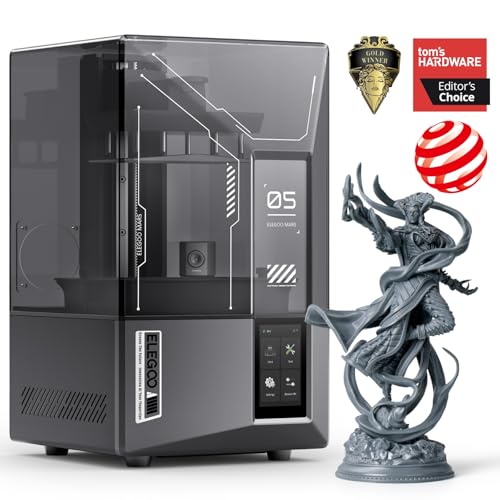
4. Elegoo Mars 5 Ultra — Best Resin Pick for Miniatures
The Mars 5 Ultra is the miniatures machine in this lineup. Its 7-inch 9K mono LCD (8520 x 4320) with 18 x 18 µm XY resolution captures faces, armor trim, and weapon detail that FDM cannot reach, and the tilt-release mechanism pushes print speed up to 150 mm/h. An AI camera watches for empty build plates and warping, the smart mechanical sensor alarms on resin shortage, residue, and leveling failure, and automatic leveling removes the paper-feeler-gauge ritual. Wi-Fi transfer on 2.4 GHz and 5 GHz plus USB covers file handling, and the 4-inch capacitive touchscreen runs the EL3D-4.0 interface with Chitubox support. The build volume of 153.36 x 77.76 x 165 mm fits a full squad of 28 mm figures in one run. A 9H tempered-glass screen protector guards the LCD from resin drips, and layer thickness runs from 0.01 to 0.2 mm. Follow the resin safety steps above: gloves, ventilation, IPA wash, and UV cure for every print.
Specs
- Type: Resin (MSLA)
- Screen: 7-in 9K mono LCD, 8520 x 4320; 18 x 18 µm XY resolution
- Light source: COB 405 nm; tilt-release up to 150 mm/h
- Build volume: 153.36 x 77.76 x 165 mm (6.04 x 3.06 x 6.49 in)
- Features: AI camera, auto-leveling, smart mechanical sensor, Wi-Fi and USB
- Display: 4-in capacitive touchscreen
- Layer thickness: 0.01 to 0.2 mm
- Weight: 19.4 lb (8.8 kg) net
- Dimensions: 10.23 x 10.55 x 17.77 in
- Power: 72W
- Model: EL-3D-M5U; first available May 27, 2024
- Sold by ELEGOO Official US
5. Anycubic Photon Mono 4 — Best Value Resin Pick
The Photon Mono 4 brings 10K resin detail to a lower tier. Its 7-inch 10K mono LCD (9024 x 5120) with 17 µm XY resolution edges out the Mars 5 Ultra on paper resolution, and the LighTurbo matrix light source spreads UV evenly across the build area. Print speed tops out at 70 mm/h, slower than the tilt-release Mars, and the 4-point one-and-done leveling keeps setup simple for a first resin machine. The build volume of 153.4 x 87 x 165 mm is slightly wider than the Mars, which helps when batching a party of miniatures or terrain scatter pieces. At 7.7 lb it is the lightest machine here and easy to move to a ventilated workspace. This is the higher-volume listing of the two Photon Mono 4 listings on Amazon; the alternate carries a different ASIN and is not the one in this guide.
Specs
- Type: Resin (MSLA)
- Screen: 7-in 10K mono LCD, 9024 x 5120; 17 µm XY resolution
- Light source: LighTurbo matrix
- Top speed: 70 mm/h
- Build volume: 153.4 x 87 x 165 mm (6.04 x 3.42 x 6.49 in)
- Vat capacity: 2.2 L
- Leveling: 4-point, one-and-done
- Weight: 7.7 lb
- Dimensions: 10 x 10 x 15 in
- Model: Mono 4; first available July 26, 2024
- Sold by ANYCUBIC Official Store; 100+ bought in past month
Comparison
For one printer covering props, terrain, and desk gear, the Bambu Lab A1 leads on build volume and speed, with the A1 Mini Combo as the compact multi-color alternative for smaller desks. The Ender-3 V3 SE trades speed and automation for a lower entry point while keeping the features that matter: direct drive, auto leveling, and a 250 mm tall build volume. For miniatures, the Mars 5 Ultra wins on speed and monitoring, while the Photon Mono 4 wins on screen resolution and portability. Gamers who print both props and miniatures should pair an FDM machine with a resin machine rather than forcing one technology to do both jobs.
FAQ
FDM or resin for tabletop miniatures?
Resin, without hesitation. A 9K or 10K mono LCD resolves facial features, armor trim, and weapon edges at 28 mm scale that no FDM nozzle can match. FDM suits the terrain, bases, and dungeon tiles those miniatures stand on, so many tabletop gamers own one of each.
Do I need an enclosure for ABS or ASA?
Yes. ABS and ASA warp on open frames and give off fumes during printing. All three FDM picks here are open-frame machines, so they are PLA and PETG machines first. Add a factory enclosure kit or a third-party tent, plus ventilation, before printing ABS or ASA.
How much space and ventilation does a resin printer need?
A resin printer needs a stable surface, room for a wash-and-cure station beside it, and a ventilated room. Uncured resin is a skin sensitizer, so wear nitrile gloves and a respirator rated for organic vapors, wash prints in isopropyl alcohol, cure them under UV light, and never pour resin or wash liquid down a drain.
Can one printer handle both props and miniatures?
One printer can do both poorly, or one job well. FDM prints miniatures with visible layer lines and soft detail, while resin build plates are too small for full-size props and resin parts are more brittle. If the budget allows two machines, pair the A1 or Ender-3 V3 SE with the Mars 5 Ultra or Photon Mono 4.
Conclusion
Start with the job, then pick the technology. The Bambu Lab A1 is the strongest single FDM pick for gaming props and terrain, the A1 Mini Combo adds multi-color printing to a compact desk, and the Ender-3 V3 SE covers the same ground on a tighter budget. For miniatures, the Mars 5 Ultra and Photon Mono 4 deliver 9K and 10K detail with the safety steps any resin workflow needs. Whichever machine you choose, confirm the listing and the included accessories before ordering.
FAQ
FDM or resin for tabletop miniatures?
Do I need an enclosure for ABS or ASA?
How much space and ventilation does a resin printer need?
Can one printer handle both props and miniatures?
More from Amazon
Programs that pair well with the guide above. Offers and eligibility are set by Amazon and may change.
Free shipping on eligible items, Prime Video and more. Eligible new members can start with a free trial.
Start a Prime free trialAd-free music streaming. Eligible new subscribers can start with a free trial.
Try Music Unlimited freeA Prime membership for ages 18-24 with a trial period. Eligibility is set by Amazon.
See Prime for Young AdultsAudiobooks and podcasts to listen to on the go. Eligible new members can start with a free trial.
Try Audible freeAs an Amazon Associate we earn from qualifying purchases.