Our Top Picks
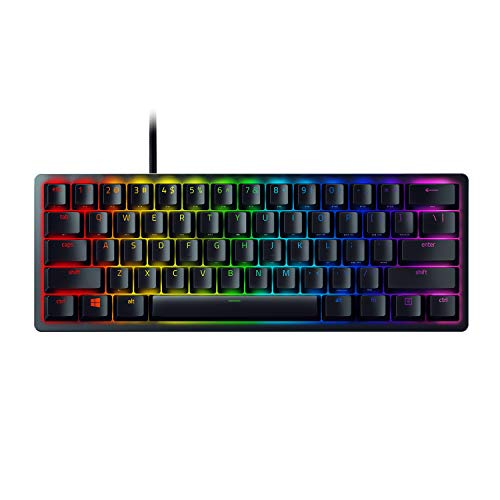 Razer Huntsman Mini 60% Gaming Keyboard11.56x 4.07 x 1.45 inches11.56 x 4.07 x 1.45 inches1.1 poundsCheck on Amazon
 SteelSeries Apex Pro Mini HyperMagnetic Gaming KeyboardPro Mini 60%4 x 11.5 x 1.6 inches1.5 poundsCheck on Amazon
 SteelSeries Apex Pro Mini Wireless KeyboardPro Mini 60%11.5 x 4 x 1.6 inches2.43 poundsCheck on Amazon
A mini gaming keyboard trades keys you rarely touch for desk space you use every match. A 60 percent board drops the number pad, the function row and the navigation cluster, leaving the letters, numbers and modifiers that carry most games. A 65 percent board adds back arrow keys and a small navigation column while staying far narrower than a full-size board. The mouse gains room to sweep, the hands sit closer together, and the whole setup travels in a bag without a second case.
The five boards in this guide all state a compact layout in the listing: 60 percent or 65 percent, with gaming switches. Two are wired, two are wireless, and one covers both wired and wireless use. Every pick uses mechanical or optical switches, per-key RGB lighting and double-shot PBT keycaps or an equivalent hard-wearing cap set. None of them is a membrane board, none is a full-size board, and none is a tenkeyless board dressed up as a mini board.
Layout alone does not decide a good mini keyboard. Switch feel, connection, keycap material, build and software all change how the board plays day to day. A linear optical switch suits fast repeated taps. A tactile switch gives a small bump that confirms each press without a loud click. A magnetic switch lets you set how far a key travels before it registers, which changes the feel of movement keys and rapid repeated presses. The guide below compares each board on the traits the listing actually states, and it says plainly where a listing stays silent.
What to look for
Layout. A 60 percent board is the smallest common gaming layout. It keeps the main typing cluster and reaches the missing keys through a function layer, so arrows, function keys and media controls live on key combinations. A 65 percent board keeps dedicated arrow keys and usually adds Home, Delete, Page Up and Page Down, which suits players who use arrows for movement or menus. If you play games that lean on function keys, a 65 percent board asks for fewer layer combinations. If you want the most mouse room, a 60 percent board wins.
Switches. Optical switches register with a beam of light instead of a metal contact, which the makers link to fast, consistent actuation. Magnetic switches, also called Hall effect switches, register by sensing a magnet in the stem, and the actuation point can move. Mechanical switches use a metal contact and a spring. Linear switches travel smoothly from top to bottom. Tactile switches add a bump partway down. Clicky switches add a bump and a sharp sound. For shared rooms and late sessions, linear and tactile switches are the quieter choices.
Connection. Wired boards draw power through a detachable USB-C cable and never need charging. Wireless boards connect over a 2.4 GHz link or Bluetooth, and the best of them also work wired through the same USB-C cable. A wireless board frees the desk from a cable, but it adds a battery to keep charged and a dongle to keep track of. Check whether the listing names a low-latency wireless mode, since a plain Bluetooth link can lag behind a dedicated 2.4 GHz link in fast games.
Keycaps and build. Double-shot PBT keycaps resist shine and wear far longer than thin ABS caps, and the legends stay crisp because the legend is a second piece of plastic rather than printed ink. An aluminum top frame or full aluminum body resists flex when you press hard during intense moments. A plastic body can still be solid, but it should not bend under normal typing force.
Software and memory. Companion software sets lighting, remaps keys and stores actuation settings. Onboard memory keeps those settings on the board itself, so the board behaves the same way on any computer you plug it into. If you move between a desktop and a laptop, onboard memory matters more than a long feature list inside one app.
Secondary functions. Mini boards hide volume, media and lighting controls on a function layer, and the legends for those functions are often printed on the side of the keycaps. Side-printed legends keep the top of the keycap clean while making the second functions easy to find. A volume roller or a dedicated media control is a bonus on a 60 percent board, since it saves a layer combination for the most-used adjustment.
Razer Huntsman Mini — Linear Optical Switches
The Razer Huntsman Mini is a wired 60 percent board with linear optical switches. The listing names Rapid Trigger mode and Snap Tap, two features aimed at fast repeated presses and quick direction changes. Rapid Trigger resets a key the moment it moves back up, so a second press registers sooner than on a switch with a fixed reset point. Snap Tap gives priority to the most recent direction key when two opposite direction keys are held, which suits strafe-heavy movement.
The board uses doubleshot PBT keycaps and an aluminum top frame, with Chroma RGB lighting across the keys. The cable is a detachable USB-C cable, and onboard memory stores up to five profiles, so the lighting and key settings travel with the board. The listing names the model number RZ03-03393200-R3U1 and the layout as 60 percent.
This is the most focused board in the guide. It has no wireless mode and no battery, so it never needs charging, and the wired link is as direct as a keyboard connection gets. The trade is desk freedom: the cable is always there, and the board stays tethered to the computer. Players who want the smallest footprint and the fastest switch behavior, and who do not mind a cable, will find the Huntsman Mini hard to fault. The listing states the switches as linear optical switches, so the feel is smooth from top to bottom with no tactile bump and no click.
Logitech G PRO X 60 LIGHTSPEED — GX Optical Tactile Switches

The Logitech G PRO X 60 LIGHTSPEED is a wireless 60 percent board built with competitive play in mind. It connects over Logitech LIGHTSPEED wireless, and it also works wired through USB-C. The switches are GX Optical Tactile switches, which give a small bump at actuation without a loud click. The keycaps are dual-shot PBT, and LIGHTSYNC RGB lighting runs across the board.
Logitech adds several touches that suit a 60 percent layout. A volume roller and media controls sit on the side of the board, so volume changes do not need a function layer combination. KEYCONTROL lets you assign functions to keys beyond the usual layout, including modifier keys. The board ships with a hard-shell carrying case, a USB-C cable and a wireless receiver, which makes it the most travel-ready pick in this guide. The listing names the model number 920-011902 and the board as a 60 percent mechanical keyboard for Windows PC.
The wireless link is the main reason to choose this board over the wired picks. LIGHTSPEED is Logitech’s low-latency wireless link, and the board also pairs over Bluetooth for use with other devices. The tactile switches suit players who want confirmation on each press without the sound of a clicky switch. The listing states the battery as a rechargeable cell charged through USB-C, and it names no battery-life figure in the excerpts checked, so buyers who play long wireless sessions should confirm the battery figure on the listing before ordering.
SteelSeries Apex Pro Mini — OmniPoint 2.0 Switches
The SteelSeries Apex Pro Mini is a wired 60 percent board with OmniPoint 2.0 HyperMagnetic switches. The switches are magnetic, and the actuation point adjusts from 0.1 to 4.0 mm, so each key can register with a feather-light touch or a deeper press. That range covers both hair-trigger movement keys and firmer keys for typing between matches. The listing names the layout as a compact 60 percent form factor, with RGB lighting, PBT keycaps and a USB-C connection. The model number is 64820.
Adjustable actuation is the defining trait here. A shallow actuation point makes repeated presses fast, while a deeper point guards against accidental presses on keys you rest your fingers on. The board also supports Rapid Trigger-style behavior through its software, letting a key re-register as soon as it moves back up. The aluminum frame keeps the board rigid, and the doubleshot PBT keycaps resist wear.
This wired version is the lower-cost way into the Apex Pro Mini line, and it shares the same switches and layout as the wireless version in this guide. The trade is the cable: it is a wired-only board, so it stays plugged in. Players who want adjustable actuation and do not need wireless will get the same switch behavior here as on the wireless model. The listing states the switches as HyperMagnetic, which is SteelSeries’ name for its magnetic switch design.
HyperX Alloy Origins 65 — Aqua Tactile Switches

The HyperX Alloy Origins 65 is a wired 65 percent board with HyperX Aqua tactile switches. The 65 percent layout keeps dedicated arrow keys and a small navigation column, so it asks for fewer function-layer combinations than a 60 percent board. The keycaps are double-shot PBT, the body is aluminum, and RGB LED backlighting runs through the NGENUITY software. The listing names the model number 56R64AA#ABA and the layout as a compact 65 percent form factor.
The Aqua switches are tactile, with a bump that confirms each press without a click. That feel suits players who type a lot between games as well as players who want feedback during play. The aluminum body is a full metal chassis rather than a plastic shell with a metal plate, so the board feels solid and resists flex. The board is wired only, with a detachable USB-C cable, and the listing names no wireless mode.
This is the best pick in the guide for players who want arrow keys without moving to a tenkeyless board. The extra column costs a little desk space compared with a 60 percent board, but it removes the most common function-layer reach on a mini board. The listing states the switches as tactile Aqua switches, and it names the keycaps as double-shot PBT. Buyers should note that the Red linear version of this board is a separate listing under a different ASIN, so confirm the Aqua tactile model on the listing before ordering.
SteelSeries Apex Pro Mini Wireless — OmniPoint 2.0 Switches
The SteelSeries Apex Pro Mini Wireless is the wireless version of the Apex Pro Mini, with the same 60 percent layout and the same OmniPoint 2.0 HyperMagnetic switches. It connects over Quantum 2.0 Wireless, which covers a 2.4 GHz link and Bluetooth 5.0, and it also works wired through USB-C. The keycaps are double-shot PBT, the lighting is RGB, and the secondary functions are printed on the side of the keycaps so the top legends stay clean. The listing names the model number 64842.
The wireless version keeps the adjustable actuation range of the wired model, from 0.1 to 4.0 mm, so the switch behavior is the same across both boards. The difference is freedom: the wireless link removes the cable, and Bluetooth lets the board pair with more than one device. The listing states the board as a 60 percent design with a detachable magnetic wrist rest in some summaries, though the wrist rest is not named in every listing copy, so buyers who want it should confirm it on the listing.
Two Apex Pro Mini boards appear in this guide, and that is deliberate: the wired and wireless versions are the same keyboard in two connection forms, and the choice between them is entirely about cable versus wireless. The wireless model costs more than the wired model for the same switches and layout, and it adds a battery to keep charged. The listing names no battery-life figure in the excerpts checked, so confirm the battery figure on the listing if long wireless sessions matter to you.
Comparison
| Keyboard | Layout | Switches | Connection | Keycaps |
|---|---|---|---|---|
| Razer Huntsman Mini | 60 percent | Linear optical | Wired USB-C | Doubleshot PBT |
| Logitech G PRO X 60 LIGHTSPEED | 60 percent | GX Optical Tactile | LIGHTSPEED wireless, Bluetooth, wired USB-C | Dual-shot PBT |
| SteelSeries Apex Pro Mini | 60 percent | OmniPoint 2.0 magnetic | Wired USB-C | Double-shot PBT |
| HyperX Alloy Origins 65 | 65 percent | HyperX Aqua tactile | Wired USB-C | Double-shot PBT |
| SteelSeries Apex Pro Mini Wireless | 60 percent | OmniPoint 2.0 magnetic | 2.4 GHz wireless, Bluetooth 5.0, wired USB-C | Double-shot PBT |
Frequently asked questions
Do mini keyboards work for every game genre?
A mini keyboard covers the keys most games use: letters, numbers, modifiers and the spacebar. Shooters, battle royales and MOBAs map well to a 60 percent or 65 percent layout, since movement and abilities sit on the main cluster. Games that lean on function keys, the number pad or a large set of hotkeys need more layer combinations, and a 65 percent board eases that with its arrow keys and navigation column. Strategy games with long hotkey lists are the hardest fit, and players who live in those games may prefer a larger board. For most genres, the missing keys are a small adjustment, not a barrier.
What is the difference between 60 percent and 65 percent layouts?
A 60 percent board keeps only the main typing cluster and reaches everything else through a function layer. A 65 percent board adds dedicated arrow keys and a small navigation column, usually with Delete, Home, Page Up and Page Down. The 65 percent board is wider by one column, so it takes a little more desk space, but it removes the most common layer reaches. If you use arrow keys for movement, menus or text editing, the 65 percent layout is the easier daily choice. If you want the most mouse room and you rarely touch the arrows, the 60 percent layout is the smaller and cleaner option.
Wired or wireless for a mini gaming keyboard?
A wired board never needs charging and the connection is as direct as it gets, which suits a fixed desk setup. A wireless board removes the cable and travels better, but it adds a battery to keep charged and a dongle to keep track of. The wireless boards in this guide use low-latency 2.4 GHz links rather than plain Bluetooth for gaming, and both also work wired through USB-C, so they cover both uses. If the board stays on one desk, wired is the simpler choice. If the board moves between a desktop, a laptop and a bag, wireless is worth the extra care.
How to choose
Begin with layout. Choose 60 percent if you want the smallest footprint and the most mouse room, and choose 65 percent if you want dedicated arrow keys without a larger board. Then choose switches. Linear optical switches suit fast repeated presses with no bump. Tactile switches suit players who want a small bump to confirm each press. Magnetic switches suit players who want to set the actuation point per key and change it between games.
Then choose connection. A wired board is the simplest fixed-desk choice. A wireless board suits travel and shared desks, and the Logitech and SteelSeries wireless picks in this guide also work wired, so they lose nothing on a desk. Check the keycaps and the frame last: double-shot PBT keycaps and an aluminum frame or top plate hold up longer than thin ABS caps and a flexing plastic shell. Confirm the exact model and switch type on the listing before ordering, since several of these boards sell in more than one switch version under separate listings, and the switch type changes the feel more than any other trait.
Disclosure: As an Amazon Associate, we may earn a commission from qualifying purchases made through links in this article, at no additional cost to you.
FAQ
Do mini keyboards work for every game genre?
What is the difference between 60 percent and 65 percent layouts?
Wired or wireless for a mini gaming keyboard?
More from Amazon
Programs that pair well with the guide above. Offers and eligibility are set by Amazon and may change.
Free shipping on eligible items, Prime Video and more. Eligible new members can start with a free trial.
Start a Prime free trialAd-free music streaming. Eligible new subscribers can start with a free trial.
Try Music Unlimited freeA Prime membership for ages 18-24 with a trial period. Eligibility is set by Amazon.
See Prime for Young AdultsAudiobooks and podcasts to listen to on the go. Eligible new members can start with a free trial.
Try Audible freeAs an Amazon Associate we earn from qualifying purchases.