4 Best 60fps Webcams Under 50 to Buy (November 2026)
The best 60fps webcams under 50 keep motion smooth on calls and streams for work and play. Compare four webcams with autofocus, privacy covers and microphones.
A 60fps webcam changes how you look on camera because motion stays smooth instead of choppy. Hand gestures, head turns and gameplay reactions all read clearly at 60 frames per second, while a 30fps camera smears fast movement into a blur. The catch is that many webcams in this budget class only reach 60fps at 720p, not at full 1080p, so the real decision is which trade-off suits your calls and streams. A camera that matches your room, your light and your software will serve you far longer than one chosen on frame rate alone.
This guide is for streamers who want smooth motion on a tight budget, remote workers who spend their day on video calls, and creators who record reaction videos and tutorials. It explains how to read frame-rate claims, what autofocus and lighting add, and it picks four webcams from names and specifications listed on their Amazon pages.
Quick Picks
As an Amazon Associate we earn from qualifying purchases.
Product
Best for
Key spec from title
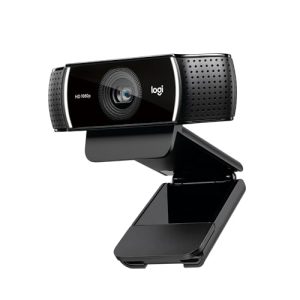
Logitech C922x
Streaming and video calls
1080p at 30fps or 720p at 60fps
Razer Kiyo
Streams in dim rooms
Built-in adjustable ring light
EMEET C960 AF
Sharp autofocus on a budget
1080p at 60fps with autofocus
NexiGo N660P
Calls with clear voice pickup
Dual microphones and privacy cover
How to Choose
Read the frame-rate claim carefully
A webcam that says 60fps may only reach that rate at 720p, dropping to 30fps at 1080p, so read the specification line by line. The listing should state the resolution and frame rate together, such as 1080p at 30fps or 720p at 60fps, and that pairing tells you what you actually get. A camera that states its modes plainly is easier to trust than one that hides them in fine print. If a listing only says 60fps without naming a resolution, treat the claim with care and look for the detailed specification table. The smoothest choice is a camera that holds 60fps at the resolution you plan to use.
Check autofocus and field of view
Autofocus keeps your face sharp when you lean in or move back from the desk, while a fixed-focus camera goes soft the moment you shift position. A field of view around 70 to 80 degrees frames one person neatly without pulling in the whole room, while a wider angle suits a two-person setup. Check whether the camera lists autofocus and its field of view, then think about how much of your room you want on screen. A camera that frames you well needs less cropping later. A camera with a wider angle also suits a guest joining you on screen without a second camera.
Look at lighting and low-light handling
Webcams struggle most in dim rooms, and the right feature makes a visible difference. A built-in ring light, like the one on the Razer Kiyo, lifts your face without a separate lamp, while automatic light correction brightens a dark frame in software. If your desk sits away from a window, favour a camera with one of these features rather than a bare lens. Test the camera in your actual room light before an important call, because a bright product photo tells you nothing about a dark corner. A camera with good low-light handling also keeps colours natural instead of washing them out.
Weigh microphones and privacy features
The microphone decides whether people hear you clearly, and a dual-microphone camera with noise filtering beats a single basic mic on most calls. A built-in privacy cover is just as practical: it blocks the lens when the camera is idle, so you never wonder whether you are on screen. Check the listing for microphone count, noise filtering and a privacy shutter, and pick the combination that fits how you work. A good mic saves you buying a separate one later. A privacy shutter also saves you from taping over the lens between meetings.
The 4 Best Options
Logitech C922x HD Pro
Top Pick
Logitech C922x HD Pro
Best for: Everyday streaming and video calls where reliability matters.
The Logitech C922x is the safe pick for anyone who streams or takes calls every day. It records 1080p at 30fps for sharp still frames and switches to 720p at 60fps when motion matters, so you choose smooth movement or extra detail as the moment demands. HD Light Correction brightens dim rooms, autofocus keeps your face sharp as you move, and the camera works with Teams, Google Meet and Zoom without extra setup. It is the most proven shape in this class, and it simply works. The folding clip mounts on a monitor or a laptop lid, and the tripod thread suits a desk stand.
Razer Kiyo Streaming Webcam
Runner-Up
Razer Kiyo Streaming Webcam
Best for: Streamers who record in dim rooms and need face lighting.
The Razer Kiyo is the pick for streamers who record in dim rooms. Its built-in adjustable ring light throws even light onto your face, which removes the harsh shadows a ceiling light leaves behind, and the brightness adjusts to suit the room. The camera records 1080p at 30fps or 720p at 60fps, with autofocus that tracks you as you lean toward the screen. A built-in microphone handles voice pickup, and the camera works with Windows and Mac. For a dark gaming corner, the ring light is the feature that shows up on screen. The ring light runs off the same USB cable.
EMEET C960 AF Webcam
EMEET C960 AF Webcam
Best for: Smooth 1080p 60fps video with reliable autofocus.
The EMEET C960 AF is the sharpest autofocus pick in this class. It delivers 1080p video at 60fps with autofocus that locks onto your face and holds it as you move, which is rare at this tier. The 73-degree view angle frames one person neatly without pulling in the whole room, and a privacy cover slides over the lens when you are done. The built-in microphone covers calls without extra gear, and the USB plug-and-play design needs no software install. For smooth, sharp video on a tight budget, it is hard to beat. The autofocus tracks small movements, so you stay sharp as you shift.
NexiGo N660P 1080P 60FPS Webcam
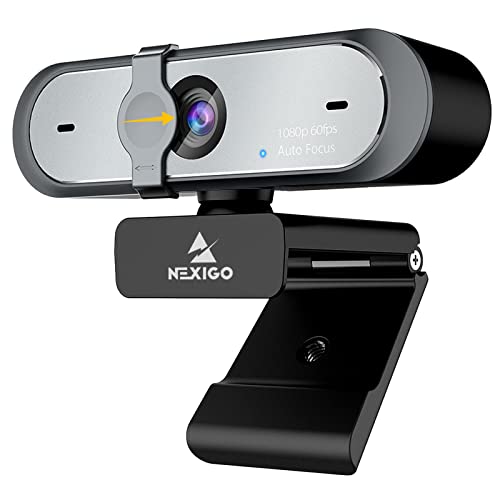
NexiGo N660P 1080P 60FPS Webcam
Best for: Daily video calls where voice clarity matters as much as video.
The NexiGo N660P suits callers who care about being heard as well as seen. It records 1080p at 60fps with autofocus, so motion stays smooth and your face stays sharp through a long meeting. Dual microphones pick up your voice clearly, and the included privacy cover blocks the lens between calls. Software control lets you adjust the picture to suit your room, and the USB connection works with OBS, Zoom, Skype, FaceTime, Teams and Twitch. It is the most complete package here for daily calls. The software lets you fine-tune brightness and framing for each room you use.
Which One Fits Your Situation
You stream games and want smooth motion
Choose the EMEET C960 AF when your stream needs smooth motion above all. Its 1080p at 60fps keeps gameplay reactions and hand gestures fluid, and the autofocus holds your face sharp as you lean into the action. The privacy cover gives you a quick way to go dark between segments, and the plug-and-play design means you are live minutes after unboxing. The 60fps picture also makes fast hand movements read clearly.
You take video calls all day for work
Pick the NexiGo N660P for a workday full of calls. Its dual microphones keep your voice clear through long meetings, and the 1080p 60fps picture stays smooth when you gesture or share your screen. The privacy cover is a small feature that matters every day, since it tells you at a glance that the lens is blocked between calls. The dual microphones also cut background noise from a busy household.
You record in a dim room
Go with the Razer Kiyo when your desk sits in a dark corner. The adjustable ring light is the only feature here that adds light instead of just coping with darkness, and it flatters your face in a way software correction cannot match. The 720p 60fps mode keeps motion smooth, and the autofocus tracks you as you move around the desk. The light also removes the grain that dark rooms add to video.
You want the most proven all-rounder
Take the Logitech C922x if you want the camera with the longest track record in this class. It works with every major meeting app, its light correction handles mixed room light well, and the choice between 1080p detail and 720p smoothness covers most situations. It is the pick when you would rather have a known quantity than a newer name. Its broad app support also means fewer surprises when you switch software.
Common Mistakes
Assuming 60fps applies at 1080p when the listing only promises it at 720p, which is the most common trap in this class.
Buying a fixed-focus camera and then sitting at a different distance every call.
Ignoring the microphone and discovering too late that callers cannot hear you clearly.
Placing the camera in a dark corner without a light or correction feature to help it.
Forgetting the privacy cover and leaving the lens open between calls.
Frequently Asked Questions
Is 60fps better than 1080p for a webcam?
It depends on what you do on camera. 60fps keeps motion smooth, which suits streaming and gesturing, while 1080p at 30fps gives a sharper image for talking-head calls. Most webcams in this class make you choose, since 60fps usually arrives at 720p. Pick smooth motion for streams and sharper detail for seated meetings.
Do I need a ring light for streaming?
Not always, but it helps a lot in a dim room. A ring light evens out the light on your face and removes ceiling-light shadows, which makes you look clearer on stream. If your desk faces a window or you own a lamp, you may not need one. In a dark corner, a built-in ring light is the simplest fix.
Does autofocus matter on a budget webcam?
Yes, because it keeps your face sharp when you move. A fixed-focus camera is set for one distance, so leaning in or back takes you out of focus. Autofocus adjusts as you move, which matters on long streams and calls. If you sit still at a fixed distance, fixed focus is fine, but most people move more than they think.
Can I use a 60fps webcam with Zoom and Teams?
Yes, these cameras work with Zoom, Teams, Google Meet, Skype and OBS through a standard USB connection. The meeting app may cap the frame rate or resolution depending on your connection and settings, so the camera’s top mode is a ceiling rather than a promise. Check the app’s video settings after plugging in to confirm the mode you actually get.
R
Razer Gaming Series Editorial Team
We compare specs, materials and verified owner reviews before a product earns a spot. Rankings are never paid.
FAQ
Is 60fps better than 1080p for a webcam?
It depends on what you do on camera. 60fps keeps motion smooth, which suits streaming and gesturing, while 1080p at 30fps gives a sharper image for talking-head calls. Most webcams in this class make you choose, since 60fps usually arrives at 720p. Pick smooth motion for streams and sharper detail for seated meetings.
Do I need a ring light for streaming?
Not always, but it helps a lot in a dim room. A ring light evens out the light on your face and removes ceiling-light shadows, which makes you look clearer on stream. If your desk faces a window or you own a lamp, you may not need one. In a dark corner, a built-in ring light is the simplest fix.
Does autofocus matter on a budget webcam?
Yes, because it keeps your face sharp when you move. A fixed-focus camera is set for one distance, so leaning in or back takes you out of focus. Autofocus adjusts as you move, which matters on long streams and calls. If you sit still at a fixed distance, fixed focus is fine, but most people move more than they think.
Can I use a 60fps webcam with Zoom and Teams?
Yes, these cameras work with Zoom, Teams, Google Meet, Skype and OBS through a standard USB connection. The meeting app may cap the frame rate or resolution depending on your connection and settings, so the camera’s top mode is a ceiling rather than a promise. Check the app’s video settings after plugging in to confirm the mode you actually get.
Affiliate disclosure. As an Amazon Associate we earn from qualifying purchases at no extra cost to you. Prices accurate as of the date shown.
Our guide to best asian live webcams explains how to pick live webcam platforms safely: privacy, payment safety, moderation, regional rules and age checks.
Learn how to judge webcam forum platforms safely with this guide to best anal webcams extreme forums, covering privacy, moderation, scams and age rules.
Four arranger keyboards compared on key count, voices and styles, recording features and speakers, using only the details printed on their Amazon listings.
Compare gaming chairs with real cooling features, from built-in fans and ventilated seats to cooling gel cushions, and learn how to choose the right type.
The best chairs for gaming tables fit your desk height, support long sessions and roll smoothly. Compare four chairs built for gaming setups and long play.
Compare the best gaming chairs under 120 for long sessions: four budget-class chairs with footrests, reclining backs, lumbar support and sturdy frames.
The best animal webcams are indoor pet cameras with a phone app and two-way talk. Compare rotating treat cameras and pan-tilt monitors from Furbo and Petcube.
Palm, claw and fingertip grips explained: how to find your natural mouse grip, match it to hand and shell size, and what switching grips costs your aim.


 NexiGo N660P 1080P 60FPS Webcam