Key takeaways
- Shopping for a black gaming mouse? Learn how shape, sensor, weight and matte finish decide comfort and aim, so your next mouse fits your hand and your games.
As an Amazon Associate we earn from qualifying purchases.
Colour catches the eye, but it should never make the decision for you. A black gaming mouse still has to track cleanly on every flick, feel right under your hand after three hours, and hold up when the coating meets daily use. The choice that matters is shape against grip, weight against control, and sensor against the games you play most. Sort those three out first, and black becomes a finish you enjoy rather than a compromise you accept.
This guide is for players building a dark desk setup, first-person shooter fans who want a mouse that disappears into the hand, and anyone replacing a worn-out mouse with something that looks tidy and plays well. It explains how to weigh shape, sensor, weight and finish, so you can pick a black mouse that fits your hand and your games instead of buying on looks alone.
How to Choose
A good black gaming mouse is chosen the same way as any good gaming mouse, with the finish treated as a tiebreaker rather than the headline. The four points below cover the decisions that change how a mouse feels in play, and they apply whether you spend your evenings in shooters, strategy games, or a mix of everything. Colour is the only thing all black mice share, and it tells you nothing about the shape under your palm or the sensor tracking your flicks. That is why the order below matters: shape first, then sensor, then weight, then finish. Work through the four points in that order and you will end up with a shortlist of mice that fit your hand and your games, with black as the final filter rather than the starting point.
Shape Comes Before Colour
Start with the shape, because no sensor can fix a mouse that fights your hand. Palm grip players need length and a high back to rest on, claw grip players want a shorter body with a hump, and fingertip players need something light that pivots freely. Measure your hand from wrist to middle fingertip, then compare it with the length and width listed for each model. A mouse that is too long forces your wrist into an awkward angle, while one that is too narrow leaves your ring finger dragging on the pad. Symmetrical shells suit both hands and most grip styles, while ergonomic shells favour right-handed players who keep their hand on the mouse.
Sensor, DPI and Polling Rate
The sensor decides whether the cursor goes exactly where your hand tells it to. Modern optical sensors track reliably across a wide range of sensitivity settings, so the headline DPI number matters far less than clean tracking at the sensitivity you actually use. Set the mouse to a sensitivity that lets you turn comfortably without lifting constantly, then check that small movements stay smooth and that fast flicks do not spin out. A higher polling rate sends position updates to the computer more often, which suits fast shooters, while slower games will not show any difference. Treat the sensor as a baseline to clear, not a contest to win.
Weight and Balance
Weight changes how a mouse feels more than any other number on the box. A light mouse starts and stops with less effort, which helps in shooters where flick shots and quick corrections decide fights. A heavier mouse can feel steadier for slow, precise aiming and for players who rest their whole hand on the shell. Balance matters as much as the total: a mouse that is heavy at the back drags differently from one that is heavy at the front, and a wireless model carries its battery weight in a spot. If you can, hold the shape before buying, and pay attention to whether the weight sits under your palm or pulls toward your fingertips.
Finish, Coating and Everyday Wear
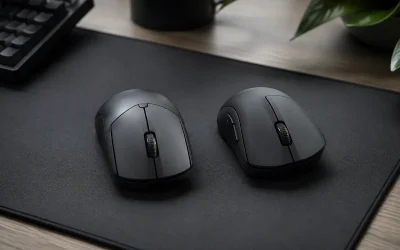
Black finishes are not all the same, and the differences show up after weeks of use rather than on day one. A matte coating resists fingerprints and hides dust, while a glossy shell looks sharp out of the box and turns into a fingerprint record within a session. Rubberised side grips add control when your hands get warm, but they can wear smooth or peel on cheaper models. Check the switch design and the feet as well: crisp buttons that do not wobble, and smooth feet that glide without scratching the pad. A mouse that still looks and feels good after months of daily play is worth more than one that only photographs well.
Which One Fits Your Situation
The right black gaming mouse depends on how you play, how long you play, and what else shares your desk. Match the situation below to your own routine, and let that narrow the field before you compare individual models. Two players can buy the same mouse and have completely different experiences, because one plays fast shooters at low sensitivity and the other works all day before gaming at night. The situations below cover the most common routines, and each one names the qualities to prioritise. Find the one closest to your own day, then use it as the lens for every model you consider.
Competitive Shooters on a Low Sensitivity
Pick a light mouse with a safe, neutral shape and a high polling rate, then pair it with a pad so your arm has room to sweep. Low sensitivity aiming uses the whole forearm, so the mouse must start moving easily and stop where you expect. A matte black finish helps here because it stays grippy when your palm warms up during long matches, and a symmetrical shell keeps flicks consistent in both directions.
Long Workdays That Turn Into Evening Games
Choose a comfortable ergonomic shape with a restful hump and buttons that do not demand a hard press. You will hold this mouse for eight hours or more, so a shape that supports your palm matters more than shaving off a few grams. A wireless model keeps the desk tidy between work calls and evening sessions, and a black finish blends in during video calls without drawing attention to itself.
A Small Desk or a Laptop Setup
Go compact and light, and favour a mouse that works well on the smaller pad that fits beside a laptop. Short bodies suit claw and fingertip grips, and a wireless connection removes the cable that would otherwise drag across a crowded surface. Black is a practical choice here too, since a small mouse in a dark finish looks deliberate next to a laptop rather than like a spare part.
An All-Black Desk Where Looks Matter
Choose a matte black mouse with restrained lighting and a shape you already know fits your hand. The finish should match the keyboard and headset without turning the desk into a mirror for every fingerprint. Keep the lighting subtle or switched off, and spend the money on the shape and sensor rather than on glow effects you will stop noticing after the first week.
Common Mistakes
A black mouse is easy to buy badly, because the colour makes every model look similar at a glance. The mistakes below are the ones that lead to returns, sore wrists, and mice that gather dust in a drawer, so it is worth reading them before you commit. Most of these mistakes come from shopping by appearance or by a single number on the box, and each one is easy to make when every black mouse looks alike in a product photo. A few minutes of thought before ordering saves the hassle of a return, and it saves your wrist from weeks with a shape that never quite fit.
- Buying on colour alone. A black shell says nothing about the shape, the sensor, or the switches inside. Decide the grip style and the games first, then filter the shortlist by colour, not the other way around. Colour should be the last filter you apply, after shape, sensor and weight have already narrowed the field.
- Chasing the biggest DPI number. Sensitivity far above what you use adds nothing to accuracy, and it can make fine aiming harder. Pick a comfortable sensitivity and judge the mouse on how cleanly it tracks there. Test it at the sensitivity you will actually use, and look for smooth tracking there rather than the size of the number on the box.
- Ignoring your grip style. A mouse built for a full palm grip will feel clumsy in a claw grip, and a tiny fingertip mouse will cramp a large hand. Match the length and hump to your hand before you look at anything else. Your hand size and the way you naturally hold a mouse will not change to suit a new purchase, so the mouse has to meet your hand where it is.
- Picking a weight you have never tried. Very light mice feel twitchy to players used to heavier shells, and heavy mice tire the wrist during long shooter sessions. If you cannot try one in person, stay near the middle of the weight range. A short session in a shop tells you little about how a mouse feels in hour three, so treat a middle weight as the safe starting point.
- Forgetting the surface it will run on. A glossy black mouse on a worn pad, or a mouse with rough feet on a hard desk, will feel worse than a cheaper mouse on a clean, even surface. Budget for a decent pad and check the feet when the mouse arrives. A clean pad and smooth feet make even a modest mouse feel precise, while a rough surface undermines the best sensor you can buy.
Frequently Asked Questions
These are the questions players ask most often when they start comparing black gaming mice, answered plainly so you can move from reading to deciding. If a question below matches something you have already wondered about, read the answer before you shortlist anything, because it may change which features you treat as essential. Anything still unclear after that is best settled by checking the shape and size against your own hand.
Does a black gaming mouse show wear faster than other colours?
It depends on the finish rather than the colour itself. Matte black hides fingerprints and dust well, but a worn matte coating can turn shiny where your palm rests. Glossy black shows smudges quickly and scratches stand out more. A good coating and regular cleaning matter more than the shade you pick.
Is a black mouse better for first-person shooters?
No, the colour has no effect on aim. What helps in shooters is a light body, a reliable sensor, and a shape that suits your grip, and those qualities exist in every colour. Choose black because it suits your desk, and choose the shape and sensor because they suit your shooting.
Should I pick a wired or a wireless black gaming mouse?
Both work well now, so the choice comes down to your desk and your habits. Wireless keeps the surface clear and suits players who move the mouse widely, while wired removes charging from your routine entirely. If you go wireless, check the battery routine and whether the mouse works while it charges.
How do I keep a matte black gaming mouse clean?
Wipe it with a dry or slightly damp cloth once a week, and avoid harsh cleaners that can strip the coating. Pay attention to the gaps around the buttons and the scroll wheel, where dust collects first. Clean hands and a clean pad do more for the finish than any special product.
FAQ
Does a black gaming mouse show wear faster than other colours?
Is a black mouse better for first-person shooters?
Should I pick a wired or a wireless black gaming mouse?
How do I keep a matte black gaming mouse clean?
More from Amazon
Programs that pair well with the guide above. Offers and eligibility are set by Amazon and may change.
Free shipping on eligible items, Prime Video and more. Eligible new members can start with a free trial.
Start a Prime free trialAd-free music streaming. Eligible new subscribers can start with a free trial.
Try Music Unlimited freeA Prime membership for ages 18-24 with a trial period. Eligibility is set by Amazon.
See Prime for Young AdultsAudiobooks and podcasts to listen to on the go. Eligible new members can start with a free trial.
Try Audible freeAs an Amazon Associate we earn from qualifying purchases.