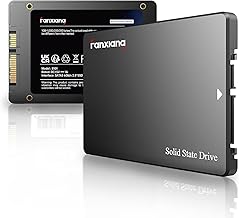
Our Top Picks
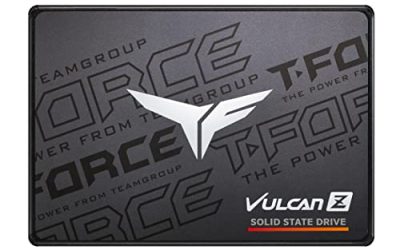
 Verbatim Pocket 512GB External SSD USB 3.2 Gen512GB3.78 x 0.39 x 1.78 inches0.13 poundsCheck on Amazon
The best external SSDs under $100 in 2026 are the Crucial X9 for value, Samsung T7 Shield for durability, Kingston XS1000 for pocketability, and Samsung T7 for balanced PC-and-console use.
Quick comparison: the best external SSDs under $100
| SSD | Typical capacity under $100 | Advertised interface | Real-world large-file transfer | Best for |
|---|---|---|---|---|
| Crucial X9 | 1TB, sometimes 2TB on sale | USB 3.2 Gen 2, 10Gbps | About 800–1,000MB/s | Maximum capacity per dollar |
| Samsung T7 | 1TB | USB 3.2 Gen 2, 10Gbps | About 750–950MB/s | General PC, Mac, and console storage |
| Samsung T7 Shield | 1TB | USB 3.2 Gen 2, 10Gbps | About 750–950MB/s | Travel and rough handling |
| Kingston XS1000 | 1TB | USB 3.2 Gen 2, 10Gbps | About 700–950MB/s | Smallest practical setup |
| Crucial X10 Pro | 1TB during occasional discounts | USB 3.2 Gen 2×2, 20Gbps | About 1,500–2,000MB/s on compatible PCs | Fast USB-C desktops and laptops |
A 2TB drive under $100 is possible for the Crucial X9 or similar USB 3.2 Gen 2 models, but it is not consistently available at that price. The figures above describe sustained file transfers in favorable conditions, not the speed of every workload.

SANDISK 1TB Extreme Portable SSD, Up to 2000MB/s Transfer Speeds-New Model | External Solid State Drive, IP65 Water & Dust Resistant, Up to 3M Drop Protection, 256-bit AES Encryption, USB-C 3.2 Gen 2
Chosen because it specifies Up to 2000MB/s Transfer Speeds-New Model and External Solid State Drive.
View on AmazonVerbatim Pocket 512GB External SSD USB 3.2 Gen 2 Up to 1000MB/s | Portable Solid State Drive with Convenient Keyring and Cable Holder, Compatible with PC, Mac, PS5, Xbox, iPhone
Chosen because it specifies Compatible with PC and Mac.
View on AmazonOur picks by buyer type
Crucial X9: best capacity per dollar
The Crucial X9 is the sensible default when the goal is to store a large PC game library, photographs, video projects, or console games without spending more than necessary. Its USB 3.2 Gen 2 connection is fast enough to approach 1,000MB/s, while its compact design avoids the cost of a more elaborate rugged enclosure.
Choose the X9 when it will live on a desk or travel in a padded bag. It is not the strongest option for rain, drops, or frequent outdoor use. Like most portable SSDs, it can also slow after a long write once its cache is exhausted, particularly when copying hundreds of gigabytes in one session.
Samsung T7 Shield: best for durability
The T7 Shield adds a rubberized exterior and IP65 dust and water resistance to the familiar T7 platform. That makes it a better choice for photographers, students, and gamers who carry a drive daily. IP65 does not mean submersible: it protects against dust and water jets, not prolonged immersion.
Its performance is similar to the regular T7 because both use a 10Gbps USB connection. You are paying for physical protection rather than a higher transfer ceiling. It supports password-protected hardware encryption through Samsung’s software, although the protected mode may require the relevant application on a computer.
Samsung T7: best balanced option
The standard T7 remains a strong all-purpose choice. It is slim, widely compatible, and fast enough that upgrading from a hard disk feels immediate. The included USB-C-to-C and USB-C-to-A cables are useful for older desktop PCs, newer laptops, and many consoles.
For a drive that mostly stays beside a computer, the T7 usually offers a better value than the Shield. For a drive that spends its life in a backpack, the Shield’s protection is worth the difference if the prices are close.
Kingston XS1000: best compact drive
The XS1000 is unusually small and light, making it convenient for laptops with limited desk space or for carrying a game library between locations. Its 10Gbps interface delivers broadly similar performance to the T7 and X9 when connected to the same USB port.
Its small enclosure leaves less surface area for heat dissipation. It is still suitable for normal game loading and document transfers, but sustained writes can cause its speed to fall sooner than on a physically larger drive. That trade-off matters more for video editors than for gamers.
Crucial X10 Pro: best only with the right USB port
The X10 Pro can approach 2,000MB/s through USB 3.2 Gen 2×2, twice the theoretical bandwidth of ordinary 10Gbps USB. It is appealing for moving large video files or editing directly from the drive, but the benefit disappears when connected to a 5Gbps or 10Gbps port.
Before choosing it, check the computer’s specifications for “USB 3.2 Gen 2×2” or “20Gbps.” A USB-C connector alone proves nothing: USB-C describes the shape, not the speed. Many laptops and nearly all game consoles will operate it at a lower rate.
Real-world speed: what the numbers mean
USB standards have substantial protocol overhead, and SSD controllers need time to manage flash memory. A 10Gbps link has a theoretical ceiling of about 1,250MB/s, but a practical large-file result around 800–1,000MB/s is normal. A 20Gbps link can theoretically reach about 2,500MB/s, while roughly 1,500–2,000MB/s is a more realistic sustained range.
Small files are much slower because each file creates additional filesystem and command overhead. A drive that copies one large 100GB video at 900MB/s may manage only a fraction of that speed with thousands of tiny files. Game installation performance also depends on decompression, CPU activity, and the launcher—not just the SSD.
For perspective, transferring 100GB at 900MB/s takes a theoretical 114 seconds:
100,000MB ÷ 900MB/s = 111 seconds, before overhead, verification, and source-drive limitations.
In practice, allow roughly two to three minutes from a fast internal SSD. From a hard disk or congested network share, the source may become the bottleneck.
PC and console compatibility
| Situation | Recommended class | What to check |
|---|---|---|
| Windows laptop with USB 3.2 Gen 2 | Crucial X9, Samsung T7, T7 Shield, or XS1000 | Use a 10Gbps-rated cable and port |
| Desktop with USB 3.2 Gen 2×2 | Crucial X10 Pro | Confirm the port supports 20Gbps, not only USB-C |
| Mac with USB-C | Any 10Gbps model; X10 Pro if the Mac supports its speed | Reformat for the intended workflow |
| PlayStation 5 | Any compatible USB 3.0-or-faster SSD, preferably 1TB | PS5 games can be stored but must run from internal or approved expansion storage |
| Xbox Series X|S | USB 3.0-or-faster SSD for backward-compatible games | Optimized Series games generally require the internal drive or expansion card to play |
| Steam Deck or handheld PC | Compact 10Gbps SSD such as the XS1000 | Check cable clearance, power behavior, and filesystem support |
For Windows and Xbox, exFAT is convenient when the drive must move between systems, but it may not be ideal for every game-library workflow. NTFS is a natural Windows choice. macOS users commonly choose APFS for Mac-only use. Reformatting erases the drive, so copy data elsewhere first.
Thermal behavior and durability
Portable SSDs are silent because they have no fan, but they still produce heat. During a long write, the controller may reduce speed to protect itself. Expect the greatest heat from 20Gbps drives, compact enclosures, and workloads that continuously write more than 100GB.
- Keep the drive in open air rather than under a laptop or blanket.
- Do not place it against a warm console exhaust or desktop power supply.
- Use the supplied short cable where possible to reduce accidental strain.
- Leave at least 10–15% free space; nearly full SSDs often have less room for background management.
For occasional game loading, thermal throttling is rarely a problem. For editing directly from the drive, repeated backups, or large media archives, choose a larger enclosure such as the T7 Shield and expect pauses between batches if performance drops.
Encryption and security
If the drive will contain tax documents, client files, or personal photographs, consider hardware-encrypted models such as the Samsung T7 family, or use operating-system encryption. A password-protected portable SSD is only useful if the password is stored safely; losing it can make the data unrecoverable.
Encryption can also affect convenience. A drive protected through vendor software may need that software to unlock on a new computer, while operating-system encryption may be less portable between platforms. For a console game drive, avoid enabling a security feature that the console cannot unlock.
How to choose in 30 seconds
- Need the most storage: choose the Crucial X9, especially when a 2TB version falls near $100.
- Carry it outdoors or commute daily: choose the Samsung T7 Shield.
- Want a dependable all-rounder: choose the Samsung T7.
- Need the smallest drive: choose the Kingston XS1000.
- Have a verified 20Gbps USB port and move huge files: choose the Crucial X10 Pro.
For most buyers, a 1TB USB 3.2 Gen 2 SSD is the best balance under $100. It provides near-gigabit-per-second transfers, works with a broad range of PCs and consoles, and avoids paying for 20Gbps performance that many devices cannot use.
What to Look For in a Budget External SSD
Sustained Write Speed, Not Just the Headline Number
Most portable drives in this class are rated at roughly 1,000 MB/s for reads, and the spec sheet rarely says how long a write can hold that pace. Budget drives use a fast cache that fills up during a long copy, after which writes can drop sharply. A one-hour video project or a 100 GB game library copy will expose this far more than a quick 2 GB file. Treat the rated figure as a ceiling and plan around the slower sustained rate.
Capacity Planning With a Real Example
A formatted 1 TB drive shows roughly 930 GB of usable space because manufacturers count in decimal units and Windows counts in binary ones. On a console, a library of ten modern titles at 60 to 100 GB each already uses most of that. A simple rule is to buy about double what you plan to store today, since an SSD that is nearly full tends to slow down and wears its cells faster.
Port, Cable, and Form Factor
A 10 Gbps drive tops out near 1,250 MB/s on paper, so a rated 1,050 MB/s drive already sits close to the interface limit. Plugging it into a 5 Gbps port caps it near 450 MB/s in practice. The faster drives built for 20 Gbps ports only reach their rated speed on a matching port and cable, so confirm the port on your laptop or console before paying for speed you cannot use. Rugged shells add weight and bulk, while bare-metal compact drives fit in a pocket but run warmer.
File System and Reformatting
Most drives ship formatted as exFAT, which both Windows and macOS read and write. Consoles often want to reformat the drive for game storage, which erases it, so decide up front whether a drive is for games or for general files.
Which One Should You Buy?
| If you… | Choose… |
|---|---|
| want the most storage for the least spend | Crucial X9 |
| carry the drive in a bag, a work site, or outdoors | Samsung T7 Shield |
| want a safe default for a laptop and a console | Samsung T7 |
| need the smallest drive that still fits a pocket | Kingston XS1000 |
| own a 20 Gbps USB port and move large files daily | Crucial X10 Pro |
Common Mistakes When Buying an External SSD
- Judging by the speed label alone. The rating assumes a matching port, a good cable, and a short burst; real copies of large folders run slower.
- Using a charging-only cable. Some USB-C cables carry power but only USB 2.0 data, which limits a fast drive to a crawl. Use the cable that came in the box.
- Paying for a 20 Gbps drive on a 5 Gbps port. The extra speed goes unused unless the host supports it.
- Filling the drive to the last gigabyte. Leave 10 to 20 percent free for steady performance.
- Treating one drive as a backup. Any single SSD can fail; important files belong on two separate devices.
Questions Buyers Often Ask
Is an external SSD faster than a USB flash drive?
Usually yes, by a wide margin on large files. Portable SSDs hold their speed over long transfers, while many flash drives slow down quickly once their small cache is full.
Will an SSD run games from a console?
Current consoles can store and launch many titles from external storage, but support varies by console generation and game. Check the console maker’s storage guidance before buying.
Does a rugged drive protect against water and drops?
Dust and water ratings and drop figures apply to the drive as sold, with its port closed or cap fitted where there is one. Confirm the exact rating on the listing, since it differs between models.
FAQ
Is an external SSD faster than a USB flash drive?
Will an SSD run games from a console?
Does a rugged drive protect against water and drops?
More from Amazon
Programs that pair well with the guide above. Offers and eligibility are set by Amazon and may change.
Free shipping on eligible items, Prime Video and more. Eligible new members can start with a free trial.
Start a Prime free trialAd-free music streaming. Eligible new subscribers can start with a free trial.
Try Music Unlimited freeA Prime membership for ages 18-24 with a trial period. Eligibility is set by Amazon.
See Prime for Young AdultsAudiobooks and podcasts to listen to on the go. Eligible new members can start with a free trial.
Try Audible freeAs an Amazon Associate we earn from qualifying purchases.