Key takeaways
- The best headsets to use with Oculus Go depend on its 3.5mm jack and built-in speakers. Learn which wired, in-ear, and Bluetooth options actually work.
As an Amazon Associate we earn from qualifying purchases.
The best headsets to use with Oculus Go are not the ones with the fanciest wireless features. They are the simplest ones. The Oculus Go is a standalone virtual reality headset that Meta discontinued on June 23, 2020, and its audio setup reflects the era it came from: built-in speakers that pipe sound down the head strap, a single 3.5mm headphone jack, and Bluetooth that officially supports gamepads only, not headphones. That combination shapes every headset choice you can make, and understanding it before you buy will save you from ordering a headset that simply will not connect.
This guide explains how audio works on the Oculus Go, which types of headsets fit it best, how to use Bluetooth headphones with a workaround, and what to avoid. It is written for people who still own and use a Go in 2026, whether for watching films, playing the games that still run on it, or sharing VR with family.
How Audio Works on the Oculus Go
The Oculus Go has two ways to deliver sound, and neither requires a headset at all. Its built-in speakers sit in the head strap and project spatial audio toward your ears without touching them. The effect is surprisingly good for a headset of its age: you can hear directional sound in games and films, and because nothing covers your ears, you can still hear the room around you. That makes the built-in speakers ideal for social VR sessions and for showing the headset to friends, since everyone in the room can follow along.
The downside is privacy and immersion. Anyone nearby can hear what you are hearing, especially at higher volumes, and the open design lets room noise in. That is where the 3.5mm headphone jack comes in. It sits on the left side of the headset, just below the micro-USB charging port, and it accepts any standard wired headphones or earphones. Plug a pair in and the built-in speakers go quiet, giving you private, fuller sound with better bass and far less leakage.
What the Go does not have is native Bluetooth audio. Its Bluetooth 4.1 radio is reserved for controllers and gamepads, and the system software offers no way to pair Bluetooth headphones directly. This is the single most common misunderstanding about Go audio, and it is the reason so many buyers end up frustrated. A pair of wireless earbuds will not pair with the headset on its own, no matter how new it is.
What to Look for in a Headset for the Oculus Go
A wired 3.5mm connection
The most important requirement is also the simplest: the headset must work over a standard 3.5mm wired connection. Any headphones or earphones with a 3.5mm plug will work, which means almost every wired headset ever made is compatible. You do not need a special VR headset, a gaming headset, or anything branded for Oculus. If it has a 3.5mm plug, it will play Go audio.
A short cable
Cable length matters more in VR than on a phone. A long cable dangles, catches on the controller, and can tug the headset when you turn your head. Look for a cable around one metre long, or use a short cable and a clip to keep the slack out of the way. Some headsets come with detachable cables, which lets you swap in a shorter one if the included cable is too long.
Low profile and light weight
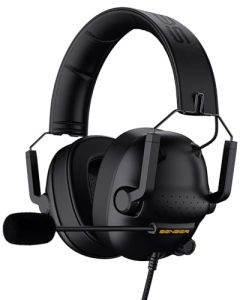
The Go already weighs on your face, and a heavy headset on top of it gets uncomfortable fast. Lightweight on-ear headphones and in-ear earphones are usually the most comfortable choices for longer sessions. Big over-ear gaming headsets can sound wonderful, but they press against the Go head strap and add weight exactly where you least want it. If you do choose over-ear headphones, pick a model with soft ear cushions and a modest clamping force.
A microphone you do not need
Many gaming headsets include a boom microphone, but the Go has a built-in microphone of its own for voice chat, and the 3.5mm jack is primarily an audio output. A boom mic will not hurt anything, but it adds bulk and weight for no benefit on this headset. If you are choosing between two similar headsets, the simpler one without a boom mic is usually the better fit for the Go.
Comfort with glasses
If you wear glasses under the Go, over-ear headphones can press the arms of your glasses into your head. In-ear earphones avoid this entirely, and on-ear models with soft padding are usually fine. This is a small detail that becomes a big one during a long film or a long gaming session.
The Best Types of Headsets for the Oculus Go
In-ear earphones: the most practical choice
In-ear earphones are the best all-round headset type for the Oculus Go, and the reasons are practical rather than technical. They weigh almost nothing, they add no pressure to the head strap, they work perfectly with glasses, and they seal in sound well enough to give you real bass and real privacy. A short cable is easy to manage, and when you take the Go off, the earphones come with it without any fuss.
For watching films and streaming video, which is what most surviving Go owners use the headset for, in-ear earphones are hard to beat. They deliver clear dialogue and a wide soundstage for their size, and they disappear during use in a way that no over-ear headset can match. If you already own a decent pair of wired earphones, try them first before buying anything new. There is a good chance they are already the right answer.
On-ear headphones: the balanced middle ground
On-ear headphones sit between in-ear earphones and full over-ear models. They rest on the ears rather than enclosing them, which keeps the weight down and the pressure low, while giving you larger drivers and a more open sound than earphones. They are a good choice if you find earphones uncomfortable over long sessions, or if you want a bit more bass and presence in games.
The trade-off is fit. On-ear headphones share space with the Go head strap, so the ear cups and the strap can compete for room around your ears. Models with thin, flexible headbands and soft padding adapt best. Try the combination on before committing to a long session, and adjust the Go strap first, then settle the headphones over it.
Over-ear headphones: best sound, most bulk
Over-ear headphones deliver the best sound quality of the three types, with the largest drivers, the deepest bass, and the best passive noise isolation. For a cinematic film night in the Go, a good pair of over-ear headphones can feel like a private cinema. They are also the most immersive option for games, since they block out the room and pull you fully into the virtual world.
The cost is comfort and bulk. Over-ear headphones add noticeable weight on top of the headset, they press against the head strap, and they can make the whole assembly feel hot during long sessions. They also make it harder to hear someone talking to you in the room, which matters if you share the headset with family. Choose over-ear headphones for the Go when sound quality is your top priority and your sessions are an hour or less.
The built-in speakers: a legitimate option
It is worth saying plainly that using no headset at all is a legitimate choice on the Go. The built-in speakers are genuinely good for casual viewing, and they are the most comfortable option because they add zero weight and zero pressure. If you mostly use the Go alone in a quiet room for short sessions, try the speakers before buying anything. Many owners find they never need a headset at all.
Using Bluetooth Headphones with the Oculus Go
Bluetooth headphones will not pair directly with the Go, but there is a well-known workaround: a small Bluetooth audio transmitter that plugs into the 3.5mm jack. The transmitter takes the wired audio output and broadcasts it over Bluetooth to your wireless headphones or earbuds. It is a small dongle, usually about the size of a matchbox, that clips or sticks to the headset strap.
Setting it up is straightforward. Plug the transmitter into the Go headphone jack, put your Bluetooth headphones into pairing mode, and pair them with the transmitter following its instructions. Once paired, the Go audio flows through the transmitter to your headphones, and the built-in speakers go quiet.
There are two things to know before you go this route. First, audio quality can suffer. The transmitter adds its own compression and conversion, and some users report a faint background hiss that is not present over a wired connection. Second, there can be a small delay between the picture and the sound, which is noticeable in games and in films with fast dialogue. A transmitter that supports a low-latency Bluetooth codec will reduce the delay, but it will not eliminate it entirely.
For most Go owners, the honest advice is to use a wired headset and skip the transmitter. The wired connection is simpler, sounds better, and has no delay. The transmitter is worth it only if you already own a pair of Bluetooth headphones you love and you refuse to go back to wires.
What to Avoid
USB-C headphones
The Go has a micro-USB port, not USB-C, and that port is for charging and data transfer, not audio output. USB-C headphones will not work with the Go, and an adapter will not fix the problem because the headset does not route audio through that port. Stick to 3.5mm wired headphones.
Headsets that need a phone app
Some modern headphones require a companion app on a phone to enable their best features, such as noise cancelling or custom equalizer settings. Those features will not transfer to the Go, which cannot run the app. If a headset sounds flat without its app, it will sound flat on the Go too. Choose a headset that sounds good on its own, straight out of the box.
Buying a headset just for a discontinued device
This is the most important advice in the guide. The Go is discontinued, its app store stopped accepting new apps in December 2020, and software support ended in 2022. It is a device for enjoying what you already have, not a platform to invest heavily in. Do not buy an expensive headset specifically for the Go. Use a wired headset you already own, or buy something affordable that you can also use with your phone, tablet, or computer. A good pair of wired earphones will serve you on every device you own, while a premium headset bought only for the Go will outlive the headset it was bought for.
Comparison Table
| Headset Type | Connection | Comfort with Go | Sound Quality | Best For |
|---|---|---|---|---|
| In-ear earphones | 3.5mm wired | Excellent, lightest option | Good, with solid bass | Everyday use and films |
| On-ear headphones | 3.5mm wired | Good, low pressure | Good, open sound | Longer sessions without ear fatigue |
| Over-ear headphones | 3.5mm wired | Fair, adds weight and heat | Best, deepest bass | Cinematic films and immersion |
| Built-in speakers | None needed | Excellent, no extra weight | Good, but audible to others | Short sessions and sharing VR |
| Bluetooth headphones via transmitter | 3.5mm transmitter | Good, no wires | Fair, possible hiss and delay | Owners who already have Bluetooth headphones |
Frequently Asked Questions
Can I use any headphones with the Oculus Go?
Yes, any headphones or earphones with a standard 3.5mm plug will work with the Oculus Go. Plug them into the headphone jack on the left side of the headset and the built-in speakers will go quiet. You do not need a headset made specifically for VR or for Oculus.
Why will my Bluetooth headphones not pair with the Oculus Go?
The Go Bluetooth radio officially supports gamepads and controllers only, not audio devices. There is no setting in the Go software to pair Bluetooth headphones. To use Bluetooth headphones you need a separate Bluetooth audio transmitter that plugs into the 3.5mm jack and sends the audio wirelessly to your headphones.
Do I need headphones at all for the Oculus Go?
No. The Go has built-in speakers in the head strap that deliver spatial audio without anything touching your ears. They are fine for casual viewing and for sharing VR with people in the room. Headphones are worth adding when you want privacy, stronger bass, or full immersion without disturbing others.
Can I use a gaming headset with a boom microphone on the Oculus Go?
You can, but the boom microphone adds bulk for no benefit, because the Go has its own built-in microphone for voice chat. A gaming headset will still play audio normally through the 3.5mm jack, so if it is the headset you already own, use it. If you are buying new, a simpler headset without a boom mic will be lighter and more comfortable.
Is it worth buying new headphones for the Oculus Go in 2026?
For most people, no. The Go is discontinued and no longer receives software support, so it makes more sense to use wired headphones or earphones you already own. If you do buy something, choose an affordable wired pair that you can also use with your phone or computer, so the purchase stays useful long after the Go itself is retired.
Conclusion
The best headsets to use with Oculus Go are the simplest ones you already own. A pair of wired earphones with a 3.5mm plug gives you private, comfortable sound with nothing to pair and nothing to charge. On-ear headphones are a solid middle ground, over-ear headphones deliver the best sound at the cost of comfort, and the built-in speakers are genuinely good enough for short sessions. Bluetooth headphones only work through a separate transmitter, and even then the sound quality and delay make wired the better choice for most people.
Because the Go is discontinued, the smart move is to keep the investment small. Use what you have, buy affordable wired headphones if you need them, and save the premium headset budget for a current VR platform. The Go still does what it was built to do, and the right headset, usually the simplest one, lets you enjoy it without spending more than the experience is worth.
FAQ
Can I use any headphones with the Oculus Go?
Why will my Bluetooth headphones not pair with the Oculus Go?
Do I need headphones at all for the Oculus Go?
Can I use a gaming headset with a boom microphone on the Oculus Go?
Is it worth buying new headphones for the Oculus Go in 2026?
More from Amazon
Programs that pair well with the guide above. Offers and eligibility are set by Amazon and may change.
Free shipping on eligible items, Prime Video and more. Eligible new members can start with a free trial.
Start a Prime free trialAd-free music streaming. Eligible new subscribers can start with a free trial.
Try Music Unlimited freeA Prime membership for ages 18-24 with a trial period. Eligibility is set by Amazon.
See Prime for Young AdultsAudiobooks and podcasts to listen to on the go. Eligible new members can start with a free trial.
Try Audible freeAs an Amazon Associate we earn from qualifying purchases.