Key takeaways
- Learn how to choose the best inexpensive gaming headsets: drivers, microphones, comfort, wired and wireless options, and platform fit, without overspending.
As an Amazon Associate we earn from qualifying purchases.
A gaming headset shapes every match you play: the footsteps behind you, the callout from a teammate, and the pressure on your ears two hours into a session. Choosing an inexpensive model only pays off when it still gets the fundamentals right, so the real decision is working out which features matter to the way you play and which ones you can happily live without. A headset that sounds muddy, pinches after an hour, or leaves your squad asking you to repeat yourself will cost you more in frustration than it ever saved at checkout.
This guide is written for first-time PC builders stretching a setup budget, console players who want one headset for several platforms, students sharing a room, and parents buying a first headset for a younger player. It draws on manufacturer-listed specifications, connection standards, and platform compatibility notes, so you can weigh models against one another on the same terms and walk into a purchase knowing exactly what to check first.
Where Budget Headsets Save Money — and Where They Should Not
Makers of inexpensive headsets usually save money in places that are easy to spot once you know where to look. Plastic replaces metal in the headband and yokes, the ear cushions use simpler foam instead of layered memory foam, and the microphone is often fixed or bendable rather than detachable. None of those choices automatically ruins a headset, and a well-built plastic frame can survive years of daily use, but they do explain why two headsets that look similar on a shelf can feel very different after a long evening of play.
The savings that should worry you are the ones you cannot see in a product photo. A driver that distorts at higher volumes will smear the footsteps and reload sounds you rely on in competitive games, while a microphone with weak noise rejection will pass every keyboard clack and fan hum to your squad. Software can help here: some headsets ship with companion apps that add an equalizer or mic tuning, while others leave the sound exactly as the hardware delivers it. Before settling on a model, check what the manufacturer actually lists for driver size, frequency response, and microphone type, and treat vague claims about immersive audio as decoration rather than evidence.
Comfort is the third place where a lower spend shows up, and it is the one that matters most over time. Thin padding, a headband that concentrates weight on one spot, and ear cups that trap heat will all push you to take the headset off mid-session, which defeats the purpose of buying one at all. Look for an adjustable headband with a wide contact area, ear cushions deep enough that the drivers do not press on your ears, and a weight that suits long sessions rather than short bursts. If you wear glasses, pay attention to clamping force in particular, since a tight seal around the temples becomes painful long before the sound quality becomes a problem.
How to Choose
Driver Size and Sound Signature
Driver size is the number most listings lead with, and it does tell you something, but it is not a ranking on its own. A larger driver can move more air and deliver fuller low-end sound, which suits explosions and cinematic moments, while a smaller, well-tuned driver can still present footsteps and dialogue with clarity. What matters more is the tuning: a headset that boosts bass heavily will bury the mid-range cues competitive players listen for, while a flatter signature keeps voices and footsteps distinct. Read the listed frequency response as a rough guide, then look for descriptions of the tuning rather than the size alone.
Microphone Design and Clarity
A headset microphone has one job: making your voice understandable without passing on everything else in the room. Cardioid and unidirectional microphones pick up sound mainly from one direction, so they reject more of the keyboard and fan noise around you than an omnidirectional capsule. A bendable boom lets you position the mic close to your mouth, which improves clarity more than any software trick, and a flip-to-mute design makes it easy to silence yourself between rounds. If you stream or record, check whether the mic is detachable, since a headset with a poor mic can still serve as a listening pair with a separate desk microphone.
Comfort, Weight, and Ear Cup Fit
Comfort decides whether a headset earns its place on your desk, and it is hard to judge from a listing alone, so focus on the details makers do publish. Over-ear cups that fully enclose the ear reduce pressure on the ear itself, while on-ear designs press directly and tend to ache sooner. Memory foam cushions usually adapt better to different head shapes than plain foam, and a padded headband spreads weight instead of concentrating it on a single line. Lighter headsets generally suit longer sessions, but a very light frame with a strong clamp can still feel tiring, so weigh the published weight together with the cushion depth and headband design rather than treating any single figure as the answer.
Connection Type and Platform Compatibility
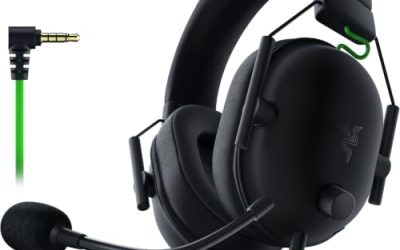
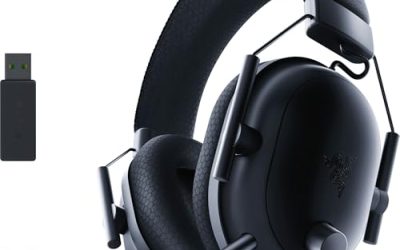
The connection you choose shapes latency, convenience, and which devices the headset will work with. A wired connection through a 3.5 mm jack works on almost everything, adds no charging to your routine, and avoids wireless dropouts entirely, which is why it remains the default for inexpensive headsets. USB connections can unlock software features such as surround processing and equalizer presets, but they tie the headset to devices with a spare port. Wireless models at this level usually rely on a 2.4 GHz dongle or Bluetooth, so check the listed battery life and confirm which of your platforms each mode supports before you commit.
Matching a Headset to Your Platform
PC players have the widest choice, since a 3.5 mm jack, a USB port, or a wireless dongle will all work, and companion software can add equalizer presets and mic tuning that consoles rarely match. That flexibility makes the PC the easiest place to get good sound from an inexpensive headset, because you can correct a bass-heavy tuning with software or route chat and game audio separately. The trade-off is that PC setups vary so much that a headset which sounds fine on one machine can pick up electrical interference on another, so a model with a USB digital connection can be worth considering if your front-panel audio jack hums or hisses.
Console players should start from the controller, since a 3.5 mm headset plugged into a PlayStation or Xbox controller is the simplest route and needs no extra hardware. PlayStation consoles also support USB headsets, which can open up software features on some models, while Xbox players should confirm compatibility explicitly, because not every USB headset works with the console even when the listing mentions Xbox in passing. Nintendo Switch players can use the headphone jack in handheld mode, though voice chat usually runs through a phone app rather than the console itself, so a headset with a clear mic and a short, tangle-free cable suits portable play best.
If you also play on a phone or tablet, check the connector before anything else. Many newer phones have no headphone jack, so a headset with a detachable cable and a USB-C adapter, or a Bluetooth mode, will be far more useful than a fixed 3.5 mm lead. A foldable design or a detachable microphone also helps when the headset doubles as everyday headphones for music and calls, since a prominent boom mic looks out of place outside a game. Whatever your mix of devices, write down the platforms you actually use, then reject any headset whose listing does not name every one of them.
Which One Fits Your Situation
Competitive Shooter Players
Pick a wired headset with a clear, balanced tuning and a cardioid microphone that sits close to your mouth. Footsteps, reloads, and directional cues matter more than deep bass here, and a wired connection removes battery anxiety and wireless lag from ranked matches. Keep the ear cups over-ear and the clamp moderate, so a long evening of rounds does not end with sore ears.
Story-Driven and Open-World Players
Choose comfort and soundstage first, since you will wear the headset for hours of exploration and dialogue. Soft, deep ear cushions and a padded headband matter more than a tournament-grade microphone, and a warmer tuning makes music and ambient sound feel richer. A longer cable or a wireless mode helps too, because these games invite you to lean back, and a short tether will remind you of its limits every time you shift in your chair.
Console Players Who Switch Platforms
Look for a headset built around a 3.5 mm connection with a detachable cable, since that combination works on the widest range of controllers, handhelds, and laptops. Confirm the listing names each platform you own rather than assuming a universal label covers them all, and favour a microphone you can detach or flip away when the headset moves to a handheld or a phone. One flexible headset beats two limited ones when your playtime is split across several devices.
Shared Rooms and Late-Night Sessions
Prioritise a closed-back design and a microphone with good noise rejection, since both keep your game in and the household out. Closed ear cups leak less sound to people nearby, which matters when someone else is sleeping or working in the same room, and a cardioid mic stops your keyboard from reaching your squad. A wired model also avoids mid-match battery warnings, and a volume control on the ear cup lets you adjust quickly without opening a menu.
Common Mistakes
- Buying on driver size alone: a large driver with muddy tuning will hide footsteps, while a smaller, well-tuned driver can present them clearly.
- Ignoring the microphone: a headset is a communication tool as well as a listening one, so check the mic type and placement before you buy.
- Assuming every headset works on every platform: confirm the listing names your console, PC, or handheld explicitly, especially for USB and wireless models.
- Forgetting about glasses and long sessions: strong clamping force and shallow ear cups become painful over time, even when the sound is good.
- Chasing extra features over fundamentals: surround modes and lighting add little when the drivers distort, the mic is unclear, or the fit aches after an hour.
Frequently Asked Questions
Do inexpensive gaming headsets work on both PC and console?
Most do, provided the connection matches the device. A headset with a 3.5 mm jack plugs into a PC, a console controller, a handheld, or a phone with a headphone socket, while USB headsets need a compatible port and a listing that names the platform. Wireless models vary more, so check which modes each platform supports before you buy, and keep the cable as a backup when one is included.
Is a wired headset better than a wireless one at a lower budget?
For most buyers, yes. A wired headset avoids charging, battery anxiety, and wireless interference entirely, and the money that would have gone into a battery and radio can instead go into better drivers and a better microphone. Wireless is worth it only when you need to move around freely or hate cables, and even then you should confirm the listed battery life and whether the headset still works while charging.
How important is surround sound in a budget headset?
It is a bonus, not a foundation. Surround processing can widen the soundstage and help with directional cues, but it cannot fix drivers that distort or a tuning that buries footsteps under bass. Choose on driver clarity, comfort, and microphone quality, then treat surround support as a tiebreaker between two otherwise equal headsets. On PC, software can add the effect later, so do not pay extra for it up front.
What should I check before buying a headset as a gift?
Start with the recipient’s platform, since compatibility causes most returns. Confirm the listing names their console or PC, check whether the headset is wired or wireless, and look for an adjustable headband and deep ear cushions if they wear glasses. Keep the packaging and receipt intact until they have tried it, and confirm the return window first, because comfort is personal and even a well-chosen headset sometimes needs swapping.
FAQ
Do inexpensive gaming headsets work on both PC and console?
Is a wired headset better than a wireless one at a lower budget?
How important is surround sound in a budget headset?
What should I check before buying a headset as a gift?
More from Amazon
Programs that pair well with the guide above. Offers and eligibility are set by Amazon and may change.
Free shipping on eligible items, Prime Video and more. Eligible new members can start with a free trial.
Start a Prime free trialAd-free music streaming. Eligible new subscribers can start with a free trial.
Try Music Unlimited freeA Prime membership for ages 18-24 with a trial period. Eligibility is set by Amazon.
See Prime for Young AdultsAudiobooks and podcasts to listen to on the go. Eligible new members can start with a free trial.
Try Audible freeAs an Amazon Associate we earn from qualifying purchases.