Key takeaways
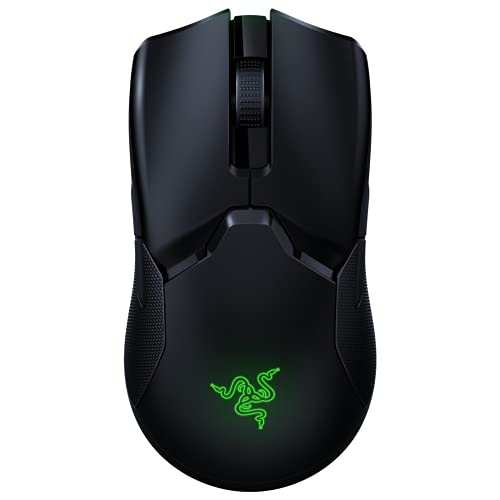
- Grip length: the Basilisk V3 Pro’s 130mm length and wide rear hump favor palm grip on medium-to-large hands (18cm+ palm length). Claw and fingertip grippers on smaller hands usually want something under 125mm with a flatter back.
- Weight: 112g is heavy by 2026 standards. Most competitive shooters now sit in the 55-75g range, which changes flick speed and wrist fatigue over long sessions.
- Buttons and scroll behavior: the Basilisk V3 Pro has 11 programmable inputs including a tilt-scroll wheel (left/right tilt clicks) and a scroll resistance switch. Many lightweight rivals drop to 6-8 buttons and a fixed-resistance wheel with no tilt function.
- Battery life with RGB on vs off: Razer rates the Basilisk V3 Pro at roughly 10 hours with RGB fully lit, climbing to about 90 hours with lighting off. That gap is the single biggest variable when comparing wireless mice, since some rivals barely change runtime with lighting on and others lose 70%+ of their battery to it.
What's inside
- What Actually Changes When You Switch Mice
- Head-to-Head: 7 Alternatives vs the Basilisk V3 Pro
- If You Want Lower Weight: DeathAdder V3 Pro or Viper V3 Pro
- If You Want to Keep High Button Count: Naga V2 Pro
- If Battery Anxiety Is the Real Problem: MX Master 3S
- Decision Matrix: Match Your Situation to a Mouse
- What You Keep and What You Lose, Summarized
The Razer Basilisk V3 Pro is a 112g, palm-sized mouse built for people who want tilt-scroll, 11 programmable inputs, and strong wireless battery life, but it’s not the right fit if you have small-to-medium hands, want a sub-70g shell for fast flicking, or don’t need the extra side-button cluster. The right alternative depends on which of those three things you’re trading away, so here’s how seven real options stack up against the Basilisk V3 Pro on grip fit, weight, buttons, and battery life.
- What Actually Changes When You Switch Mice
- Head-to-Head: 7 Alternatives vs the Basilisk V3 Pro
- If You Want Lower Weight: DeathAdder V3 Pro or Viper V3 Pro
- If You Want to Keep High Button Count: Naga V2 Pro
- If Battery Anxiety Is the Real Problem: MX Master 3S
- Decision Matrix: Match Your Situation to a Mouse
- What You Keep and What You Lose, Summarized
What Actually Changes When You Switch Mice
Four numbers decide whether a swap feels like an upgrade or a downgrade in daily use:

Logitech G305 Lightspeed Wireless Gaming Mouse - Black
Included for 'Razer Basilisk V3 Pro Alternatives: 7 Mice Worth Buying Instead' because the listing specifies Black, details this guide uses to compare options.
View on Amazon
Logitech MX Master 3S - Performance Wireless Mouse with Ultra-Fast Scrolling, Ergo, 8K DPI, Track on Glass, Quiet Clicks, Bluetooth, Windows, Linux, Chrome, Black
Included for 'Razer Basilisk V3 Pro Alternatives: 7 Mice Worth Buying Instead' because the listing specifies Performance Wireless Mouse with Ultra-Fast Scrolling and Ergo, details this guide uses to compare options.
View on Amazon
Logitech MX Master 4 Ergonomic Wireless Mouse with Haptics - Graphite
Included for 'Razer Basilisk V3 Pro Alternatives: 7 Mice Worth Buying Instead' because the listing specifies Graphite, details this guide uses to compare options.
View on Amazon
Logitech MX Master 3S Bluetooth Wireless Mouse No Receiver - Graphite
Included for 'Razer Basilisk V3 Pro Alternatives: 7 Mice Worth Buying Instead' because the listing specifies Graphite, details this guide uses to compare options.
View on Amazon- Grip length: the Basilisk V3 Pro’s 130mm length and wide rear hump favor palm grip on medium-to-large hands (18cm+ palm length). Claw and fingertip grippers on smaller hands usually want something under 125mm with a flatter back.
- Weight: 112g is heavy by 2026 standards. Most competitive shooters now sit in the 55-75g range, which changes flick speed and wrist fatigue over long sessions.
- Buttons and scroll behavior: the Basilisk V3 Pro has 11 programmable inputs including a tilt-scroll wheel (left/right tilt clicks) and a scroll resistance switch. Many lightweight rivals drop to 6-8 buttons and a fixed-resistance wheel with no tilt function.
- Battery life with RGB on vs off: Razer rates the Basilisk V3 Pro at roughly 10 hours with RGB fully lit, climbing to about 90 hours with lighting off. That gap is the single biggest variable when comparing wireless mice, since some rivals barely change runtime with lighting on and others lose 70%+ of their battery to it.
Head-to-Head: 7 Alternatives vs the Basilisk V3 Pro
| Mouse | Weight | Length / Grip Fit | Buttons | Tilt-Scroll? | Battery (RGB on / off) |
|---|---|---|---|---|---|
| Razer Basilisk V3 Pro (reference) | 112g | 130mm / palm, medium-large hands | 11 | Yes | ~10h / ~90h |
| Razer DeathAdder V3 Pro | 63g | 128mm / palm or claw, medium-large | 5 | No | ~90h / ~90h (no RGB model) |
| Razer Viper V3 Pro | 54g | 126mm / claw or fingertip, small-medium | 5 | No | ~95h / ~95h (no RGB) |
| Logitech G Pro X Superlight 2 | 60g | 125mm / claw or fingertip, small-medium | 5 | No | ~95h / ~95h (no RGB) |
| Logitech MX Master 3S | 141g | 125mm / palm, medium-large | 7 | No (free-spin wheel instead) | ~70 days / ~70 days (minimal LED use) |
| Razer Naga V2 Pro | 126g | 120mm / palm, medium-large | 19 (swappable side panels) | No | ~12h / ~150h |
| SteelSeries Rival 5 | 85g | 128mm / palm or claw, medium | 9 | No | ~18h / ~70h |
If You Want Lower Weight: DeathAdder V3 Pro or Viper V3 Pro
Both drop roughly 50g off the Basilisk V3 Pro’s 112g shell, which matters more than it sounds. At typical flick distances, a lighter mouse needs less force to accelerate and decelerate, so repeated large flicks (common in FPS titles) feel less tiring over a 2-3 hour session. The tradeoff is real: you lose tilt-scroll entirely and drop from 11 buttons to 5. If you don’t use the tilt wheel for lateral scrolling in browsers or spreadsheets, and you only bind a couple of extra side buttons anyway, this is a clean upgrade. If you rely on 6+ custom bindings for MMO or MOBA rotations, neither of these replaces that function.
Grip-wise, the DeathAdder V3 Pro’s shape stays closer to the Basilisk’s palm-friendly hump, while the Viper V3 Pro is flatter and suits claw or fingertip grip better. Hand size is the deciding factor here, not preference alone: if your palm length is under 17.5cm, the Viper’s shorter 126mm body will feel more controllable; above that, the DeathAdder’s 128mm body won’t feel cramped.
If You Want to Keep High Button Count: Naga V2 Pro
The Naga V2 Pro is the only mouse on this list that matches or beats the Basilisk V3 Pro’s input count, with swappable side plates offering 2, 6, or 12 extra buttons (19 total in the 12-button configuration). It’s heavier at 126g and has no tilt-scroll, so lateral scrolling disappears, but if your workflow depends on macro-dense binding (MMO raiding, streaming overlays, CAD shortcuts) this is the direct successor to the Basilisk’s “more buttons than you’ll use” philosophy. Battery life with RGB on (~12h) is close to the Basilisk V3 Pro’s figure, which makes sense since both are driving similar lighting zones and wireless radios.
If Battery Anxiety Is the Real Problem: MX Master 3S
Here’s a worked comparison that spec sheets don’t make obvious. The Basilisk V3 Pro’s battery budget looks like this:
- RGB on: ~10 hours per charge → roughly 1 charge every workday if you use it 8 hours a day.
- RGB off: ~90 hours → about once every 11 workdays.
The MX Master 3S has no addressable RGB lighting at all, just a small battery status LED that draws negligible current, so its quoted 70-day runtime barely changes between “lit” and “unlit” states because there’s nothing substantial to dim. For someone who charges a mouse “whenever I remember,” that’s the difference between a weekly habit and a monthly one. The catch: this is a productivity mouse, not a gaming mouse. No tilt-scroll in the gaming sense (it has a separate free-spinning thumb wheel for app switching), lower polling rate, and a 141g body that’s heavier than the Basilisk V3 Pro. Don’t buy this for competitive play; buy it if your “daily use” is mixed work and casual gaming and you’re tired of charging cables.
Decision Matrix: Match Your Situation to a Mouse
| Your priority | Best pick | What you give up vs Basilisk V3 Pro |
|---|---|---|
| Lightest shell, small-medium hands, claw/fingertip grip | Viper V3 Pro or G Pro X Superlight 2 | Tilt-scroll, 6 of 11 buttons, RGB entirely |
| Lightest shell, medium-large hands, palm grip | DeathAdder V3 Pro | Tilt-scroll, 6 of 11 buttons, RGB entirely |
| Keep high button count for MMO/macros | Naga V2 Pro | Tilt-scroll only |
| Minimize charging frequency, mixed work/game use | MX Master 3S | Competitive-grade sensor, tilt-scroll, low weight |
| Balance of weight and button count, mid hand size | SteelSeries Rival 5 | 2 buttons, tilt-scroll, some battery life |
What You Keep and What You Lose, Summarized
No alternative here fully replicates the Basilisk V3 Pro’s combination of tilt-scroll plus 11 programmable buttons plus mid-pack weight. Every option trades at least one of those three for a gain elsewhere, usually weight or battery life. The Naga V2 Pro gets closest on buttons, the Viper V3 Pro and G Pro X Superlight 2 get closest on weight, and the MX Master 3S wins outright on battery life but isn’t built for competitive gaming. Pick based on which of the three you actually use day to day rather than which spec sheet looks the most complete, since the Basilisk’s own “do everything” design is exactly what makes it heavier and shorter-lived on a charge than any single-purpose rival.