Our Top Picks
Pros & cons
- Up to 250 hours of gameplay come from a single AA battery
- Endurance mode can extend battery life up to 9 months
- At 3.4 ounces, the lightweight body supports high maneuverability
- Relies on a single AA battery rather than a rechargeable cell
- 12,000 DPI sensitivity may be more than casual users need
The Razer DeathAdder Elite is a wired, right-handed ergonomic gaming mouse with a 16,000 DPI optical sensor, 7 programmable buttons, 450 IPS tracking and mechanical switches rated for 50 million clicks. It is a strong pick for palm and claw grips. Among the DeathAdders covered here, only the V2 X HyperSpeed is wireless.
Verdict: Is the Razer DeathAdder Elite Worth It?
The DeathAdder Elite is worth considering if you want the classic DeathAdder ergonomic shape with a high-DPI optical sensor and do not need wireless. It is an older generation, so compare it with the V2 X HyperSpeed if you want to drop the cable.
- Buy the Elite if: you use a palm or relaxed claw grip, you want a proven shape and you prefer wired.
- Buy the V2 X HyperSpeed if: you want a wireless DeathAdder with long battery life.
- Look at the 2013 original only if: you want the historic version; check the maker for exact specs.
- Skip all of them if: you want an ultralight mouse or a left-handed or ambidextrous shape.
Razer DeathAdder Elite Specs
Figures come from retailer and editorial spec sheets. Sources disagree on a few details, which we flag.
| Spec | DeathAdder Elite |
|---|---|
| Connection | Wired USB |
| Sensor | Razer 16,000 DPI optical sensor |
| DPI range | 100 to 16,000, steps of 50 |
| Tracking speed | 450 IPS |
| Polling rate | 1,000 Hz |
| Buttons | 7 programmable |
| Switches | Razer mechanical, rated for 50 million clicks |
| Weight | Many sources say about 105 g; others report about 96 g |
| Size | About 127 x 70 x 43 mm |
| Lighting | Chroma RGB |
DeathAdder V2 X HyperSpeed Specs
| Spec | DeathAdder V2 X HyperSpeed |
|---|---|
| Connection | Wireless (HyperSpeed) and Bluetooth |
| Sensor | Razer 5G Advanced Optical Sensor |
| DPI range | Up to 14,000 |
| Tracking speed | 450 IPS per EloShapes; another source lists 300 IPS |
| Buttons | 7 programmable |
| Switches | 2nd-gen Razer mechanical, rated for 60 million clicks |
| Weight | About 103 g (about 100 g with AA battery reported by one user) |
| Battery | Razer claims up to 235 hours; uses an AA battery |
| Release | October 2021 |
The DeathAdder Family in Plain Terms
Razer has used the DeathAdder name since the early 2000s, and it has become one of the best-known ergonomic shapes in gaming. The mice listed here sit at three points in that history.
- DeathAdder 2013: a refresh of the original design. We could not verify its sensor and DPI ceiling from our sources, so check the maker’s page before buying.
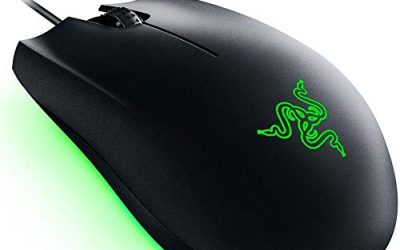
- DeathAdder Elite: the wired, 16,000 DPI generation with Chroma lighting and mechanical switches.
- DeathAdder V2 X HyperSpeed: the wireless, battery-friendly model with a simpler design and an AA battery.
Design and Comfort
The DeathAdder shape is a right-handed ergonomic design with a pronounced arch and a wide back. Rubber side grips on the Elite give your thumb and ring finger something to hold.
- Palm grip: the best fit. The back of the mouse fills the palm.
- Claw grip: good for medium to large hands.
- Fingertip grip: workable, though the weight is closer to 100 g than to ultralight.
- Small hands: a compact mouse may be more comfortable.
- Left-handed use: not supported.
Performance by Use
FPS and competitive shooters
The Elite’s sensor tracks at 450 IPS and 1,000 Hz polling. Both help with accurate, consistent aim. The shape suits slower, deliberate aim better than ultra-fast flick styles.
MOBA, MMO and strategy
Seven programmable buttons suit camera and ability binds, though it does not have the button count of a dedicated MMO mouse.
Wireless play with the V2 X HyperSpeed
Razer’s wireless link gives low-latency play without a cable. Battery life is very long thanks to the AA cell, but the battery adds to the weight.
Office and everyday use
The ergonomic arch is comfortable for long work sessions, and DPI is adjustable for large monitors.
DeathAdder Elite vs DeathAdder V2 X HyperSpeed
| Question | Elite | V2 X HyperSpeed |
|---|---|---|
| Connection | Wired | Wireless and Bluetooth |
| Max DPI | 16,000 | 14,000 |
| Switch rating | 50 million | 60 million |
| Weight | About 96 to 105 g | About 103 g |
| Lighting | Chroma RGB | Not a feature in our sources |
| Battery | Not applicable | Up to 235 hours claimed |
| Best for | Wired palm and claw grips | Cable-free ergonomic play |
The Elite has the higher DPI ceiling and RGB lighting. The V2 X HyperSpeed has a higher switch rating, wireless freedom and a very long battery life.
The DeathAdder 2013: What to Know
The DeathAdder 2013 is a refreshed edition of the original design, introduced before the Elite. It keeps the classic ergonomic arch, but it uses an older generation sensor. We could not verify its exact DPI and tracking figures, so treat this as a historical option and confirm details on the maker’s page.
If you want the shape on a budget, compare it with the DeathAdder Essential, an inexpensive modern version of the same idea. The listings in this shop include the Essential, which uses a 6,400 DPI optical sensor and five programmable buttons, per the listing.
Pros and Cons
DeathAdder Elite pros
- Proven ergonomic arch that suits palm and claw grips.
- High 16,000 DPI ceiling and 450 IPS tracking.
- Chroma RGB lighting and rubber side grips.
- Wired connection with no battery to manage.
- Mechanical switches rated for 50 million clicks.
DeathAdder Elite cons
- Right-handed only.
- Around 100 g, so not light by current standards.
- Large for small hands.
DeathAdder V2 X HyperSpeed pros and cons
- Pro: wireless and Bluetooth with a very long claimed battery life.
- Pro: 60-million-click switch rating.
- Con: the AA battery adds weight and the mouse has no RGB feature in our sources.
- Con: DPI ceiling is 14,000, lower than the Elite.
Real Queries: Short Answers
Is the Razer DeathAdder Elite wireless?
No. The DeathAdder Elite is wired. The V2 X HyperSpeed is the wireless option in this group.
What is the DPI of the DeathAdder Elite?
The maximum is 16,000 DPI, adjustable in steps of 50.
Is the DeathAdder Elite good for FPS games?
Yes, for players who like a larger ergonomic shape. Its tracking speed and polling rate suit most shooters.
What is the DeathAdder V2 X HyperSpeed?
It is a wireless DeathAdder with a 14,000 DPI sensor, up to 235 hours of claimed battery life and 7 programmable buttons.
DeathAdder Mice in the Shop
These cards show items in the store that match the topic. Descriptions follow the listing details.
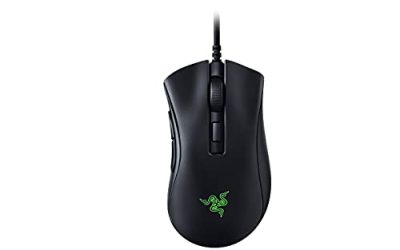
Razer DeathAdder Elite Gaming Mouse

Razer DeathAdder Elite Gaming Mouse: 16,000 DPI Optical Sensor - Chroma RGB Lighting - 7 Programmable Buttons - Mechanical Switches - Rubber Side Grips - Matte Black
Chosen because it specifies 000 DPI Optical Sensor and Chroma RGB Lighting.
View on AmazonThe listing is for the Razer DeathAdder Elite, a wired ergonomic mouse with a 16,000 DPI optical sensor, Chroma RGB lighting and seven programmable buttons. It has mechanical switches and rubber side grips. Because it is an older model, confirm the condition and the seller details before ordering, and look for a new unit. It is the right choice if you want a classic arch with a wired connection.
Best for: wired palm and claw grips. Skip if: you want wireless or an ultralight mouse.
Razer DeathAdder V2 X HyperSpeed

Razer DeathAdder V2 X HyperSpeed, Award-Winning Ergonomic Design, Black | Ultra-Fast HyperSpeed Wireless, 235hr Battery Life, 7 Programmable Buttons, Gen 2 Mechanical Switches, 14K DPI Optical Sensor
Chosen because it specifies Award-Winning Ergonomic Design and Black.
View on AmazonThe listing describes the Razer DeathAdder V2 X HyperSpeed as an ergonomic, award-winning design with ultra-fast HyperSpeed wireless and a 235-hour battery claim. It is the wireless step for DeathAdder fans. You gain freedom from the cable and a long battery life from an AA cell, and you accept a simpler feature set than the Elite’s Chroma lighting.
Best for: wireless ergonomic play. Skip if: you want RGB lighting or the highest DPI ceiling.
Logitech G305 Lightspeed Wireless Gaming Mouse

Logitech G305 LIGHTSPEED Wireless Gaming Mouse, Hero 12K Sensor - Black | 12,000 DPI, lightweight, 6 programmable buttons, 250h battery life, on-board memory, PC/Mac, lightweight gaming mouse
Chosen because it specifies Hero 12K Sensor and Black.
View on AmazonThe Logitech G305 Lightspeed is a wireless gaming mouse with a Hero 12K sensor and six programmable buttons, per the listing. It suits buyers who like the idea of a wireless mouse but want a smaller, lighter body than a DeathAdder. It has a more neutral shape and fewer buttons.
Best for: small to medium hands. Skip if: you want a large ergonomic arch.
Logitech G203 Wired Gaming Mouse

Logitech G203 Wired Gaming Mouse for Laptop & Computer, 8,000 DPI - Black | Rainbow Optical Effect, 6 Programmable Buttons, On-Board Memory, Screen Mapping, PC/Mac Computer and Laptop Compatible
Chosen because it specifies 000 DPI and Black.
View on AmazonThe Logitech G203 is a wired mouse with an 8,000 DPI sensor and six programmable buttons, plus a rainbow lighting effect, according to the listing. It is a simple, lightweight alternative to the DeathAdder Elite for beginners. It lacks the DeathAdder’s pronounced ergonomic shape but costs much less in tier.
Best for: beginners on a budget. Skip if: you want a large palm-grip body.
Other DeathAdder Models to Know
- DeathAdder Essential: an inexpensive wired version with a 6,400 DPI sensor and five buttons per the listing.
- DeathAdder V3 and V3 HyperSpeed: newer, lighter models; the V3 Wired is listed around 59 g and the V3 HyperSpeed at 55 g.
- DeathAdder V4 Pro: a current-generation wireless model with 8K polling per the listing.
If weight is your main complaint about the Elite, the V3 family is the natural step up.
Who Should Buy Each DeathAdder in This Review
Buy the Elite if you are a wired palm-grip player
You get the full ergonomic arch, Chroma lighting and a 16,000 DPI ceiling. You accept a cable and a weight close to 100 g. This is a strong match for long sessions in tactical shooters, strategy games and office work where comfort counts more than low weight.
Buy the V2 X HyperSpeed if you want to cut the cable
Wireless freedom, a long battery claim and a high switch rating make it the practical everyday DeathAdder. You give up RGB and a couple of thousand DPI of headroom, which most players will not miss. It also supports Bluetooth, so it can pair with a laptop when you travel.
Look at the 2013 version if you value history
The 2013 DeathAdder is a good talking point for collectors and long-time Razer fans. Because it is an older design, verify the specification, condition and seller before buying, and compare it with newer models at a similar tier.
Skip the DeathAdder shape if
- You use a fingertip grip and want something very light.
- You have small hands.
- You play left-handed.
- You want a mouse with many side buttons for MMO use.
Grip and Hand Size Guide
| Hand length (wrist crease to middle fingertip) | Likely fit with a DeathAdder shape |
|---|---|
| Under about 17 cm | Likely large; a compact mouse is easier to control |
| About 17 to 19 cm | Comfortable for most palm and claw grips |
| Over about 19 cm | Comfortable and supportive, especially in palm grip |
These are general guidelines, not maker figures. If you are between sizes, think about how you hold the mouse. A claw grip tolerates a larger body better than a fingertip grip.
Surface and Pad Advice
Optical sensors work well on most cloth and hard pads. A medium-speed cloth pad is a safe choice for the Elite and the V2 X HyperSpeed because the mice are around 100 g and benefit from steady glide. Avoid glass and very glossy desks. For the wired Elite, a mouse bungee keeps the cable from tugging during flicks.
Wired or Wireless: Which Fits You?
Choose wired if
- You never want to think about batteries.
- You want RGB lighting and the 16,000 DPI ceiling.
- You play at a fixed desk with space for a cable.
Choose wireless if
- You dislike cable drag during fast aim.
- You move the mouse between a desk and a laptop.
- You are happy to replace an AA battery every few months, based on Razer’s long battery claim.
Modern wireless mice are fast enough for most games, so the decision is more about habit and desk layout than raw speed.
Upgrading From a DeathAdder Elite
If you already own an Elite and want something newer, look at what bothers you most.
- Weight: the V3 family is listed far lighter, around 55 to 59 g per the listings.
- Cable: the V2 X HyperSpeed or V3 HyperSpeed removes it.
- Sensor and polling: V4 Pro lists 8K polling per its listing.
- Shape: all of these keep the DeathAdder arch, so the hand feel stays familiar.
If nothing bothers you, there is no rush. The Elite remains a capable mouse for everyday play.
Three Mistakes to Avoid When Shopping for a DeathAdder
- Ignoring the model name. The DeathAdder line covers many versions with different sensors, weights and connections. A listing that only says DeathAdder is not enough to decide.
- Assuming every DeathAdder is wireless. Only the HyperSpeed and Pro variants are, and the Elite is wired.
- Overpaying for specs you will not use. If you play at 800 DPI, the difference between 14,000 and 16,000 DPI does not matter to you.
Care and Longevity
- Wipe the shell and the rubber grips with a slightly damp, lint-free cloth.
- Replace worn mouse feet when glide becomes rough.
- Avoid sharp bends near the cable strain relief on the wired Elite.
- Remove the AA battery from the V2 X HyperSpeed if you store it for a long time.
- Keep the dongle in a protected spot when travelling.
Setting Up a DeathAdder Elite
- Install Razer’s software and let it update the firmware.
- Set your DPI. Most shooter players pick between 400 and 1,600.
- Assign the two thumb buttons to your most-used actions.
- Choose a polling rate. 1,000 Hz is the usual choice.
- Save the profile to onboard memory if you want it to follow the mouse.
- Turn off pointer acceleration in the operating system.
Starting Sensitivity Table
| Use | Starting DPI | Reason |
|---|---|---|
| Tactical shooter, 1080p | 400 to 800 | Precise aim |
| Arena shooter, 1440p | 800 to 1,600 | More distance per swipe |
| MOBA and strategy | 1,600 to 3,200 | Quick cursor across the screen |
| Office on a large monitor | 1,600 to 3,200 | Short wrist travel |
Software and Lighting Notes
Razer’s software controls DPI steps, button assignments, polling rate and, on the Elite, Chroma lighting effects. Keep the software current, since firmware updates can change behaviour. If you prefer a clean setup, configure the mouse once, save the profile to onboard memory and close the software. The V2 X HyperSpeed has a simpler feature set, so its software page is shorter and quicker to set up. Always check the maker’s support page for the latest version for your operating system.
Common Problems and Fixes
Cursor jumps
Clean the sensor window and try a different pad. Glossy surfaces can confuse optical sensors.
Wireless lag on the V2 X HyperSpeed
Move the dongle to a front USB port, keep it away from other wireless devices and replace the AA battery if power runs low.
Double clicks
If one press registers twice, check the maker’s warranty and support page; switches can wear on older units.
Lighting not changing
Update Razer’s software and firmware, then reapply your lighting profile.
How We Chose These Picks
This review is research-based. We did not use these mice ourselves. We compared maker information, retailer listings and independent comparison pages, and we noted where sources disagree, such as the Elite’s weight and the V2 X’s tracking speed. The alternatives cover three buyers: a wireless ergonomic buyer, a small-hand buyer and a budget beginner.
Buying Guide
- Exact model: DeathAdder, DeathAdder 2013, Elite, Essential, V2, V2 X and V3 are different mice. Read the full title.
- Condition: skip anything marked used, open-box or refurbished unless that is your choice.
- Hand size: the DeathAdder shape is mid to large. Measure your hand if you are not sure.
- Wired or wireless: only the V2 X HyperSpeed in this group is wireless.
- Weight: the Elite and V2 X are both around 100 g. Choose a V3 model if you want lighter.
- Lighting: the Elite has Chroma RGB, the V2 X is simpler.
Frequently Asked Questions
How heavy is the DeathAdder Elite?
Many spec sources list about 105 g, while some user reports say about 96 g. Check the maker if weight is critical.
Does the DeathAdder Elite have RGB?
Yes. The listing mentions Chroma RGB lighting.
How long does the V2 X HyperSpeed battery last?
Razer claims up to 235 hours on one AA battery, though real life depends on use and settings.
Is the DeathAdder good for small hands?
Not usually. The body is mid to large, so small-handed players may prefer a compact mouse.
What is the difference between the DeathAdder Elite and the V2?
The V2 generation is newer than the Elite. Variants differ in sensor, switches and connection, so check the maker’s page for the exact V2 model you are considering.
Is the DeathAdder 2013 still available?
It may appear in listings, but it is an older model. Verify condition and specifications before buying.
Which DeathAdder is best for FPS?
The Elite and V2 X both suit shooters. If you want lighter and faster, look at the V3 family.
Which One Should You Buy?
- Want wired ergonomic with RGB: Razer DeathAdder Elite.
- Want wireless ergonomic: Razer DeathAdder V2 X HyperSpeed.
- Want smaller and wireless: Logitech G305.
- Want a cheap, simple wired mouse: Logitech G203.
Sources
- ProSettings, Razer DeathAdder Elite review
- EloShapes, Razer DeathAdder Elite vs V2 X HyperSpeed comparison
- MouseShape, Razer DeathAdder Elite specs
- MouseCompare, Razer DeathAdder V2 X HyperSpeed specs
Last updated: November 2026
FAQ
Verdict: Is the Razer DeathAdder Elite Worth It?
Is the Razer DeathAdder Elite wireless?
What is the DPI of the DeathAdder Elite?
Is the DeathAdder Elite good for FPS games?
What is the DeathAdder V2 X HyperSpeed?
How heavy is the DeathAdder Elite?
Does the DeathAdder Elite have RGB?
How long does the V2 X HyperSpeed battery last?
More from Amazon
Programs that pair well with the guide above. Offers and eligibility are set by Amazon and may change.
Free shipping on eligible items, Prime Video and more. Eligible new members can start with a free trial.
Start a Prime free trialAd-free music streaming. Eligible new subscribers can start with a free trial.
Try Music Unlimited freeA Prime membership for ages 18-24 with a trial period. Eligibility is set by Amazon.
See Prime for Young AdultsAudiobooks and podcasts to listen to on the go. Eligible new members can start with a free trial.
Try Audible freeAs an Amazon Associate we earn from qualifying purchases.