Best Keyboards to Use on Xbox One (2026): 5 Keyboards That Work With the Console
Five keyboards that work with Xbox One, compared on connection, layout, switch feel and couch or desk use, so typing and supported games feel right on console.
An Xbox One with a keyboard attached becomes a much easier machine to live with. Typing a long message to a friend, entering a redeem code, searching the Microsoft Store, or filling in a login field all go far faster with real keys than with a controller stick tapping out letters one at a time. A small group of games also accepts keyboard input directly, so a keyboard can change how those games feel to play. This guide covers five keyboards that connect to an Xbox One and work with it, from a couch-friendly wireless board with a built-in touchpad to a purpose-built lapboard set designed with the console in mind.
OUR TOP PICK
Razer Turret Wireless Mechanical Gaming Keyboard and Mouse Combo
The most important fact about keyboards on Xbox One is that the console decides the connection rules, and each game decides whether keyboard input counts during play. The Xbox One accepts a standard USB keyboard at once for text entry across the dashboard, in messages, and in search fields. That part of keyboard support works with nearly any standard USB keyboard, and it is the part every owner can count on. Wireless keyboards that ship with their own USB receiver work the same way, because the console sees the receiver as a standard USB keyboard. A Bluetooth-only keyboard will not connect, because the Xbox One has no Bluetooth pairing menu for keyboards. Every board in this guide connects through a cable or through its own USB receiver, which is the connection the Xbox One actually accepts.
Gameplay is a different story. Only a small group of games accept keyboard input on Xbox One, and the list is set by each developer. Games known to accept keyboard and mouse on Xbox One include Fortnite and Warframe, plus a handful of others, while the large majority of the library ignores keyboard input during play. A keyboard still helps in those games for chat and menus, but it will not move a character in a game that does not support it. Buy a keyboard for typing first and treat game support as a bonus, and the purchase will not disappoint.
Quick Picks
Our Short List of 3
Editor’s Choice
1. Razer Turret Wireless Mechanical Gaming Keyboard and Mouse Combo
Connectivity: 2.4 GHz wireless, single USB dongle for keyboard and mouse
Layout: Tenkeyless lapboard with retractable magnetic mouse mat
Switches: Razer Green mechanical, 50 gram actuation
The Razer Turret is the most purpose-built choice in this guide because it was designed with Xbox One in mind rather than being a PC keyboard that merely happens to work. It is the first wireless keyboard and mouse set built with Microsoft for the Xbox One, and it remains the reference point for couch play. The set pairs a tenkeyless mechanical keyboard with a gaming mouse, and both devices share a single 2.4 GHz USB dongle, so one port on the console serves the whole set. The keyboard has a retractable magnetic mouse mat that slides out from under the board, giving the mouse a proper surface on a lap, and the mouse docks magnetically into the keyboard for storage.
The keyboard uses Razer Green mechanical switches, which are tactile and clicky, with a clear bump and an audible click on each press. The actuation force is 50 grams, and the keyboard polls at 1000 Hz. Chroma RGB lighting runs across the keys, and the lighting can sync with supported games through Xbox Dynamic Lighting. The mouse carries a 5G optical sensor rated up to 16,000 DPI, so it tracks precisely on the slide-out mat. A dedicated Xbox key sits on the keyboard for quick access to the console dashboard.
Battery life is a practical concern with any wireless set, and Razer states up to 40 hours of combined use on a single charge with lighting disabled. That figure comes from the original manufacturer announcement and describes a new battery, not a guarantee for an older unit, so treat it as a guide rather than a promise. The Turret is also an older hardware line, so a buyer should check that the listing includes the dongle, the charging cable, and the mouse, and that the battery still holds a charge, before ordering. When the full set is present and working, nothing else in this guide matches it for couch play on Xbox One.
The Logitech K400 Plus is the couch pick for players who want the simplest possible wireless setup. It is a compact wireless keyboard with a built-in touchpad on the right side, so it handles typing from a sofa without a second device on the lap. The touchpad is a PC and TV feature, and on the Xbox One the keyboard itself is the part that types, while the touchpad stays quiet, so buy this board for its typing and its lap-friendly shape rather than for pointer control on the console.
The board connects through a tiny Logitech Unifying receiver on the 2.4 GHz band, with a stated range of up to 33 feet, which is more than enough to reach a console across a living room. Logitech states up to 18 months of battery life from two AA batteries, with an on/off switch that helps the board last longer in storage. The keys are quiet and low profile, and the layout is compact at under 14 inches wide, so it sits easily on a lap or a cushion. There is no backlight, and the keys are membrane rather than mechanical, so the feel is soft and muted instead of crisp. That soft feel suits late-night typing when other people are in the room, and the board is light enough at under a pound to hold comfortably for a long session.
The model number to match is 920-007119, which is the US English layout. Other regional layouts exist under different codes, so check the listing before ordering. The K400 Plus is a 2015 listing that has stayed in production for years, which speaks to how well the design fits its job, but it also means a buyer should confirm the listing is current. Its listing was confirmed live on Amazon in November 2026.
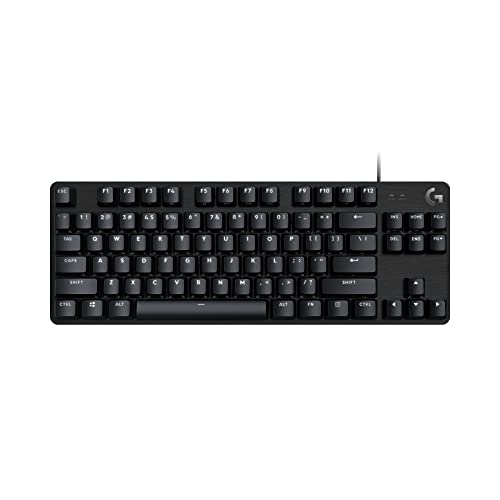
The Logitech G413 TKL SE is the compact mechanical pick for a desk setup next to the console. It drops the number pad, so the board takes less desk space and leaves more room for a mouse, which suits a desk setup next to the console. The tactile mechanical switches give a clear bump on each press without the loud click of a clicky switch, and the brushed aluminum top plate keeps the board rigid when typing hard.
Lighting is a single white backlight rather than full RGB, which fits the board’s plain and serious look. The backlight makes the keys easy to find in a dark room, and the white glow suits a living room better than a rainbow effect for many players. Anti-ghosting keeps multiple simultaneous presses registering, which matters in games that do accept keyboard input and in fast typing alike.
The board is wired over USB, so it plugs straight into the console with no receiver and no battery to think about. It has no wrist rest and no number pad, so players who type long messages with numbers may miss the pad, and the cable is fixed rather than detachable. The model number to match is 920-010442. Do not confuse this tenkeyless model with the full-size G413 SE, which is a different board under a different listing. The listing was confirmed live on Amazon in November 2026 with a current tracker record.
The Redragon K556 is the full-size mechanical pick with the most practical character. It is a 104-key board on a solid aluminum base, with hot-swappable sockets that let the owner pull a switch out and press a different one in without soldering. That makes it the only board in this guide that can change its feel after purchase, and it suits a player who wants to try a different switch type later.
This listing uses soft tactile brown switches, which give a gentle bump and a moderate sound, a middle ground between a quiet membrane board and a loud clicky one. The RGB backlight offers 18 lighting modes, and noise-absorbing foam inside the case damps the hollow sound that can make a metal board ring. N-key rollover means the board keeps up when several keys are held at once, which is useful in the games on Xbox One that accept keyboard input.
The K556 is wired and full size, so it needs desk space and a free USB port, and it has no wireless mode. Redragon also sells this board with linear red switches under a separate listing, so match the ASIN and the brown switch variant when ordering. The brown switch listing was confirmed in stock and fulfilled by Amazon in November 2026.
The HyperX Alloy Origins Core is the compact mechanical pick with the most polished build. Its body is aluminum, its layout is tenkeyless, and its HyperX Red linear switches travel straight down with no tactile bump, which many players prefer for fast repeated presses. The RGB backlight covers the full range of lighting effects, and the detachable USB-C cable means a worn cable can be swapped without replacing the board.
Linear switches are a matter of taste. They feel smooth and quick, but they give no bump to confirm a press, so a player who types long messages may prefer the tactile feel of the G413 TKL SE or the Redragon K556 brown switches instead. The Alloy Origins Core suits a player who already knows they like a linear switch and wants a small board that feels dense and solid on the desk. The switches are rated for 80 million keypresses, and the board stores three lighting and macro profiles in onboard memory.
The HyperX manual for this board lists console compatibility with PS4 and Xbox One, which is an unusually direct statement for a PC-first keyboard, and it is one of the reasons this board earns its place here. Match the ASIN and the Red switch variant when ordering, because HyperX sells this same board with a tactile Aqua switch under a separate listing. The Red switch listing carries the model family HX-KB7RDX and was confirmed through the Amazon listing record.
Begin with the connection. A wired USB board is the simplest choice and works at once, while a wireless board must ship with its own USB receiver, because the Xbox One has no Bluetooth pairing menu for keyboards. A board that is Bluetooth-only will not connect, no matter how good it feels. Check the listing for a receiver in the box, and keep the receiver plugged into the console rather than a hub for the first try, since some hubs behave oddly with the console.
Next, decide where the keyboard will live. A couch setup favors a compact wireless board with a small footprint, such as the K400 Plus or the Razer Turret, while a desk setup favors a tenkeyless or full-size wired board that stays in one place. A full-size board gives a number pad for long codes and numbers, while a tenkeyless board leaves more room for a mouse hand. The Xbox One has three USB ports, so a player who also uses an external drive and a headset adapter should plan the port layout before buying, since a wired keyboard, a wireless receiver, and an external drive can fill the ports quickly.
Then think about feel and sound. Membrane boards are quiet and soft, tactile mechanical switches give a clear bump, and linear switches feel smooth and fast. Backlighting matters too: a white or RGB backlight helps in a dark room, while an unlit board is fine in a bright living room. A hot-swappable board such as the Redragon K556 lets the owner change the feel later without buying a new keyboard, which is useful when the household shares one board and different people prefer different switches.
Finally, check the game list. A keyboard will always help with typing, messages, and search on the Xbox One, but only a small group of games accept keyboard input during play. Buy the board for typing first and treat game support as a bonus, and the purchase will not disappoint. If the household plays mostly supported games, a mechanical board with anti-ghosting and N-key rollover is the better fit. If the keyboard is mainly for chat and menus, a quiet membrane board or a compact wireless board is the better fit.
Frequently Asked Questions
Do all Xbox One games work with a keyboard?
No. Only a small group of games accept keyboard input on Xbox One, and each developer decides whether to support it. A keyboard always works for typing, messages, and search across the dashboard, but most games ignore keyboard input during play.
Can I use a Bluetooth keyboard with Xbox One?
No. The Xbox One has no Bluetooth pairing menu for keyboards, so a Bluetooth-only board will not connect. Use a wired USB keyboard or a wireless keyboard that ships with its own USB receiver.
Does the Xbox One support a mouse as well as a keyboard?
Yes, in the same limited way. The same small group of games that accept keyboard input also accept a mouse, and a mouse works in some apps and menus. Most games ignore mouse input during play, just as they ignore keyboard input. The Razer Turret is the only pick in this guide that includes a mouse in the box.
Which keyboard is best for couch play on Xbox One?
The Razer Turret is the best couch pick in this guide because it was designed for Xbox One and combines a wireless keyboard and mouse with a slide-out mouse surface. The Logitech K400 Plus is the simpler couch pick, with a built-in touchpad and a much lighter body, and it suits players who mainly type from the sofa.
Which keyboard is best for a desk next to the console?
The Logitech G413 TKL SE is the best desk pick for players who want a tactile mechanical feel in a compact board, while the Redragon K556 is the best desk pick for players who want a full-size layout with a number pad and hot-swappable switches. The HyperX Alloy Origins Core suits players who prefer a linear switch and a dense aluminum body.
Disclosure: As an Amazon Associate, we earn from qualifying purchases made through links on this page.
R
Razer Gaming Series Editorial Team
We compare specs, materials and verified owner reviews before a product earns a spot. Rankings are never paid.
Affiliate disclosure. As an Amazon Associate we earn from qualifying purchases at no extra cost to you. Prices accurate as of the date shown.
How to choose a small electronic music keyboard for circuit bending: battery power, simple construction, pitch behaviour and second-hand checks, explained without computer keyboards.
Our guide to best asian live webcams explains how to pick live webcam platforms safely: privacy, payment safety, moderation, regional rules and age checks.
Learn how to judge webcam forum platforms safely with this guide to best anal webcams extreme forums, covering privacy, moderation, scams and age rules.
The best 60fps webcams under 50 keep motion smooth on calls and streams for work and play. Compare four webcams with autofocus, privacy covers and microphones.
Four arranger keyboards compared on key count, voices and styles, recording features and speakers, using only the details printed on their Amazon listings.
Compare gaming chairs with real cooling features, from built-in fans and ventilated seats to cooling gel cushions, and learn how to choose the right type.
The best chairs for gaming tables fit your desk height, support long sessions and roll smoothly. Compare four chairs built for gaming setups and long play.
Compare the best gaming chairs under 120 for long sessions: four budget-class chairs with footrests, reclining backs, lumbar support and sturdy frames.
The best animal webcams are indoor pet cameras with a phone app and two-way talk. Compare rotating treat cameras and pan-tilt monitors from Furbo and Petcube.

 Razer Turret Wireless Mechanical Gaming Keyboard & Mouse23.62 x 14.79 x 7.63 inches4.33 poundsCheck on Amazon
 Logitech K400 Plus Wireless Touch TV Keyboard for13.95L x 5.5W x 0.93H inches13.95 x 5.5 x 0.93 inches0.86 poundsCheck on Amazon
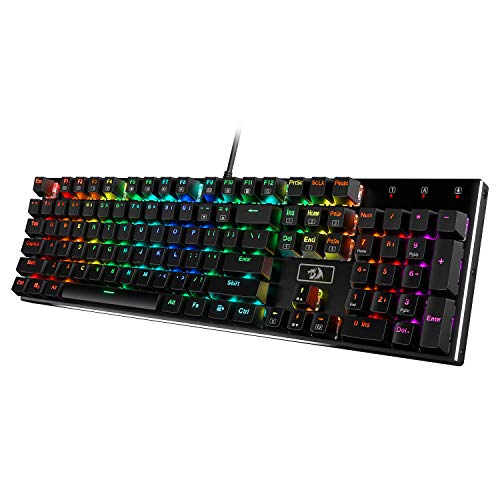 Redragon K556 Wired RGB Mechanical Gaming KeyboardBrown Switch17.13 x 4.88 x 1.59 inches2.2 poundsCheck on Amazon
 5. HyperX Alloy Origins Core Mechanical Gaming Keyboard