Our Top Picks
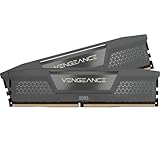
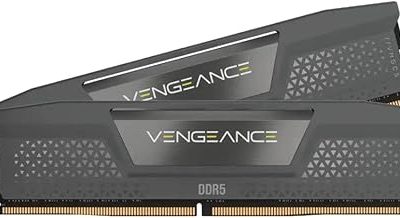
 Corsair Vengeance RGB RS DDR5 32GB32GB (2 x 16GB)5.43 x 0.27 x 1.77 Inches0.11 poundsCheck on Amazon
Pros & cons
- Dual memory profiles support either AMD or Intel platforms
- Onboard voltage regulation aids stable overclocking through Corsair software
- Hand-sorted chips help maintain consistent high-frequency performance
- Rated 6000MHz speed needs overclocking and BIOS tuning
- Only compatible with AMD EXPO or Intel XMP 3.0 boards
Ryzen on the AM5 socket is picky about memory in ways that older platforms never were. Only DDR5 will fit, the kit has to hold a stable profile through the motherboard’s memory training, and the sticker on the box matters because EXPO is the profile standard AMD built for its own chips. Choosing DDR5 for a Ryzen desktop is therefore less about chasing the biggest frequency and more about picking a kit whose capacity, timings and profile support match your processor and your motherboard.
The six kits below all list 6000MHz or 6000MT/s, the speed most AM5 builders treat as the comfortable target in 2026, and all are desktop-format modules. They differ in capacity, in latency (CL30, CL36 and CL38 appear), in lighting, and in which profile standards they mention. Two laptop SODIMM kits were left out because they will not fit a desktop board. Use the Quick Picks table to narrow down, then read the buying sections to decide how much latency and capacity you actually need.
Quick Picks
Corsair Vengeance RGB RS DDR5 32GB (2 x 16GB) Up to 6000MHz AMD Intel RAM | Desktop Gaming Memory, AMD EXPO & Intel XMP 3.0 Compatible, CL36, Grey, CMG32GX5M2E6000Z36
One of the consumer electronics options compared in this guide.
View on Amazon
CORSAIR Vengeance RS DDR5 32GB (2 x 16GB) Up to 6000MHz AMD Intel RAM | Desktop Gaming Memory, AMD EXPO & Intel XMP 3.0 Compatible, CL38, Gray, CML32GX5M2D6000Z38
One of the consumer electronics options compared in this guide.
View on Amazon
G.SKILL Flare X5 Series DDR5 RAM (AMD EXPO & Intel XMP 3.0) 32GB (2x16GB) Up to 6000MT/s* CL36-36-36-96 1.35V Desktop Computer Memory U-DIMM - Matte Black (F5-6000J3636F16GX2-FX5)
One of the consumer electronics options compared in this guide.
View on AmazonCorsair Vengeance RGB RS DDR5 16GB (2 x 8GB) Up to 6000MHz AMD Intel RAM | Desktop Gaming Memory, AMD EXPO & Intel XMP 3.0 Compatible, CL36, Grey, CMG16GX5M2E6000Z36
One of the consumer electronics options compared in this guide.
View on Amazon
CORSAIR Vengeance DDR5 32GB (2 x 16GB) Up to 6000MHz AMD Intel RAM | Desktop Gaming Memory, AMD EXPO & Intel XMP 3.0 Compatible, CL30, Grey, CMK32GX5M2B6000Z30
One of the consumer electronics options compared in this guide.
View on Amazon
Patriot Viper Venom DDR5 RAM 16GB (2X8GB) 6000MT/s CL36 Desktop Memory | Voltage: 1.35v; Supports Intel XMP and AMD EXPO; Module type: UDIMM.
One of the consumer electronics options compared in this guide.
View on Amazon| Product | Best for | Key spec from the title |
|---|---|---|
| Corsair Vengeance RGB RS 32GB | Lit-up builds with mainstream timings | 2 x 16GB, up to 6000MHz, CL36, EXPO and XMP 3.0 |
| G.SKILL Flare X5 32GB | Clean, low-profile look with AMD focus | 2 x 16GB, up to 6000MT/s, CL36-36-36-96, 1.35V |
| Corsair Vengeance 32GB CL30 | Tightest timings without RGB | 2 x 16GB, up to 6000MHz, CL30, EXPO and XMP 3.0 |
| Patriot Viper Venom 16GB | Lowest-capacity entry kit | 2 x 8GB, 6000MT/s, CL36, 1.35V, XMP and EXPO |
| Lexar Thor Z RGB 32GB | RGB kit with on-die ECC and PMIC | 2 x 16GB, 6000MHz, CL38, 288-pin UDIMM |
| G.SKILL Trident Z5 Neo RGB 32GB | AMD-tuned premium kit | 2 x 16GB, up to 6000MT/s, CL30-38-38-96, EXPO |
The 6 Best Options
Corsair Vengeance RGB RS 32GB (2 x 16GB) CL36
This kit’s title is a model of clarity: 32GB in two 16GB sticks, up to 6000MHz, AMD EXPO and Intel XMP 3.0 compatible, CL36, grey finish. The dual-profile wording is useful because it means the same kit can move to another platform if you ever change processors. A two-stick layout is also the arrangement AM5 boards handle best, since populating only two of four slots keeps the memory controller under less strain.
It suits a builder who wants a classic mid-range gaming configuration: enough capacity for modern games with a browser and chat apps open, a speed that sits where Ryzen is generally comfortable, and RGB lighting for a tempered-glass case. Corsair’s Vengeance line is widely sold, which usually means a larger body of user setup guides to lean on. The title does not state module height, so a builder with a large air cooler should confirm clearance before buying, as RGB heat spreaders are often taller than plain ones.
- 32GB across two modules matches the layout AM5 boards handle most easily
- EXPO and XMP 3.0 on one kit keeps the memory portable between platforms
- CL36 is a mainstream latency that is easier to run stable than very tight timings
- RGB lighting adds cost and software without improving speed
- CL36 is looser than the CL30 kits further down the list
Skip it if your case has no window or you prefer a plain heat spreader, since you would be paying for lighting you cannot see. Compared with the G.SKILL Flare X5 next, it offers the same capacity and timing class with a lighting package, while the Flare X5 leans on plain styling and a fully spelled-out timing string.
G.SKILL Flare X5 32GB (2x16GB) CL36-36-36-96
G.SKILL’s title includes full timing numbers, CL36-36-36-96, with a 1.35V figure and U-DIMM form factor. The Flare X5 series is built with AMD platforms in mind, and the title supports that by naming EXPO first and XMP 3.0 second. The full timing string is more transparent than a bare CL number, because secondary timings also influence stability and responsiveness.
It fits a Ryzen builder who wants a no-nonsense, understated kit that does not compete visually with the graphics card or cooler. A plain, low-lit look also makes it a good partner for compact cases where a tall, bright module would be in the way of a large air cooler. If you like to keep the interior of a build uncluttered, this kind of kit lets the graphics card and cooler take the visual lead.
- The full CL36-36-36-96 string is stated, so you know exactly what you are buying
- 1.35V is the common voltage for 6000-class DDR5 and works with standard boards
- No RGB means no extra software and a calmer-looking build
- Timings are the same class as the Corsair RGB RS kit, so there is no latency advantage
- The title is cut off after the color, so confirm height and finish on the product page
Skip it if you want visible lighting or the tightest timings on the list. Against the Corsair Vengeance CL30 kit that follows, it sacrifices several clock cycles of latency in exchange for a sober appearance and a clearly documented timing string.
Corsair Vengeance 32GB (2 x 16GB) CL30
The headline difference here is CL30 at up to 6000MHz in a 32GB kit with both AMD EXPO and Intel XMP 3.0 compatibility. Lower CAS latency means the module needs fewer clock cycles to answer a request, so at the same speed a CL30 kit is generally more responsive than a CL36 kit. Ryzen processors tend to reward low latency at 6000, which is why this configuration is a favorite among AM5 builders.
It is the pick for a performance-minded player who wants quick responses in games, but does not need lighting. A plain grey heat spreader keeps the look conservative, and the 32GB capacity covers gaming plus streaming, editing or heavy multitasking. Because it uses the same two-stick layout as the other 32GB kits, installation is just as simple, and enabling the profile in the BIOS is the only step that really matters.
- CL30 is the tightest standard latency among the Corsair kits listed here
- EXPO and XMP 3.0 support gives flexibility across platforms
- 32GB leaves room for creative work alongside gaming
- Tight timings may be harder for some motherboards to hold stable out of the box
- It sits higher in cost tier than the CL36 kits for a modest practical gain
Skip it if you simply want something that works with minimal fuss, because the CL36 kits are easier targets. It sits close to the G.SKILL Trident Z5 Neo, which shares the CL30 first number but adds RGB and AMD-only EXPO branding, so the two form the natural head-to-head in the performance tier.
Patriot Viper Venom 16GB (2x8GB) 6000MT/s CL36
Patriot lists 16GB in two 8GB modules at 6000MT/s, CL36, 1.35V, UDIMM, with support for Intel XMP and AMD EXPO. This is the smallest kit in the guide, and its position is clear: it is for builders who want DDR5 and EXPO at the lowest cost tier and who are not going to run memory-hungry applications. For basic gaming and everyday tasks, 16GB remains a workable amount, though it leaves less room than 32GB.
It suits a first AM5 build with a modest graphics card, a tight budget, or a secondary PC for work and light games. It also gives an easy upgrade story, since you can add a second matching pair later if the motherboard has four slots, though mixing kits can bring stability issues. Because the title does not say whether the modules carry a heat spreader or lighting, treat it as a plain, functional kit and verify appearance on the product page if looks matter to you.
- It is the lowest-capacity and lowest-cost tier option for a DDR5 build
- 6000MT/s CL36 matches the speed class of the larger kits
- Both EXPO and XMP are named, so the kit is portable
- 16GB is a constraint for streaming, editing or many background applications
- Adding a second pair later may require matching the kit exactly or accepting a speed drop
Skip it if you play modern titles with other programs open or plan to keep the PC for many years. If capacity matters more than price, step up to the Lexar Thor Z RGB below, which doubles the memory.
Lexar Thor Z RGB 32GB (2x16GB) 6000MHz CL38
Lexar’s title lists a 32GB kit, 6000MHz, CL38, a 288-pin UDIMM format, support for Intel XMP 3.0 and AMD EXPO, on-die ECC, a PMIC and 1.35V. The on-die ECC and PMIC mentions are features of DDR5 as a standard rather than special extras, but their presence confirms the module follows the current specification. CL38 is the loosest timing on the list, which tells you the manufacturer prioritized compatibility and cost over latency.
It suits a builder who wants 32GB with RGB lighting at an accessible tier and who accepts slightly slower responses than the CL30 and CL36 kits. For general gaming and productivity, the difference is small, and the capacity is what usually matters most. A builder who values lighting and capacity above everything else will find this kit hits both without a large jump in cost tier.
- 32GB with RGB lighting is offered at a value-oriented position
- EXPO and XMP 3.0 are both named, making it a flexible choice
- 288-pin UDIMM format is stated, confirming desktop compatibility
- CL38 is the loosest latency in this guide
- Lexar is a less common name in enthusiast memory, so community tuning guides may be fewer
Skip it if you want the strongest responsiveness or the widest base of user experience. Compared with the Corsair RGB RS kit, it offers the same capacity and lighting with a slower latency figure, which is the trade a bargain-minded builder is making.
G.SKILL Trident Z5 Neo RGB 32GB (2x16GB) CL30-38-38-96
The Trident Z5 Neo is G.SKILL’s AMD-focused premium line, and the title says so by naming only AMD EXPO. The kit offers 32GB in two modules, up to 6000MT/s, CL30-38-38-96 timings, 1.35V and a U-DIMM format, with RGB lighting. The first number matches the Corsair CL30 kit, but the secondary timings are different, so the two are not identical in character.
It is the pick for an AM5 builder who wants an enthusiast-grade, AMD-tuned kit with lighting and does not need Intel compatibility. If you are fairly sure the system will stay on Ryzen, the EXPO-only wording is a statement of intent rather than a limitation. Its secondary timings of 38-38-96 are looser than the primary figure might suggest, which is worth knowing if you compare kits by the full string rather than by CL alone.
- CL30 gives the tightest primary latency along with the Corsair Vengeance
- It is designed around AMD EXPO, targeting Ryzen directly
- RGB lighting suits a showpiece build
- The title mentions only EXPO, so it is less portable to Intel platforms
- Premium positioning means a higher cost tier than the CL36 and CL38 kits
Skip it if you might move to an Intel board or if lighting does not matter, since the plain Corsair CL30 kit gives similar latency for less visual flash. As the last pick, it is the most specialized, and it is the natural reference for anyone prioritizing AMD tuning over portability.
Who Needs DDR5 Tuned for Ryzen
Anyone building on the AM5 socket
AM5 boards accept only DDR5, so there is no choice about the generation; the choice is about the kit. A buyer pairing a new Ryzen 7000-series or newer processor with a board needs DDR5 with an EXPO profile or a compatible XMP-style one. Choosing a kit that names EXPO directly removes one common source of confusion during setup. It also avoids the trap of buying a kit meant for a different platform and then hunting through BIOS menus for a setting that is not there.
Upgraders replacing a first kit
Many AM5 owners begin with a basic 16GB kit and later find it limiting. They benefit from stepping up to 32GB at 6000, ideally in a single matched two-stick kit rather than adding sticks to an existing set. A fresh matched kit avoids the mismatch problems that come from mixing different memory bins. If your current board still has two free slots, resist the urge to fill them with a mismatched pair; selling the old kit and buying one fresh pair usually gives a calmer result.
Gamers and creators who notice latency
Lower latency can matter for competitive play and for tasks that hit memory often. If you are in that group, the CL30 kits on this list are the natural targets, and the extra care in tuning pays off with a snappier system. Content creators who work with large files, such as video timelines or big photo catalogs, gain from capacity first and latency second, so for them a 32GB CL36 kit is often the more useful purchase than a 16GB CL30 one.
How to Choose
Capacity: 32GB is the comfortable default
Sixteen gigabytes is a workable floor for gaming alone, but 32GB is the safer default for current titles plus background applications. If you edit video, run virtual machines or keep many browser tabs open, 32GB is the sensible minimum and 64GB is worth considering. Two sticks of 16GB are generally easier on the memory controller than four smaller sticks. As a rule, buy the capacity you need for the next three years in one matched kit rather than planning to add sticks later, because a second kit seldom behaves exactly like the first.
Speed: 6000 is the usual sweet spot
For AM5 Ryzen, 6000MT/s is widely treated as the best balance of speed and stability, because it lines up well with the processor’s internal fabric clocking. Faster kits exist, but they may not run at their advertised speed on every board or chip. Do not pay extra for headline numbers that your processor cannot sustain. A kit that runs at 6000 with stable settings beats a faster one that crashes under load. If a seller advertises a speed above 6000, check that the board vendor lists it as supported, and be ready to run it at a lower setting if the system proves unstable.
Latency: CL30 for tuners, CL36 for most
CAS latency measures how many cycles the memory needs to respond. CL30 is the tight end of the 6000 range, CL36 is mainstream, and CL38 is relaxed. The real-world gap between them is small for most people, often a few percent in memory-sensitive games and close to nothing in office work, so choose the lower latency only if the price gap is reasonable and your board can hold it stable. A useful way to compare kits is to look at the full timing string where it is given, for instance 36-36-36-96 against 30-38-38-96, because the first number alone does not tell the whole story.
Profile support: EXPO, XMP and what the sticker means
EXPO is AMD’s own profile standard, and it lets the board apply the right speed and timings with one setting. Kits that list both EXPO and XMP 3.0 are the most portable. EXPO-only kits are ideal if you plan to stay on Ryzen. Many boards offer a one-click EXPO option in the BIOS menu, so look for it on the first screen. Make sure you enable the profile in the BIOS, because kits default to a much slower base speed otherwise. After enabling it, confirm the speed in the BIOS or in a system information tool, and keep the profile enabled rather than hand-tuning unless you are comfortable with manual voltage settings.
Form factor and height
Desktop kits are UDIMM modules with 288 pins. Laptop SODIMM modules will not fit. Check module height against your air cooler, since tall RGB heat spreaders can collide with large heatsinks over the memory slots. Verify clearance in the cooler’s specification sheet. As a rough threshold, if the module is taller than about 40mm, check the cooler fan placement carefully, and know that low-profile plain kits such as the Flare X5 are the safest option for tight builds.
Voltage, lighting and where budget kits cut corners
1.35V is typical for 6000-class DDR5, and any value much higher deserves attention. Ignore RGB when ranking performance, since it adds nothing to speed, and ignore marketing words such as gaming or extreme that carry no measurable meaning. Budget kits tend to cut corners on heat spreader quality, on the strictness of binning, and on warranty or support. Check that the vendor offers a lifetime or multi-year warranty before you choose. Also look for a heat spreader that is firmly attached and a clear return policy, since DIMMs that arrive with bent pins or loose spreaders should be replaced rather than installed.
Tight Timings or Relaxed Timings
The key trade-off within this list is CL30 versus CL36 or CL38 at the same 6000 speed. The table compares them using only the figures given in the titles. Remember that the same speed number with a lower latency means a shorter wait for every memory request, which is why the CL30 rows stand out.
| Kit | Capacity | Timing in title | Lighting |
|---|---|---|---|
| Corsair Vengeance CL30 | 32GB | CL30 | No RGB |
| G.SKILL Trident Z5 Neo | 32GB | CL30-38-38-96 | RGB |
| Corsair Vengeance RGB RS | 32GB | CL36 | RGB |
| G.SKILL Flare X5 | 32GB | CL36-36-36-96 | No RGB |
| Patriot Viper Venom | 16GB | CL36 | Not stated |
| Lexar Thor Z RGB | 32GB | CL38 | RGB |
When CL30 is worth chasing
If you play competitive games or run memory-intensive tasks, and the CL30 kit sits only a small step up in cost, it is a reasonable investment. Make sure your motherboard is current with its BIOS, because early firmware sometimes struggles with tight timings. It also helps to pair a CL30 kit with a processor you intend to keep, since the benefit of a premium kit is wasted if you swap platforms within a year.
When CL36 or CL38 is the better call
Most buyers will not notice the gap in everyday use, and looser timings are often easier to stabilize. If you are balancing the budget between memory, graphics card and storage, CL36 is the practical pick, and CL38 suits a value-first build that prioritizes capacity. Note also that the Patriot kit at 16GB is not directly comparable on capacity, so weigh it against the 32GB kits only if memory size is not a concern. Spending the savings on a faster graphics card or a larger drive often improves the experience more than shaving a few cycles off latency.
Setup, Compatibility and Upgrade Tips
What to check before buying
Confirm that your board is AM5 and uses standard UDIMM slots, then look up the motherboard’s memory support list for your exact kit or at least for the same speed class. Check the height of your cooler, and decide between two or four sticks. Two matched sticks give the best chance of reaching the advertised speed. If you are unsure which slots to use, the motherboard manual shows the two that should be filled first, and they are usually the second and fourth slots counting from the processor.
What to upgrade first
If you are on 16GB, move to a 32GB kit before chasing tighter timings, because capacity usually changes day-to-day use more than a few cycles of latency. After that, update the BIOS, then enable the EXPO profile. A fast kit running at default base speed wastes the purchase. Once those steps are done, consider a larger kit only if your workload demands it, rather than chasing a marginal gain in timings.
Common compatibility traps
The first boot after installing a new kit can take several minutes while the board trains the memory, which looks like a hang but is normal. Mixing different kits in four slots often forces lower speeds. And some boards require a BIOS update to recognize a given kit at its advertised speed, so check the support page before you install. If the system will not boot, clear the CMOS, reseat the modules fully until both clips click, and give the board a few minutes to finish training before concluding anything is faulty. Keep the old kit, if you have one, until the new one has run for a few days without a problem.
Which One Fits Your Situation
You want a dependable 32GB kit with lighting
Choose the Corsair Vengeance RGB RS 32GB CL36. It combines mainstream timings, dual profile support and a broad user base. It is the safest first choice for a new AM5 gaming tower.
You want low latency with a plain look
Choose the Corsair Vengeance 32GB CL30. It offers the tightest timings without lighting and keeps compatibility with both platforms.
You are building a lit AMD showpiece
Choose the G.SKILL Trident Z5 Neo RGB. Its CL30 primary timing and EXPO focus make it a natural match for a Ryzen build with a window case, and it rewards a builder who is willing to check the BIOS version first.
You are on a tight budget but need DDR5
Choose the Patriot Viper Venom 16GB if capacity is secondary, or the Lexar Thor Z RGB 32GB if you want the extra memory at a relaxed latency.
Common Mistakes
- Forgetting to enable the EXPO profile in the BIOS, so the kit runs far below its advertised speed
- Buying laptop SODIMM memory for a desktop board because the title mentions Ryzen, when the 288-pin UDIMM format is the one a standard board accepts
- Choosing very tall RGB modules without checking clearance under a large air cooler
- Mixing two different kits in four slots and wondering why stability drops
- Paying extra for speeds above 6000 that the processor cannot make use of
- Ignoring the motherboard’s memory support list and BIOS version before installing, which is the quickest way to end up with a PC that refuses to boot at the advertised speed
Related guides
- Razer Gaming Chairs For Tall Gamers
- 7.1 Surround Sound Gaming Headsets
- Laptops For Students Lightweight
Frequently Asked Questions
Is 6000MHz the best speed for Ryzen DDR5?
It is widely treated as the best balance for AM5 because it pairs well with the processor’s internal clocks. Faster kits can work but are not guaranteed to run at their advertised speed.
Do I need an EXPO kit for Ryzen?
It is the easiest path because the board applies EXPO settings with one switch. XMP kits can work too, but compatibility is less direct, so EXPO-labeled kits reduce guesswork.
Is 16GB enough?
For basic gaming it can be, but 32GB is the safer choice for new builds. It leaves room for background applications, streaming and creative work.
Does CL30 matter in games?
It can improve responsiveness slightly, especially in competitive titles. For most players the gap versus CL36 is small, so cost and stability are fair deciding factors. Prefer the tighter kit only when the price gap is small.
Can I use SODIMM memory in a desktop?
No, SODIMM modules are shorter and designed for laptops. Look for 288-pin UDIMM kits for a standard desktop board.
Why does my PC take a long time to boot after installing RAM?
New DDR5 kits go through memory training, which can take a few minutes on the first boot. If it never completes, reseat the modules and update the BIOS. Patience on the first boot saves a lot of needless troubleshooting.
Final Words
For most Ryzen builders the answer is a matched 32GB kit at 6000, with EXPO support and the lowest latency your budget and board can comfortably run. The Corsair Vengeance CL30 and the Trident Z5 Neo lead on latency, the Corsair RGB RS and Flare X5 offer the mainstream balance, and the Patriot and Lexar kits serve tighter budgets. Check cooler clearance, enable the profile, and update your BIOS, and any of these six will give an AM5 system a solid memory foundation for years of gaming and work, and a clear route to a larger kit when your needs grow.