Our Top Picks
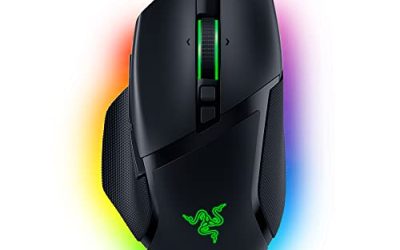
 Razer DeathAdder V3 Pro Wireless Gaming Mouse1000 Hz5.01 x 2.65 x 1.69 inches0.1 poundsCheck on Amazon
The Razer Ouroboros and the Razer Abyssus are two very different mice that share one thing: both come from an older chapter of Razer’s lineup. The Ouroboros is a wireless, ambidextrous mouse with an 8200 DPI dual-sensor system and a moving palm rest, while the Abyssus line is a simple, symmetrical wired mouse built around a handful of buttons and a modest sensor. If you are weighing razer ouroboros and abyssus against newer designs, the short answer is that both are workable for casual play, but current Razer mice beat them on weight, sensor, switch tech and software support.
Quick Verdict: Razer Ouroboros and Abyssus at a Glance
The Ouroboros is the more interesting design and the Abyssus is the simpler, more predictable one. Neither is the mouse we would point a new buyer to for competitive shooters today.
- Razer Ouroboros: best for tinkerers who like an adjustable shape and want a wireless mouse with a dock-style charging setup. Skip it if you want a light mouse. It weighs 135 g per Razer’s own guide.
- Razer Abyssus (Essential-era version): best for a low-cost wired mouse that fits any grip. Skip it if you want side buttons or a high-end sensor.
- Current picks: the DeathAdder V3 family and the Basilisk V3 family cover almost every use these two older mice were bought for.
Availability changes often, so this guide makes no claim about whether any single unit is on sale. Check the listing and the maker’s page before you commit, particularly for the older Ouroboros.
Razer Ouroboros Specs
The Razer Ouroboros was announced around 2012 as an adjustable, wireless mouse aimed at players who wanted to fit the mouse to their hand rather than the other way around. The figures below come from Razer’s own master guide and launch coverage.
| Spec | Razer Ouroboros |
|---|---|
| Type | Ambidextrous, wireless (with cable option) |
| Sensor | 8200 DPI 4G dual sensor system (laser plus optical) |
| DPI range | 100 to 8200, up to 5 stages |
| Tracking | Up to 200 inches per second, 50 g acceleration |
| Buttons | 11 programmable Hyperesponse buttons |
| Polling rate | 1000 Hz |
| Weight | 135 g |
| Power | One AA battery, 12+ hours continuous play, charging dock included |
| Adjustments | Palm rest moves up to 0.9 in, back tilt angle, swappable side panels |
What the adjustable body does
The adjustable palm rest and side panels let the shape change for claw, palm or hybrid grips. In practice that means a larger hand can slide the rest back, while a smaller hand can pull it in and tilt the rear of the mouse for a more arched hold. It is a clever idea, but every moving part is also one more thing that can feel loose over years of use, and a mouse with a movable chassis will never feel as solid as a one-piece shell.
Wireless on an AA battery
Razer lists wireless latency of about 1 ms and at least 12 hours of continuous use on a single AA cell. A single replaceable battery is practical because you can swap it in seconds, but it adds weight, and the mouse is heavy by modern standards. Modern wireless esports mice use rechargeable cells and weigh a third of this, with battery life measured in tens or hundreds of hours.
The dual sensor idea
Razer paired a laser sensor with an optical sensor in the Ouroboros and called the result a 4G dual sensor system. The aim was to read many kinds of desk surface accurately. Modern optical sensors have made that trick less necessary, since a single good optical sensor now tracks cloth, hard pads and most desks without a second sensor. That is one reason the headline 8200 DPI figure matters less today than it did at launch.
Razer Abyssus Specs and Which Version You Mean
Razer has used the Abyssus name more than once, and listings mix generations. The version in the store listing we reviewed is the Abyssus Essential, which is described as a 7,200 DPI optical-sensor mouse with three Hyperesponse buttons, Razer Chroma lighting and an ambidextrous shape. Earlier Abyssus releases used different sensors and button layouts. We could not verify their exact numbers, so check the maker’s page for the specific model on the box before assuming a spec.
| Spec | Razer Abyssus Essential |
|---|---|
| Type | Wired, ambidextrous |
| Sensor | 7,200 DPI optical |
| Buttons | 3 Hyperesponse buttons per listing |
| Lighting | Razer Chroma |
| Weight | Not listed in the listing text. Check the maker. |
Razer Abyssus Essential

Razer Abyssus Essential: True 7,200 DPI Optical Sensor - 3 Hyperesponse Buttons - Powered by Razer Chroma - Ambidextrous Ergonomic Gaming Mouse
Chosen because it specifies 200 DPI Optical Sensor and 3 Hyperesponse Buttons.
View on AmazonThe listing describes a wired ambidextrous mouse with a true 7,200 DPI optical sensor, three Hyperesponse buttons and Razer Chroma lighting. That is a short feature list, and it fits a simple office or light gaming desk rather than a full macro setup. If you play slower games, browse a lot and want a mouse that suits either hand, this layout is easy to live with. Skip it if you want side buttons for MOBA or MMO play.
Razer Ouroboros vs Abyssus Side by Side
| Category | Ouroboros | Abyssus Essential |
|---|---|---|
| Connection | Wireless plus cable option | Wired |
| Shape | Adjustable, ambidextrous | Fixed, ambidextrous |
| Buttons | 11 | 3 per listing |
| Weight | 135 g | Not listed |
| Sensor | 8200 DPI dual (laser + optical) | 7,200 DPI optical |
| Best for | Hand-fit tinkering, many hotkeys | Simple, cheap, either hand |
| Main drawback | Heavy, older design | Few buttons, basic feature set |
The two mice are not true rivals. They solve different problems, and the real choice for most buyers is between one of them and a newer mouse in the same brand.
Performance by Use
Casual and strategy games
Both mice cope with turn-based games, strategy titles and general play. The Abyssus is lighter on features and easier to pick up. The Ouroboros adds profile-ready buttons, and its 11 programmable buttons cover hotkeys that the Abyssus cannot match.
Competitive shooters
This is where age shows. Esports players now favor symmetrical or ergonomic mice in the 50 to 65 g range, and the median weight among tracked pros sits around 60 g according to ProSettings.net. At 135 g the Ouroboros is more than double that. The Abyssus line is lighter, but its three-button layout and basic sensor are not what shooter players tend to buy today. If shooters are your goal, move to a current pick.
MMO and MOBA play
The Ouroboros has the button count to handle skill bars, but its 11 buttons are not laid out like a thumb grid. If this is your main use, a Basilisk-class mouse is a better modern fit.
Office and creative work
For spreadsheets, editing and browsing, both mice are fine. The Ouroboros can be set up with the palm rest where your hand sits naturally, which helps in long sessions. The Abyssus has fewer parts to fail and plugs in with no battery to think about.
Left-handed players
Both designs are ambidextrous, which is their strongest argument. Many current Razer mice are right-handed shapes, so left-handers have fewer choices. The Abyssus Essential and Ouroboros both suit either hand.
Who Should Buy and Who Should Skip
Buy the Ouroboros if
- You want a wireless mouse that changes shape for your hand.
- You already own AA batteries and like the dock-style setup.
- You value 11 programmable buttons over low weight.
Buy the Abyssus Essential if
- You want a basic wired mouse that fits either hand.
- You are building a low-cost second desk or a kid’s setup.
- You do not need side buttons.
Skip both if
- You play fast shooters where weight and click speed matter.
- You want current Razer software features and long-term driver updates.
- You need an exact sensor or battery claim. The Ouroboros figures are from its original launch, not a current listing.
Current Razer Alternatives
If you landed here searching for razer ouroboros or razer abyssus because you need a Razer mouse today, these current lines are the natural step up.
Razer DeathAdder V3 Pro Wireless
Razer DeathAdder V3 Pro Wireless Gaming Mouse, 63g, 90 Hr Battery, Black | Focus Pro 30K Optical Sensor, Fast Optical Switches Gen-3, HyperSpeed Wireless, 5 Programmable Buttons
Chosen because it specifies 63g and 90 Hr Battery.
View on AmazonThe listing shows a 63 g wireless mouse with up to 90 hours of battery life, a Focus Pro 30K optical sensor and fast optical switches. Compared with the 135 g Ouroboros, that is less than half the weight, and the ergonomic shape suits palm and claw grips. Best for shooter players who liked the Ouroboros’s wireless idea but not its bulk. Skip it if you are left-handed, because the shape is right-handed.
Razer Basilisk V3 family
The Basilisk V3 line is the better replacement for anyone who bought the Ouroboros for its many buttons. Razer’s listings show wired and wireless versions with a HyperScroll tilt wheel and a long list of programmable controls. Pick this line for MMO, MOBA and productivity use. Check the maker’s page for the exact count of buttons on the version you plan to buy.
Razer Cobra and DeathAdder Essential
For a straight replacement for the Abyssus, look at the Razer Cobra, a wired 58 g mouse with Gen-3 optical switches according to its listing, or the DeathAdder Essential, a wired ergonomic mouse that sits at the budget end of the line. Both keep the cable but add a more modern feel.
Upgrade Path: Which Modern Mouse Matches Which Old One
| If you liked | Look at | Why |
|---|---|---|
| Ouroboros wireless freedom | DeathAdder V3 Pro or Basilisk V3 Pro line | Much lighter wireless designs with rechargeable batteries |
| Ouroboros button count | Basilisk V3 family | Many programmable controls plus a tilt wheel |
| Abyssus simplicity | Cobra or DeathAdder Essential | Wired, low cost, easy setup |
| Ambidextrous shape | Check symmetrical lines such as Viper | Symmetrical shells favored by shooter players |
Keep in mind that a symmetrical shape is not the same as an ambidextrous design with matching buttons on both sides. Many symmetrical mice put side buttons on the left only, so left-handers should read the button layout before buying.
Grip Fit: How Each Mouse Sits in the Hand
Palm grip
Palm grip players rest the whole hand on the shell. The Ouroboros suits this style better than most older mice because the palm rest can slide back and the rear can tilt up. Set the rest so the base of your thumb sits just behind the side panel, then check that your fingers land on the main buttons without stretching. The Abyssus has a fixed shell, so palm grip comfort depends on your hand size.
Claw grip
Claw grip arches the fingers and presses the palm against the rear of the mouse. A mouse with a tall back works well, and the Ouroboros can be set up that way by tilting the back angle. The Abyssus is lower and flatter, which some claw players like for quick flicks and others find too flat.
Fingertip grip
Fingertip grip needs a light mouse that is easy to lift. Neither mouse is a natural fit here. The Ouroboros is heavy at 135 g, and the Abyssus has no weight figure in its listing, so the safe route is to look at the modern picks above if fingertip grip is your style.
Setup and Software Notes
Older Razer mice were built around the Razer Synapse software of their era, and the Chroma lighting on the Abyssus Essential belongs to the newer software family. Because software support changes, treat these steps as a checklist rather than a promise.
- Plug the mouse in or pair the wireless dongle before installing any software, so the system finds the device cleanly.
- Check the maker’s support page for the exact model name. The Abyssus name covers several versions, and a driver for one may not apply to another.
- Set DPI to a value you can control. Most players land between 400 and 1600 DPI, and a number near the top of the range is rarely needed.
- Keep polling rate at 1000 Hz unless you have a reason to change it. The Ouroboros lists 1000 Hz as its polling rate.
- Save a profile to the mouse if the model supports onboard memory, so the settings travel with it. Confirm this on the maker’s page.
Common Issues With Older Mice
Double clicks and worn switches
Mechanical switches wear out with use. A mouse that registers one click as two is the classic sign of an aging switch. Current Razer mice use optical switches, which Razer’s own listings highlight, and this is one of the strongest practical reasons to move on from an older design.
Loose adjustable parts
On an adjustable mouse such as the Ouroboros, side panels and the palm rest can loosen with age. If a panel rattles or shifts under your hand, check the fit before you blame the sensor.
Cable fraying on wired mice
The Abyssus is wired, and a cable bends at the same point every day. If it starts to cut out, wiggle the cable near the strain relief to see whether the connection drops. A fraying cable is usually the end of the mouse unless the cable is detachable.
Surface and glide
Older mice often have thin feet. A clean cloth pad or a hard pad both work with modern optical sensors, but a worn foot can drag. Wipe the feet and the pad and check that no debris is stuck near the sensor window.
Is It Worth Buying a Legacy Mouse in 2026?
There are two honest reasons to pick up one of these mice. The first is that you already own a compatible dock, batteries or cable and want to keep a setup going. The second is that you prefer the shape. Outside those cases, a current mouse gives you lower weight, a newer sensor and a clear support page. If you do buy an older unit, ask for photos of the feet and switches, confirm what is included, and check the maker’s page for the model you plan to buy. Because we cannot confirm which versions are on sale at any moment, treat any older unit as one-of-a-kind and read the listing closely.
Buying Guide: What to Check Before You Pick
| Factor | Good threshold | Why it matters |
|---|---|---|
| Weight | Under 70 g for shooters, under 100 g for general play | Lighter mice are easier to flick and tire the wrist less. |
| Sensor | Any modern optical sensor. Very high DPI figures are not required | Most players use 400 to 1600 DPI. Higher numbers are a headline, not a need. |
| Switches | Optical switches in current mice | They avoid the double-click wear of older mechanical switches. |
| Connection | Wired for budget, wireless for desk freedom | Modern wireless latency is close to wired. |
| Shape | Match your grip | Palm grips like tall ergonomic shapes. Claw grips like shorter symmetrical ones. |
Mice with adjustable bodies, like the Ouroboros, were meant to remove the shape guesswork. Today that guesswork is lower because makers offer several clear shapes: ergonomic, symmetrical and tall MMO. If you are unsure of your grip, measure your hand length and compare it against the maker’s dimensions instead of relying on a shape name.
Frequently Asked Questions
What is the Razer Ouroboros?
It is a wireless, ambidextrous Razer mouse with an 8200 DPI dual sensor, 11 buttons and an adjustable palm rest and side panels. It weighs 135 g.
Is the Razer Abyssus a good gaming mouse?
The Abyssus Essential is a basic wired mouse with a 7,200 DPI optical sensor and three buttons. It works for light gaming but is not built for competitive shooters.
How much does the Razer Ouroboros weigh?
Razer’s guide lists 135 g, which is heavy against current esports mice in the 50 to 65 g range.
Does the Razer Ouroboros use a rechargeable battery?
It runs on a single AA battery according to Razer, with a charging dock included in the original package. Check the listing to confirm what comes with any unit you buy.
Is the Razer Abyssus ambidextrous?
The Abyssus Essential is described as ambidextrous, so it fits left and right hands. Earlier Abyssus versions may differ, so check the model you are buying.
What replaces the Razer Ouroboros today?
There is no single successor. The DeathAdder V3 family covers shooters, and the Basilisk V3 family covers programmable-button play.
Will Razer Synapse support these older mice?
Software support for older models changes over time. Check the maker’s support page for the exact model before you rely on a particular feature.
Which One Should You Buy?
Buy the Abyssus Essential if you want a cheap, simple wired mouse for either hand. Buy the Ouroboros only if you specifically want its adjustable shape and 11 buttons and accept the 135 g weight. For almost everyone else, a current DeathAdder or Basilisk is the better use of money, with lower weight and newer optical switches.
How We Chose
This review is research-based. We did not use the products ourselves. We compared Razer’s published specifications and launch coverage for the Ouroboros, the store listing for the Abyssus Essential and the listings for current Razer mice, then weighed them against pro weight and polling-rate data. Where a spec was not available, we say so rather than guess.
Sources
- Razer Ouroboros master guide (Razer support)
- The Tech Report, Razer Ouroboros announcement coverage
- Razer store listings for the Abyssus Essential and DeathAdder V3 Pro
- ProSettings.net, pro mouse usage data
FAQ
Is It Worth Buying a Legacy Mouse in 2026?
What is the Razer Ouroboros?
Is the Razer Abyssus a good gaming mouse?
How much does the Razer Ouroboros weigh?
Does the Razer Ouroboros use a rechargeable battery?
Is the Razer Abyssus ambidextrous?
What replaces the Razer Ouroboros today?
Will Razer Synapse support these older mice?
More from Amazon
Programs that pair well with the guide above. Offers and eligibility are set by Amazon and may change.
Free shipping on eligible items, Prime Video and more. Eligible new members can start with a free trial.
Start a Prime free trialAd-free music streaming. Eligible new subscribers can start with a free trial.
Try Music Unlimited freeA Prime membership for ages 18-24 with a trial period. Eligibility is set by Amazon.
See Prime for Young AdultsAudiobooks and podcasts to listen to on the go. Eligible new members can start with a free trial.
Try Audible freeAs an Amazon Associate we earn from qualifying purchases.