Our Top Picks


Wi-Fi is still the weakest link in a competitive session: a crowded band or a wall can turn a stable connection into jitter and packet loss. A wired connection removes that variable, and for laptops and handhelds without an Ethernet port, a USB-C to Ethernet adapter is the smallest way to get it back.
An adapter is not a dock. An adapter adds one Ethernet port and nothing else: plug it into a USB-C port, plug a cable into the RJ45 jack, and the device is on the wired network. A dock is a multi-port desktop station with video outputs, extra USB ports, and its own power supply. If all you need is a wired connection, the adapter is the lighter tool.
That last use case has grown fastest: the Steam Deck, the ROG Ally, and the Legion Go all ship without an Ethernet port, and all three accept a USB-C adapter. None of the five listings below names a handheld outright, so this article states the operating-system support each listing does claim. The one trade-off is that an adapter takes the device’s only USB-C port, which is also its charging port, though one pick below solves that with charging passthrough.
As an Amazon Associate, we earn from qualifying purchases.
How to choose a USB-C to Ethernet adapter for gaming
Match the speed to the rest of your network. A 2.5GbE or 5GbE adapter only runs at full speed when everything behind it supports that speed: the router or switch port, the NAS or server, and the cable. A 2.5GbE adapter on a gigabit switch simply links at 1 Gbps. Gigabit is enough for online play; the faster picks earn their place when you move large files across a local network or already own a multi-gigabit switch.
Check that your USB-C port carries data. USB-C is a connector shape, not a speed guarantee. These adapters need a USB-C port that exposes USB 3 data; a charge-only port cannot run one. The Anker listing puts it plainly: the device’s USB-C port must support USB 3.0 or above. Most laptop and handheld ports qualify, but a port on a cheap hub or a monitor’s downstream port may not.
Read the driver situation, not just the connector. Most of these adapters are plug and play on current Windows and macOS, but the details vary by model. The UGREEN manual, for example, lists Windows 11 and macOS as plug and play while older Windows versions need a driver install. On a Steam Deck, USB Ethernet support comes through the Linux kernel, and the Realtek controller families used here are handled by mainline drivers on modern kernels, so the connection comes up without installing anything.
Decide whether you need charging passthrough. A laptop with two USB-C ports can charge from one while the adapter uses the other. A handheld has one port, so a plain adapter means choosing between wired play and charging. The Cable Matters pick below is the only one of the five with a charging passthrough port, rated at 100W, which lets the device charge while it stays wired.
Thunderbolt compatibility is not a speed claim. Several listings say Thunderbolt 4 and 3 compatible, meaning the adapter works in a Thunderbolt port; it is still a USB Ethernet device, limited by the USB data rate.
1. UGREEN USB-C to Ethernet Adapter 2.5G (Model 25052)

The UGREEN is the most capable all-rounder here: a 2.5GbE link in a small aluminum dongle, built around the Realtek RTL8156BG controller, with status LEDs on the RJ45 jack. It auto-negotiates 2.5 Gbps, 1 Gbps, 100 Mbps, and 10 Mbps, so it slots into any network and runs at whatever the rest of the path supports. The aluminum housing keeps the controller cool under sustained transfers.
At 60 grams it is light enough to live in a laptop sleeve or a handheld carrying case, and its size is the reason third-party gaming guides keep naming it the travel and handheld pick: plug it into a Steam Deck’s USB-C port and the handheld becomes a stable wired client, with SteamOS picking up the connection through the Linux kernel. One detail worth checking: UGREEN sells this adapter under two model numbers, 25052 on the listing and CM648 in some retail channels. Confirm the model number and the RTL8156BG controller rather than trusting a generic marketplace title. There is no charging passthrough and no video output on this unit: it adds one Ethernet port and nothing else.
Specs
- Speed: 2.5GbE, with fallback to 1 Gbps, 100 Mbps, and 10 Mbps
- Controller: Realtek RTL8156BG
- Connector: USB-C, USB 3.0 host; RJ45 Ethernet
- Housing: Aluminum with status LEDs
- Weight: 60 g (2.1 oz)
- Model: 25052, also sold as CM648
- Operating systems: Windows 11 and macOS plug and play; driver install on older Windows
2. TP-Link UE300C
The UE300C is the compact gigabit pick. It folds flat, it weighs 20 grams, and it is plug and play on Windows 11 and 10, macOS, ChromeOS, and Linux, with a driver needed only for Windows 7. For a laptop or handheld that just needs a reliable gigabit connection, that is the whole job done.
The current listing title, captured in November 2026, describes it as compact and plug and play, a portable 1 Gbps RJ45 to USB-C 3.0 adapter compatible with Thunderbolt 3 and 4, for MacBook Pro and Air, iPad Pro, Galaxy, and more. The title no longer names a colorway, so this article states none. The foldable plug lies flat against the body, so nothing snags in a pocket. One thing this article deliberately does not state is the chipset: TP-Link’s own datasheets disagree across hardware revisions, with one revision listing a Realtek controller and a later revision listing an ASIX controller, and there is no way to tell from the listing which revision a given unit is.
Specs
- Speed: 1GbE, 10, 100, and 1000 Mbps
- Connector: USB-C, USB 3.0 host; RJ45 Ethernet
- Design: Foldable plug, compact body
- Dimensions: 2.8 x 1.0 x 0.6 in
- Weight: 20 g
- Operating systems: Plug and play on Windows 11 and 10, macOS, ChromeOS, Linux; driver needed for Windows 7
3. Cable Matters USB-C to 2.5Gb Ethernet Adapter with 100W Charging (Model 201363-BLK)
This is the pick for anyone whose device has exactly one USB-C port. Alongside the 2.5GbE RJ45 jack it carries a USB-C charging passthrough port rated at 100W, so a laptop or handheld can charge while it stays wired. Instead of choosing between a wired connection and a charging cable, you get both through one port.
The networking side is the most fully featured of the five. It supports Wake-on-LAN and PXE boot, and MAC address pass-through, which matter in managed setups and are rarely found on adapters this size. It auto-negotiates 2.5 Gbps down to 10 Mbps, and the listing states Thunderbolt 4 compatibility. One listing note deserves to be stated plainly: the title says the adapter is not for Android or Chromecast. That exclusion does not affect the handhelds in this article’s scope, since the Steam Deck runs Linux and the ROG Ally and Legion Go run Windows.
Specs
- Speed: 2.5GbE, with fallback to 1 Gbps, 100 Mbps, and 10 Mbps
- Charging passthrough: USB-C, 100W
- Connector: USB-C host; RJ45 Ethernet
- Features: Wake-on-LAN, PXE boot, MAC pass-through
- Design: Folding, compact body
- Model: 201363-BLK
- Compatibility note: Not for Android or Chromecast, per the listing; Thunderbolt 4 compatible
4. SABRENT USB-C to 5Gb Ethernet Adapter (Model NT-C5GA)
The SABRENT is the fastest adapter in this lineup, and the only 5GbE pick. It negotiates 5 Gbps, 2.5 Gbps, and gigabit links, so it fits a multi-gigabit home network today and keeps working on slower networks. The listing states Windows, macOS, and Linux support.
The requirement to take seriously is the host port. Full 5 Gbps needs a USB 3.2 Gen 2 host port, a 10 Gbps port. On a 5 Gbps USB-C port the adapter still works, but it negotiates down and the 5GbE link never appears. Before buying for speed, check what your laptop’s or handheld’s USB-C port actually delivers. The listing states plainly that this is a wired LAN adapter, not Wi-Fi or cellular. For most gamers this is more adapter than the network can use; the value is for homes with multi-gigabit switches and network storage.
Specs
- Speed: 5GbE and 2.5GbE multi-gig, with gigabit fallback
- Connector: USB-C host; RJ45 Ethernet
- Host requirement: USB 3.2 Gen 2, 10 Gbps port for full 5 Gbps; negotiates down on 5 Gbps ports
- Housing: Aluminum
- Model: NT-C5GA
- Operating systems: Windows, macOS, Linux
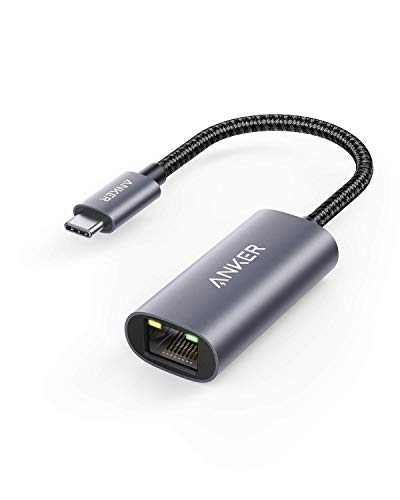
5. Anker PowerExpand USB-C to Gigabit Ethernet Adapter (Model A8313)
The Anker is the simplest pick here, and sometimes simplest is the right call. One gigabit Ethernet port, an aluminum body, and a braided nylon cable that resists the fraying that kills cheaper dongles. It is plug and play, it carries an 18-month warranty, and it does the one job without extras to configure.
Two listing notes are worth carrying into the buying decision. First, the adapter is not compatible with the Nintendo Switch, stated directly in the listing. Second, the listing notes that the device’s USB-C port must support USB 3.0 or above, which is the same data-port rule that applies to every adapter in this article, stated here in plain language. Do not confuse it with the Anker A8311, a different adapter; the model to look for is the A8313.
Specs
- Speed: 1GbE, 10, 100, and 1000 Mbps
- Connector: USB-C host; RJ45 Ethernet
- Housing: Aluminum body, braided nylon cable
- Warranty: 18 months
- Model: A8313, PowerExpand
- Compatibility note: Not compatible with Nintendo Switch, per the listing; host USB-C port must support USB 3.0 or above
Which adapter fits your setup
If your network runs faster than gigabit, the UGREEN 2.5G is the default choice: the fastest widely useful speed and a size that travels. If your device has one USB-C port and you play longer than the battery lasts, the Cable Matters 100W charging pick is the only one here that keeps the device charging while it stays wired. For a straightforward gigabit connection, the TP-Link UE300C wins on size and the Anker A8313 on build and warranty. Whatever you choose, confirm the listing’s current title and model number before buying, since several of these adapters have changed revisions and titles over their time on sale.
FAQ
Will a USB-C Ethernet adapter work on a Steam Deck?
Yes, in the general case. SteamOS is Linux-based, and USB Ethernet support comes through the Linux kernel, so a USB-C adapter is picked up without installing anything. The trade-off is the Deck’s single USB-C port: with a plain adapter you cannot charge while you play wired, so for long sessions use the Cable Matters pick with charging passthrough or a dock with an Ethernet port.
Do I need 2.5GbE or 5GbE, or is gigabit enough?
Gigabit is enough for online play and for nearly every internet connection. The faster speeds pay off on a local network: moving games to and from network storage or streaming from a local server. Whatever speed you buy, the router or switch port, the cable, and the other end must support it too, or the adapter links at a lower speed.
Why does my adapter link at a lower speed than expected?
The usual causes are a USB-C port that only carries USB 2.0 data or is charge-only, a switch or router port that tops out below the adapter’s speed, or a cable that cannot carry the rate. Check the port first: the adapter needs a USB-C port with USB 3 data, and the 5GbE pick needs a 10 Gbps port. Then check the network hardware and the cable, since the link negotiates to the slowest part of the path.
Can I charge my device while the adapter is plugged in?
Only with an adapter that has a charging passthrough port, which here means the Cable Matters 201363 with its 100W passthrough. The other four picks occupy the USB-C port they plug into, so a single-port device cannot charge at the same time. On a laptop with two USB-C ports this is not an issue, since the charger can use the second port.
Conclusion
A USB-C to Ethernet adapter is a small purchase that fixes a real gaming problem: Wi-Fi variability. The UGREEN 2.5G covers most setups, the SABRENT 5GbE serves multi-gigabit networks, the Cable Matters charging pick solves the single-port handheld problem, and the TP-Link and Anker picks cover the rest. Match the speed to your network, confirm your USB-C port carries USB 3 data, and check the listing’s current model number before you buy.
FAQ
Will a USB-C Ethernet adapter work on a Steam Deck?
Do I need 2.5GbE or 5GbE, or is gigabit enough?
Why does my adapter link at a lower speed than expected?
Can I charge my device while the adapter is plugged in?
More from Amazon
Programs that pair well with the guide above. Offers and eligibility are set by Amazon and may change.
Free shipping on eligible items, Prime Video and more. Eligible new members can start with a free trial.
Start a Prime free trialAd-free music streaming. Eligible new subscribers can start with a free trial.
Try Music Unlimited freeA Prime membership for ages 18-24 with a trial period. Eligibility is set by Amazon.
See Prime for Young AdultsAudiobooks and podcasts to listen to on the go. Eligible new members can start with a free trial.
Try Audible freeAs an Amazon Associate we earn from qualifying purchases.