Our Top Picks
Choosing a webcam for live adult shows is really a decision about how you look under the lighting you actually perform in, and how completely the camera can be shut off afterwards. Most shows run in the evening, in a single room, under lamps picked for mood rather than for a sensor. A camera that holds detail and skin tone in that light, follows you when you move, and closes with a physical shutter matters far more than a headline resolution figure.


This roundup is for solo performers broadcasting seated shows from a desk, performers who stand and move during a show and need the frame to follow, and creators who also record clips between live sessions. Every pick below was selected from the product name and specifications on its Amazon listing, with sensor size, light correction, tracking, framing range and listing-stated privacy features used as the first filters.
Quick Picks
As an Amazon Associate we earn from qualifying purchases
| Product | Best for | Key spec from title |
|---|---|---|
| Razer Kiyo Pro Ultra | Dim rooms where low-light detail decides the show | 4K webcam with large sensor and auto light correction |
| OBSBOT Tiny 2 | Performers who move around the room during a show | 4K PTZ webcam with 1/1.5-inch sensor and gesture control |
| Insta360 Link | Hands-free framing changes mid-show | PTZ 4K webcam with 1/2-inch sensor and AI tracking |
| Elgato Facecam Pro | Shows that also become recorded clips | True 4K60 Ultra HD webcam with Sony sensor |
| Logitech Brio 4K | A fixed desk setup with a physical privacy shade | 4K webcam with HD auto light correction and wide field of view |
How to Choose
Start With Sensor Size and Light Handling
Evening shows punish small sensors. A larger sensor gathers more light from the same lamps, so the picture stays cleaner when the room is deliberately dim, and the listing-stated light features do the rest: the Kiyo Pro Ultra names auto light correction, the Facecam Pro names advanced light correction, and the Brio names HD auto light correction with its RightLight 3 system. Check what the listing actually claims rather than assuming a 4K badge means good low-light behaviour, because two cameras at the same resolution can handle a dark room very differently.
Decide Whether the Camera Must Follow You
A fixed camera suits a seated show at a desk, where you stay inside one frame for hours. Once a show involves standing, turning or moving across the room, a PTZ design earns its place: the Tiny 2 and the Link both physically pan and tilt to track you, and both list gesture control, so framing changes do not require walking back to the keyboard mid-show. Decide honestly how much you move. Tracking hardware you never use is wasted, while a fixed frame you keep drifting out of costs you viewers.
Match Field of View to the Room You Show
Field of view decides how much of the room appears behind you, which is a creative choice as much as a technical one. The Brio offers three diagonal presets at 65, 78 and 90 degrees, so one camera can frame a tight head-and-shoulders shot or open up to show more of the set. The Facecam Pro is listed as wide angle, which suits performers who want the room in frame. In a small room, a narrower preset is often the safer default, because it keeps clutter and anything personal outside the shot.
Insist on a Physical Way to Close the Lens
For this kind of work, privacy is not a settings menu. The Kiyo Pro Ultra lists a built-in shutter, and the Brio lists an attachable privacy shade that flips down over the lens, so the camera is visibly closed between shows. Prefer a physical cover over trusting an indicator light or a software toggle, especially on a shared computer or in a shared home. Also confirm the mount in the listing: a clip that also removes for a tripod gives you more placement options as your set changes.
The 5 Best Options
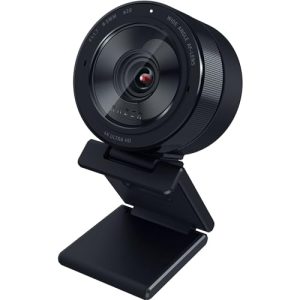
Razer Kiyo Pro Ultra
The Kiyo Pro Ultra is built around the largest sensor in this group, a 1/1.2-inch Sony STARVIS 2 unit behind an F/1.7 lens, which is exactly the combination a dim, lamp-lit room rewards. Its listing describes DSLR-like 4K quality, AI-powered face tracking with autofocus and auto exposure, and HDR at 30 frames per second, so exposure adjusts as you move between brighter and darker parts of the set. The built-in shutter closes the lens physically after a show. For performers whose room lighting is part of the act, this is the most light-focused pick here.
Specs
- Video: 4K at 30 fps, 1080p at 60 fps, uncompressed 4K at 24 fps as listed
- Sensor: 1/1.2-inch Sony STARVIS 2, 2.9 μm pixel size
- Lens: custom F/1.7 aperture lens
- Tracking: AI-powered face tracking, autofocus and auto exposure
- Light handling: auto light correction, HDR at 30 fps
- Privacy: built-in shutter
- Audio: built-in microphone
- Model number: RZ19-04420100-R3U1
Best for: Performers broadcasting from dim, mood-lit rooms who want the strongest low-light specification in this roundup.
Watch out for: The listing is heavy and large for a webcam at 1.5 pounds, so check your monitor clip placement; a separate bundle listing with a cleaning kit circulates under a different ASIN.
ASIN: B0CT6FFK4R
OBSBOT Tiny 2
The Tiny 2 is the movement pick. Its Amazon listing title names a 4K PTZ design with a 1/1.5-inch sensor, AI tracking with multiple modes, autofocus, gesture control and voice control, so the camera head physically follows you instead of relying on a digital crop. A listed 60 fps mode keeps motion smooth when you move quickly, and HDR light correction is named for uneven room lighting. For performers whose shows involve standing, dancing or moving between positions in the room, that physical tracking removes the constant worry about drifting out of frame.
Specs
- Video: 4K, with 60 fps as listed in the title
- Sensor: 1/1.5-inch CMOS
- Design: PTZ with AI tracking in multiple modes
- Controls: gesture control and voice control as listed
- Focus: auto focus
- Light handling: HDR light correction as listed
- Connection: USB, for PC, streaming and meetings as listed
Best for: Performers who stand and move during shows and want the camera to follow without touching the keyboard.
Watch out for: Remote and tripod bundles of the Tiny 2 circulate under different ASINs, so confirm you are ordering the standalone camera listing described here.
ASIN: B0C3B6ZR1V
Insta360 Link
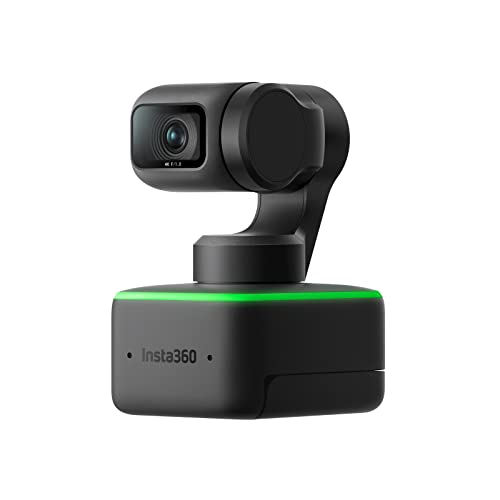
The Link takes a similar tracking idea in a smaller gimbal form. Its listing title names a PTZ 4K camera with a 1/2-inch sensor, AI tracking, gesture control and HDR, plus noise-canceling microphones, which matters if you talk throughout a show and do not run a separate microphone. Specialized modes are named in the title, giving framing options beyond a single fixed shot. It suits performers who want hands-free reframing during a show but prefer a compact unit that clips onto a laptop or monitor and packs away between sessions in a shared space.
Specs
- Video: PTZ 4K as listed in the title
- Sensor: 1/2-inch
- Tracking: AI tracking with gesture control
- Light handling: HDR as listed
- Audio: noise-canceling microphones
- Modes: specialized modes named in the listing title
- Use: webcam for laptop, video calls and live streaming as listed
Best for: Performers who want gesture-controlled tracking and built-in noise-canceling microphones in a compact gimbal camera.
Watch out for: A kit version with accessories circulates under a different ASIN, so check whether the listing you open is the standalone camera or the kit before ordering.
ASIN: B0B826KS4B
Elgato Facecam Pro

The Facecam Pro is the recording-leaning pick in this group. Its listing title leads with true 4K60 Ultra HD, a frame rate the other fixed cameras here do not claim, alongside a Sony sensor, advanced light correction and DSLR-style control, which lets you set exposure and related values deliberately instead of leaving everything automatic. The wide-angle lens suits a show framed to include more of the room. For performers who record clips at the same desk where they broadcast live, that combination of a high frame rate and manual-style control carries across both jobs.
Specs
- Video: true 4K60 Ultra HD as listed in the title
- Sensor: Sony sensor as listed
- Light handling: advanced light correction
- Controls: DSLR-style control as listed
- Lens: wide angle as listed
- Compatibility: works with OBS, Teams and Zoom on PC and Mac as listed
- Model number: 20WAB9901
Best for: Performers who record clips as well as broadcasting live and want deliberate, DSLR-style control over the picture.
Watch out for: A Renewed version of the Facecam Pro circulates under a different ASIN; the ASIN below is the standard listing, so check the condition shown on the page before ordering.
ASIN: B0BJL7Q3SR
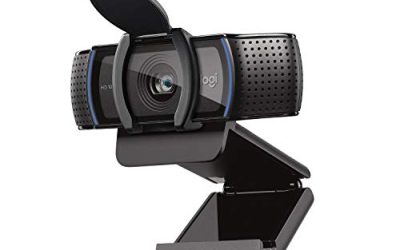
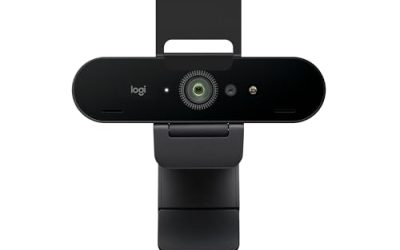
Logitech Brio 4K

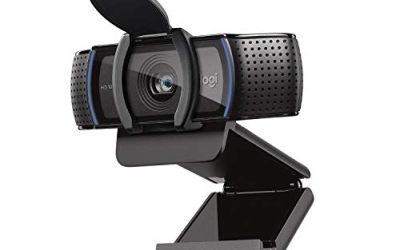
The Brio is the straightforward fixed-desk option. Its listing states 4K video at 30 frames per second with autofocus and 5x digital zoom, RightLight 3 auto light correction for glare and backlighting, and three field-of-view presets at 65, 78 and 90 degrees, so you can tighten or widen the frame in software. Dual omnidirectional microphones with noise-canceling technology are listed, and the attachable privacy shade flips down over the lens between shows. For a performer who broadcasts seated from one position, it covers the essentials without tracking hardware to manage.
Specs
- Video: 4K at 30 fps, with autofocus and 5x digital zoom
- Field of view: adjustable 65, 78 and 90-degree diagonal presets
- Light handling: RightLight 3 auto light correction with HDR as listed
- Audio: dual omnidirectional microphones with noise-canceling technology
- Privacy: attachable privacy shutter
- Connection: USB-A and USB-C as listed
- Compatibility: Windows, Mac and ChromeOS as listed
Best for: Seated performers at a fixed desk who want switchable framing presets and a physical privacy shade.
Watch out for: The privacy shade is attachable rather than built in, so keep track of it; the MX Brio is a different, newer model under a different ASIN.
ASIN: B09NBWWP79
Which One Fits Your Situation
You Perform in a Deliberately Dim Room
Start with the Razer Kiyo Pro Ultra. Its 1/1.2-inch Sony STARVIS 2 sensor and F/1.7 lens are the strongest low-light specification in this group, and its listing names auto light correction and HDR, so the picture holds together under lamps chosen for atmosphere. The Elgato Facecam Pro, with its listed advanced light correction, is the alternative if you also record.
You Move Around During the Show
Choose between the two tracking cameras. The OBSBOT Tiny 2 lists AI tracking with multiple modes, gesture and voice control, and a 60 fps mode for faster movement. The Insta360 Link lists AI tracking and gesture control in a smaller gimbal body, with noise-canceling microphones built in. Pick the Tiny 2 for movement range, the Link for compactness and audio.
You Broadcast Seated From One Desk
The Logitech Brio 4K fits a fixed setup best. Its three field-of-view presets let you frame head and shoulders or widen to show more of the set without moving the camera, autofocus handles small shifts in your chair, and the attachable privacy shade closes the lens afterwards. It is the simplest camera here to live with day to day.
You Share Your Home and Need the Camera Clearly Off
Prioritise a physical closure. The Kiyo Pro Ultra has a built-in shutter, and the Brio has an attachable shade that flips down over the lens, so either is visibly closed between shows. If you choose a tracking camera instead, unplug it after sessions and store it out of the room, since its listing does not name a built-in shutter.
Common Mistakes
- Buying a tracking camera for a fully seated show, then never using the tracking while paying for hardware that adds setup steps.
- Assuming a 4K badge guarantees a good picture in a dim room, when sensor size and the listed light correction decide that instead.
- Framing too wide in a small room and broadcasting clutter, documents or personal items sitting behind you.
- Relying on a software indicator instead of a physical shutter or shade to keep the camera off between shows.
- Ordering a bundle, kit or Renewed variant under a different ASIN instead of the exact standalone listing you compared.
Frequently Asked Questions
Is 4K necessary for live adult shows?
Not strictly, because streaming platforms compress your feed before viewers see it, so a clean 1080p picture from a well-lit camera can look sharp on screen. A 4K model such as the Brio or Facecam Pro helps most when you also record clips, crop the frame in software, or want extra detail held back for editing later.
Which matters more, sensor size or resolution?
For evening shows, sensor size usually matters more. A larger sensor, such as the 1/1.2-inch unit in the Kiyo Pro Ultra or the 1/1.5-inch unit in the Tiny 2, gathers more light from the same lamps, so the image stays cleaner in a dim room. Resolution decides fine detail in good light; the sensor decides whether that detail survives low light at all.
Do I need a separate microphone with these webcams?
It depends on how much you talk. The Link lists noise-canceling microphones and the Brio lists dual omnidirectional microphones with noise-canceling technology, which cover spoken interaction at a desk. Performers who move far from the camera, or who record clips where voice quality carries the piece, will usually still prefer a separate microphone placed closer to them.
How should I handle privacy between shows?
Use a physical barrier wherever the listing offers one: the built-in shutter on the Kiyo Pro Ultra or the attachable shade on the Brio. Close it as part of your shutdown routine, every time. On cameras without a listed shutter, unplug the USB cable after the show and store the camera facing a wall or inside a drawer.
FAQ
Is 4K necessary for live adult shows?
Which matters more, sensor size or resolution?
Do I need a separate microphone with these webcams?
How should I handle privacy between shows?
More from Amazon
Programs that pair well with the guide above. Offers and eligibility are set by Amazon and may change.
Free shipping on eligible items, Prime Video and more. Eligible new members can start with a free trial.
Start a Prime free trialAd-free music streaming. Eligible new subscribers can start with a free trial.
Try Music Unlimited freeA Prime membership for ages 18-24 with a trial period. Eligibility is set by Amazon.
See Prime for Young AdultsAudiobooks and podcasts to listen to on the go. Eligible new members can start with a free trial.
Try Audible freeAs an Amazon Associate we earn from qualifying purchases.