Key takeaways
- Best sex webcams for adult-content creators: compare resolution, autofocus, low-light performance, privacy controls and framing before you choose one.
As an Amazon Associate we earn from qualifying purchases.
Choosing a webcam for adult content creation is a different decision from picking one for video calls. The camera has to hold focus while you move, keep skin tones natural under warm room lighting, and deliver a clean image for hours at a time without dropping frames or overheating. A camera that looks fine in a short meeting can fall apart during a long stream, so the real question is not which webcam is most popular, but which one stays sharp, stable, and flattering through an entire session in your actual room.
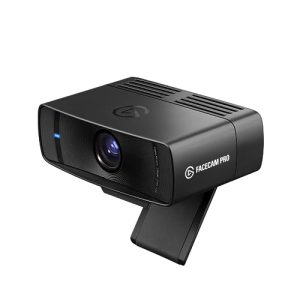
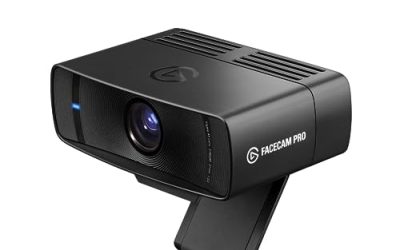
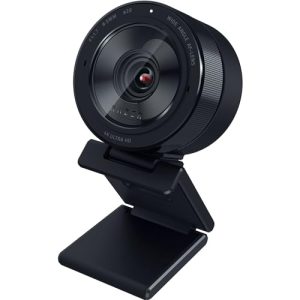
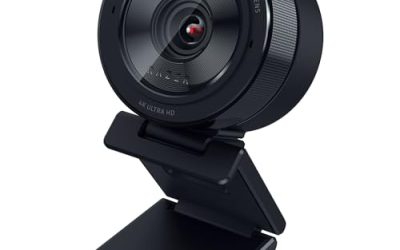
This guide is written for independent adult-content creators, cam performers, and couples who stream from home, as well as for creators who record clips for subscription platforms and want a dependable camera without a full studio rig. The recommendations below are drawn from the names and specifications listed on each product’s Amazon page, so you can compare resolution, field of view, autofocus behaviour, and privacy features on equal terms before you spend anything.
How to Choose
Resolution and Frame Rate
Resolution decides how much detail your viewers see, and frame rate decides how smooth movement looks. A 1080p camera running at 30 frames per second is the practical baseline for most creators, while 4K models add headroom for cropping and for viewers on large screens. Higher frame rates, such as 60 frames per second at 1080p, matter most when you move a lot on camera, because fast motion stays readable instead of smearing. Before you pay for 4K, check whether your streaming platform and your upload speed can actually carry it, since a 4K feed your connection cannot sustain will look worse than a steady 1080p one.
Autofocus and Low-Light Performance
Autofocus is where cheap webcams fail first. A good autofocus system locks onto your face quickly and stays there when you lean in, lean back, or shift position, while a slow one hunts back and forth and leaves whole stretches of video soft. Low-light performance matters just as much, because most creators stream in bedrooms and home studios rather than under studio lights. Look for a large sensor, a wide aperture, and explicit low-light correction in the specifications, and read how the manufacturer describes its noise handling. A camera that keeps the image bright without turning it grainy will do more for your stream than extra resolution alone.
Field of View and Framing
Field of view controls how much of the room appears in frame and how close the camera feels to you. A wide angle around 90 degrees suits creators who move around, show a full setup, or perform with a partner, because it keeps everyone in shot without constant repositioning. A narrower angle around 65 to 78 degrees flatters a solo creator sitting close to the desk, since it crops out clutter at the edges and keeps the focus on you. Some cameras let you switch between preset angles or zoom digitally, which is useful if you alternate between close-up and full-body framing.
Privacy Controls and Build Quality
Privacy controls are a practical necessity for a camera that lives in a bedroom. A physical shutter or a lens cover lets you block the lens with certainty when you are not streaming, which is more reassuring than a software toggle that could be overridden. Some cameras add a status light that shows clearly when the sensor is active, so you always know whether you are on camera. Build quality matters too: a solid mount that clamps firmly to a monitor or tripod thread keeps the framing steady, and a camera that runs cool during long sessions avoids the focus drift and shutdowns that plague overheating models. Check the mount type and the cable length before you buy.
Privacy, Consent, and Platform Safety
Adult-content creation carries safety considerations that do not apply to ordinary streaming, and the camera you choose is part of that picture. Start with the basics: keep the webcam covered or unplugged whenever you are not streaming, and use a camera with a physical shutter so blocking the lens is a habit rather than a setting you might forget. Position the camera so that nothing identifying appears behind you unless you intend it to — personal photos, mail, or a window view of a street can reveal more than you expect. A neutral backdrop or a room divider solves most of this without any extra equipment.
Your platform’s rules matter as much as your hardware. Every major adult platform publishes content policies, age-verification requirements, and recording rules, and those rules change, so check the current policy on the platform you use before you stream rather than relying on advice from a forum. Never record or stream anyone who has not clearly agreed, and keep records of consent where your platform requires them. If you stream with a partner, agree in advance what is on camera and what is off limits, and make sure both of you can stop the stream at any time. A camera with a clearly visible recording indicator helps everyone in the room know when they are being filmed.
Account security deserves the same attention as the camera itself. Use a strong, unique password for your streaming and payout accounts, turn on two-factor authentication wherever it is offered, and keep the email address tied to those accounts separate from your personal one if you can. Be cautious about sharing details of your setup, schedule, or location in chat, since regular viewers can piece together more than you intend. If a platform offers geographic blocking, consider whether it fits your situation, and review your privacy settings whenever the platform updates them.
Setting Up a Reliable Streaming Space
A good camera still needs a workable room. Lighting makes the biggest difference for the least money: a soft key light placed in front of you, slightly above eye level, evens out shadows and lets the camera hold natural colour without straining its sensor. A ring light works well for close framing, while a small panel light gives you more control over brightness and warmth. Avoid a bright window directly behind you, because the camera will expose for the window and leave you in silhouette. If you stream at night, a single warm lamp behind the camera is often enough to lift the image out of graininess.
Sound and stability are the next two things to get right. Your camera’s built-in microphone will pick up room echo and keyboard noise, so a separate USB microphone on a small arm is a worthwhile upgrade once the camera is sorted. Mount the webcam at eye level or slightly above, clamp it firmly so it cannot slip mid-stream, and test the full setup — camera, lights, microphone, and streaming software — for at least half an hour before your first real session. That rehearsal will show you whether the camera overheats, whether the autofocus wanders, and whether your upload speed holds steady under load.
Which One Fits Your Situation
Solo Creators Streaming From a Bedroom
If you stream alone from a small room, a 1080p camera with fast autofocus and strong low-light performance is the sensible starting point. You will be sitting close to the lens, so a moderate field of view keeps the framing tight and flattering, and a physical privacy shutter matters because the camera lives where you sleep. Spend the money you save on resolution on a small ring light instead, since good lighting improves the image more than extra pixels.
Creators Who Move Around or Perform With a Partner
A wider field of view and a higher frame rate matter more once two people are in frame or you move around the room. Look for a camera that holds focus across a deeper range and does not hunt when someone steps closer or further away. A 4K model earns its place here, because the extra resolution lets you crop the frame in software without losing detail. Mount the camera on a tripod rather than a monitor.
Creators Recording Clips for Subscription Platforms
Recorded clips forgive a weaker connection but punish a soft or noisy image, because viewers can pause and rewatch. Resolution and colour accuracy matter most here, so a camera with a larger sensor and honest low-light handling is worth the extra cost. Record at the highest quality your computer handles comfortably, keep your lighting consistent from clip to clip so your page looks coherent, and review the first minute of every recording before you publish it.
Creators on a Tight Budget
A tight budget does not mean a bad image, but it does mean choosing carefully. Prioritise autofocus and low-light performance over 4K, because a sharp, bright 1080p image beats a grainy 4K one every time. A used or previous-generation model from a known brand can be good value, provided you confirm the lens is clean and the mount is intact. Put any money you save toward a basic light, since lighting improves every camera you will ever own.
Common Mistakes
- Buying a 4K webcam before checking whether your upload speed and streaming platform can carry a 4K feed without dropping frames.
- Ignoring autofocus behaviour and discovering mid-stream that the camera keeps hunting for focus every time you move.
- Streaming with a bright window or lamp behind you, which turns you into a silhouette while the background stays perfectly exposed.
- Leaving the webcam uncovered and plugged in between sessions instead of using a physical shutter or unplugging it when you are not streaming.
- Spending the whole budget on the camera and leaving nothing for lighting, which is the single cheapest way to improve image quality.
Frequently Asked Questions
What resolution do I need for adult cam streaming?
A 1080p camera at 30 frames per second is enough for most creators and most platforms, and it is the safest choice if your upload speed is modest. Step up to 4K only if your connection can sustain the higher bitrate for a full session and your platform supports it, since a 4K feed that stutters looks worse than a steady 1080p one.
Is a built-in microphone good enough for streaming?
A built-in webcam microphone works for a first session, but it picks up room echo, keyboard clicks, and fan noise, and it sits further from your voice than a dedicated microphone. A separate USB microphone on a small arm or desk stand is one of the cheapest meaningful upgrades you can make, and it keeps your voice clear even when you move away from the desk.
How do I keep my webcam private when I am not streaming?
Use a camera with a physical shutter or a sliding lens cover, and close it every time you finish a session so blocking the lens becomes a habit. Unplugging the camera when you are not streaming is the most certain option, and a camera with a clear status light tells you at a glance whether the sensor is active. Keep your streaming software closed between sessions too.
Does field of view matter for a solo creator?
Field of view matters more than most solo creators expect, because it decides how much of the room appears behind you and how close the camera feels. A narrower angle around 65 to 78 degrees keeps the framing tight and crops out clutter at the edges, which suits a creator sitting close to the desk. A wider angle is better if you move around or show more of the room.
FAQ
What resolution do I need for adult cam streaming?
Is a built-in microphone good enough for streaming?
How do I keep my webcam private when I am not streaming?
Does field of view matter for a solo creator?
More from Amazon
Programs that pair well with the guide above. Offers and eligibility are set by Amazon and may change.
Free shipping on eligible items, Prime Video and more. Eligible new members can start with a free trial.
Start a Prime free trialAd-free music streaming. Eligible new subscribers can start with a free trial.
Try Music Unlimited freeA Prime membership for ages 18-24 with a trial period. Eligibility is set by Amazon.
See Prime for Young AdultsAudiobooks and podcasts to listen to on the go. Eligible new members can start with a free trial.
Try Audible freeAs an Amazon Associate we earn from qualifying purchases.