Key takeaways
- Find the best keyboards for Galaxy Note 4, from folding Bluetooth keyboards to keyboard cases and USB options, with setup and buying tips.
As an Amazon Associate we earn from qualifying purchases.
The best keyboards for Galaxy Note 4 are compact Bluetooth keyboards, because the Note 4 has no keyboard dock of its own and Bluetooth is the most reliable way to add a full physical keyboard to a phone from 2014. The Galaxy Note 4 is an older phone with a 5.7-inch screen, an S Pen, and a micro-USB port, and those details shape every keyboard choice. A keyboard that works well with a modern phone may pair poorly with the Note 4, draw too much power, or need an app the phone can no longer run. This guide explains which keyboard types actually work with the Note 4, what to check before buying, and how to set one up so typing feels natural instead of frustrating.
There are no shopping links in this guide. The Note 4 is a discontinued phone, and most keyboards marketed for it are also discontinued, so availability changes constantly and a specific product link would go stale quickly. What follows is the information you need to choose well on the secondhand market or to reuse a keyboard you already own.
How Keyboards Connect to the Galaxy Note 4
The Note 4 supports three ways to connect a keyboard. The first and best is Bluetooth. The Note 4 has Bluetooth 4.1, which is compatible with almost every Bluetooth keyboard ever made. Pairing is straightforward, the connection is stable at normal typing distances, and the keyboard draws no power from the phone. Bluetooth is the option this guide recommends for most people.
The second way is USB On-The-Go, usually shortened to OTG. The Note 4 supports USB OTG through its micro-USB port, which means a wired USB keyboard can work with the right adapter. You need a micro-USB OTG adapter, and the keyboard must not draw more power than the phone can supply. Most basic wired keyboards work fine. Backlit keyboards and keyboards with built-in USB hubs often draw too much power and may fail or drain the battery quickly. OTG is a good fallback when Bluetooth is not an option, but the cable makes it awkward for travel.
The third way is a keyboard case, which is a case with a built-in Bluetooth keyboard that the Note 4 slides into. These were popular when the Note 4 was new, and they turn the phone into a tiny laptop. They are harder to find now, and many used ones have worn-out batteries or broken hinges, so inspect them carefully before buying.
Wi-Fi-based keyboard apps and remote keyboard software exist, but they are a poor substitute for a physical keyboard. They need a computer on the same network, they add latency, and they do nothing for typing directly on the phone. This guide focuses on physical keyboards.
Folding Bluetooth Keyboards
A folding Bluetooth keyboard is the best overall choice for the Galaxy Note 4. It folds in half or in thirds, fits in a jacket pocket or small bag, and opens into a full-size keyboard. For a phone with a 5.7-inch screen, that balance of portability and typing comfort is hard to beat.
When choosing a folding keyboard, check the key size first. Some folding models shrink the keys to save space, and cramped keys cause typos on long documents. Look for a model with near-full-size keys and a proper layout, including a number row and dedicated arrow keys if you edit documents. The hinge should lock firmly when open, with no flex in the middle of the keyboard. A wobbly hinge makes touch typing miserable.
Battery life matters too. Most folding Bluetooth keyboards use a rechargeable battery that lasts weeks of normal use, but older models may use coin cells or AAA batteries. A rechargeable model charged over micro-USB is convenient, since the same cable can charge the Note 4. Check that the keyboard can hold a charge; a used folding keyboard with a dead battery is only useful if the battery is replaceable.
Pairing is simple. Turn the keyboard on, put it in pairing mode, open the Note 4 Bluetooth settings, and select the keyboard from the list. Once paired, the phone remembers it and reconnects automatically next time. If the connection drops, toggle Bluetooth off and on, or remove the pairing and set it up again. Most folding keyboards support pairing with more than one device, so you can switch between the Note 4 and a tablet or laptop with a key combination.
One caution: some folding keyboards sold today are designed for newer phones and tablets, and their companion apps may require a newer Android version than the Note 4 can run. The keyboard itself will still work over standard Bluetooth, because Bluetooth keyboards use a universal profile that does not need an app. You only lose extra features like custom key mapping or battery indicators that depend on the app. That is a fair trade for a keyboard that otherwise works perfectly.
Full-Size Bluetooth Keyboards
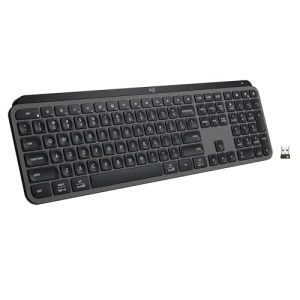
A full-size Bluetooth keyboard is the right choice if you mostly type at a desk. It has standard key spacing, a full number row, and often a numeric keypad. Typing on one feels like typing on a desktop keyboard, which is a big step up from any folding model.
The tradeoff is size. A full-size keyboard does not travel well, and it looks oversized next to a phone. But if your Note 4 lives on a desk as a secondary device for email, notes, or documents, a full-size keyboard is the most comfortable option and usually the cheapest, because these keyboards are common and widely available secondhand.
When buying a full-size Bluetooth keyboard for the Note 4, confirm that it supports Bluetooth 4.1 or earlier profiles. Almost all of them do, since Bluetooth keyboards are designed to be backward compatible. Also check the layout: a keyboard made for Windows will work with Android, but a few keys behave differently. The Windows key usually opens the app drawer or recent apps screen, and the Alt key works as expected in most apps. Media keys for volume and playback generally work too. If a key does nothing, it is usually a layout quirk rather than a fault, and remapping apps can fix it if you are willing to install one that still supports the Note 4.
Compact and Mini Bluetooth Keyboards
Compact Bluetooth keyboards sit between folding and full-size models. They are smaller than a full-size keyboard but do not fold, which makes them sturdier and simpler. They are a good fit for a bag or a small desk, and they are often cheaper than folding keyboards.
The main thing to check is the layout. Compact keyboards save space by shrinking or removing keys, and some remove the number row entirely or merge it with other keys. That is fine for short messages and searches, but painful for writing long emails or editing spreadsheets. If you plan to type documents, a compact keyboard with a full number row and arrow keys is worth the slightly larger size.
Battery life on compact keyboards is usually excellent, often measured in months, because they use very little power. Many take two AAA batteries, which are easy to replace and keep the keyboard working even after years in a drawer. That makes used compact keyboards a safe buy: there is no built-in battery to wear out.
Keyboard Cases for the Galaxy Note 4
A keyboard case combines a protective case with a built-in Bluetooth keyboard, turning the Note 4 into a miniature laptop. When these cases were new, they were one of the most popular accessories for the phone. Today they are mostly found on the secondhand market.
The appeal is obvious: the keyboard is always with the phone, there is nothing extra to carry, and the case protects the phone at the same time. The drawbacks are real too. The keyboard is small, because it has to fit the width of the phone, so touch typing is harder than on a folding keyboard. The case adds bulk and weight. And the built-in battery that powers the keyboard may be worn out after years of use.
If you buy a used keyboard case, test it before paying when possible. Check that the keyboard pairs and types correctly on every key, that the battery holds a charge for at least a few hours, and that the hinge or sliding mechanism opens and closes smoothly. Inspect the case for cracks, especially around the corners and the port cutouts. A cracked case will not protect the phone, and a case that does not hold the phone firmly is worse than no case at all.
Also confirm the case is made for the Galaxy Note 4 specifically, not the Note 3 or Note 5. The three phones look similar, but their dimensions, button positions, and port locations differ. A case made for the wrong model will block buttons or leave the phone loose.
Wired Keyboards Over USB OTG
A wired keyboard connected through a micro-USB OTG adapter is the simplest option in one sense: there is no battery to charge and no Bluetooth pairing to manage. Plug it in and type. The Note 4 supports OTG natively, and most basic USB keyboards work immediately.
The practical problems are the cable and the power draw. The adapter and cable tether the phone to the desk, which defeats the portability that makes a phone keyboard useful. And while a basic keyboard draws very little power, a keyboard with backlighting, a built-in hub, or extra features can draw more than the phone supplies, causing the keyboard to fail or the phone to drain quickly.
OTG is still worth knowing about, because it is a useful fallback. If your Bluetooth keyboard runs out of battery, an OTG adapter and a spare wired keyboard will get you typing again immediately. Keep an OTG adapter in your bag if you rely on the Note 4 for typing. They are cheap, small, and solve more problems than their size suggests.
One more detail: when a physical keyboard is connected, the Note 4 may hide the on-screen keyboard automatically. That is normal. If you need the on-screen keyboard back while the physical keyboard is connected, the setting is under Language and Input in the phone settings, where you can choose to show the virtual keyboard even when a physical keyboard is attached.
What to Avoid
Not every keyboard that claims to work with Android will work well with the Note 4. Avoid keyboards that require a companion app for basic typing, because the app may not install on the Note 4’s Android version. Avoid keyboards that use Bluetooth Low Energy only, with no classic Bluetooth profile, because older Android versions handle those inconsistently. And avoid very cheap no-name folding keyboards with mushy keys and weak hinges; they feel bad to type on and tend to break at the fold.
Also be careful with keyboards marketed for tablets that are oversized for a phone. A keyboard wider than the phone is fine at a desk, but a tablet-sized keyboard in a small bag is just dead weight. Match the keyboard to how you actually use the Note 4, not to the biggest keyboard you can find.
Setting Up and Using Your Keyboard
Setup takes a few minutes. For Bluetooth, charge the keyboard, put it in pairing mode, and pair it from the Note 4 Bluetooth settings. For OTG, plug the adapter into the phone, plug the keyboard into the adapter, and wait a moment for the phone to recognize it. For a keyboard case, slide the phone in, turn the keyboard on, and pair it like any Bluetooth keyboard.
Once connected, a few settings make typing smoother. Open the Language and Input settings and check that the physical keyboard layout matches your keyboard, usually US English or your local layout. If accented characters or symbols come out wrong, the layout setting is the first thing to check. Try the keyboard in a notes app first, where mistakes do not matter, before using it for an important email.
Learn the Android keyboard shortcuts. The most useful are Ctrl plus C, X, and V for copy, cut, and paste, Ctrl plus A to select all, and Alt plus Tab to switch between recent apps. Arrow keys move the cursor, and holding Shift while pressing an arrow key selects text. These shortcuts work in most apps and make a physical keyboard far more productive than tapping the screen.
For long writing sessions, prop the phone up so the screen is at a comfortable angle. A small phone stand, a folded case, or even a stack of books works. Typing with the phone flat on the desk forces you to look down sharply, which strains your neck. A stand costs very little and makes a real difference over an hour of typing.
Comparison Table
| Keyboard type | Connection | Portability | Best for |
|---|---|---|---|
| Folding Bluetooth | Bluetooth | Excellent | Travel and everyday typing |
| Full-size Bluetooth | Bluetooth | Poor | Desk use and long documents |
| Compact Bluetooth | Bluetooth | Good | Small bags and short sessions |
| Keyboard case | Bluetooth | Excellent | All-in-one carry with the phone |
| Wired USB keyboard | USB OTG | Poor | Backup when Bluetooth fails |
Frequently Asked Questions
Does the Galaxy Note 4 support Bluetooth keyboards?
Yes. The Note 4 has Bluetooth 4.1 and supports the standard Bluetooth keyboard profile, so almost any Bluetooth keyboard pairs with it. No special app is needed for basic typing.
Can I use a wired keyboard with the Galaxy Note 4?
Yes, through a micro-USB OTG adapter. Most basic wired keyboards work immediately. Keyboards with backlighting or built-in hubs may draw too much power, so a simple keyboard is the safer choice.
Will a keyboard made for a newer phone work with the Note 4?
Usually yes, if it connects over standard Bluetooth. The keyboard will pair and type normally. Extra features that depend on a companion app may not work, because the app might require a newer Android version than the Note 4 can run.
Why does the on-screen keyboard disappear when I connect a physical keyboard?
Android hides the virtual keyboard when a physical keyboard is connected, because it assumes you want to type on the physical one. You can change this in the Language and Input settings by choosing to keep the virtual keyboard visible.
Is a keyboard case a good choice for the Note 4?
It can be, if you find one in good condition made specifically for the Note 4. The keyboard is small, and used cases may have worn batteries or cracked shells, so inspect and test before buying. A folding Bluetooth keyboard is more comfortable for long typing sessions.
Conclusion
The best keyboards for Galaxy Note 4 are the ones that match how you use the phone. A folding Bluetooth keyboard is the best all-round choice, combining a comfortable typing experience with pocket-sized portability. A full-size Bluetooth keyboard wins at a desk, a compact keyboard is a cheap and reliable middle ground, and a keyboard case is worth considering if you want everything in one package. A wired keyboard over USB OTG is a useful backup that costs almost nothing to keep around.
Whatever you choose, verify the basics before buying: the keyboard should pair over standard Bluetooth or work over OTG without a companion app, the keys should be full-size enough for your hands, and the layout should match your language. Test every key, check the battery, and confirm the case or keyboard is made for the Note 4 rather than a similar-looking model. Get those details right, and the Note 4 becomes a surprisingly capable little typing machine, years after it left the shelves.
More from Amazon
Programs that pair well with the guide above. Offers and eligibility are set by Amazon and may change.
Free shipping on eligible items, Prime Video and more. Eligible new members can start with a free trial.
Start a Prime free trialAd-free music streaming. Eligible new subscribers can start with a free trial.
Try Music Unlimited freeA Prime membership for ages 18-24 with a trial period. Eligibility is set by Amazon.
See Prime for Young AdultsAudiobooks and podcasts to listen to on the go. Eligible new members can start with a free trial.
Try Audible freeAs an Amazon Associate we earn from qualifying purchases.