Key takeaways
- How to choose wireless headsets for recording clear voice audio with low latency and a stable connection for podcasts, voiceovers, and remote work.
As an Amazon Associate we earn from qualifying purchases.
Recording with a wireless headset means trading the reliability of a cable for freedom of movement, and the real decision is whether the microphone and the wireless link hold up for an entire take. A headset can sound wonderful for music yet deliver thin, distant, or choppy voice audio, and that gap only shows up when you press play. What matters most is not the brand on the earcup but the combination of a well-placed microphone, a low-latency connection, and a fit you can wear through a long session without fidgeting.
This guide is for desk podcasters, voiceover beginners, remote workers recording meetings and calls, and interviewers capturing conversations in the field. It focuses on recording use, a different job from gaming chat or simultaneous interpretation: gaming headsets prioritise team voice and game sound, while interpretation headsets prioritise hearing a second language clearly, and neither guarantees a clean recording. The sections below explain what to listen for, how to judge a wireless connection, and which setup fits your situation.
How to Choose
Microphone Quality and Placement
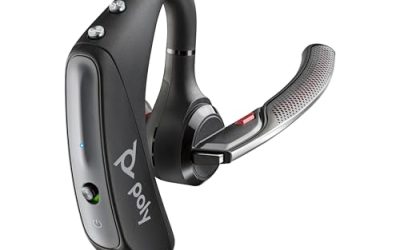
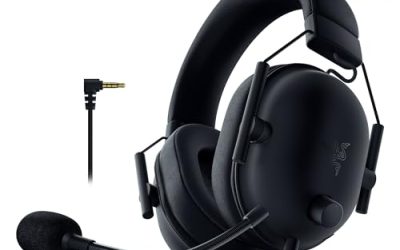
The microphone decides whether your recording sounds professional or like a phone call from a hallway, so judge it before anything else. A boom microphone that sits near the corner of your mouth captures a fuller voice with less room echo than microphones hidden in an earcup, which sit further away and pick up more room sound. Listen for how the mic handles plosives, the bursts of air on P and B sounds, and whether keyboard or fan noise leaks through. Noise rejection helps, but it cannot rescue a mic placed too far from your mouth. If you can, record a short sample in your actual room and play it back on speakers rather than trusting a specification sheet.
Latency and Monitoring
Latency is the delay between speaking and hearing yourself, and it is the most common surprise for first-time wireless recorders. Standard Bluetooth connections introduce a delay that is easy to ignore on a call but becomes visible when your voice drifts out of sync with video, or distracting when you monitor yourself live. Headsets that connect through a dedicated 2.4 GHz USB receiver generally keep that delay far lower than a plain Bluetooth link, which suits video recording and live monitoring. Check whether the headset lets you hear your own voice in the earcup, a feature often called sidetone, because it keeps your volume steady and stops you from shouting or mumbling during a long take.
Wireless Stability and Range
Stability depends on the radio link, the distance to the receiver, and interference from nearby Wi-Fi networks, other Bluetooth devices, and walls between you and your computer. A headset with a dedicated USB receiver tends to hold a steadier link than one paired directly to a laptop, and a clear line of sight matters more than the printed maximum range. Multipoint pairing, staying connected to two devices at once, is convenient for switching between a phone and a laptop, but it can introduce switching delays, so test it before relying on it for a recording.
Battery Life, Comfort, and Session Length
Battery life matters in recording because sessions rarely end when planned, and a headset that dies mid-interview ends the interview. Look at the expected run time with the microphone active and noise cancellation on, since both draw more power than plain music playback, and check whether the headset can charge and keep working at the same time. Comfort matters just as much: clamping force that feels fine for ten minutes can become a headache after an hour, and heavy earcups make you adjust the fit constantly, which the microphone will pick up. Lighter designs with soft, breathable cushions suit long sessions, and a headset that folds flat or travels with a case is easier to carry to a recording location.
Recording Setups That Work With a Wireless Headset
The simplest setup pairs a wireless headset with a phone and a recording app, which suits voice notes, quick interviews, and remote guests who have no other equipment. Keep the phone close, switch the phone to Do Not Disturb, and record a ten-second test before the real conversation starts, because a notification sound or a call interrupting the app can cost you the whole take. A step up is a laptop with a digital audio workstation or a simple recording program, where you can see the waveform as it is captured and spot clipping or dropouts immediately. Record in a lossless format when the software offers it, and save the project frequently rather than trusting a single unsaved session.
A third pattern uses a portable recorder or a camera as the capture device, with the headset handling monitoring and voice pickup, which suits field interviews and video work where the computer stays at home. In this pattern, the connection matters even more, because you cannot glance at a waveform on a laptop screen, so a wired backup recorder or a second phone recording in the room is cheap insurance. Whichever pattern you choose, keep the same routine: test the full chain before the guest arrives, record thirty seconds of room tone for editing later, and speak a short identification line at the start of each file so takes stay organised when you return to edit.
File handling deserves the same care as the recording itself. Save each take in a dated folder with a name that says what it is, such as the guest name and the topic, because a folder of files called Audio 1 through Audio 40 becomes unsearchable within a week. Back up the raw files to a second location before you start editing, so a failed edit or a corrupted project never costs you the original take. If you record on a phone, transfer the files to a computer the same day rather than leaving them on a device that might run out of space or get lost.
Which One Fits Your Situation
Solo Podcasting at a Desk
A desk podcaster should prioritise a boom microphone and a low-latency receiver link, since the recording is the whole product and every flaw lands in the final episode. Comfort for hour-long sessions matters more than portability, and sidetone helps you keep a steady speaking level without watching a meter. Record a sample episode before committing to a setup, and listen to it on speakers and on earbuds to catch problems that one playback device hides.
Voiceovers and Narration
Narration rewards a microphone that captures a warm, detailed voice with minimal room sound, and a quiet recording space matters as much as the headset itself. A boom mic close to the mouth beats an earcup mic here, and a stable wireless link prevents the small gaps that force re-recording a paragraph. Keep the recording level conservative so loud passages do not clip, and leave pauses between sections so editing stays simple.
Recording Calls and Meetings on the Move
Mobile recording rewards battery life, a stable Bluetooth link, and a microphone that rejects street and office noise, because you cannot control the environment. Multipoint pairing is genuinely useful here, letting you take a call on the phone and then switch to the laptop without repairing, but always run a short test call first. Keep a charging cable in your bag, and start the recording before the meeting begins rather than during the introductions.
Field Interviews and On-the-Go Notes
Field work rewards light weight, quick setup, and a microphone that stays close to your mouth while you move, since you will be standing, walking, and turning toward your subject. A headset that pairs fast and reconnects reliably after a dropout saves more interviews than any specification on the box. Bring a backup recording method, even a second phone in a pocket, because a single failed file can mean losing an interview that cannot be repeated.
Common Mistakes
- Buying for music sound instead of microphone quality: a headset tuned for deep bass and sparkling highs can still have a weak microphone, so judge the mic from a recorded sample, not from how your favourite songs sound through the earcups.
- Ignoring latency until the edit: a delay that is invisible on a phone call becomes obvious when voice drifts away from video, so test latency with a clap or a spoken count against the camera before recording anything that must stay in sync.
- Expecting noise cancellation to fix a noisy room: cancellation is designed to reduce steady background hum for the listener, not to remove a barking dog or a conversation next door from your recording, so choose the quietest corner you can find first.
- Forgetting battery and charging: a session that runs long will find the end of a battery, so charge before every recording, know the run time with the microphone active, and keep a cable or a spare charged device within reach.
- Skipping the test recording: the most avoidable failure is discovering a problem after the guest has left, so record a minute of your real setup, play it back in full, and fix what you hear before the actual session begins.
Frequently Asked Questions
Can a wireless headset match a wired microphone for recording?
A good wireless headset can produce clear, usable voice audio for podcasts, narration, and meetings, but a wired microphone usually wins on consistency, since it has no radio link to drop and no battery to drain. The gap is smallest for spoken voice in a quiet room and largest for video, where latency matters. If your recording must be flawless, keep a wired backup ready even when you record wirelessly.
Is Bluetooth latency a problem for video recording?
Latency becomes a problem whenever your voice must line up with picture, because even a small delay is visible on lip movement and tedious to correct in editing. A dedicated 2.4 GHz receiver connection usually keeps the delay low enough for video work, while plain Bluetooth is better suited to audio-only recordings. Test by clapping on camera and checking the alignment before a real session.
Do I need a boom microphone for recording?
A boom microphone is not mandatory, but it is the easiest way to get a clear, full voice, because it sits close to your mouth and picks up far less room echo than earcup microphones. If your headset has only built-in microphones, record in a quiet room and speak at a steady distance to get the best result. For narration and podcasting, the boom is usually worth choosing.
How do I reduce background noise in my recordings?
Start with the room, not the headset: close windows and doors, move away from fans and appliances, and choose a space with soft furnishings that absorb echo. Then position the microphone close to your mouth and keep your speaking level steady, which lets the recording level stay low enough to keep background sounds quiet. Software noise reduction can help afterwards, but it works best on an already clean recording.
FAQ
Can a wireless headset match a wired microphone for recording?
Is Bluetooth latency a problem for video recording?
Do I need a boom microphone for recording?
How do I reduce background noise in my recordings?
More from Amazon
Programs that pair well with the guide above. Offers and eligibility are set by Amazon and may change.
Free shipping on eligible items, Prime Video and more. Eligible new members can start with a free trial.
Start a Prime free trialAd-free music streaming. Eligible new subscribers can start with a free trial.
Try Music Unlimited freeA Prime membership for ages 18-24 with a trial period. Eligibility is set by Amazon.
See Prime for Young AdultsAudiobooks and podcasts to listen to on the go. Eligible new members can start with a free trial.
Try Audible freeAs an Amazon Associate we earn from qualifying purchases.