‘5 Best Gaming Chairs for Back Problems (November 2026)’
'The best chairs for gaming and have back problems sorted: adjustable lumbar support, ergonomic backrests and seat-depth controls for comfortable sessions.'
A gaming chair for someone whose back complains after long sessions is a different purchase from a chair bought for looks. Racing stripes and bright stitching do nothing for a lower back that stiffens after two hours. What matters is whether the lumbar support meets your spine, moves when you shift position, and lets your thighs rest flat instead of cutting off circulation at the front edge. Get those three things right and the chair disappears under you; get them wrong and no padding saves the session.
This guide is for gamers who sit for long stretches and feel it in their lower back, for taller players who never fit standard chairs, and for anyone whose lumbar pillow slides out of place by mid-evening. The five chairs below were chosen from the names and specifications on their Amazon product pages, favouring built-in or adjustable lumbar systems over loose cushions, and every pick states its lumbar mechanism and its weight and height limits for a fit check before you buy.
Quick Picks
As an Amazon Associate we earn from qualifying purchases.
Product
Best for
Key spec from title
Razer Iskur V2
Fine-tuned lumbar fit
Adaptive lumbar support, 6D adjustment
AndaSeat Kaiser 3 Large
Tall players and deep recline
Integrated lumbar, 165-degree recline
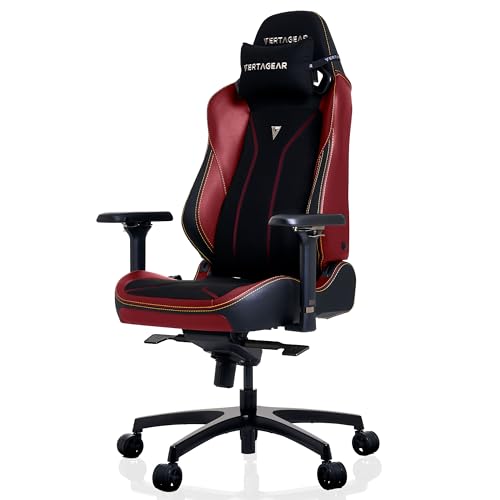
Vertagear SL5800
Lumbar that follows your movement
ContourMax lumbar, VertaAir seat
AutoFull M6
Active lumbar plus a footrest
Dynamic tracking lumbar, ventilated seat
Corsair TC100 Relaxed
A wider, softer seat
Adjustable lumbar pillow, 375mm seat
How to Choose
Lumbar support that moves in two directions
The most useful feature is a lumbar system that adjusts for both height and depth. Height adjustment places the support against the inward curve of your own lower back instead of your mid-back or hips, while depth adjustment controls how firmly it presses forward. The Razer Iskur V2 offers 60 mm of height and 40 mm of protrusion adjustment, the AndaSeat Kaiser 3 moves its internal lumbar up, down, in and out, and the AutoFull M6 tracks fore and aft by 3.94 inches with 1.97 inches of height travel. A fixed lumbar arch can suit one body and miss the next, so treat two-way adjustment as the baseline and check the numbers on the listing first.
Seat depth and tilt that match your legs
Seat depth decides whether your thighs rest flat or dangle, and dangling legs pull the pelvis forward and load the lower back. A seat that is too deep presses the front edge into the back of your knees, while a seat that is too shallow leaves your thighs unsupported and pushes your weight onto your sitting bones. Look for a seat pan with enough depth for your leg length and a tilt mechanism that lets you rock slightly or lock the seat at a gentle angle. The Vertagear SL5800 pairs its lumbar system with a VertaAir seat designed around pressure relief for the sitting bones, and a rocking tilt on the Kaiser 3 lets you shift position without standing up.
Backrest shape, recline range and armrests
A backrest should hold your shoulders without pinching them, and the recline range should let you change posture through a session rather than locking you upright for hours. Recline figures in this guide run from 150 degrees on the Corsair TC100 Relaxed to 165 degrees on the AndaSeat Kaiser 3, with lockable positions in between so you can stop at a working angle instead of flopping fully back. Armrests matter more than they look: 4D armrests that move in height, depth, width and angle let you bring support under your forearms at desk height, which takes load off the shoulders and upper back. Chairs with only fixed or two-way armrests force your shoulders to do the work instead.
Weight and height limits from the listing
Every chair here publishes a maximum weight and a recommended height range, and those numbers rule a chair out fastest. The AndaSeat Kaiser 3 Large is rated to 396 lb for players up to 6 feet 2 inches, the AutoFull M6 lists a 397 lb capacity, the Razer Iskur V2 is rated to 300 lb, 5 feet 3 inches to 6 feet 7 inches, the Vertagear SL5800 has a 250 lb maximum for users up to 6 feet 4 inches, and the Corsair TC100 Relaxed is rated to 264 lb for users up to 6 feet 2 inches. Check both figures against your own measurements: a chair rated well above your weight keeps its foam and mechanism in better shape.
The 5 Best Options
Razer Iskur V2
Top Pick
Razer Iskur V2
Specs:
Adaptive lumbar support with 60 mm height and 40 mm protrusion adjustment
High-density foam cushions with reactive seat tilt
The Iskur V2 suits buyers who want the lumbar support itself to do the fine-tuning. Its adaptive lumbar curve pivots from a central point to follow your spine as you turn, and two knobs set the height by 60 mm and the protrusion by 40 mm, the most precise lumbar adjustment here. High-density foam cushions and a reactive seat tilt keep the seat supportive over long evenings, the backrest reclines to 152 degrees, and the 4D armrests move on four axes. Razer sizes it for users from 5 feet 3 inches to 6 feet 7 inches with a 300 lb maximum, and a memory foam head cushion is included.
AndaSeat Kaiser 3 Large
Runner-Up
AndaSeat Kaiser 3 Large
Specs:
Integrated lumbar support adjusts for height and extension depth
Cold-cure foam seat and backrest
Backrest reclines 90 to 165 degrees with five lockable positions and rocking mode
The Kaiser 3 Large is the roomiest chair here, and the natural choice for taller players. Its internal lumbar adjusts for height and extension depth through side knobs, so the support stays inside the backrest instead of hanging off it as a strap-on pillow, and the cold-cure foam seat and backrest hold their density instead of softening into a hammock shape. The backrest reclines from 90 to 165 degrees with five lockable positions plus a rocking mode, and the 4D armrests take swappable magnetic toppers. AndaSeat rates the Large size to 396 lb for users up to 6 feet 2 inches, making it the highest-capacity chair in this guide.
Vertagear SL5800
Vertagear SL5800
Specs:
ContourMax dynamic lumbar with 4 adaptive modules and 64 responsive branches
VertaAir seat with air pods for pressure relief at the sitting bones
4D adjustable armrests in height, depth, width and rotation
The SL5800 is the most back-specific chair here, built around a moving lumbar system. Its patented ContourMax lumbar uses four adaptive modules with 64 responsive branches that shift with your movement to support the midback and lower back, and the VertaAir seat uses air pods to ease pressure on the sitting bones. The chair carries a 10 year limited warranty, a steel frame, an aluminium alloy five-spoke base and a Class-4 gas lift, and the backrest measures 550 mm wide at the lumbar area. Vertagear lists a 250 lb maximum and a recommended height up to 6 feet 4 inches, and RGB LED kits can be added later.
AutoFull M6
AutoFull M6
Specs:
AUTO dynamic tracking lumbar support, 3.94 inches in and out and 1.97 inches up and down
The AutoFull M6 takes the most active approach here, pairing a tracking lumbar system with a ventilated and heated seat. Its AUTO dynamic tracking lumbar follows small shifts in posture with 3.94 inches of fore-aft travel and 1.97 inches of height travel, and the listing adds lumbar and thigh vibration massage plus a retractable footrest for breaks. The 360 degree armrests move up, down, in, out and rotate, and the ventilated and heated seat addresses the heat build-up of long sessions. The listing states a 397 lb weight capacity, matching the Kaiser 3 at the top of this guide, and the chair is built on a metal frame.
Corsair TC100 Relaxed
Corsair TC100 Relaxed
Specs:
Adjustable high-density foam lumbar pillow included
The TC100 Relaxed is the calmest chair here and the best fit for buyers who want a wider, softer seat without flagship bulk. Its racing-inspired backrest uses relaxed bolstering and a roomy 375 mm seat, and the support comes from an adjustable high-density foam lumbar pillow plus a detachable memory foam neck pillow, both included. The backrest reclines from 90 to 150 degrees, the Class-4 gas lift gives 100 mm of height range, and the armrests adjust for desk-height elbows. Corsair rates it to 264 lb for users up to 6 feet 2 inches, and the fabric finish stays cooler than leatherette through long sessions.
Which One Fits Your Situation
You sit for six hours or more every day
Pick the Razer Iskur V2. Its adaptive lumbar curve follows your spine as you turn, and the 60 mm height and 40 mm protrusion knobs let you set the support exactly where your lower back curves inward. High-density foam and a reactive seat tilt keep the seat supportive through the whole evening, and the 4D armrests take the load off your shoulders. Just confirm the listing is the black synthetic leather model, since the colour variants sit under separate ASINs.
You are tall and standard chairs feel cramped
Pick the AndaSeat Kaiser 3 Large. The Large size is built for players up to 6 feet 2 inches with a 396 lb rating, and the wide seat and tall backrest stop the bolsters from pinching your shoulders. The internal lumbar adjusts for height and depth without a strap-on pillow, and the 165 degree recline with five lockable positions gives you room to stretch between matches. Order the Large, not the XL, unless you need the bigger frame.
Your back stiffens when you hold one position
Pick the AutoFull M6, with the Vertagear SL5800 as the quieter alternative. The M6 tracks your movement with its dynamic lumbar, and the footrest and ventilated seat make it easy to change position without leaving the desk. If you would rather skip the massage and heating features, the SL5800 offers the same idea in simpler form: its ContourMax lumbar shifts with you and its VertaAir seat takes pressure off your sitting bones.
You want a wider seat and simple support
Pick the Corsair TC100 Relaxed in fabric. The 375 mm seat and relaxed bolstering give you room to shift around, the lumbar pillow can be moved up or down the backrest to find the right spot, and the fabric finish stays cooler than leatherette. It is the simplest support system in this guide, so expect to reposition the pillow now and then, and check the 264 lb and 6 feet 2 inches limits before ordering.
Common Mistakes
Buying on looks and ignoring the lumbar mechanism, then discovering the support is a fixed arch that misses your lower back entirely.
Skipping the weight and height limits on the listing and ending up with a chair whose foam bottoms out or whose backrest ends below your shoulders.
Choosing a seat that is too deep, so the front edge presses into the back of your knees and pulls your pelvis forward.
Treating a loose lumbar pillow as equal to a built-in system, when pillows slide out of place and need constant repositioning.
Forgetting the armrests: fixed armrests that sit too high or too low push your shoulders up or leave your forearms hanging, which loads the upper back.
Frequently Asked Questions
Is a built-in lumbar system better than a lumbar pillow?
A built-in system stays where you set it and adjusts for height and depth, so it supports your lower back as you shift. A pillow can work well when positioned carefully, as on the Corsair TC100 Relaxed, but it can slide down the backrest and needs repositioning. If losing support mid-game bothers your back, a built-in system such as the Iskur V2 or Kaiser 3 is the safer choice.
What weight and height limits should I check before buying?
Check both figures on the listing. Here the range runs from 250 lb on the Vertagear SL5800 to 397 lb on the AutoFull M6, and from 6 feet 2 inches on the Corsair to 6 feet 7 inches on the Razer. A chair rated well above your weight keeps its foam and gas lift in better shape, and a backrest below your shoulders cannot support your upper back.
Can a gaming chair help if my back already hurts?
A chair can only change how you sit: lumbar support, seat depth, recline and armrests decide how much load falls on your lower back. None of the chairs in this guide treats or cures back problems, and a chair is not a substitute for medical advice. If pain persists, keeps returning, or comes with numbness or weakness, speak to a clinician before relying on furniture to fix it.
How do I set up the lumbar support once the chair arrives?
Start upright, seat height set so your feet rest flat on the floor. Set the lumbar support against the inward curve of your lower back, just above your belt line, then adjust the depth until it feels firm. Sit for twenty minutes, then fine-tune the height in small steps. If the support presses into your spine or leaves a gap, move it before your next session.
R
Razer Gaming Series Editorial Team
We compare specs, materials and verified owner reviews before a product earns a spot. Rankings are never paid.
FAQ
Is a built-in lumbar system better than a lumbar pillow?
A built-in system stays where you set it and adjusts for height and depth, so it supports your lower back as you shift. A pillow can work well when positioned carefully, as on the Corsair TC100 Relaxed, but it can slide down the backrest and needs repositioning. If losing support mid-game bothers your back, a built-in system such as the Iskur V2 or Kaiser 3 is the safer choice.
What weight and height limits should I check before buying?
Check both figures on the listing. Here the range runs from 250 lb on the Vertagear SL5800 to 397 lb on the AutoFull M6, and from 6 feet 2 inches on the Corsair to 6 feet 7 inches on the Razer. A chair rated well above your weight keeps its foam and gas lift in better shape, and a backrest below your shoulders cannot support your upper back.
Can a gaming chair help if my back already hurts?
A chair can only change how you sit: lumbar support, seat depth, recline and armrests decide how much load falls on your lower back. None of the chairs in this guide treats or cures back problems, and a chair is not a substitute for medical advice. If pain persists, keeps returning, or comes with numbness or weakness, speak to a clinician before relying on furniture to fix it.
How do I set up the lumbar support once the chair arrives?
Start upright, seat height set so your feet rest flat on the floor. Set the lumbar support against the inward curve of your lower back, just above your belt line, then adjust the depth until it feels firm. Sit for twenty minutes, then fine-tune the height in small steps. If the support presses into your spine or leaves a gap, move it before your next session.
Affiliate disclosure. As an Amazon Associate we earn from qualifying purchases at no extra cost to you. Prices accurate as of the date shown.
Compare the best Bluetooth gaming keyboards from ASUS, SteelSeries, Razer, Corsair and Logitech G, with tri-mode connections, switch types and battery life explained.
Four starter keyboards for new gamers compared: quiet membrane, mecha-membrane and first mechanical picks with spill resistance, wrist rests and simple controls.
Find the best wireless phone headsets for hands-free calls. Compare five Bluetooth headsets with call microphones, long talk time, and comfortable all-day fits.
Find the best wired headsets for PS5 with clear chat, Tempest 3D Audio support, and long-session comfort. Compare wired picks for the DualSense controller.
The best keyboards for developers combine quiet typing, programmable keys and comfort. See five boards built for long coding sessions and multi-device setups.
Compare the best Nintendo Switch 2 TV docks for big-screen play — cradle, hub, and travel picks with 4K output, charging, and per-generation fit compared.
Compare 5 studio monitor speakers for gaming desks: flat, accurate near-field pairs from KRK, JBL, Edifier, PreSonus, and Mackie, with inputs and desk fit.


 AutoFull M6
 Corsair TC100 Relaxed