Our Top Picks
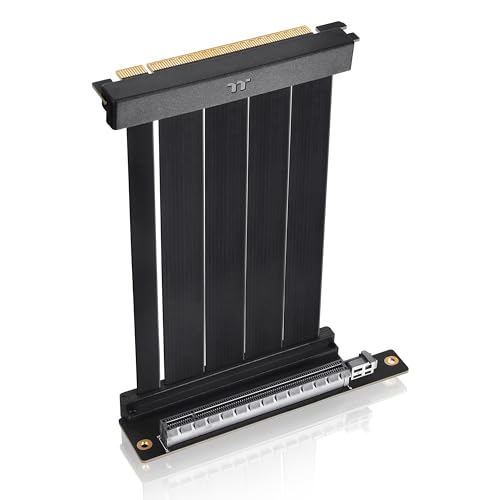 Thermaltake PCIe 4.0 Dual 90°Degree Connectors Riser Cable;Compact6.22 x 5.24 x 1.92 inches0.2 poundsCheck on Amazon
 Cooler Master MasterAccessory Riser Cable PCIe 4.0 x16200mm V2 Black7.87 x 3 x 0 inches0.3 poundsCheck on Amazon
 Lian Li Universal 4- Slots Vertical GPU kitVertical GPU kit Black7.4 x 4.72 x 6.38 inches1.6 poundsCheck on Amazon


A GPU riser cable lets you mount your graphics card vertically, so the fans and backplate face the side panel instead of the floor of the case. It is the part that makes showcase builds possible, and it also solves real fit problems in small cases where the card cannot sit in the motherboard slot directly. Every cable here is PCIe 4.0 rated, which matches current mainstream graphics cards, and each one was checked against its Amazon listing for the exact model and ASIN below.
As an Amazon Associate, we earn from qualifying purchases.
How to Choose a GPU Riser Cable
Match the PCIe generation to your system. A PCIe 4.0 cable is the right call for RTX 30 and 40 series cards and RX 6000 and 7000 series cards. A Gen 3 cable on a Gen 4 system will either fail to boot or force the slot down to Gen 3 speeds, so do not reuse an old cable to save a step. Gen 5 cables exist, but they are still scarce and carry a premium; a Gen 4 cable is the sensible mainstream choice.
Pick the length for your case, not the longest one on the shelf. Short cables (130 to 200 mm) suit compact cases and vertical brackets that sit close to the motherboard slot. Longer 300 mm runs suit full towers and brackets mounted further from the slot. Extra length adds signal path, so buy only the reach you need and route the cable without sharp folds.
Check the connector angle. Most riser cables end in a 90-degree female connector, which points the card parallel to the motherboard for vertical mounting. Dual 90-degree designs fold flat at both ends and help in tight cases. Confirm the angle matches your bracket before ordering, since a straight plug in a bracket built for a right angle will not line up.
Do not skip the shielding. At Gen 4 speeds, electromagnetic interference from power cables and fans running alongside the riser can cause crashes and link drops. Look for EMI shielding and a multi-layer PCB, and keep the ribbon away from the power supply cables where possible.
Remember the bracket is separate. A riser cable is only the electrical link. You still need a vertical GPU bracket unless you buy a kit that includes one. The Lian Li pick below is the only complete kit in this guide; the other four are cables only.
The 5 Best GPU Riser Cables for Gaming PCs
1. Thermaltake PCIe 4.0 Dual 90-Degree Riser Cable 130mm
The shortest cable in this guide, built for compact cases where every millimetre of slack matters. The dual 90-degree connectors fold flat at both ends, so the ribbon lies flush against the motherboard tray instead of looping through the case. EMI shielding and a 3-year warranty round out a tidy package for small-form-factor vertical mounts.
Specs
- Length: 130 mm (5.12 in)
- Interface: PCIe 4.0 x16, backward compatible with PCIe 3.0, 2.0, and 1.0
- Connectors: PCIe x16 male to PCIe x16 female, dual 90-degree
- Data rate: 16 Gbps per lane
- Cable thickness: 1.3 mm
- Weight: 0.1 kg (0.22 lb)
- Shielding: EMI shielding cover
- Warranty: 3 years
- ASIN: B0D9VSN5HY
2. NZXT PCIe 4.0×16 Riser Cable AB-RC200-B1
NZXT’s 200 mm cable is the straightforward mid-length option: flexible, shielded, and long enough for most mid-tower vertical brackets. It is the natural match for NZXT cases with a vertical slot, but the standard x16 connectors fit any motherboard and any bracket that takes a 200 mm run. The thin ribbon bends easily around the motherboard tray without stressing the connectors.
Specs
- Length: 200 mm
- Interface: PCIe 4.0 x16, backward compatible with earlier generations
- Connectors: PCIe x16 male to PCIe x16 female
- Design: Flexible flat ribbon, shielded
- Model: AB-RC200-B1
- ASIN: B0B1LV8S5Z
3. Cooler Master MasterAccessory Riser Cable PCIe 4.0 x16 200mm V2
Cooler Master’s V2 cable pairs a 90-degree female connector with a protective ABS casing around the PCB end, which guards the part most likely to flex during installation. The 30 AWG tinned copper conductors carry the full Gen 4 signal, and the TPE cable sleeves keep the ribbon tidy. It is listed as compatible with GeForce GTX 1000 through RTX 4000 series cards and Radeon RX 5000 through 7000 series cards.
Specs
- Length: 200 mm (7.9 in)
- Interface: PCIe 4.0 x16, backward compatible with PCIe 3.0 and older
- Connectors: PCIe x16 male to PCIe x16 90-degree female
- Data rate: 16 Gbps per lane, over 64 Gbps bi-directional
- Conductors: 30 AWG tinned copper, EMI shielded
- Sleeves: TPE cable sleeves, protective ABS casing
- Model: MCA-U002R-KPCI40-200
- ASIN: B0CC2L99JR
4. OwlTree PCIe 4.0 Riser Cable 300mm
The long-reach pick for full towers and brackets mounted well away from the motherboard slot. At 300 mm it covers routing paths the 200 mm cables cannot, and the 90-degree adapter keeps the card parallel to the motherboard for vertical mounting. The listing rates it for RTX 4090, 4080, and 4070 cards as well as PCIe 3.0 systems, and it ships in a sealed anti-static bag with a protective cardboard insert.
Specs
- Length: 300 mm (11.8 in)
- Interface: PCIe 4.0 x16, backward compatible with PCIe 3.0 systems
- Connectors: PCIe x16 male to PCIe x16 female, 90-degree adapter
- Data rate: 64 Gbps bi-directional
- Dimensions: 5.5 x 0.03 x 11.8 in
- Model: BT224cUS
- Colour: Black
- ASIN: B0DCZ4DTJQ
5. Lian Li Universal 4-Slots Vertical GPU Kit VG4-4-V2X
The only complete kit in this guide, for builders who need the bracket as well as the cable. It includes a 200 mm Gen 4 riser cable and a steel bracket that holds cards up to four slots thick, so thick flagship cards fit without sagging. The kit is designed for Lian Li O11 Dynamic cases but works in most ATX and E-ATX cases with enough expansion slots. If your case has no vertical bracket of its own, this is the one-stop option.
Specs
- Riser cable: 200 mm, PCIe 4.0 x16, PCIe 3.0 compatible
- Bracket: 4-slot vertical GPU holder, alloy steel
- GPU support: Up to 4 slots thick
- Case compatibility: ATX and E-ATX cases
- Dimensions: 18.8 x 11.99 x 16.21 cm
- Weight: 730 g
- Model: VG4-4-V2X
- ASIN: B0CF9MS1HG
At a Glance
| Cable | Length | PCIe Gen | Angle | Best For |
|---|---|---|---|---|
| Thermaltake Dual 90-Degree | 130 mm | 4.0 | Dual 90-degree | Compact cases |
| NZXT AB-RC200-B1 | 200 mm | 4.0 | Straight | Mid-tower vertical mounts |
| Cooler Master V2 | 200 mm | 4.0 | 90-degree | Durability and easy routing |
| OwlTree | 300 mm | 4.0 | 90-degree | Full towers and long runs |
| Lian Li VG4-4-V2X kit | 200 mm | 4.0 | 90-degree | Cable plus bracket in one box |
FAQ
Do riser cables slow down a graphics card?
A Gen 4-rated cable matched to a Gen 4 card and slot runs at full speed. Problems appear when a Gen 3 cable is used on a Gen 4 system, or when a cable is folded too sharply, which can cause link drops and crashes.
How do I know which length I need?
Measure the path from your motherboard’s x16 slot to the vertical bracket, following the route the cable will actually take. Add a little slack for gentle bends, then pick the shortest cable that covers the distance.
Does a vertical GPU run hotter?
It can, if the card ends up pressed against the side panel glass with little room for its fans to breathe. Leave as much clearance as your case allows, and check that the bracket positions the card away from the glass.
Can I use a riser cable with a PCIe 5.0 graphics card?
A Gen 4 cable will run a Gen 5 card at Gen 4 speeds, which is a small loss on most current cards. If you want the full Gen 5 link, you need a Gen 5-rated cable, which is a separate and still limited market.
Do I need to change anything in the BIOS?
Usually not, as long as the cable generation matches your card and slot. If the system fails to detect the card, check that the cable is fully seated at both ends, then look for a PCIe generation setting in the BIOS and set it to match the cable.
Conclusion
For most builders, a 200 mm Gen 4 cable is the right starting point: the NZXT AB-RC200-B1 and the Cooler Master V2 both cover mid-tower vertical mounts well, with the Cooler Master adding a tougher casing around the connector. Compact builds should go with the 130 mm Thermaltake, full towers with the 300 mm OwlTree, and anyone starting from scratch should consider the Lian Li kit, which supplies the bracket as well as the cable. Match the generation, measure the run, and your vertical mount will hold a full-speed link.
More from Amazon
Programs that pair well with the guide above. Offers and eligibility are set by Amazon and may change.
Free shipping on eligible items, Prime Video and more. Eligible new members can start with a free trial.
Start a Prime free trialAd-free music streaming. Eligible new subscribers can start with a free trial.
Try Music Unlimited freeA Prime membership for ages 18-24 with a trial period. Eligibility is set by Amazon.
See Prime for Young AdultsAudiobooks and podcasts to listen to on the go. Eligible new members can start with a free trial.
Try Audible freeAs an Amazon Associate we earn from qualifying purchases.