Our Top Picks
 Andonstar AD407 Pro 3D HDMI Soldering Digital MicroscopeAD407 with Pro stand4.7 poundsCheck on Amazon


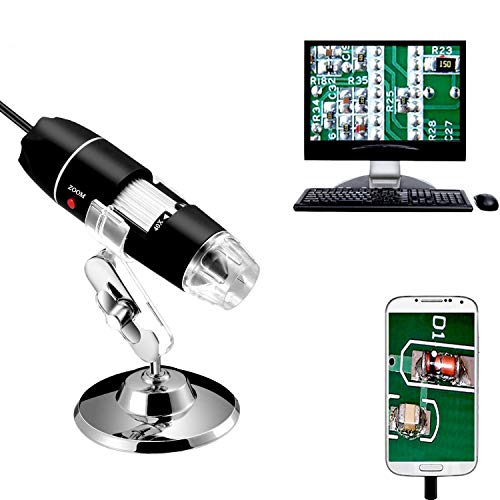

Building or repairing a PC means working with parts too small to judge with the naked eye. A single solder bridge, a hairline crack in a PCB trace, or a bent pin inside a CPU socket can turn a finished build into hours of troubleshooting. A USB microscope puts that detail on a screen, large enough to see what is going on before you reach for the soldering iron.
These tools fall into two broad groups. Standalone models carry their own screen and stand, so the microscope works as a bench instrument with both hands free. Tethered models plug into a computer over USB and show the image on a monitor, which keeps the kit small and portable. The five microscopes below cover both styles, from a full bench unit with a 7-inch screen to pocket-sized USB scopes. Every pick is a digital USB microscope suited to PCB and solder inspection, with a real, verified ASIN.
As an Amazon Associate, we earn from qualifying purchases.
How to Choose a USB Microscope for PC Building
Treat listed magnification with caution. Headline figures such as 1000X or 1200X are listing figures measured against a display size, not calibrated optical magnification. Usable zoom is lower, and image quality depends far more on the sensor and lens than on the number in the title.
Standalone screen or PC tether. A microscope with its own screen keeps the image in front of you while your hands stay on the soldering iron, and it needs no software. A tethered USB scope uses your computer monitor, which gives a bigger picture but ties up a USB port. If your bench already has a monitor, a tethered scope is the simpler setup.
Working distance and stand stability. Soldering under a microscope only works when there is room for the iron between the lens and the board. A tall, rigid stand matters more than raw magnification: a wobbly stand turns every focus adjustment into a fight. Look for a metal stand with a solid base that locks at height.
Lighting. Small subjects need bright, even light, and glare from solder joints can wash out detail. Adjustable LED lighting is essential, and side or gooseneck lights can be angled to cut reflections.
Capture and measurement. Saving a photo of a suspect joint is useful for a second opinion or a repair record. Screen models usually record to a microSD card, while tethered models save through software. Some software adds on-screen measurement for checking pin pitch or trace width.
Operating system support. Most tethered scopes use the USB Video Class standard, so they work on Windows, macOS, Linux, and ChromeOS without special drivers, though some features may only work on Windows. Note that iPhones do not accept external USB cameras, so most of these scopes cannot connect to an iPhone; iPad support varies by model.
1. Andonstar AD407 Pro — Best Standalone Bench Microscope
The Andonstar AD407 Pro is the closest thing in this lineup to a proper bench instrument. It pairs a 7-inch IPS screen with a tall metal Pro stand, so the whole setup works as a self-contained inspection station with no computer or software needed. The head rides on a metal column, leaving room underneath for a soldering iron and a PCB in the included metal clips.
The camera uses a 4 MP sensor and records video at 2160P UHD, with still photos up to 4032 x 3024 (a 12M photo resolution; the sensor itself is 4 MP). Magnification runs up to 270x, an honest figure for solder joints and fine PCB traces. Two flexible LED lights mount on the base plate with 8 brightness levels, and a UV filter sits pre-assembled on the lens to shield it from soldering heat and smoke.
One limitation: the AD407 Pro does not offer USB live view to a PC. Its USB port handles power and file access; the live image goes to the built-in screen or out over HDMI.
Specs
- Screen: 7-inch IPS LCD
- Sensor: 4 MP
- Video: 2160P UHD
- Still photos: Up to 4032 x 3024 (12M photo resolution)
- Magnification (listed): Up to 270x
- Lighting: Two flexible LED lights, 8 brightness levels
- Stand: Pro metal stand, 7 x 7.8 x 13 inches
- Storage: MicroSD card slot (Class 10 card, not included)
- Outputs: HDMI, USB
- Extras: UV filter, wireless remote control, metal PCB clips
- Weight: 4.66 lb (2.12 kg)
2. TOMLOV DM9 — Best Screen Microscope for Everyday Bench Work
The TOMLOV DM9 is the most versatile screen model in this lineup because it does two jobs: it works standalone on its 7-inch rotatable FHD screen and also hooks up to a PC over USB for a larger view on Windows and macOS. That flexibility lets you begin on the built-in screen for quick checks, then switch to the computer to capture images or share the view.
The camera records 1080P video and stills up to 12MP (4023 x 3024), with listed magnification from 5X to 1200X. As with every scope in this class, the top figure is a listing number measured against a display, so the sharpest image sits well below the ceiling. Lighting comes from 8 ring LEDs plus 2 gooseneck lamps, which you can angle to kill glare on shiny solder. A microSD card is included, and the metal stand holds the head steady while you work. The 7-inch screen rotates 90 degrees for viewing the board from a different angle.
Specs
- Screen: 7-inch rotatable FHD IPS LCD
- Photo resolution: 12MP (4023 x 3024)
- Video: 1080P FHD
- Magnification (listed): 5X to 1200X
- Lighting: 8 ring LEDs plus 2 gooseneck lamps
- Storage: MicroSD card included
- PC view: Windows and macOS compatible
- Stand: Metal stand
- Material: Aluminum alloy
- Dimensions: 24.2 x 20.4 x 9 cm
- Weight: 970 g
3. Plugable USB2-MICRO-250X — Best Tethered Scope for PC Users
Plugable takes the opposite approach from the screen models: a compact USB scope that plugs into your computer and uses the monitor as its display. The payoff is a bigger image, simple capture through standard camera software, and a kit that packs down to almost nothing.
The numbers here are refreshingly honest. Magnification runs from about 60x to 250x, set by focus and working distance rather than a digital zoom button, and the 2 MP sensor captures 1600 x 1200 snapshots. That covers solder joints, bent pins, and tiny silkscreen labels. An LED halo light with brightness control rings the lens, and the flexible arm stand grips the supplied observation stage with a suction cup.
The scope uses the USB Video Class standard, so it works on Windows, macOS, ChromeOS, Linux, and Android, plus iPad. iPhones do not accept external cameras, so it cannot connect to an iPhone. A USB-C adapter is included, and Plugable backs the microscope with a 2-year warranty.
Specs
- Sensor: 2 MP CMOS
- Magnification: 60x to 250x
- Snapshots: 1600 x 1200
- Video: 640 x 480
- Lighting: LED halo light with brightness control
- Connection: USB 2.0, 4 ft cable, USB-C adapter included
- Compatibility: Windows, macOS, ChromeOS, Linux, Android, iPad (not iPhone)
- Stand: Flexible arm observation stand with suction cup
- Body: 3.5 x 1.2 x 1.2 inches
- Weight: 2.9 oz
- Warranty: 2 years
4. Jiusion 40-1000x — Best Compact Scope for Quick Checks
The Jiusion 40-1000x is the simplest tool in this lineup: a handheld USB scope on a small metal stand, built for quick inspections. Plug it into a laptop, open a camera app, and you are looking at a magnified board within seconds.
Listed magnification runs from 40x to 1000x, with 8 adjustable LEDs around the lens. As with the other tethered scopes, the usable image is sharpest well below the top figure, and the focus range of about 1 to 90 mm frames anything from a single joint to a whole connector. A metal stand, an OTG adapter, a calibration ruler, and driver software come in the box. It works on Windows, Mac, Linux, and ChromeOS, plus Android phones with OTG support, but not with iPhone or iPad.
The stand is basic next to the rigid metal stands of the screen models, so for long sessions hold the scope by hand. For fast checks, a suspect joint or a part number too small to read, it is hard to beat for convenience.
Specs
- Magnification (listed): 40x to 1000x
- Lighting: 8 adjustable LEDs
- Focus range: 1 to 90 mm
- Connection: USB 2.0, OTG adapter included
- Compatibility: Windows, Mac, Linux, ChromeOS, Android with OTG (not iPhone or iPad)
- Stand: Metal stand
- In the box: Calibration ruler, driver CD
- Body: About 4.5 inches long
- Material: PLA, polycarbonate, polyethylene, metal
- Weight: 200 g
5. Bysameyee 40-1000X — Best for Measurement and Documentation
The Bysameyee 40-1000X looks similar to the Jiusion at a glance, a handheld USB scope with 8 LEDs and a metal stand, but its bundled software sets it apart. MicroCapture includes measurement and calibration tools, and the Micro-Measure utility measures length, diameter, angles, perimeter, and area on screen.
Listed magnification runs from 40x to 1000x, and the focus range is 10 to 250 mm per the listing, which frames both tight close-ups and wider views of a board. Video records in AVI at up to 30 frames per second; photos save as JPEG or BMP. A carrying case and metal stand come in the box.
One quirk: the focus wheel works on every device, but the SNAP and ZOOM buttons only work on Windows, because they depend on the bundled software. It works on Windows, Mac, Linux, and ChromeOS, plus some Android phones, but not with iPhone or iPad.
Specs
- Model: SB-19
- Magnification (listed): 40x to 1000x
- Lighting: 8 adjustable LEDs
- Focus range: 10 to 250 mm (per listing)
- Video: AVI, up to 30 fps
- Photos: JPEG or BMP
- Connection: USB 2.0, 5V DC from USB port
- Compatibility: Windows, Mac, Linux, ChromeOS, some Android (not iPhone or iPad)
- Software: MicroCapture with measurement and calibration, Micro-Measure tool
- Buttons: SNAP and ZOOM work on Windows only
- Dimensions: 1.2 x 1.2 x 4.5 inches
- Weight: 8.8 oz
Which USB Microscope Should You Buy?
For a dedicated inspection station, the Andonstar AD407 Pro is the pick: its own 7-inch screen, tall metal stand, and HDMI output make it the most bench-ready scope here, though it cannot stream live to a PC. The TOMLOV DM9 splits the difference, offering both a built-in screen and a PC view, which makes it the most flexible choice.
For tethered use, the Plugable USB2-MICRO-250X is the most honest and best-supported option, with modest magnification figures it actually delivers and a 2-year warranty. The Jiusion 40-1000x is the most portable and quickest to set up, while the Bysameyee 40-1000X earns its place with measurement software that turns inspection into documentation.
Frequently Asked Questions
What magnification do I need to inspect solder joints?
For most solder joints and PCB traces, moderate magnification is enough. A scope that delivers a sharp image between roughly 20x and 100x on screen covers the vast majority of PC building work. Higher listed figures, such as 1000X, describe magnification measured against a display size, not sharpness at that level.
Can I use a USB microscope with a Mac or Linux computer?
Most tethered USB microscopes use the USB Video Class standard, so they work with the built-in camera software on Windows, macOS, Linux, and ChromeOS without special drivers. Some bundled features may only work on Windows. Screen models with their own display need no computer at all.
Will a USB microscope work with my iPhone?
In most cases, no. iPhones do not accept external USB cameras, so the majority of USB microscopes cannot connect to an iPhone. Some models work with iPad, but a standard wired USB scope should be treated as a computer accessory.
Do I need a microscope with its own screen?
It depends on how you work. A built-in screen keeps the image in front of you while both hands stay free for the soldering iron, and it needs no software or computer. A tethered scope gives you a bigger image on a monitor, but it ties up a USB port and a computer. If your bench already has a monitor, a tethered scope is usually enough.
Conclusion
A USB microscope turns guesswork into a clear view. Whether you pick the standalone Andonstar AD407 Pro, the flexible TOMLOV DM9, the dependable Plugable USB2-MICRO-250X, the portable Jiusion 40-1000x, or the measurement-ready Bysameyee 40-1000X, you will see your boards up close, well lit, and in enough detail to fix the problem the first time.
FAQ
Which USB Microscope Should You Buy?
What magnification do I need to inspect solder joints?
Can I use a USB microscope with a Mac or Linux computer?
Will a USB microscope work with my iPhone?
Do I need a microscope with its own screen?
More from Amazon
Programs that pair well with the guide above. Offers and eligibility are set by Amazon and may change.
Free shipping on eligible items, Prime Video and more. Eligible new members can start with a free trial.
Start a Prime free trialAd-free music streaming. Eligible new subscribers can start with a free trial.
Try Music Unlimited freeA Prime membership for ages 18-24 with a trial period. Eligibility is set by Amazon.
See Prime for Young AdultsAudiobooks and podcasts to listen to on the go. Eligible new members can start with a free trial.
Try Audible freeAs an Amazon Associate we earn from qualifying purchases.