5 Best One Handed Keyboards for Gaming (November 2026)
Compare the best one handed keyboards and gaming keypads: analog thumbsticks, d-pads and analog keys explained, with key counts and switches as listed.
A one-handed keyboard only earns its desk space if it replaces the half of the keyboard your left hand actually uses, and the products in this category split into two designs that do that job differently. Gaming keypads shrink the layout around a thumb control for movement, while one-handed keyboards keep a familiar grid of full keys in a narrower body. Choosing between them is really choosing what your thumb will do: steer, tap a directional pad, or rest beside ordinary keys.
The picks below come from each product’s own Amazon listing, and the thumb hardware is reported exactly as listed, because this category suffers more than most from blurred wording. An analog thumbstick, an 8-way directional pad and analog key switches are three different technologies. One model here even carries two different key counts inside its own listing; both are shown rather than silently merged into a single convenient number.
Quick Picks
As an Amazon Associate we earn from qualifying purchases
Product
Best for
Key spec from title
AZERON Cyborg II Gaming Keypad
Players who want a true analog thumbstick
Hall Effect analog thumbstick, 30 keys
Razer Tartarus Pro Gaming Keypad
Analog key control and adjustable actuation
Analog-optical switches, 32 keys
Razer Tartarus V2 Gaming Keypad
A proven keypad with a d-pad and scroll wheel
Mecha-membrane switches, 32 keys
AZERON Cyborg Compact Gaming Keypad
A smaller Azeron with an analog stick
Analog thumbstick, 29 keys
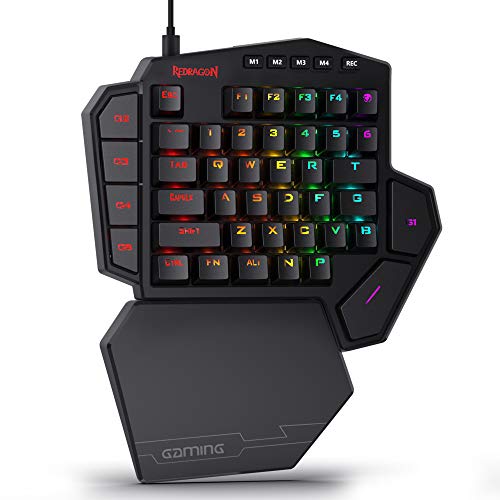
Redragon K585 DITI One-Handed Keyboard
A normal key layout in a one-handed body
Mechanical blue switches, 42 keys
How to Choose
Keypad With a Thumb Control, or a One-Handed Keyboard
The first decision is layout philosophy. A keypad such as the Tartarus or Azeron models arranges a compact grid around your fingers and gives your thumb its own control, which suits games where movement and abilities run simultaneously. A one-handed keyboard such as the Redragon K585 keeps rows of standard keys, including a number row area, in a cut-down body; nothing about the typing feel changes, you simply get fewer keys. If you are coming from a normal keyboard and play titles that need many distinct binds, the keyboard layout usually feels familiar sooner.
D-Pad, Analog Thumbstick and Analog Keys Are Not the Same Thing
Marketing copy loves the word “analog”, so check where it applies. The Tartarus V2’s thumb control is an 8-way directional pad: it registers directions, not degrees of tilt, and it is not a thumbstick. The Azeron Cyborg II and Cyborg Compact carry actual analog thumbsticks that register how far you push, like a controller stick. The Tartarus Pro takes a third route: its analog element lives in the key switches themselves, which read how deeply each key is pressed, while its thumb control remains a pad. Decide which input your games reward before comparing anything else.
Switch Type Sets the Feel and the Noise
Each pick here uses a different switch approach, and your household may vote on this choice. The Tartarus V2 uses Razer’s Mecha-Membrane switches, a soft membrane base with a mechanical-style click. The Tartarus Pro’s analog optical switches actuate with light and allow adjustable actuation points. The Redragon K585 DITI uses mechanical blue switches, which the listing describes as tactile and clicky; they are satisfying and audible in equal measure. The Azeron models are 3D printed, hand-shaped keypads built around finger towers, a different ergonomic bet altogether rather than a conventional switch deck.
Handedness, Key Counts and Software
Two traps catch buyers in this category. The first is handedness: the Azeron listings here are the right-hand versions, described by Azeron as “for Righties”, and a version for the other hand is a different listing, so confirm which one you are opening before ordering. The second is key counting, which is not standardized; the Tartarus V2’s own listing says 32 programmable keys in its title while a specification field lists a button quantity of 20. Compare what each count includes, and check the software story too, since programming layers and macros on the Razer models run through Razer Synapse.
The 5 Best Options
AZERON Cyborg II Gaming Keypad
Top Pick
AZERON Cyborg II Gaming Keypad
Best for: players who want controller-style analog thumb movement combined with keyboard binds.
Thumb control: Hall Effect analog thumbstick, as titled
Keys: 30 programmable keys, as titled
Body: 3D printed, customized, hand-shaped with finger towers
Version: for right-handed players (“for Righties”), black
The Cyborg II is the pick for players who have tried a d-pad and want genuine analog movement instead. Its title states a Hall Effect analog thumbstick, a real stick that reads how far you push it, paired with 30 programmable keys. The body is 3D printed and hand-shaped, with finger towers that place keys around each finger rather than in flat rows, so the learning curve is real but so is the access speed once your hand adapts. This listing is the black version for right-handed players, described as “for Righties”, and handedness is part of the purchase decision rather than a setting you change later.
Watch out for: confirm you are opening the right-hand listing; the opposite-hand version and other colors are separate listings with their own codes.
Razer Tartarus Pro Gaming Keypad
Runner-Up
Razer Tartarus Pro Gaming Keypad
Best for: players who want analog-style key control, such as gradual movement or driving inputs, from the keys themselves.
Switches: Razer Analog Optical, registering input by press depth
Features as titled: Rapid Trigger, adjustable actuation
Keys: 32 programmable keys, as titled
Thumb control: thumbpad module; no analog thumbstick stated in the listing
The Tartarus Pro is built around a question no other pick here asks: how far down did you press the key? Its Razer Analog Optical switches register scaling levels of input based on press depth, so a gentle press and a full press can mean different things, and the listing titles adjustable actuation and Rapid Trigger alongside. The key count is stated as 32 programmable keys. Be precise about the thumb, though: the Pro carries the Tartarus line’s thumbpad module, and no analog thumbstick is stated for this model in the listing content. The analog story on this device lives entirely in its key switches.
Watch out for: do not buy this expecting a thumbstick; if thumb movement is your priority, the Azeron models are the ones whose listings state an analog stick.
Razer Tartarus V2 Gaming Keypad
Razer Tartarus V2 Gaming Keypad
Best for: players who want a well-supported keypad with a d-pad, scroll wheel and deep macro software.
Switches: Razer Mecha-Membrane, as listed
Keys: 32 programmable keys per the title and features; the listing’s spec fields also state “Button Quantity: 20”
Thumb control: 8-way directional thumbpad (not analog), plus a 3-way scroll wheel
players who want a well-supported keypad with a d-pad, scroll wheel and deep macro software.
Watch out for
the dual key counts come from the listing itself; check which figure a comparison site quotes before treating any head-to-head key-count comparison as settled.
The Tartarus V2 is the established, lower-tech sibling, and its listing needs careful reading. The title and features describe 32 programmable Mecha-Membrane keys, and the features copy breaks that figure down as the key grid plus an 8-way directional thumbpad and a 3-way scroll wheel; the same listing’s specification fields also show “Number of Keys: 32” alongside “Button Quantity: 20”. Both counts appear in the listing, so they are both reported here rather than averaged away. The thumbpad is a directional pad, not an analog stick. An adjustable palm rest with two positions and Razer Synapse support round out a wired, USB-A design with Chroma RGB lighting.
Watch out for: the dual key counts come from the listing itself; check which figure a comparison site quotes before treating any head-to-head key-count comparison as settled.
AZERON Cyborg Compact Gaming Keypad
AZERON Cyborg Compact Gaming Keypad
Best for: players who want Azeron’s analog stick and shaped body in the smaller model.
Thumb control: analog thumbstick, as titled (Hall Effect not stated for this model)
Keys: 29 programmable keys, as titled
Body: 3D printed, customized keypad; smaller Compact form
Version: for right-handed players (“for Righties”), Galaxy Purple
players who want Azeron’s analog stick and shaped body in the smaller model.
Watch out for
this block’s details come from a price-tracker record of the listing, so spot-check the title wording and key count on the live listing before ordering.
The Cyborg Compact takes the Azeron formula, an analog thumbstick plus a shaped, 3D printed body, and trims it down. Its title states an analog thumbstick and 29 programmable keys, one fewer than the Cyborg II, and describes the same customized, hand-shaped approach in the smaller Compact form, which is a distinct model from both the original Cyborg and the Cyborg II rather than a variant of either. Note one wording boundary carefully: unlike the Cyborg II’s title, the Compact’s title does not say Hall Effect, so this guide does not claim that sensor type for it. This listing is the Galaxy Purple version for right-handed players.
Watch out for: this block’s details come from a price-tracker record of the listing, so spot-check the title wording and key count on the live listing before ordering.
players who want a standard key layout and mechanical switches in half the desk space.
Watch out for
the brown-switch wired version is a separate listing, so check the switch color in the title of the listing you open; this block’s details should also be confirmed on the live listing before ordering.
The K585 DITI is the conservative choice in this guide, and that is a compliment. It is a one-handed keyboard rather than a thumb-control keypad: 42 keys as titled, mechanical blue switches, a Type-C wired connection and a detachable magnetic wrist rest. Seven onboard macro keys handle the repeatable combinations, and RGB backlighting is built in. Crucially, no thumbstick or thumbpad is stated for this model anywhere in its listing, so movement stays on the keys exactly as it would on a standard board. For players whose games need many distinct, ordinary key presses, that familiarity is the entire point.
Watch out for: the brown-switch wired version is a separate listing, so check the switch color in the title of the listing you open; this block’s details should also be confirmed on the live listing before ordering.
Which One Fits Your Situation
You Want Your Thumb to Handle Movement
Choose an Azeron. The Cyborg II’s listing states a Hall Effect analog thumbstick and 30 programmable keys, while the Cyborg Compact states an analog thumbstick and 29 keys in a smaller body. Either gives you the gradual, controller-style movement input that a directional pad cannot reproduce. Between them, pick the Cyborg II for the fully featured version and the Compact if its smaller shape suits your hand and desk better.
You Play Racing or Driving Games on Keys
The Tartarus Pro is the interesting option here, because its analog optical switches read press depth on the keys themselves, which is the input style gradual throttle and steering corrections need. Its thumb control is a pad rather than a stick, so think of it as analog fingers instead of an analog thumb. Adjustable actuation and Rapid Trigger, both named in its title, add further tuning for players who like to dial in key response.
You Just Want More Mouse Room
If your real problem is a full-size keyboard crowding your mouse pad, the Redragon K585 DITI solves it without asking you to relearn anything: ordinary mechanical keys, a familiar layout and a wired connection. The Tartarus V2 is the alternative if you also want a thumb pad and scroll wheel in the freed-up space. Either way, measure your desk first; these devices save width, but a keypad plus a full keyboard side by side saves nothing.
You Rely on Macros for Work as Much as Play
Look at the stated macro stories. The K585 carries 7 onboard macro keys that travel with the device, while the Razer keypads build their programming around Razer Synapse profiles, with the Tartarus V2 listing 32 programmable keys in its features copy. Onboard storage suits shared or work machines where you cannot install software; Synapse suits a single personal rig where deep per-game profiles matter more than portability between computers.
Common Mistakes
Calling the Tartarus V2’s 8-way thumbpad an analog thumbstick; it is a directional pad and registers directions, not tilt.
Assuming the Tartarus Pro has an analog thumbstick because its name highlights analog; the analog element is in its key switches.
Ordering an Azeron without checking handedness, when the listing in front of you is specifically the version for one hand.
Comparing key counts across brands at face value, when one listing’s own page can carry two different counts for the same device.
Expecting a keypad to replace a full keyboard for typing; these devices cover gaming binds, not documents and spreadsheets.
Frequently Asked Questions
Is a one-handed keyboard the same as a gaming keypad?
Not quite. A gaming keypad is built around a compact key grid plus a thumb control, such as a d-pad or an analog thumbstick, and is designed purely for game input. A one-handed keyboard keeps a section of a normal keyboard, with standard keys in standard rows, and simply cuts away the rest. The Redragon K585 in this guide is the keyboard type; the Razer and Azeron models are keypads.
Does the Razer Tartarus V2 have an analog thumbstick?
No. Its listing describes an 8-way directional thumbpad, which is a d-pad: it registers which direction you press, not how far. The same listing also includes a 3-way scroll wheel in its breakdown of the 32 programmable keys. If you need true analog thumb movement, the Azeron Cyborg II and Cyborg Compact are the picks here whose titles state an analog thumbstick.
What does “analog” mean on the Tartarus Pro?
On the Tartarus Pro it describes the key switches, not a thumbstick. Its Razer Analog Optical switches register scaling levels of input depending on how far a key is pressed, which can imitate the gradual input of an analog control on individual keys. The listing titles adjustable actuation and Rapid Trigger as well. No analog thumbstick is stated for this model in the captured listing content.
Can I use a one-handed keyboard for the other hand?
Only if the model is made or listed for that hand. The Azeron keypads in this guide are handed products, and the listings used here are the versions described as “for Righties”; the other-hand version is a separate listing. The Razer Tartarus models and the Redragon K585 are shaped for the standard left-hand gaming position. Always confirm handedness in the listing title before ordering a shaped keypad.
R
Razer Gaming Series Editorial Team
We compare specs, materials and verified owner reviews before a product earns a spot. Rankings are never paid.
FAQ
Is a one-handed keyboard the same as a gaming keypad?
Not quite. A gaming keypad is built around a compact key grid plus a thumb control, such as a d-pad or an analog thumbstick, and is designed purely for game input. A one-handed keyboard keeps a section of a normal keyboard, with standard keys in standard rows, and simply cuts away the rest. The Redragon K585 in this guide is the keyboard type; the Razer and Azeron models are keypads.
Does the Razer Tartarus V2 have an analog thumbstick?
No. Its listing describes an 8-way directional thumbpad, which is a d-pad: it registers which direction you press, not how far. The same listing also includes a 3-way scroll wheel in its breakdown of the 32 programmable keys. If you need true analog thumb movement, the Azeron Cyborg II and Cyborg Compact are the picks here whose titles state an analog thumbstick.
What does “analog” mean on the Tartarus Pro?
On the Tartarus Pro it describes the key switches, not a thumbstick. Its Razer Analog Optical switches register scaling levels of input depending on how far a key is pressed, which can imitate the gradual input of an analog control on individual keys. The listing titles adjustable actuation and Rapid Trigger as well. No analog thumbstick is stated for this model in the captured listing content.
Can I use a one-handed keyboard for the other hand?
Only if the model is made or listed for that hand. The Azeron keypads in this guide are handed products, and the listings used here are the versions described as “for Righties”; the other-hand version is a separate listing. The Razer Tartarus models and the Redragon K585 are shaped for the standard left-hand gaming position. Always confirm handedness in the listing title before ordering a shaped keypad.
Affiliate disclosure. As an Amazon Associate we earn from qualifying purchases at no extra cost to you. Prices accurate as of the date shown.
Five Bluetooth keyboards that pair with Android phones and tablets and put emoji one tap away, from swappable emoji keys to a dedicated emoji menu key.
Discover the best cherry mx brown keyboards with genuine Cherry MX Brown switches, quiet tactile feedback, and full-size, tenkeyless, and compact layouts.
Find the best keyboards for MacBooks with Mac-ready layouts, Bluetooth and USB-C connections, and comfortable typing for work, study, and everyday use.


 AZERON Cyborg Compact Gaming Keypad
 Redragon K585 DITI One-Handed RGB Mechanical Gaming Keyboard
 Razer Tartarus V2 Left-Handed Gaming Keypad6.02x 2.36 x 0.8 Inch2.36 x 7.98 x 6.02 inches0.8 poundsCheck on Amazon