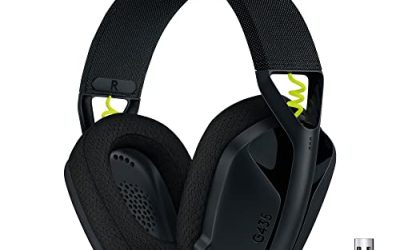
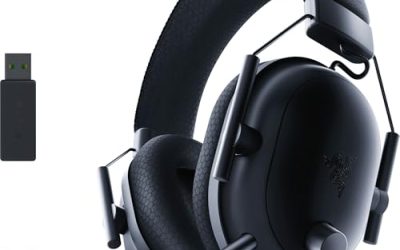
Key takeaways
- Want the best pa5 headsets? This guide covers PS5 Tempest 3D Audio, USB dongle and wired headsets, mic quality, comfort and battery life to help you pick well.
As an Amazon Associate we earn from qualifying purchases.
A note on the name first: there is no console, brand or headset line called PA5, so this guide reads “pa5” as a misspelling of PS5, the PlayStation 5. Every headset here is judged on how it performs with that console; nothing here invents a product that does not exist. The real decision is not which logo sits on the earcup, but how the headset connects to the console, how it handles the PS5’s spatial audio, and whether its microphone and fit hold up across sessions.
That choice looks different depending on who is wearing the headset. Competitive players chase footsteps and callouts, story-driven players want atmosphere and immersion, families sharing a living room need game sound kept private late at night, and first-time buyers usually want the simplest option that still sounds good. This guide walks through each of those needs using the names and specifications on Amazon product pages, so you can compare listings on equal terms and pick the headset that matches how you play.
How PlayStation 5 Audio Works
The PlayStation 5 produces spatial sound through Tempest 3D AudioTech, a system that places sounds above, below, behind and beside you rather than simply pushing stereo left and right. Games that support it can make rain feel as though it is falling overhead, footsteps register from a stairwell behind you, and distant gunfire carry a sense of direction that a flat stereo mix cannot match. The effect is processed by the console itself, which means the headset does not need a special chip to deliver it, although headsets tuned with Sony’s own audio profile tend to present it most cleanly.
Connection method shapes the experience more than most buyers expect. A headset that plugs into the DualSense controller’s 3.5 mm jack receives audio directly from the controller, which keeps things simple and removes charging from the equation entirely. A wireless headset using a USB dongle talks to the console through its own low-latency radio link, freeing you from the cable at the cost of battery management. Standard Bluetooth audio, meanwhile, is not supported by the PS5 for gameplay sound, so a headset that only supports Bluetooth will not carry game audio on its own. Knowing these three paths before you shop prevents the most common disappointment in this category: buying a headset whose connection simply does not fit the console.
Microphone design matters as much as sound quality, because party chat is where a weak headset shows itself first. Boom microphones that sit near your mouth generally capture speech more clearly than microphones hidden inside an earcup, and a microphone that can be flipped up to mute or detached entirely is easier to live with day to day. Sidetone, the feature that feeds a little of your own voice back into your ears, helps you avoid shouting without realising it, and it is worth looking for on any listing aimed at multiplayer players.
How to Choose
Connection Type and Latency
Decide first how the headset will reach your console, because that choice governs everything else. A wired headset plugged into the DualSense controller is the most dependable route, with no battery to charge, no dongle to lose and no wireless interference, which suits players who sit close to the screen. A 2.4 GHz wireless headset with a USB dongle trades that simplicity for freedom of movement, and the best keep delay low enough that footsteps and gunshots still line up with what you see. Check the listing for the exact connection types, and be wary of any headset that lists Bluetooth as its only wireless option, since the PS5 does not carry game audio over standard Bluetooth.
Tempest 3D Audio and Soundstage
Tempest 3D Audio is built into the PS5, so any headset can reproduce it, but not every headset presents it equally well. Open, spacious drivers with a wide soundstage make directional cues easier to read, which is why competitive players often favour headsets that keep the midrange clear rather than burying it under heavy bass. Sony’s own headsets are tuned specifically for the Tempest profile, so they tend to deliver the most faithful version of the effect straight out of the box. When reading a listing, look for mention of PS5 3D Audio support and driver size, and treat vague claims about surround sound with scepticism unless the listing explains how the effect is produced.
Microphone Quality and Chat Clarity
A headset can sound wonderful and still frustrate your squad if its microphone is an afterthought. Detachable or retractable boom microphones usually outperform microphones built into the earcup, because they sit closer to your mouth and pick up less room noise. Noise-cancelling microphone designs help in busy households, filtering out keyboard clicks, television sound and conversation nearby. Flip-to-mute is a small feature that becomes essential in practice, letting you silence yourself instantly without fumbling through menus. Read the listing for the microphone type and whether it is detachable, and remember that a headset marketed purely for music listening may have a microphone that was never designed for hours of party chat.
Comfort, Weight and Battery Life
Long sessions punish a headset that seemed fine in the first ten minutes, so comfort deserves the same attention as sound. Clamping force, earcup depth and headband padding decide whether a headset stays pleasant after three hours, and lighter designs generally fatigue the neck less during marathon sessions. Earcups that fully enclose the ear keep sound in and household noise out, while breathable materials reduce heat build-up. For wireless models, the battery figure on the listing tells you how often you will be tethered to a charger: compare it against your typical session length, check whether the headset can keep playing while charging, and note the charging connector type so you know whether a cable you already own will work.
Which One Fits Your Situation
Competitive Multiplayer Where Every Footstep Counts
For ranked matches, prioritise a low-latency 2.4 GHz wireless headset with a USB dongle, or a wired headset plugged into the DualSense controller. Both keep audio tightly synced with the action, and a clear midrange with a wide soundstage helps you place footsteps and reload sounds before you see their source. A boom microphone with noise cancelling keeps callouts intelligible when the match gets loud, and a flip-to-mute arm cuts your mic between rounds without opening a menu.
Cinematic Single-Player Games and Immersion
Players working through story-driven adventures should look for a headset that presents Tempest 3D Audio at its best, since atmosphere is the whole point of these games. Sony’s own wireless headsets are tuned for the console’s spatial profile, and a comfortable closed-back design pulls you into the world while keeping the living room quiet. Battery life matters less here than comfort, because a headset that presses on your ears will end a session long before the story does.
A Shared Living Room and Late-Night Sessions
When the console sits in a room other people use, a wireless headset is less a luxury than a household peace treaty. A dongle-based wireless model lets you play after everyone else has gone to bed without waking the house, and closed earcups stop game audio leaking out to anyone nearby. A long battery figure on the listing means fewer mid-session charging interruptions, and a headset that works while charging covers the nights you forget to plug it in.
A First Headset on a Tight Budget
New console owners do not need to spend heavily to get good sound from a PS5. A wired headset that plugs straight into the DualSense controller delivers the console’s spatial audio with no battery, no dongle and nothing to configure, which makes it the simplest starting point. Check the listing for a comfortable fit and a microphone that suits party chat, and you can always move to a wireless model later once you know which features you actually miss.
Setting Up Your Headset on PS5
Getting a new headset running on the PS5 takes only a few minutes, and doing it properly avoids most of the audio complaints new owners report. For a wired headset, plug the 3.5 mm cable into the jack on the bottom of the DualSense controller, then open the console’s sound settings and confirm the output device shows the controller headset. For a dongle-based wireless headset, plug the USB dongle into one of the console’s front USB ports, switch the headset on, and wait for the pairing light to settle before launching a game. The PS5’s 3D Audio settings let you measure your ear shape and select the profile that sounds most natural to you, which is worth the two minutes it takes, because the default profile does not suit everyone. Finally, test your microphone in a party chat or with the console’s mic test before your first match, so you discover any volume or clarity problem while there is still time to adjust it.
Common Mistakes
- Buying a Bluetooth-only headset and expecting it to carry PS5 game audio, when the console does not support standard Bluetooth audio for gameplay.
- Choosing a headset by driver size alone, when tuning, soundstage and comfort shape what you actually hear far more than a single specification.
- Ignoring the microphone entirely, then discovering in your first party chat that your squad hears room noise more clearly than your voice.
- Picking a wireless headset without checking the battery figure on the listing against how long your sessions usually run.
- Assuming every headset labelled for PlayStation works identically, when some models are tuned for the PS4 era and present the PS5’s spatial audio less cleanly.
Frequently Asked Questions
Does any headset work with the PlayStation 5?
Almost any headset with a 3.5 mm plug works when connected to the DualSense controller, and most USB dongle wireless headsets designed for PlayStation connect without fuss. The exceptions are headsets that rely only on standard Bluetooth, which the PS5 does not use for game audio, and models built around another console’s proprietary wireless system. Checking the listing for PS5 compatibility before buying removes the guesswork.
Do I need a Sony headset for Tempest 3D Audio?
No, Tempest 3D Audio is processed by the PS5 itself, so any connected headset can reproduce it. Sony’s own headsets are tuned specifically for the Tempest profile and usually present it most faithfully, but third-party headsets with a wide soundstage and clear midrange can deliver convincing directional audio too. The console’s ear-shape measurement in the 3D Audio settings helps any headset sound its best.
Can I use Bluetooth headphones with the PS5?
Not directly for game audio, because the PS5 does not support the standard Bluetooth audio profile used by ordinary headphones. Some wireless gaming headsets include Bluetooth alongside their 2.4 GHz dongle connection, and that Bluetooth link is useful for phone calls or music while you play. For game sound itself, use the dongle connection or a wired connection to the controller instead.
Is a wired or wireless headset better for the PS5?
Neither is better in every situation, so the answer depends on how you play. Wired headsets plugged into the DualSense controller are simpler, never need charging, and keep latency at its lowest, which suits competitive players. Wireless dongle headsets give you freedom to move around the room and are kinder to shared living spaces late at night. Choose wired for simplicity and responsiveness, and wireless for comfort and freedom.
FAQ
Does any headset work with the PlayStation 5?
Do I need a Sony headset for Tempest 3D Audio?
Can I use Bluetooth headphones with the PS5?
Is a wired or wireless headset better for the PS5?
More from Amazon
Programs that pair well with the guide above. Offers and eligibility are set by Amazon and may change.
Free shipping on eligible items, Prime Video and more. Eligible new members can start with a free trial.
Start a Prime free trialAd-free music streaming. Eligible new subscribers can start with a free trial.
Try Music Unlimited freeA Prime membership for ages 18-24 with a trial period. Eligibility is set by Amazon.
See Prime for Young AdultsAudiobooks and podcasts to listen to on the go. Eligible new members can start with a free trial.
Try Audible freeAs an Amazon Associate we earn from qualifying purchases.