Key takeaways
- Picking a Razer mouse for FPS? Compare sensors, shapes, weight and wireless options to find the model that matches your aim style, grip and desk setup.
As an Amazon Associate we earn from qualifying purchases.
Every shooter asks the same thing of a mouse: move exactly when your hand moves, and stop exactly where you expect. A Razer mouse built for first-person shooters earns its place by tracking cleanly at speed, sitting comfortably through long matches, and keeping its buttons crisp after thousands of clicks. The real decision is not which model carries the newest badge. It is which shape fits your grip, how much weight you want to throw around in a flick shot, and whether a cable or a wireless link suits your desk. Answer those questions first, and the choice narrows quickly.
This guide is for competitive players climbing ranked ladders, casual shooter fans who want a mouse that feels fast without feeling fragile, and Razer owners looking to stay inside one software setup. It explains how to weigh sensor, shape, weight and connection, so you can find the Razer mouse that matches your aim style rather than the one with the loudest marketing.
How to Choose
Razer makes several mice that suit shooters, and they differ in ways that matter more than the name on the box. The four points below separate a mouse that helps your aim from one that only looks the part, and they apply whether you play tactical shooters, fast arena games, or a mix of both. The order below matters. Sensor first, because tracking is the foundation everything else rests on, then shape, which decides whether the mouse fits your hand, then weight, which changes how every flick feels. Connection and software come last, since they shape convenience rather than aim. Work through the four points in that order and the shortlist builds itself.
Sensor and Polling Rate
The sensor is the foundation of any shooter mouse, because it turns hand movement into cursor movement without surprises. Look for an optical sensor that tracks reliably at the sensitivity you actually use, with smooth small movements and no spinning out on fast flicks. A higher polling rate reports the mouse position to the computer more often, which can make aiming feel more responsive in fast games, while slower games show little difference. Set your sensitivity to a level where you can turn comfortably, then judge the mouse on how steady it feels there rather than on the biggest number printed on the packaging.
Shape and Grip for Flick Shots
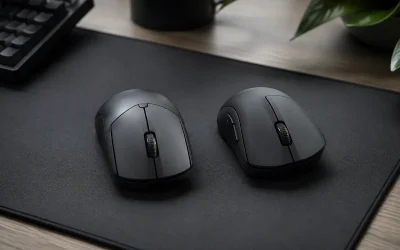
Shape decides whether the mouse becomes an extension of your hand or a distraction you fight every round. Palm grip players need a longer body with a supportive hump, claw grip players want a shorter shell with a clear hump under the palm, and fingertip players need a light mouse that pivots freely on the pad. Compare the length and width with your hand size, and think about where the hump sits: a mid-hump suits a neutral grip, while a rear hump fills the palm. A symmetrical shell works for many grips and both hands, while an ergonomic shell favours right-handed players who rest their whole hand down.
Weight and How It Moves
Weight changes the feel of every flick, and shooters punish a mouse that is too heavy or too light for your style. A lighter mouse starts and stops with less effort, which helps when you snap between targets or correct a flick mid-swing. A slightly heavier mouse can feel calmer when you hold an angle and wait, because it resists small accidental movements. Balance matters too: a mouse that is heavy at the back drags differently from one that is heavy at the front, and a wireless model carries its battery in a fixed place. Try the shape if you can, and notice whether the weight sits under your palm or pulls toward your fingers.
Wireless or Wired, and the Software Around It
A wireless Razer mouse frees the desk from cable drag, which matters when your arm sweeps widely at low sensitivity, while a wired mouse removes charging from your routine and keeps the setup simple. Modern wireless links respond quickly enough for competitive play, so the choice comes down to whether you mind keeping a battery topped up. The software matters as well: it stores your sensitivity, button assignments and lighting, and it should let you save settings to the mouse so your setup follows you to another computer. Check that the mouse works while it charges if you choose wireless.
Which One Fits Your Situation
The best Razer mouse for shooters depends on how you play, how you grip, and how seriously you take ranked matches. Match your routine to the situation below and let it point you toward the right shape and connection. The right choice shifts with your routine. A ranked grinder, a casual weekend player, and a low-sensitivity arm aimer all need different things from the same brand, and the situations below name those differences plainly. Match your own routine first, then judge each mouse against what that routine demands.
Competitive Ranked Play Every Night
Pick a light, symmetrical mouse with a strong sensor and a high polling rate, and pair it with a pad so your arm has room to sweep. Ranked play rewards consistency above all, so a neutral shape that suits claw and fingertip grips keeps your flicks repeatable from the first round to the last. Wireless works well here if you keep the battery charged, since a free-moving mouse removes one thing to think about mid-fight.
Casual Shooters With Friends After Work
Choose a comfortable mouse with a forgiving shape and a wireless link, so the setup stays tidy and the sessions stay relaxed. You do not need the lightest shell or the highest polling rate; you need a mouse that feels good after a long day and does not demand constant attention. A mid-weight body with a gentle hump suits most grips, and a simple software setup keeps the evening about the game.
Low-Sensitivity Arm Aimers
Go for a light mouse with a safe shape and a smooth glide, because your whole forearm does the aiming. Low sensitivity means long swipes for every turn, so the mouse must start easily and stop precisely without dragging. A wireless model helps here, since a cable tugging during a wide sweep is the last thing you need in the middle of a duel.
Palm-Grip Players With Large Hands
Pick a longer, ergonomic Razer mouse with a full hump that supports your whole hand. Large hands need length and width to avoid cramping, and an ergonomic shell that fills the palm keeps the wrist relaxed through long sessions. A little extra weight feels steady here rather than slow, and side buttons placed within easy reach of the thumb make utility use comfortable.
Common Mistakes
Shooter mice invite confident buying, and confidence is exactly what leads to the mistakes below. Read them before you order, because each one is cheaper to avoid than to fix with a return. Most of these mistakes come from shopping by reputation or by a single number on the box, and each one is easy to make when every Razer mouse looks similar in a product photo. A few minutes of thought before ordering saves the hassle of a return and the cost of learning the lesson twice.
- Buying the flagship without checking the shape. The most expensive model in the range is not the best one for your hand. A cheaper shape that fits your grip will beat a flagship that cramps your fingers every single round. Read the shape and dimensions first, and treat the model name as a label rather than a promise about how it will feel in your hand.
- Setting sensitivity far too high. Very high sensitivity makes the crosshair twitchy and turns small hand tremors into missed shots. Drop the sensitivity until you can track a moving target smoothly, then let the mouse earn its keep. Spend a week at the new sensitivity before judging it, since the first days always feel strange after years on a different setting.
- Ignoring the weight until it is too late. A mouse that feels fine in the hand for a minute can tire your wrist over a three-hour session. Think about how long you play, and stay near the middle of the weight range if you are unsure. A short try in a shop tells you little about hour three of a long session, so give a new weight a full week before you decide whether it suits you.
- Forgetting the pad underneath. A great sensor on a worn, dirty, or tiny pad will track worse than a modest sensor on a clean, large one. Pair the mouse with a pad that gives your arm room and a consistent surface. Clean the pad and check the feet when the mouse arrives, because a good sensor deserves a surface that lets it track properly.
- Leaving the software at its defaults. Default sensitivity, lighting and button settings rarely suit anyone. Spend ten minutes setting your sensitivity, checking the polling rate, and saving the profile to the mouse before your first match. Save your profile to the mouse itself, so your sensitivity and buttons travel with you instead of living only on one computer.
Frequently Asked Questions
These are the questions shooter players ask most often when they compare Razer mice, answered directly so you can decide and get back to playing. The answers below cover the points that confuse buyers most, from software to battery life. Read them before you compare models, since a wrong assumption here can push you toward the wrong shape. If you still feel torn between two models, let your grip style decide, because it matters more than any feature list.
Do Razer gaming mice need the Synapse software to work?
No, a Razer mouse works as a normal pointer as soon as you plug it in or connect it wirelessly. The software is where you change sensitivity, polling rate, button assignments and lighting, and where you save those settings to the mouse. Install it once, set the mouse up properly, and it will keep your settings even on another computer.
Which Razer mouse shape suits a claw grip for FPS games?
Claw grip players usually suit a shorter, lighter mouse with a defined hump in the middle of the shell, because the palm rests while the fingers stay arched over the buttons. Symmetrical shapes tend to work well for claw grips, since they keep the hand centred. Measure your hand and compare it with the listed length before you choose.
Is a wireless Razer mouse fast enough for competitive shooters?
Yes, modern wireless Razer mice respond quickly enough for ranked play, and many competitive players use them daily. The difference from a wired mouse is small enough that shape, weight and sensor matter far more. Keep the battery charged and the receiver close to the mouse for the most consistent link.
How long does a wireless Razer mouse battery last?
It varies with the model, the polling rate, and how much lighting you run, so there is no single answer. Turning the lighting down and using a sensible polling rate stretches each charge noticeably. A mouse that works while it charges removes the worry entirely, since you can top it up between sessions without stopping play.
FAQ
Do Razer gaming mice need the Synapse software to work?
Which Razer mouse shape suits a claw grip for FPS games?
Is a wireless Razer mouse fast enough for competitive shooters?
How long does a wireless Razer mouse battery last?
More from Amazon
Programs that pair well with the guide above. Offers and eligibility are set by Amazon and may change.
Free shipping on eligible items, Prime Video and more. Eligible new members can start with a free trial.
Start a Prime free trialAd-free music streaming. Eligible new subscribers can start with a free trial.
Try Music Unlimited freeA Prime membership for ages 18-24 with a trial period. Eligibility is set by Amazon.
See Prime for Young AdultsAudiobooks and podcasts to listen to on the go. Eligible new members can start with a free trial.
Try Audible freeAs an Amazon Associate we earn from qualifying purchases.