Our Top Picks
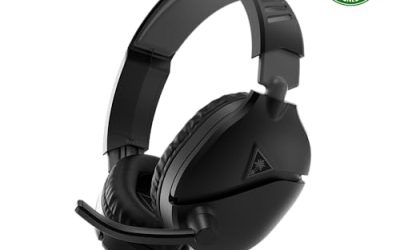
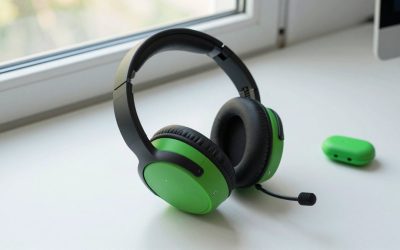
 Turtle Beach Recon 70 Multiplatform Gaming Headset for40mm6.37 x 3.3 x 7.2 inches0.51 poundsCheck on Amazon
 Razer BlackShark V2 X Wired Gaming Headset with3.5 mm7.6 x 6.76 x 3.86 inches0.5 poundsCheck on Amazon
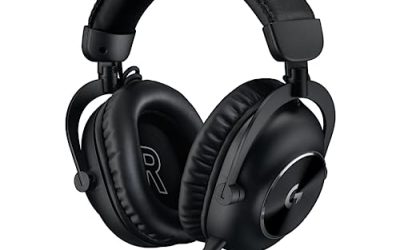
 Logitech G432 Wired Gaming Headset7.2 x 3.2 x 6.8 inches7.8 x 4.3 x 9 inches0.7 poundsCheck on Amazon
A wired headset is the simplest way to hear a PS4 game and talk to a squad at the same time. Plug the 3.5mm jack into the DualShock 4 and game audio and chat come through one cable, with no battery to charge and no wireless pairing to drop in the middle of a match. The real decision is which plug-in trade-offs matter most to you: comfort for long nights, a mic your teammates can hear clearly, or a cable long enough to reach the couch.
This guide is for PS4 players who want a wired headset and nothing else: solo story players, party-chat regulars, and competitive players who need footsteps and callouts to come through cleanly. The five headsets below were chosen from the names and specs on their Amazon product pages, and every one connects to a PS4 through the controller jack or a USB connection the console accepts.
Quick Picks
As an Amazon Associate we earn from qualifying purchases
| Product | Best for | Key spec from title |
|---|---|---|
| HyperX Cloud Stinger | Long sessions without neck strain | 50mm drivers, 275-gram frame |
| Turtle Beach Recon 70 | A first wired headset on a tight budget | 40mm speakers, flip-to-mute mic |
| Razer BlackShark V2 X | Competitive play and clear callouts | 50mm TriForce drivers, cardioid mic |
| Logitech G432 | Surround sound on PC, stereo on PS4 | DTS Headphone:X 2.0, flip-to-mute mic |
| ASTRO A10 Gen 2 PS Edition | A durable headset with replaceable parts | 32mm drivers, detachable cable |
How to Choose
Match the plug to the DualShock 4
Every headset in this guide plugs into the DualShock 4 through its 3.5mm jack, which is the connection PS4 handles best. A single 4-pole plug carries game audio and chat together, so you do not need a separate mic cable or a USB adapter for the basics. Some headsets also ship with a Y-splitter cable for PC use, which splits the combined plug into separate headphone and microphone jacks. Keep that splitter in the box on PS4, since the controller takes the combined plug directly. If a headset only works through a USB sound card, check the listing carefully, because not every USB audio device is accepted by the console.
Check how chat actually works on PS4
Game audio and party chat do not always travel the same way, so read the listing before you buy. On PS4, a wired headset plugged into the controller handles both, but the console settings decide the mix: under Sound and Screen you choose whether all audio or only chat audio goes to the headset. A flip-to-mute or swivel-to-mute mic is worth having, because it lets you silence yourself without opening a menu mid-match. A headset with an inline volume wheel is also handy, since you can turn chat down when a lobby gets loud without pausing the game to reach for the system menu.
Weigh comfort against driver size
Bigger drivers do not automatically mean better sound on PS4, and the heaviest headset in this guide is not the best sounding one. The models below range from 32mm to 50mm drivers, and each one pairs its drivers with a different ear-cup design: memory foam seals in more sound, while cloth and foam cushions breathe better during long sessions. Weight matters more than most buyers expect, because a headset that presses on the top of your head for three hours will end a session early. Check the listed weight and the headband padding, and favor adjustable steel sliders or a padded band over a rigid frame.
Read the cable length before you buy
A wired headset is only as good as its cable, and the shortest cable in this guide is 1.2 meters, which is fine at a desk but tight from a couch. Measure the distance from your usual seat to where the controller rests, then add slack for leaning back and turning your head. A headset that includes an extension cable solves the problem without a separate purchase, while a detachable cable is easier to replace if it frays. Avoid headsets with a fixed cable that is shorter than your setup needs, because an extension you buy later can add noise and loosen the connection over time.
The 5 Best Options
HyperX Cloud Stinger
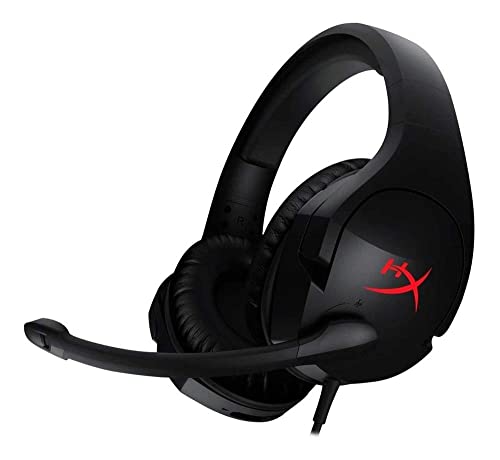
The Cloud Stinger is the lightest headset in this guide, and that is the first thing you notice when you put it on. Its 50mm directional drivers sit parallel to the ear, and the memory foam cushions seal well enough to keep game audio in and room noise out. The swivel-to-mute microphone flips up against the head when you want silence, and the volume slider sits on the bottom of the right ear cup where your thumb finds it without looking. Steel sliders adjust the fit, and the ear cups rotate 90 degrees so the headset rests flat around your neck between matches.
Specs
- 50mm directional drivers with neodymium magnets
- 275-gram frame with 90-degree rotating ear cups
- Swivel-to-mute noise-cancelling microphone
- 3.5mm 4-pole plug with 1.3m cable plus 1.7m extension Y-cable
- Frequency response 18Hz to 23,000Hz, impedance 30 ohms
- Memory foam ear cushions and adjustable steel sliders
Best for: PS4 players who want a light headset for long story sessions and party chat.
Watch out for: the 1.3m headset cable is short on its own, so keep the extension cable attached for couch play, and there is no sidetone to hear your own voice.
Turtle Beach Recon 70
The Recon 70 is the simplest headset in this guide, and that is exactly why it suits a first wired purchase. It plugs straight into the DualShock 4 with a 3.5mm jack and needs no software, no charging, and no setup beyond the console audio menu. Its 40mm speakers are tuned for clear highs and heavy lows, and the synthetic leather cushions block enough outside noise to keep you focused. The flip-to-mute mic sits on a fixed boom, and a master volume wheel on the ear cup handles level changes without a menu.
Specs
- 40mm speakers with neodymium magnets
- 232-gram frame with synthetic leather ear cushions
- Fixed omni-directional flip-to-mute microphone
- Wired 3.5mm connection with 1.2m cable
- Frequency response 20Hz to 20kHz, over-ear closed design
- Master volume wheel and mic mute on the headset
Best for: players buying their first wired PS4 headset who want plug-and-play chat at a low cost.
Watch out for: the 1.2m cable is the shortest in this guide, so couch players will want an extension, and the materials feel basic next to heavier headsets.
Razer BlackShark V2 X
The BlackShark V2 X is the competitive pick in this guide, built around 50mm TriForce Titanium drivers that split highs, mids, and lows into separate tuning zones. That design makes footsteps and reload sounds easier to place, which matters in ranked matches where a half-second of warning decides a round. The HyperClear cardioid mic bends into place and rejects sound from behind and to the sides, so teammates hear your callouts instead of your room. At 240 grams with memory foam cushions, it stays comfortable through long tournament sessions.
Specs
- TriForce Titanium 50mm drivers
- 240-gram frame with memory foam ear cushions
- HyperClear cardioid microphone with bendable boom
- 3.5mm audio jack, wired connection
- Frequency range 20Hz to 28kHz, impedance 32 ohms
- Volume wheel on the headset, passive noise cancellation
Best for: competitive PS4 players who want clear footsteps and a mic that keeps background noise out of party chat.
Watch out for: the 7.1 surround sound works only on Windows 10, so on PS4 you get stereo through the controller jack, and some color variants show no buying options, so choose the black 3.5mm version.
Logitech G432
The G432 is the most versatile headset in this guide, because it works two ways: plug it into the DualShock 4 with the 3.5mm jack for stereo game audio and chat, or connect the included USB DAC to a PC for DTS Headphone:X 2.0 surround sound. Its 50mm drivers deliver full game audio, and the flip-to-mute microphone folds up when you are done talking. Leatherette ear cups seal around the ear, and the headset is light enough at 10.6 ounces to wear through a long evening without neck fatigue.
Specs
- 50mm drivers with DTS Headphone:X 2.0 surround sound
- Flip-to-mute microphone
- 3.5mm audio jack plus USB DAC for PC
- Leatherette ear cups, wired connection
- Compatible with PS4, PC, Mac, Xbox One, and Nintendo Switch
- 10.6-ounce frame, volume control on the headset
Best for: players who split time between PS4 and PC and want one wired headset for both.
Watch out for: the DTS surround sound needs the USB DAC on a PC, so on PS4 you hear stereo through the controller, and the listing’s driver-size field is garbled, so rely on the title and description instead.
ASTRO A10 Gen 2 PS Edition

The A10 Gen 2 PS Edition is the toughest headset in this guide, built for players who wear a headset every day and want it to last. Its closed-back design and custom-tuned 32mm drivers keep game audio focused, and the 6.0mm unidirectional boom mic flips up to mute with a motion you can feel without looking. The cable detaches and carries its own inline volume control, and the ear cushions and headband pad are replaceable, so worn parts do not force a whole new headset. It is made for PlayStation first, with PS5 and PS4 listed as its primary platforms.
Specs
- Custom-tuned 32mm dynamic drivers
- 6.0mm unidirectional flip-to-mute boom microphone
- Detachable cable with inline volume control, 6-foot cable
- Closed-back over-ear design, wired 3.5mm connection
- Replaceable ear cushions and headband pad
- Compatible with PS5, PS4, Nintendo Switch, PC, and Mac
Best for: daily PS4 players who want a rugged headset they can repair instead of replace.
Watch out for: the 32mm drivers are the smallest in this guide, so the soundstage is narrower than the 50mm models, and some colors show low stock, so confirm the black PS Edition before ordering.
Which One Fits Your Situation
You play story games alone for hours
Pick the HyperX Cloud Stinger. At 275 grams it is the lightest headset here, and the memory foam cushions and rotating ear cups keep it comfortable through a full evening of single-player games. The 50mm drivers give cutscenes and open-world audio room to breathe, and the extension cable reaches the couch without a separate purchase.
You squad up in party chat most nights
Pick the Turtle Beach Recon 70 or the ASTRO A10 Gen 2 PS Edition. The Recon 70 is the cheapest way to get clear flip-to-mute chat, while the A10 Gen 2 adds a detachable cable and replaceable cushions for nightly use. Both plug straight into the DualShock 4, so you are talking within seconds of sitting down.
You play ranked matches and need every footstep
Pick the Razer BlackShark V2 X. Its TriForce Titanium drivers separate highs, mids, and lows so footsteps and reloads stand out from background noise, and the cardioid mic keeps your callouts clean. Remember that its surround sound is a PC-only feature, so judge it on its stereo imaging through the controller.
You want one headset for PS4 and a PC
Pick the Logitech G432. The 3.5mm jack covers PS4 chat and game audio, while the USB DAC unlocks DTS surround sound on a PC. That dual setup means one headset on the desk instead of two, and the flip-to-mute mic works the same way on both machines.
Common Mistakes
- Buying a wireless-only headset and expecting it to pair with PS4 over Bluetooth, which the console does not support for game audio
- Choosing a headset for its PC surround sound and then being surprised when PS4 only delivers stereo through the controller jack
- Ignoring cable length and ending up with a headset that pulls tight every time you lean back on the couch
- Picking a platform-specific variant, such as an Xbox model, instead of the PlayStation or multiplatform version with the right plug
- Forgetting to set the PS4 audio output to the headset, so game sound keeps coming from the TV while chat goes to the ear cups
Frequently Asked Questions
Do wired headsets work with the DualShock 4 controller?
Yes. Plug the 3.5mm jack into the bottom of the DualShock 4 and the PS4 sends game audio and chat through the controller. Open Settings, then Devices, then Audio Devices, and set the output to the headset. Choose all audio if you want game sound and chat together, or chat audio only if you prefer game sound from the TV speakers.
Can I use a USB headset on PS4?
Some USB headsets work on PS4, but support depends on the model, and not every USB audio device is accepted by the console. A 3.5mm connection through the controller is the safer choice, because every PS4 accepts it. If you buy a headset with a USB DAC, use the 3.5mm cable for PS4 and save the USB connection for a PC, where the extra features actually work.
Why does surround sound not work on PS4 with some headsets?
Surround sound on these headsets usually comes from PC software or a USB DAC, and neither runs on PS4. When you plug a headset into the DualShock 4, the console delivers stereo audio, and the headset’s drivers do the rest. The stereo imaging on a good 50mm headset still places footsteps and direction well, so do not treat the missing surround label as a deal breaker.
Will these headsets work on PS5 too?
Yes. Every headset in this guide uses a 3.5mm jack that plugs into the DualSense controller just as it plugs into the DualShock 4. The ASTRO A10 Gen 2 PS Edition and the HyperX Cloud Stinger list PS5 as a supported platform, and the others use the same standard connection. Your PS4 headset carries over, so you do not need a new one for the newer console.
FAQ
Do wired headsets work with the DualShock 4 controller?
Can I use a USB headset on PS4?
Why does surround sound not work on PS4 with some headsets?
Will these headsets work on PS5 too?
More from Amazon
Programs that pair well with the guide above. Offers and eligibility are set by Amazon and may change.
Free shipping on eligible items, Prime Video and more. Eligible new members can start with a free trial.
Start a Prime free trialAd-free music streaming. Eligible new subscribers can start with a free trial.
Try Music Unlimited freeA Prime membership for ages 18-24 with a trial period. Eligibility is set by Amazon.
See Prime for Young AdultsAudiobooks and podcasts to listen to on the go. Eligible new members can start with a free trial.
Try Audible freeAs an Amazon Associate we earn from qualifying purchases.