5 Best Metal Frame Gaming Headsets (November 2026)
Compare five gaming headsets whose Amazon listings state a metal frame, from aluminum HyperX builds to steel and aluminum Logitech and SteelSeries picks.
The real decision behind a metal headset is not shine or a premium label. It is what happens after a year of being pulled off with one hand, dropped on a desk, stuffed into a bag, and twisted every time you adjust the fit. Plastic hinges and headbands are usually where that wear shows first, so a frame the listing actually describes as metal, aluminum, or steel changes which parts are likely to survive daily handling.
This guide is for players who have already cracked, creaked, or loosened a headset and want the next one built around a stronger skeleton. Every pick below is a gaming headset with a microphone, and every one earned its place because its Amazon listing states the frame material in words, not because a product photo looked metallic.
Quick Picks
As an Amazon Associate we earn from qualifying purchases
Product
Best for
Key spec from title
HyperX Cloud III
Multi-platform players who want one wired headset for everything
Angled 53mm drivers, full metal frame
HyperX Cloud Alpha
Players who want a simple 3.5mm headset with no software layer
50mm Dual Chamber Drivers, Aluminum Frame
Logitech G PRO X
PC players who care most about voice processing
50 mm Drivers, DTS 7.1, Blue VO!CE mic
SteelSeries Arctis Prime
Competitive players who want the lightest metal build brief
Neodymium 40mm drivers, Aluminum and Steel
Corsair HS80 RGB USB
PC and PlayStation players who want a floating headband fit
50mm neodymium drivers, Dolby Audio 7.1
How to Choose
Read the listing wording, not the product photo
Metal only counts when the listing says so. Plenty of headsets use metallic paint, chrome-look trim, or a single metal slider inside an otherwise plastic build, and photographs cannot tell you which parts are actually metal. Look for explicit wording such as a full metal frame, an aluminum frame, aluminum forks, or a steel headband, and check that the wording belongs to the exact variant you are buying. Color and connection versions of the same model can carry different specification tables, so confirm the material line on the page for the version in your cart before you order.
Know which metal part does which job
Aluminum and steel solve slightly different problems. Aluminum frames and forks, like the ones HyperX and Corsair describe, keep weight down while stiffening the yokes that hold the earcups. Steel headbands, like the one Logitech pairs with aluminum forks, resist bending and hold their shape under repeated stretching over a wide head. Some listings combine both metals, using steel where flex happens and aluminum where weight matters. Ask where the metal sits: a steel band with plastic hinges still leaves the hinge as the weak point, while metal forks protect the joint that moves most.
Match the connection to your platforms before the frame
A strong frame is wasted if the headset only connects properly to half your setup. Wired models in this guide split into two camps: plain 3.5mm headsets that work almost anywhere a jack exists, and USB models that add surround processing, a DAC, or software features on PC but narrow console support. The Cloud Alpha and Arctis Prime stay universal through 3.5mm, while the HS80 RGB USB is a USB-only design for PC and PlayStation. Check your controller, console, and PC ports against the listing’s compatibility line, and note whether surround features need the USB connection rather than the jack.
Weigh the frame against comfort over long sessions
Metal adds structure, and structure can add clamp and weight if the padding does not keep up. Compare the listed weight, the cushion material, and how the headband spreads pressure. Memory foam wrapped in leatherette, a floating headband that suspends the band off your scalp, and rotating or angled earcups all change how a metal frame feels after two hours. A slightly heavier headset with a suspension band can feel easier than a lighter one that concentrates pressure on one spot. If you wear glasses, look for softer cushions and a frame described as flexible rather than rigid.
The 5 Best Options
HyperX Cloud III
Top Pick
HyperX Cloud III
Best for: Players who move between PC and several consoles and want the metal frame with the widest connection set.
The Cloud III is the easiest metal-frame recommendation for someone who plays across PC and consoles and wants one wired headset to cover all of it. HyperX states the point plainly: the headset is flexible and features a full metal frame, built to stay resilient through travel, accidents, and mishaps. Around that frame sit angled 53mm drivers, a detachable 10mm microphone, and on-earcup controls, so the durability story does not come at the cost of the everyday features a multi-platform player actually uses.
HyperX Cloud Alpha
Runner-Up
HyperX Cloud Alpha
Best for: Players who want a proven wired headset that works on almost anything with a headphone jack.
The original Cloud Alpha remains the straightforward answer for a buyer who wants an aluminum frame and nothing electronic standing between the headset and the game. Its listing puts the material in the title itself, Aluminum Frame, and the description calls it a long-lasting aluminum frame built for durability and stability. Sound comes from dual chamber 50mm drivers, which separate bass into its own chamber from the mids and highs, and everything runs through a detachable 3.5mm cable with inline controls, so there is no battery, dongle, or app to manage.
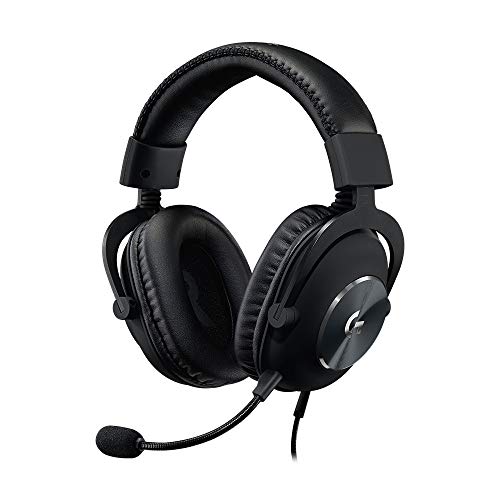
Logitech G PRO X
Logitech G PRO X
Best for: PC-first players and streamers who want metal construction plus the strongest microphone processing in this group.
Frame: Steel frame headband with aluminum forks
Material: Aluminum
Drivers: 50 mm drivers
Audio: DTS 7.1 surround through the USB connection
The PRO X is the pick for PC players who treat their voice as part of the setup. Logitech describes the build directly: premium aluminum forks and a strong steel frame headband, finished with padded contact points, and the listing summarizes it as a durable steel and aluminum build. On top of that skeleton, the detachable boom microphone runs through Blue VO!CE processing when connected over USB, and the box includes both leatherette and cloth memory foam ear pads, a USB DAC, and a carrying bag, which makes it the most complete desk-focused package here.
SteelSeries Arctis Prime
SteelSeries Arctis Prime
Best for: Competitive players who want a metal frame in a stripped-back wired headset with no wireless hardware adding weight.
Construction: Lightweight durable metal construction
The Arctis Prime takes the competitive route: a wired esports headset co-developed with competitive players, built around what SteelSeries calls lightweight durable metal construction. The specification table names both metals, listing the enclosure material as Aluminum and Steel, so the claim is structural rather than decorative. Its 40mm neodymium drivers are tuned for detail across a wide 10 to 40,000 Hz frequency response, and the kit stays deliberately simple: a detachable 3.5mm cable, on-headset controls, noise-isolating cushions, and a noise-cancelling microphone described as Discord-certified.
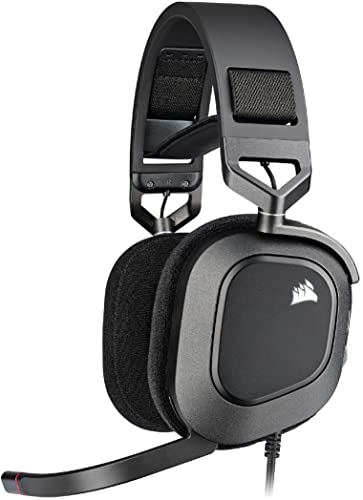
Corsair HS80 RGB USB
Corsair HS80 RGB USB
Best for: PC and PlayStation players who want aluminum reinforcement with a suspended fit instead of a firm padded band.
Construction: Sturdy construction reinforced with aluminum
The HS80 RGB USB approaches durability from the reinforcement angle. Corsair’s description says the construction is reinforced with aluminum for years of durability, and the specification table lists the material as Aluminum. Instead of a padded band pressing straight onto your head, it uses a floating headband design paired with memory foam earpads covered in breathable microfiber cloth, which suits players who find leatherette hot over long sessions. Custom-tuned 50mm neodymium drivers, Dolby Audio 7.1 surround, and a broadcast-grade omni-directional microphone round out a PC-leaning package.
Which One Fits Your Situation
You play on PC and consoles with one headset
Start with the HyperX Cloud III. Its full metal frame comes with USB-C, USB-A, and 3.5mm connections in the box and a compatibility list that covers PC, PlayStation, Xbox, Switch, Mac, and mobile. That breadth means the same durable headset follows you between a desk and a couch without adapters or a second purchase, and the detachable microphone keeps it usable for calls away from the console.
Your last headset died at the hinge and you keep gear for years
Look hardest at the two explicit frame builds: the Cloud Alpha, whose aluminum frame is the headline feature, and the Logitech G PRO X, which pairs a steel headband with aluminum forks. Both put metal exactly where headsets usually fail, at the band and the earcup joints. Between them, choose the Alpha for simple plug-and-play use and the PRO X if your setup lives on PC and you want the extra pads, DAC, and voice tools included.
You play competitive titles and travel to play
The SteelSeries Arctis Prime fits this routine best. Its aluminum and steel construction is described as lightweight and durable, the cable detaches at both ends so a snagged cable is replaceable rather than fatal, and there is no battery or wireless hardware to charge before a session. The wide frequency response and detail-focused tuning suit games where footsteps and reload sounds matter more than cinematic bass.
You game mainly on PC and sit for long sessions
The Corsair HS80 RGB USB earns its place through fit. Aluminum reinforcement handles the durability side, while the floating headband and microfiber-covered memory foam handle the comfort side, spreading pressure instead of pressing a padded band onto one strip of scalp. Dolby Audio 7.1 over USB and the broadcast-grade microphone also suit a fixed desk setup where the headset rarely leaves the room.
Common Mistakes
Assuming a headset is metal because it looks metallic in photos, when the listing never states a frame material.
Checking the material on one color or connection variant and ordering a different variant with a different build.
Buying a USB-only metal headset for a setup that actually needs a 3.5mm controller connection.
Ignoring weight and headband design, then finding a strong frame uncomfortable after an hour.
Treating a metal frame as protection for everything, while the cable, cushions, and microphone still wear out first.
Frequently Asked Questions
Does a metal frame make a gaming headset sound better?
Not directly. The frame’s job is structural: it holds the earcups in a consistent position and resists the bending and twisting that loosen a headset over time. Sound still comes from the drivers, tuning, and seal of the cushions. A metal frame helps indirectly by keeping that seal and alignment stable after months of use, instead of letting a warped plastic band change how the cups sit.
Is aluminum or steel better for a headset frame?
Each listing here uses metal for a different part of the job. Aluminum keeps frames and forks light while adding stiffness, which is why HyperX and Corsair build around it. Steel suits headbands that must spring back to shape after repeated stretching, as on the Logitech G PRO X. A headset combining both, like the Arctis Prime, uses each metal where it helps most rather than picking one winner.
Will a metal headset be too heavy for long sessions?
Weight depends on the whole design, not the frame material alone. The headsets here range from the Cloud Alpha at 298 grams to designs that spread load through a floating headband, like the HS80 RGB USB. Padding, clamp, and pressure distribution matter as much as the number. If you play for hours, compare listed weight and cushion type together rather than ruling out metal on principle.
How can I verify the frame is really metal before buying?
Read the product information table and manufacturer description on the Amazon page for the exact variant you plan to order. Look for a material entry such as Aluminum, a frame description such as full metal frame, or named parts such as aluminum forks and a steel headband. If the page only shows metallic-looking photos with no material wording, treat the build as unconfirmed.
R
Razer Gaming Series Editorial Team
We compare specs, materials and verified owner reviews before a product earns a spot. Rankings are never paid.
FAQ
Does a metal frame make a gaming headset sound better?
Not directly. The frame’s job is structural: it holds the earcups in a consistent position and resists the bending and twisting that loosen a headset over time. Sound still comes from the drivers, tuning, and seal of the cushions. A metal frame helps indirectly by keeping that seal and alignment stable after months of use, instead of letting a warped plastic band change how the cups sit.
Is aluminum or steel better for a headset frame?
Each listing here uses metal for a different part of the job. Aluminum keeps frames and forks light while adding stiffness, which is why HyperX and Corsair build around it. Steel suits headbands that must spring back to shape after repeated stretching, as on the Logitech G PRO X. A headset combining both, like the Arctis Prime, uses each metal where it helps most rather than picking one winner.
Will a metal headset be too heavy for long sessions?
Weight depends on the whole design, not the frame material alone. The headsets here range from the Cloud Alpha at 298 grams to designs that spread load through a floating headband, like the HS80 RGB USB. Padding, clamp, and pressure distribution matter as much as the number. If you play for hours, compare listed weight and cushion type together rather than ruling out metal on principle.
How can I verify the frame is really metal before buying?
Read the product information table and manufacturer description on the Amazon page for the exact variant you plan to order. Look for a material entry such as Aluminum, a frame description such as full metal frame, or named parts such as aluminum forks and a steel headband. If the page only shows metallic-looking photos with no material wording, treat the build as unconfirmed.
Affiliate disclosure. As an Amazon Associate we earn from qualifying purchases at no extra cost to you. Prices accurate as of the date shown.
Find the best live production headsets for directors, commentators and crews, covering dynamic boom mics, single vs double ear, and XLR intercom links.
Key weight means actuation force: how hard you must press each key. Learn which gram range fits gaming, typing and long sessions, and how to pick yours.
Find the best local deal LG Bluetooth headsets with this guide to LG Tone models, local stores, open-box savings, and what to check before you buy in store.
Compare the best Bluetooth gaming keyboards from ASUS, SteelSeries, Razer, Corsair and Logitech G, with tri-mode connections, switch types and battery life explained.



 SteelSeries Arctis Prime
 Corsair HS80 RGB USB